
Google ads announced that asset experiments are officially available for Performance Max Campaigns, and we are excited!
Prior to this rollout, if you wanted to “test” assets in a PMAX campaign you had to duplicate the asset group and manually swap out assets. This obviously didn’t produce scientific results because it’s not a true A/B test. PMAX would prioritize one asset group over the other, leaving advertisers to draw their own conclusions based on limited data. Now, all of that is history because of the PMAX Asset Experiments.
What Are the PMAX Asset Experiments?
These new asset experiments allow advertisers to run an A/B test on headlines, descriptions, images, and videos within a PMAX asset group. Let’s break down the parts of the experiment and then dive into what we can actually do with it.
The key components of the PMAX asset experiments:
Control Group (A): The existing assets in the asset group that acts as your baseline.
Treatment Group (B): The assets you want to compare against the control. This group can be made up of new or existing assets you want to test.
Common Assets: Assets not assigned to either group. These show to 100% of the campaign’s traffic regardless of which branch a user falls into.
Setting up an Asset Experiment
When you go to set up an experiment, you’ll notice there are three different PMAX asset experiment types.
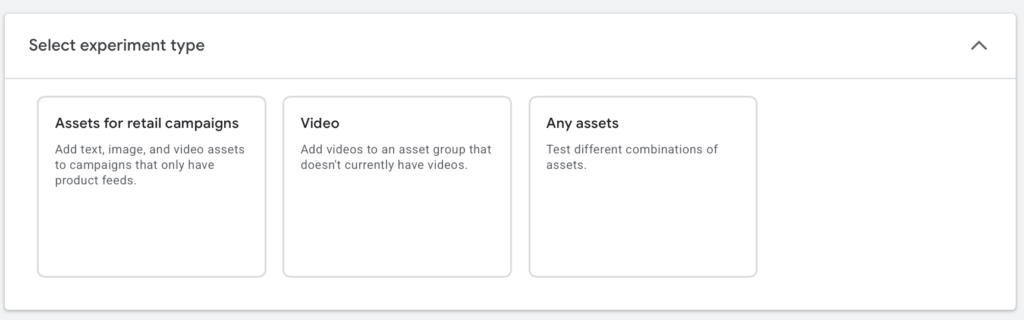
The first two types — “Assets for Retail Campaigns” and “Video” — aren’t new. The Assets for Retail Campaigns type lets advertisers add assets to product feed-only PMAX campaigns, and the Video type lets advertisers test adding videos to a PMAX campaign that previously had none. Both of these experiment types are really asking should your campaign have assets — not which assets perform better. That’s where the third type comes in.
The third experiment type is labeled “Any Assets,” and this is where things get interesting. Advertisers can test different headlines, long headlines, descriptions, images, and videos against each other. Here’s the kicker — you’re not limited to testing a single asset type per experiment. You can swap out every headline, description, and image in the treatment group and compare the whole package against the control. We love this because it means advertisers can go beyond “this image vs. that image” and test entirely different creative themes.
Here’s an example of what that looks like in practice:
Client: A furniture company selling dining room tables.
Control Group Theme — Product Focused: Headlines center on quality, craftsmanship, and the details of the furniture. Images and videos are close-up product shots with a showroom feel.
Treatment Group Theme — Lifestyle Focused: Headlines and descriptions center around dining tables bringing families together. Images and videos feature people enjoying meals together.
Common Assets: Company name and key value propositions.
Advertisers then set the experiment split (50/50 is recommended) and time frame. Once the experiment wraps, the top-performing branch can be implemented.
Why We Care
There are two main reasons we love this update.
One: Advertisers no longer have to run makeshift, inaccurate tests just to see which creative works better. Gone are the days of duplicating an asset group just to swap out a few videos and photos. That method never produced reliable results — Google would typically favor one asset group over the other, leaving advertisers wondering whether the difference was caused by the creative change or some structural variable.
Two: Google is continuing to give advertisers more control. When PMAX first launched, advertisers had limited input and even more limited visibility into what was working and what wasn’t. Over the past year, Google has made significant strides in closing the gap between advertiser control and AI automation. This new experiment capability is another step in the right direction — and we’re here for it.
If you’re running Performance Max campaigns and want help setting up asset experiments the right way, let’s talk.