These are all the pages you’ll ever need.
Category: Uncategorized
-
A/B Asset Experiments in PMAX Campaigns
Google ads announced that asset experiments are officially available for Performance Max Campaigns, and we are excited!
Key Takeaways
- PMAX now supports true A/B testing. Asset experiments let advertisers test creative inside Performance Max campaigns with real data instead of guesswork.
- You can test entire creative themes, not just single assets. Headlines, descriptions, images, and videos can all be compared as one package.
- Advertisers are getting more control over Google’s automation. It’s the latest in a string of PMAX updates moving in that direction.
Prior to this rollout, if you wanted to “test” assets in a PMAX campaign you had to duplicate the asset group and manually swap out assets. This obviously didn’t produce scientific results because it’s not a true A/B test. PMAX would prioritize one asset group over the other, leaving advertisers to draw their own conclusions based on limited data. Now, all of that is history because of the PMAX Asset Experiments.
What Are the PMAX Asset Experiments?
These new asset experiments allow advertisers to run an A/B test on headlines, descriptions, images, and videos within a PMAX asset group. Let’s break down the parts of the experiment and then dive into what we can actually do with it.
The key components of the PMAX asset experiments:
Control Group (A): The existing assets in the asset group that acts as your baseline.
Treatment Group (B): The assets you want to compare against the control. This group can be made up of new or existing assets you want to test.
Common Assets: Assets not assigned to either group. These show to 100% of the campaign’s traffic regardless of which branch a user falls into.
Setting up an Asset Experiment
When you go to set up an experiment, you’ll notice there are three different PMAX asset experiment types.
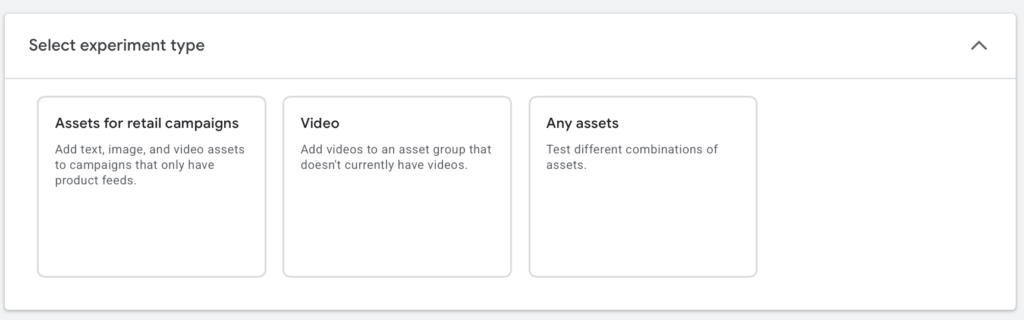
The first two types — “Assets for Retail Campaigns” and “Video” — aren’t new. The Assets for Retail Campaigns type lets advertisers add assets to product feed-only PMAX campaigns, and the Video type lets advertisers test adding videos to a PMAX campaign that previously had none. Both of these experiment types are really asking should your campaign have assets — not which assets perform better. That’s where the third type comes in.
The third experiment type is labeled “Any Assets,” and this is where things get interesting. Advertisers can test different headlines, long headlines, descriptions, images, and videos against each other. Here’s the kicker — you’re not limited to testing a single asset type per experiment. You can swap out every headline, description, and image in the treatment group and compare the whole package against the control. We love this because it means advertisers can go beyond “this image vs. that image” and test entirely different creative themes.
Here’s an example of what that looks like in practice:
Client: A furniture company selling dining room tables.
Control Group Theme — Product Focused: Headlines center on quality, craftsmanship, and the details of the furniture. Images and videos are close-up product shots with a showroom feel.
Treatment Group Theme — Lifestyle Focused: Headlines and descriptions center around dining tables bringing families together. Images and videos feature people enjoying meals together.
Common Assets: Company name and key value propositions.
Advertisers then set the experiment split (50/50 is recommended) and time frame. Once the experiment wraps, the top-performing branch can be implemented.
Why We Care
There are two main reasons we love this update.
One: Advertisers no longer have to run makeshift, inaccurate tests just to see which creative works better. Gone are the days of duplicating an asset group just to swap out a few videos and photos. That method never produced reliable results — Google would typically favor one asset group over the other, leaving advertisers wondering whether the difference was caused by the creative change or some structural variable.
Two: Google is continuing to give advertisers more control. When PMAX first launched, advertisers had limited input and even more limited visibility into what was working and what wasn’t. Over the past year, Google has made significant strides in closing the gap between advertiser control and AI automation. This new experiment capability is another step in the right direction — and we’re here for it.
If you’re running Performance Max campaigns and want help setting up asset experiments the right way, let’s talk.
-

Google’s change to how they are pacing your Google ads Daily Budget
Attention all Google Ads advertisers who use daily budgets and ad schedules: Your spend is about to change!
If you’re reading this before Jun 2026 we hope you have time to adjust your budgets.
If you’re reading this after June 2026 trying to figure out why your Google ads spend increased, we hope this answers your questions
The Quick Preview
- Daily budgets now pace monthly. As of June 1, 2026, Google paces spend to your daily budget × 30.4, even if your ad schedule only runs weekdays.
- Your bill could jump. A $100/day weekday-only campaign goes from about $2,100 a month to about $3,040. There’s no opt-out.
- Adjust now, not after the invoice. Lower your daily budgets to hit your real monthly target, or let our Google Ads team handle it for you.
WHAT is the change Google ads is making to budget pacing
Google announced that it is changing how Google ads utilizes its daily spend limits effective June 1st 2026.
Pre June 1st 2026 (Google’s old budget pacing):
Advertisers set their daily budget, and google would pace their spend based on the daily budget times the number of active days in the ad schedule.
- EX: Your daily budget is $100/day running Monday-Friday (about 21 days in a month). Your monthly spend would come out to $2,100.
Post June 1st 2026 (Google’s new budget pacing):
Google will pace towards your daily spend times 30.4.
- EX: Your daily budget is $100/day running Monday-Friday (about 21 days in a month). Your monthly spend will now come out to about $3,040
That’s right, advertisers who use the ads schedule can expect to see potentially drastic differences in their monthly spend.
A few things will remain the same:
- Google will not spend over twice your daily budget in a day.
- Google still adheres to your ad schedule and does not show ads on days you have blocked.
WHY is Google changing their Ads Budget Pacing?
Google says it’s making this change to “support more predictable monthly spending for Google ads campaigns… This change ensures your campaigns can achieve their full monthly spending potential, even when they run on a reduced schedule.”
What do we think of the change?
In all honesty, we aren’t too pleased.
This change is about to have potentially huge impacts on businesses’ spend and there is no way to opt in or out. The change is going to happen whether advertisers realize it or not.
For people who are involved in their ads account, they can make changes to accommodate for this new pacing. But, we know there are plenty of small businesses out there that won’t notice until the end of June when their advertising bill is way higher than they planned.
I understand having tools to help advertisers reach their monthly budget more efficiently. In fact, most of our clients, and people in marketing, set advertising budgets as monthly goals not daily. So yes, 100%, making it easier to reach a monthly budget is welcome. However, I would have liked to have seen this as an additional spend option not a reconfiguring of active budgets. People have set up entire programs around daily budgets, because that was the only option, so we predict Google’s switch up in June to create big waves for businesses across the platform.
So come June 2026, if you look at your spend and go “oh sh*t why did my advertising spend increase this month?” it is likely because of the changes Google made to how they are pacing their Google ads budgets.
Hopefully you are catching this now and adjusting your budgets accordingly!
-

How to Improve Your Ranking on Google Maps
A Guide to Google Maps SEO
In the digital age, visibility on platforms like Google Maps is crucial for driving business growth. Whether you’re running a restaurant, plumbing service, law practice, or car dealership, it’s a safe bet that Google Maps is how most of your clients and customers find your business.
This guide will provide insights on methods to improve your Google Maps ranking, helping you leverage online tools to amplify your business presence.
Complete Your Google Business Profile Setup
Google Maps results are linked to your Google Business Profile (GBP), formerly Google My Business.
So, if you want to rank on Google Maps, that’s step one. If you need help setting up your business profile, check out this guide over on BrightLocal. For this post, we’ll assume that your GBP is already set up and ready to go.
Be Active on Your GBP
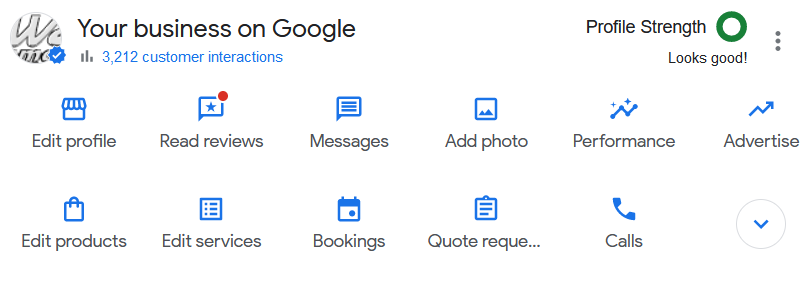
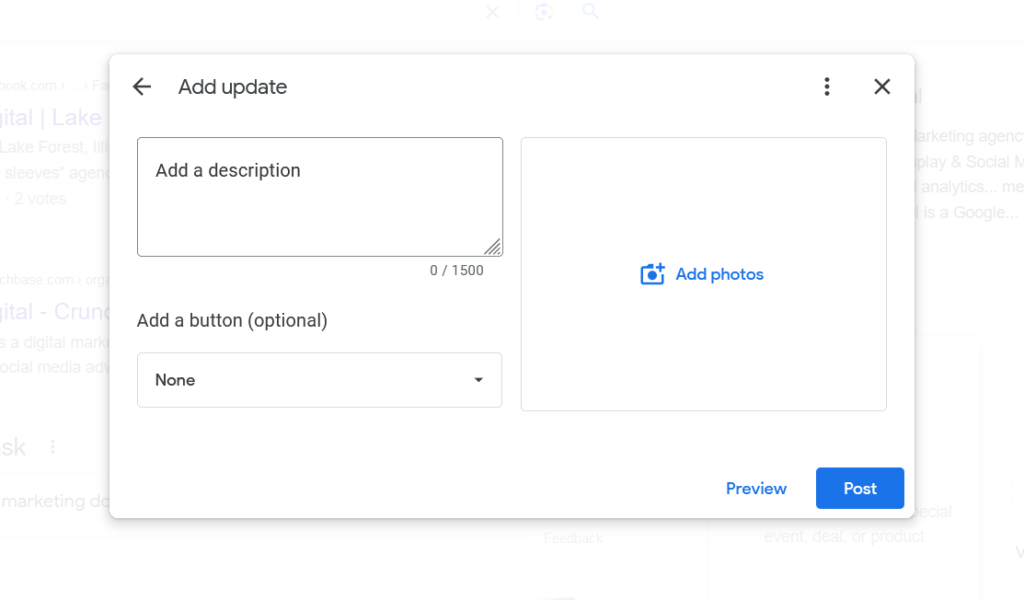
Maintaining an active Google Business Profile (GBP) establishes credibility and authenticity in the eyes of both search engines and your customers. Regular updates to your GBP, such as posting about ongoing deals, responding to customer queries, and uploading recent photos of your business, show that your business is operational and attentive to customer interactions.
Solicit and Respond to Reviews
Reviews are one of the most important pieces for ranking well on Google Maps.
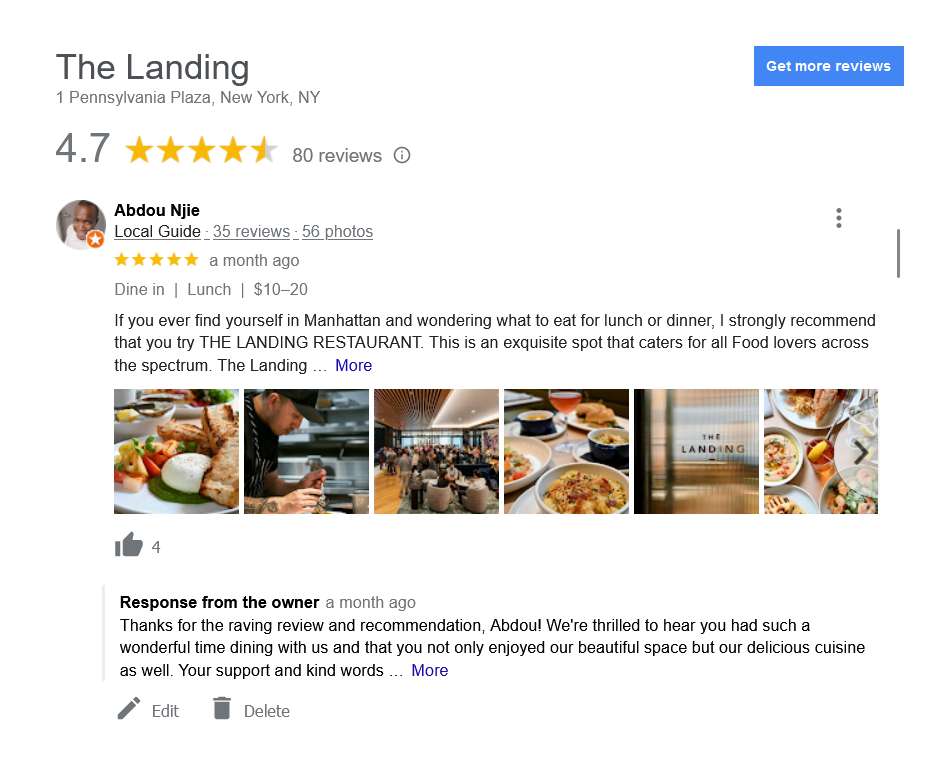
To gather reviews, reach out to satisfied clients or customers and ask them to share their positive experiences on your GBP. This can be done at the point of service, through a follow-up email after a purchase or service, or by placing a review link on your business’s website or social media pages.
When responding to reviews, be sure to address both positive and negative feedback.
For positive reviews, express gratitude for their patronage and provide a personalized response where feasible.
For negative reviews, maintain a professional tone, apologize for any inconvenience caused, and offer solutions. If possible, suggest discussing the matter privately to show proactive customer service. This can turn a negative experience into a testament to your dedication to customer satisfaction.
Post About Deals & Events
Posting regularly about ongoing deals, promotions, and other updates can be helpful for maintaining an active profile.
Frequent updates signal Google that your business is active, and ultimately, this fosters a vibrant and dynamic business profile that appeals to both your current customer base and potential new customers.
Strong On-Page SEO
In addition to an active Google Business Profile, another key factor to ranking on Google Maps is your website content. This is where Google draws much of what it understands about your business and, therefore, what keywords it will rank your profile for.
The ideas is to send Google “signals” about who you are and what your business offers.
Identify Your Keywords
The first step is to identify what keywords you want to rank for. Some of these are obvious.
Restaurants will want to target “restaurants” and “restaurants near me.” If you’re located in Springfield, then you’ll want to target “restaurants in springfield.” These will be your primary keywords.
However, there may be secondary keywords you’ll want to target as well. For instance, if you’re located near an event center and want to target customers searching for a place to eat before and after an event, you’ll want to target queries like “restaurants near EVENT CENTER NAME.”
This is where SEO intersects with your overall marketing strategy. Where are your customers coming from, who are the audiences you’re targeting, and what would they be searching for?
On-Page Optimization
Once you have your keywords, you’ll need to optimize your pages. This optimization will not only help in the organic rankings (the blue links on the results page) but in Google Maps as well.
Your page title tags are the most important part of on-page equation. If you want to target people looking for restaurants in Springfield, then your homepage title should be something like:
RESTAURANT NAME | Gourmet Restaurant in Springfield

In addition to title tags, it’ll be important to include geo-modified content in your on-page copy. That means using words like “Springfield restaurant” instead of simply “restaurant.”
Embed Google Maps
Embedding Google Maps on your site serves a dual purpose for SEO. Firstly, it provides clear, easy-to-follow directions to your physical location, enhancing user experience. Secondly, it sends strong local signals to search engines, reinforcing the geographical relevance of your site.

Create Supporting Content
Supporting content is great for expanding the topics covered by your website and for targeting those secondary keywords.
For example, if your restaurant wants to target those customers searching for a restaurant near the event center, consider creating a page dedicated to those customers. “If you’re looking for a restaurant near THE EVENT CENTER, our restaurant is the perfect choice.”
Be sure to include relevant details. This can include content like directions from the event center to your restaurant, any specials you offer on event night, etc.
Content like this signals to Google that your profile is relevant to a specific location or event, thereby increasing its chances of ranking for related searches.
Off-Page SEO
But it’ll take more than signals from your GBP and your own website to achieve good rankings. Google also looks to other websites in order to gauge your credibility and trustworthiness.
For local business, an important category of websites includes business name address, & phone number (NAP) citations.
Business NAP Citations
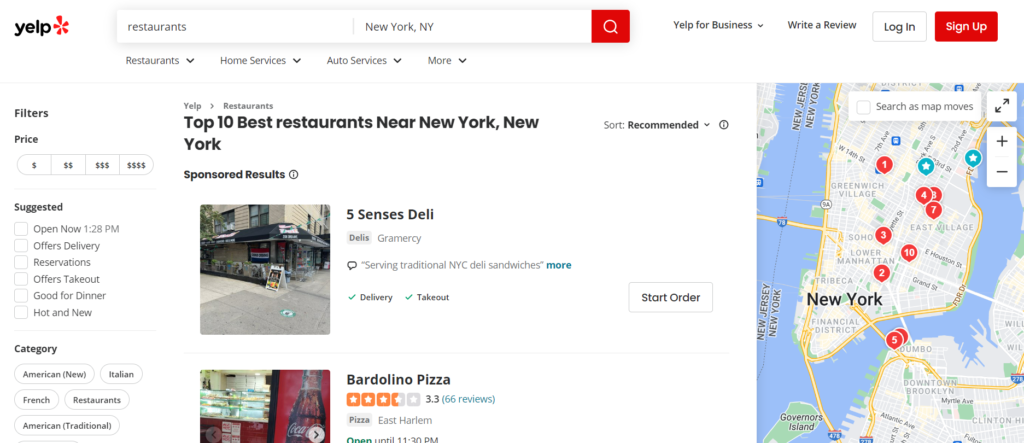
While your Google Business Profile is the most important business profile, it’s not the only one that matters. In addition to Google, there is Yellow Pages, Yelp, as well as many niche-specific NAP websites.
These sites not only serve as sources of reviews, but also provide valuable business information to search engines.
To improve your off-page SEO and Google Maps ranking, it’s crucial to ensure that your business name, address, and phone number (NAP) are consistent across all directories. This consistency helps create trust in the accuracy of your business information and avoids confusion for potential customers.
Wrapping Up
In conclusion, optimizing your business for Google Maps involves a comprehensive strategy that includes your Google Business Profile, on-page SEO, and off-page SEO.
By ensuring consistent NAP information across all platforms, actively managing customer reviews, and carefully implementing keyword strategies, you can enhance your visibility and attract more customers.
Remember, digital marketing is an ongoing process, and staying proactive in your efforts is key to maintaining a strong online presence.
-

Rebrand Your Site Without Losing SEO Rankings
SEO Tips for a Smooth Rebrand
At some point in their lifecycles, many businesses will undergo a rebrand or website redesign, and with it often comes the fear of losing SEO rankings.
This can be both an exciting and scary undertaking, especially if your website has had success with SEO. Nobody wants to lose all that traffic and revenue, not to mention all the resources you put into achieving those rankings.
So the question most businesses will ask is, ‘How can I rebrand my website without losing SEO rankings?’
The short answer is continuity. That means (1) retaining the same URL structure & architecture where possible and using 301s where it’s not, (2) ensuring the title tags and content of high-performing pages are kept consistent, and (3) using links and content to signal your new brand/identity.
In this post, we’ll detail each of these steps to ensure a successful rebrand without losing rankings
Rebranding Considerations
Rebrands exist on a spectrum. On one end, you have minor cosmetic touch-ups. This can be something as simple as altering the color scheme or getting a shiny new logo.
On the other end are total identity overhauls. Changing your company name, business focus, or offering a dramatic shift in tone and messaging requires more work than just swapping out logos.
In this post, we’ll focus more on the latter. Specifically, cases that involve changing domain names.
Site Architecture & URL Schemes
URLs
One of the most critical steps for a successful rebrand is establishing consistent URLs between your old and new site. For example, if your old site was www.olddomain.com/product-category/, then you’ll want to make sure the new URL is something like www.newdomain.com/product-category/.
Why?
Within its index of web pages, Google has a ‘map’ of your website layout. It knows which pages link to which others and has an idea of how they relate to each other. This informs how Google will rank your pages for search queries.
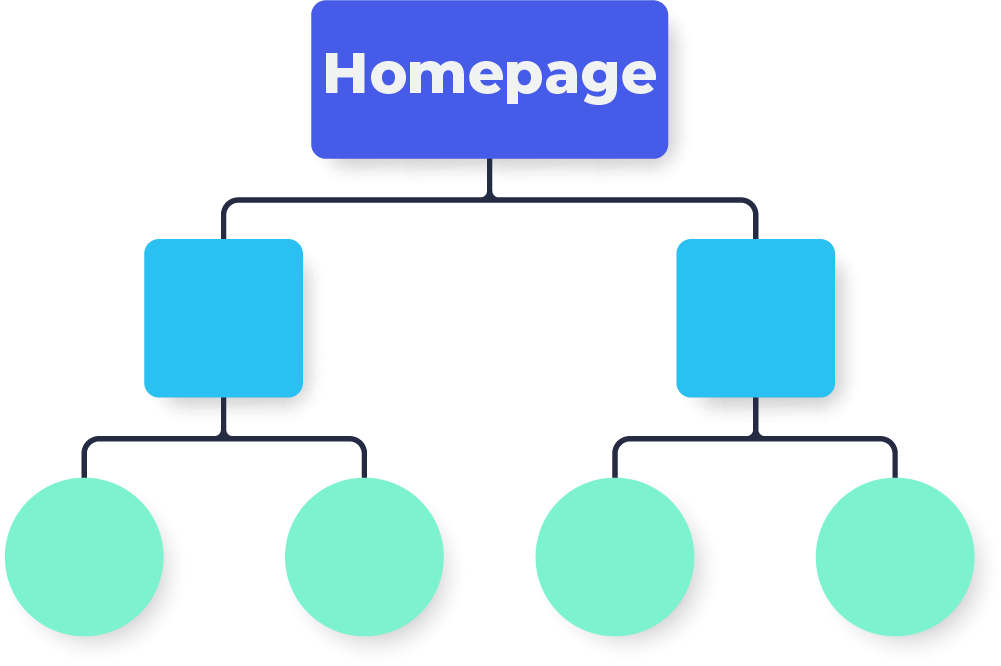
The closer the structure of your new site matches your old site, the better understanding search engines will have right off the bat, and the more likely you are to retain your SEO rankings.
301 Redirects
But sometimes, rebranding requires splitting or consolidating content. When this is the case, 301 redirects are a critical step in guiding Google and other search engines to the new URL.
It’s important that you use properly implemented 301 redirects for any pages where content is no longer available, as this helps Google understand your new website structure and pass ranking signals to the new URLs.
www.olddomain.com/best-sightseeing-spots-in-alaska/
www.olddomain.com/10-most-beautiful-tourist-destinations-alaska/
— both pages 301 redirect too —
www.newdomain.com/sightseeing-and-tours-alaska/
While Google will eventually piece everything together, effective redirects will ensure that your rankings don’t take as big of a hit when you finally launch your new site. Think of it as helping Google redraw these old maps instead of waiting for it to reindex everything on its own.
On-Page Content
Consistent Title Tags & Content
The next step is to make sure your title tags, meta descriptions, and content are consistent with the pages you had before the rebrand. This helps preserve rankings since these elements are some of the most important signals for search engines.
In addition to title tags and meta descriptions, your old page content should match up to the new pages you’re creating. Not only will this help keep rankings intact, but it will also give users the same familiar experience they had before the rebrand.
Updating Internal Links
Any internal links pointing to pages that are no longer in use should be updated to point to their relevant counterparts on the new domain name. Doing this will help ensure a smoother experience for visitors and keep your page crawling efficient and effective.
Signal Your New Brand to Customers & Search Engines
One of the biggest losses in potential traffic is through your company’s old branded searches. Customers will continue to search for your old brand, but without proper signals, Google (and your customers!) may have trouble connecting the old with the new.
In order to counteract this, it’s important to signal the connection between both before and after your launch.
This can be done through blogs posts on your site detailing the upcoming rebrand, sections or FAQ pages on your new site that mention the change, and by clearly displaying your new brand throughout all of your content.
Wrapping Up
Rebrands can pose a risk to your high ranking content. But by taking proactive steps, you can ensure that your new brand sends the proper signals to search engines, and minimize any negative impact of your rebrand.
-

Google Ads Phrase Match Types Compared in 2023
Should You Switch to Broad Match Keyword?
We have all been there. Going through our campaign recommendations and being told once again to change all our phrase and exact match keywords to broad match. Moving people to Broad Match Keywords seems to be one of google’s biggest goals as of late.
Don’t worry, you are not the only one receiving this recommendation again and again. In fact, we manage a number of accounts and about 90% of them receive this recommendation repeatedly.
But is changing your keywords to broad match always the best move?
Our short answer is no, switching all your keywords to broad match without analyzing them is not the best move, and here is why.
Match Types Looking Different Nowadays
If you’ve not managed the day-to-day of a campaign in a few years you may be out of the game and may have missed the memo that keyword match types are not what they were five years ago. In fact they are not even what they were a year ago.
Google still has the core match types: broad match, phrase match, and exact match. However, their definitions have changed in the past few years and google completely went away with broad match modifiers in July 2021. We would argue that the new definitions for the match types have actually blurred the lines between them.
Let’s take a look at the new definitions for each match type and what that means for the search terms google pulls.
KEYWORD MATCH TYPE DEFINITIONS
This is how google now defines each term:
Broad Match Keywords: The search term has to be related to the keyword but does not need to have the same meaning.
Phrase Match Keywords: The Search Term has to include the same meaning as the keyword.
Exact Match Keywords: The search term has to have the same meaning as the keyword.
SOME EXAMPLES
Keyword: Auto Shop Broad Match Phrase Match Exact Match Car Towing company Purchase a Ford Custom Auto Shopauto shop labor rates by state Auto Shop These rules make sense and are pretty straight forward, but here is where the waters get really muddied. Google has also introduced “close variants”. What does close variant mean? Well, it means that exact match keywords are no longer just exact match and phrase match Keywords are no longer just phrase match. Close variants are not a setting like phrase or exact match, rather if you set a keyword to exact match google might show search terms that are exact match “close variant”. Same goes for phrase match. Here are some examples of close variants for the same keyword “Auto Shop”.
Keyword: Auto Shop Phrase Match “close variant” Exact Match “close variant” car accessory shop exhaust shop near me bmw performance shop auto store car shops auto places As you can see some of the phrase match “close variant” examples start to look similar to the broad match search terms. We have even seen the same search term appear as both a phrase match “close variant” and an exact match “close variant” for the same keyword.
Right about now is when you might be asking the same question that we were asking: Can you turn close variant matches off? Nope. Truly there is no off switch. There have been a handful of articles written about stopping google ads from showing close variants, but these articles all include tips on negative matching and account organization. Sadly none of them include a magic answer about where a hidden off switch button is. That being said, if you are interested in these other tactics Browser Media goes into detail on close variants and ways to prevent them.
What Keyword Match Type Is Best For You?
Now that we have looked at the match type definitions, let’s get into what this looks like in practice and assess if changing your exact match keywords to broad or phrase match is the best fit for your company.
Our biggest observation that companies need to look out for is the difference in search terms when using exact match vs phrase match for general industry keywords, like “automotive shop” or “Restaurants in Chicago”. The difference being that exact match will get you search terms with the same meaning as your keywords but phrase match will get you names of other companies.
Let’s use “Restaurants in Chicago” as our example. Some exact match search terms would be “best chicago restaurants”, “chicago restaurant” and “must try restaurants in chicago”. Whereas, Phrase match search terms that include competitor names would include “portillos in chicago” and “cooper hawks Chicago”.
If your company doesn’t want to bid on competitor search terms, you will need to monitor the search terms closely and frequently negative match when using phrase match. If you don’t have the bandwidth for negative matching, then using more specific keywords or sticking to exact match keywords is the way to go.
Don’t get us wrong, phrase match keywords will bring in non-competitor search terms as well which may in fact be helpful for your company, but you will need to be thorough in your negative keyword build-out.
So those are observations on the actual search terms that appear but what about numbers? How do the match types perform compared to one another?
Our campaigns, that span across industries, show consistently that exact match keywords out perform broad match and phrase match keywords in terms of CTR and Conversion rate. However exact match keywords also have a higher Cost Per Click.
Thus if your goal is number of ad impressions and brand awareness, broad match is the way to go. However, most of the time companies value conversions over impressions in which case the exact match keywords are your friend.
Our Recommendation
Our biggest recommendation is to not switch all your keywords to broad match at once without doing your research and being prepared that your metrics might take a turn. Understand that making the switch from exact match to phrase match or phrase match to broad match is going to bring in search terms that your campaigns haven’t seen yet.
One option we recommend is to take it slow and try a few keywords at a time to see if you like the results of broad match keywords. From there, you can make the call if your other keywords should follow suit.
That being said, here are some questions to ask yourself before making the switch:
Do I have the time to sort through search terms and build out negative keyword lists?
What are my KPIs? Do I value conversion rates or impressions?
Do I want to bid on competitor terms?
Do I have the time to do deep dives into individual keyword performances?
Final Take Away
Don’t be pressured by Google recommendations to change all your keywords to broad match without understanding what that is going to do to your campaigns. Remember, you know your account. You know your keywords and your metrics. You can make the best decision for your campaigns, whether it is taking Google’s recommendation or once again hitting that pesky dismiss button and keeping your exact match keywords.
-

Comparing Website Authority Scores (DA vs DR vs AS)
Domain Authority vs. Domain Rating vs. Authority Score
One of the primary selling points of popular SEO tools such as Moz, Ahrefs, and SEMRush are the website authority metrics. These metrics proport to calculate a website’s “authority” based, for the most part, on the quantity and quality of its backlinks.
Website Authority Tools
- Moz: Domain Authority (DA)
- Ahrefs: Domain Rating (DR)
- SEMRush: Authority Score (AS)
While these metrics measure roughly the same thing, each tool uses different factors in their calculations which can result in radically different scores.
In this post, we’ll offer a head to head of Domain Authority vs Domain Rating vs Authority Score by first looking at the original authority metric, PageRank. Then we’ll dive into each metric, their individual input factors, and compare the outcomes by looking at our own website’s performance on each.
But first, a short history lesson.
It all Begins with PageRank
What is Google PageRank? This was one of the most important SEO metrics a decade ago. Back then, an update to the PageRank toolbar provided an opportunity to determine if the recent steps you took helped to improve the positioning of the website – and that Google viewed your site as one with more authority. Where does PageRank fit into metrics today?
To understand the value and place of PageRank and authority scores, you need to consider the application in today’s industry and how they may or may not matter to your link building strategy.
What You Should Know About PageRank
PageRank is quite a complex algorithm. It provides a score in a numerical format that is supposed to give you an idea of where your website stands. PageRank is more of a linear representation of that rather than a true way to know how well your website is going to rank in the search engines.
A low score, for example of 0, means that your website is low quality. That often means that it is not seen as an authority website by Google, and as such, Google may not value it high enough to position it high in search engines.
A score of 10, on the other hand, seems like a good figure, and it does indicate that the website is more authoritative than other sites.
What Factors Influence PageRank?
While we know that PageRank is no longer used in the way it once was, there are still some key components of it that do make a difference. For example, things like anchor text and how likely it is that the link will be followed can still play a role in your success.
While Google retired the PageRank Toolbar that was often used to help with this figure, we know that PageRank still matters to some degree. That’s why several other organizations decided to create their own tools to help you better understand how well your website ranks.
Difference Between DA, DR, and AS
When considering website authority scores, you will find a lot of different acronyms out there. It is easy to become overwhelmed with trying to navigate all of your options. Here are some of the explanations you need to do that.
Domain Rating
Domain Rating, DR, is one of the terms you will see readily used. This metric was developed by Ahrefs. It helps to show the strength of your website’s backlink profile. It provides this information on a scale that ranges from 1 to 100. How does Ahrefs determine what this number is?
Key factors that DR uses
To calculate this information, the tool will look at the following:
- Referring domains
- Link root domains
- Domain age
- The total number of links
Fanatically Digital’s Domain Rating
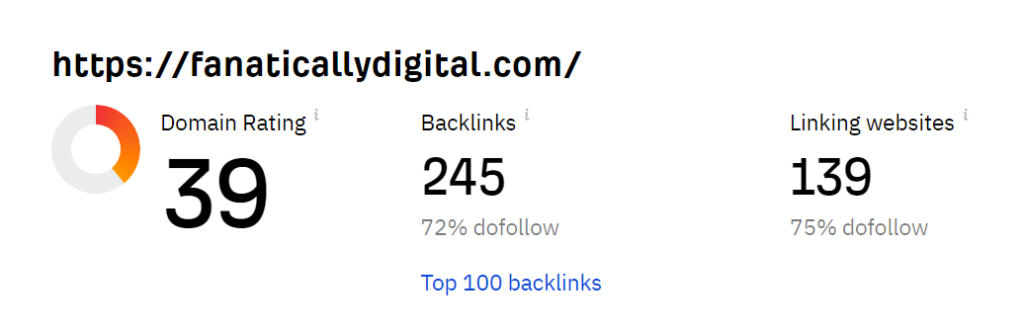
Fanatically Digital’s Domate Rating is 39, apparently. Cool.
They have also found 139 unique websites that link to us. Ahrefs relies heavily (if not exclusively) on backlinks in order to calculated their score.
This can be a positive because it keeps things relatively simplified. We know what is being measured. That is, where a website generally stands within the backlink hierarchy of the internet.
However, having only a few variables impacting this score (quantity and quality of links) means it’s more susceptible to spamming and manipulation.
Anyway, let’s see how this compare to what the others found.
Domain Authority
Domain Authority, or DA, is a bit different. It is a Moz calculation. That means it provides a bit of a different source of data. It aims to provide you with insight into how well your website may rank in the search engines.
What factors does DA use?
- The age of the domain itself
- The spam score it has
- The amount of traffic volume the website sees
- The total number of backlinks that are on the website
- The quality and the quantity of backlinks in comparison to each other
- Social signals pointing to the website
- The linking root domains
Fanatically Digital’s Domain Authority

Rather than focus exclusively on backlinks, which is what PankRank did, Moz takes things a step further by factoring in performance on search engines.
Domain Authority isn’t merely attempting to mirror PageRank. It’s not trying to gauge the quality of the inputs (i.e. quality of it’s backlinks). It’s using the outputs (i.e. search engine performance) to predict Google’s assessment of authority.
You can see this reflected in Fanatically Digital’s lower Domain Authority, only 22 compared to our 39 Domain Rating. That’s because Moz’s evaluation of our search engine performance is lower than one might expect given our backline profile. Only 44 keywords, according to Moz (although according to Search Console, this metric is off by a factor of 100).
They also take into account our Spam Score, which is only 1% so that’s nice, I guess.
Authority Score
The third option is Authority Score, or AS, which SEMRush designed. It provides a different viewpoint as well. Here, the score is more explicitly a prediction of the overall quality of the webpage or the website itself. It is best used to compare domains.
What factors does AS use?
Your AS is dependent on numerous factors but specifically focuses on these areas:
- The link power of the domain. By this, the organization focuses on the quality as well as the number of backlinks for the website.
- Organic traffic. The second key factor here is the amount of organic traffic that is coming to your website. This is estimated on a monthly average. Organic traffic stems from people landing on your page from search engine results often thanks to your SEO efforts.
- Spam factors. The third factor that plays a significant role in this process is spam. That is, the tool looks for anything that seems spammy and whether or not there is a natural link profile.
To provide some additional insight into Spam Factors, SEMRush shares that there are six key things it does to determine this:
- If you get no organic rankings on the search engine results page
- Having a super high percentage of do follow domains
- Having too many referring domains that come from the same IP address or the same IP network
- An imbalance in the amount of organic traffic the website gets compared to the number of links it has
- Another domain that has the same (identical even) backlink profile
Fanatically Digital’s Authority Score

While our Domain Rating is a cool 39 and our Domain Authority was a respectable 22, our Authority Score is a meager 5.
These are all out of 100.
As you can probably tell just from these numbers here, SEMRush weighs organic search performance A LOT. Our organic traffic is 0 visitors per month, apparently (also heavily contested by Search Console).
So despite our relatively respectable backlink profile, our Authority Score has been given an F–
This all begs the question, what exactly are these tools purporting to be measuring? And how do we as search marketers or business owners find value in them.
It’s interesting how, over time, these tools try less and less to be mirrors of PageRank, focused exclusively on the quality and quantity of backlines. Instead, they shift further towards an all encompassing SEO score.
Where Do You Stand on the Use of PageRank?
We find that these website authority metrics are a viable bit of information, and all of these versions, AS, DR, and DA, are great tools to have. However, this is just one component of a much larger picture. You cannot determine how well your website is optimized for search engines using these tools. They cannot provide you with enough insight to know what you need to improve either.
The key here is that these scores can be used as a component of an overall marketing strategy but not the total picture. They are merely proxies, and what is worse, they are highly susceptible to manipulation. For that reason, they are often overvalued in today’s use.
Don’t rely on this as the sole component of your marketing campaign. Instead, use it along with the help of a professional organization to customize your marketing strategy.
-

Display Campaigns & Brand Awareness
Today, we’re looking at how to build brand awareness with display advertising. This can be a very nuanced conversation and it is important your team is on the same page from the jump. Some decisions that need to be made from the start are, what campaign and ad types to use and what KPIs will be used to measure the success of a brand awareness campaign.
Here we are going to break down a few ways to set up and measure a brand awareness campaign.
Why Display Campaigns for Brand Awareness?
Using a display campaign alongside a search campaign is a great tactic for a brand awareness objective.
These two campaign types will work side by side to support one another. When solely using search campaigns you are only getting in front of people who are actively searching for your product or service.
However, when using display campaigns and curated audiences your ads will appear in front of potential customers who might not even know your product or service exists. Thus expanding your potential and actual reach exponentially.
Here is where your search ads come in handy to support your display ads.
A potential customer who viewed your display ad may click directly on your ad and be taken straight to your sight. Great!
However, they might not be ready to buy just yet. Then a few days, weeks, or even months later, when they are ready to buy or looking for more information, they can search for your company and be met with a search ad.
Perfect! The tag team ad types did their job. Now, your search ads may come into play much quicker.
Those who are distrusting of display ads may pop over and do a quick google search right away for your company. Again being met with your search ads. So don’t be surprised if you see an increase in your search campaign impression and make sure to budget accordingly to pick up the new traffic.
Measuring the Success of a Brand Awareness Campaign
Being on the same page regarding Key Performance Indicators is crucial for any campaign, especially for a brand awareness campaign.
That’s because usually, brand awareness campaigns aren’t using conversion rate or cost per conversion as their success metrics, instead oftentimes using impressions, clicks, and CPM.
This can be a tricky adjustment if your team isn’t used to using these KPIs.
If your goal is to see an increase in impressions and clicks for a brand awareness campaign there is also a good chance that conversion rates will go down and cost per conversion will go up, which can make people uneasy.
We get that.
Usually, you want a higher conversion rate and a lower cost per conversion, which is why your KPIs need to be straightened out ahead of time.
So, why is a display campaign with a brand awareness objective worth it?
Well, it’s true, display ads, unlike search ads, aren’t necessarily reaching people who are actively searching for your product or service thus your click-through rate and conversion rate are logically going to decrease.
That being said, brand awareness campaigns are all about the long term pay off. Display ads aren’t reaching people actively searching for your product or service, no, but hopefully when people are in need of your product or service your company will come to mind or at least be a recognizable name when they search.
Keep in mind this need could be in 2 weeks, 2 months or even 2 years. Therefore you want to increase your impressions and clicks so you are getting in front of as many new customers as possible.
This leads us to another good indicator of a successful brand awareness campaign.
Rather than zeroing in and looking at the impressions and clicks of one individual campaign try zooming out and looking at branded queries as a whole. This is relevant for both paid ads and organic searches. Are more people searching for your company name?
For example, when running a Brand Awareness Campaign for 10 weeks we saw an 88% increase in paid branded search term queries and a 110% increase in organic branded search queries.
We saw that our increase in branded awareness spend strongly correlated with the increase in branded search queries. This benefit would not have been something that was noticed if we isolated ourselves to only looking at the display ad metrics. Thus, once again it is important to take a step back and look at the whole picture when running a brand awareness campaign.
All companies and campaigns are different. Running ads and goals can be very nuanced. It is crucial to have the important conversations about ad types and KPIs right off the bat to ensure that your campaign runs smoothly towards your team’s goals.
-
Our favorite 9 Google Analytics Reporting Features
Google Analytics has a lot of great reporting capabilities and features. Too many people don’t use them because they may not be obvious, or may take some time to set up, or their inputs may not be properly set up. Whatever the reason, it is worth overcoming it to benefit from these Google Analytics capabilities.
Google Universal Reporting overview
These capabilities are part of Google Universal. Yes, Google wants everyone to migrate to Google G4, and you should. But the reality is that Universal Analytics will be around for a while. The amount of time you spend setting up proper GA reporting will be well worth it for the next year or two or more before your G4 migration.
GA Universal has several areas for reporting. All of them have their own value, and which ones you use will depend on what questions you want to answer. And this is the key point for any reporting setup.
The first step is to gather the questions you need to answer, how often you need the answers, and what you will do with the information. Too often, we see people set up elaborate reporting schemas, but don’t really have an idea of what the action items might be.
To get to the questions it helps to start with something as basic as your responsibilities.
- What actions do you take and how often?
- To decide on those actions, what information do you need, questions answers?
- Finally, how will you know if your decisions and actions actually made an impact?
The type of reporting and frequency will be based on the answers to these questions.
Daily reporting is often a comfort rather than a practical use of your time or resources. Do you take action every day based on yesterday’s metrics? If so, then daily reporting makes sense. If not, then daily reporting becomes a distraction, or worse, encourages you to ignore information because it comes in too often without changing.
Design your reporting around the three questions above, and you’ll find your time is much more productive.
Though we really like the reports shown below, the standard sets of reporting capabilities are very useful. You should be sure to explore these to understand if they serve your needs before investing time and resources in customizing reports and dashboards. Don’t over-engineer your reporting.
Our Favorite Types of Google Analytics Reports & Features
1. Google Analytics Alerts
One frustration people have is learning about a problem well after it started. These situations often lead to prolonged poor user experience, lost revenue, or large gaps in information. If you are charged with maintaining a website, or your goals are impacted by various parts of site performance, then Google Analytics Alerts can help you stay on top of things without having to constantly log into GA or your site to check.
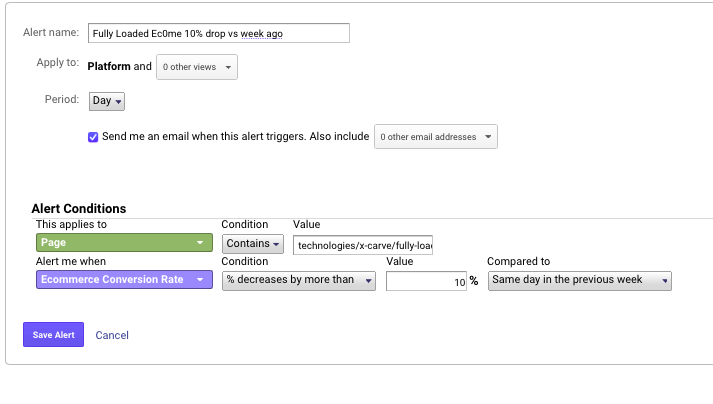
You set up your Custom Alerts in the Admin area for a given View.
Take a look at the options that are relevant to your responsibilities. If it’s eCom conversion rates, you can create an alert for a drop vs a prior period or below a certain level. Basically, anything that you can measure in GA can be the basis for an alert.
The alerts can be set to be emailed to yourself or others.
A few things to keep in mind.
- The alerts are intended to be triggered based on performance. So, they work over a daily period or longer.
- Be sure of your threshold. Getting alerted every morning because you set the conversion rate threshold too low will lead to you ignoring the alerts. If the threshold is truly accurately set, but likely to trigger alerts, you need to address the core issue causing the low conversion rate before setting up the alert.
- GA Alerts are not intended to notify you of catastrophic events. If your site crashes today, you’ll not know until tomorrow. If page load speed drop significantly, again, you’ll not know until tomorrow. There are other tools available to monitor major events like these.
Google Analytics Alerts are a great tool if you follow the “management by exception” philosophy. As long as things are going well, you don’t need to constantly monitor reports. But, when something falls off (is an exception), you want to know and manage it.
2. Google Analytics Dashboards
A Dashboard is a great type of report that concisely shows important information and lets you keep an eye on trends, general performance, and any exceptions. The key is that the elements of the dashboard remain consistent so you can tell, almost at a glance, if something seems off.
The purpose of the dashboard is to provide a higher-level view of performance and indicates where and when you may need to delve deeper. This is often made analogous to the instruments in an airplane cockpit. They’re designed to be quick and easy to read, so we know if there is an approaching issue.
In addition to the traditional approach of using an analytics dashboard, we also like to use them when we launch a new initiative. Set up properly, with the right filters, and you can closely monitor virtually any segment of your website traffic against target metrics. This makes it easier to see if the initiative is on target or you need to adjust your plan.
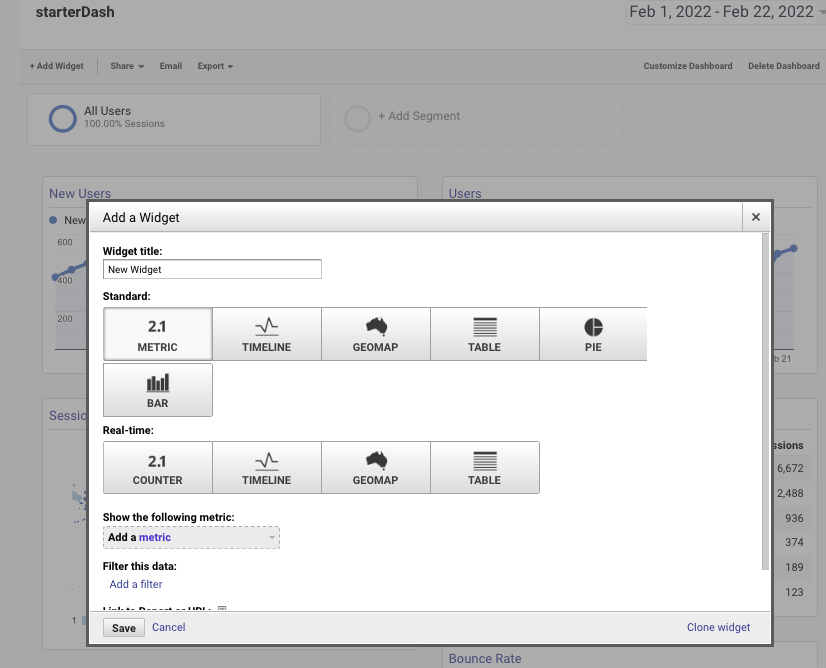
Setting up a dashboard in GA is pretty straightforward. On the left-hand panel under Customization, you click on Dashboards. Then, click the red “Create” button.
At this point, you will have three options:
- Blank Canvas. I recommend holding off on this option until you are familiar with the widgets and filters of the dashboard.
- Starter Dashboard. This is a good, basic dashboard about general user stats for the site. It won’t show you much by way of nuance, but it is a good overview of the site’s performance.
- Import From Gallery. The GA Dashboard gallery is pretty well populated and a great way to explore different layouts and ways to view your GA data. One caveat is that some of the dashboards in the gallery might make assumptions about how your GA is set up and your data may not fit their dimensions, metrics, and filters.
Once you are in a dashboard, you will see a few options at the top. The first is the “+Add Widget”. Dashboards are comprised of widgets displaying graphs, tables, counters, etc.
There are a lot of configurations you can create. But, one of the most useful elements is the “Filter.” This handy tool lets you isolate the site traffic to that which is important to you.
Most of us look at segments of the traffic, such as paid search or certain content/pages, among other dimensions.
Explore the dimensions and you will likely find that you can narrow the scope of the dashboard data to what is most relevant to your reporting needs.
If you are starting out, focus on playing with the “Starter Dashboard,” editing the widgets to see what happens.
Then do the same with the gallery dashboards. After a while, you’ll be able to add the widgets and filters that show you the information in the format you need.
3. Google Analytics Custom Reports
The custom reports, also under Customization, allow for the same data and filter access as the Dashboard. But, the reports tend to be narrow and deep, whereas dashboards tend to be wide and shallow.
Galleries are also available in the Custom Report area. These reports tend to be good for metrics shown over many elements of a dimension. Think product sales, conversion rates by date by channel. These are data tables built to show metrics and dimensions in a way that the default to Google’s UI reporting doesn’t.
There are three basic ways to set up reports.
Build the report
start by selecting the metrics, then the dimensions. You have the option of creating flat tables or building in a drill-down table.
Additionally, you can add multiple tabs. This can get tricky because there is a temptation to add tabs upon tabs, leading to data creep. Falling into this trap causes reports that become unuseful, they lose their focus.
When creating these reports, one of the most important tools is the filter. Generally, without filters, the data in reports created here are very similar to the standard reports in the GA UI.
Import from Gallery
Like Dashboard, there is a robust custom reports gallery. The gallery has some great filtering capabilities that will let you narrow the scope to the most relevant types of reports.
When you look through the Gallery, be careful to select reports and not dashboards. These are usually identified in the title.
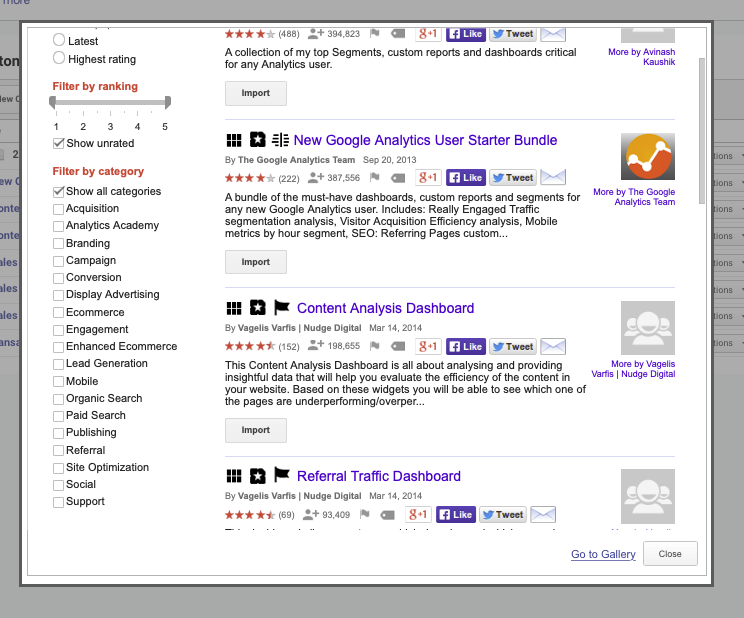
Finally, before you build a report from scratch, take a look at the next way to create custom reports.
4. Saved Reports
I am combining “Saved Reports” with “Custom Reports” because what you save from the regular Google Analytics UI has been customized.
If you find yourself going into the standard reports in GA, adding the same secondary dimension, and the same filters to review data on a regular basis, this should be created as a saved custom report. And Google makes it easy with the “Save” button at the top.
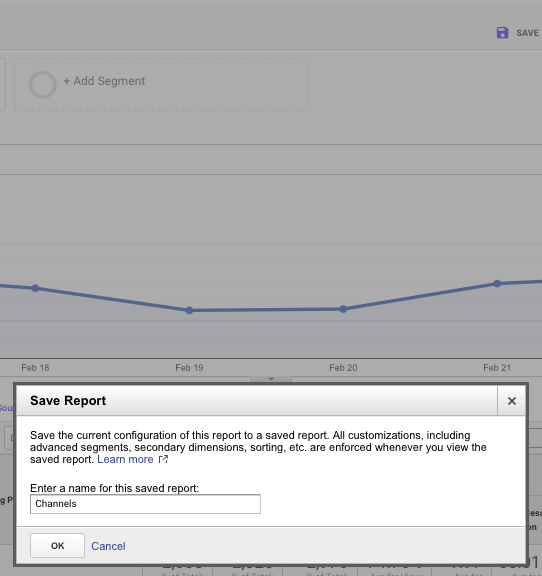
The good thing about the Custom reports and the Saved reports is that they have the same date range selection as all GA reports. Also, if you want to make tweaks, or try out different dimensions, you can duplicate the report. This lets you keep the current report intact while checking out some options.
5. Goal Funnels
Perhaps one of the most useful reports for optimizing the users’ path to your target goals is the Conversion Goal Funnel visualization. This is something we like to use with the purchase funnel but can be used with any goal that requires the user to take discreet steps.
To start, you need to set up a goal in the View’s Goals section. Creating a destination goal, with steps along the way.
Generally, the steps are discreet pages that the user clicks through on the way to the goal destination. This may be a thank you page, transaction confirmation, or some other content consumption.
There are several reasons the funnel visualization is useful. At a high level, it tells the conversion rate from when someone starts the process to when they complete it.
But, more telling is that at each stage, you can see the funnel drop off and where the users went, either as an exit or to which pages on the site they went.
A closer review of this information can provide insight as to why people are dropping off. This can be used to decide where you might run A/B testing, or change content to ease the flow from one step to the next.
Helpful Google Analytics Features
Generating reports is great, but providing features to share, annotate and append the data are key strengths in Google Analytics. The rest of our favorite features in GA incorporate these capabilities and we’ve found it to be very useful.
6. Exporting GA Reports
A nice aspect of Google Analytics reporting is the ability to share the report via email, PDF, or spreadsheet. You can export the various reports for downloading or send them to a Google Docs Spreadsheet. You can also set the reports to be emailed on a one-time basis or as a scheduled report.
7. Notation in GAs UI
Often, when we see changes or odd blips in the GA data, we ask what happened that may have caused. A neat feature of Google Analytics is the ability to make date-based notations that appear wherever the graph of data is seen. Make notations as things happen, even if you don’t initially see a data impact. This will help when looking back to explain data trends.
8. Data Importing
A great feature of Google Analytics is the direct connection to Google Ads, being able to see the cost, clicks, and impressions by various dimensions. This feature is extended to other channels via the data import feature in GA.
There are several types of Data Import. We most often use Cost data. A key consideration is that your UTM parameters’ values match the medium, campaign, content, and other dimensions that are being passed through with the channel data that you upload.
If you are responsible for media performance, this tool makes it easier to create a single repository of your media metrics and performance KPIs. You will find this feature in the properties admin section.
9. Audience Definitions – Audiences
Creating audiences allows you to segment your visitors into distinct profiles that can be used in Google Ads, or in segmenting your reporting. This is great for remarketing, optimizing the user experience, or just understanding how some segments behave versus other segments.
As you explore Google Analytics, you will no doubt find features that you favor over others. The fact is, there is a lot that can be done in GA. These 9 features just barely scratch the surface.
From integrating other Google Tools, to creating content segments, or custom dimensions, you can design just about any kind of reporting you need in order to make decisions. Just be sure you plan what you need ahead of time.
-
Google My Business is Now Google Business Profile
Google My Business (GMB) is going to be seeing some changes in the coming months.
Namely, Google My Business will now be branded Google Business Profile, and the Google My Business app will be retired in 2022 in favor of direct profile editing in Search or Maps.
Google My Business is Now Called Google Business Profile
First, it was simply called Google Local before a rebrand changed it to Google Places. Then, they doubled back, in a way, and it became Google+Local. They changed their minds again, returning to Google Places until about 2014 when Google My Business became the tool we all know and love (or simply tolerate; it’s not too often you see people with strong opinions on GMB).
Now they’re opting for a more direct branding approach with the informative, if unimaginative, Google Business Profile.
Yes, Google loves their rebrands almost as much as I am indifferent to them.
Will This Rebrand Affect Your Site or Business?
Almost certainly not. This appears to be nothing more than a name change will which likely go unnoticed by the vast majority of users.
However, if your site relies on content with a “GMB” focus for traffic, it may be worth considering an update to reflect this new branding. Just keep in mind that while this change is immediate, it will take years before this rebrand will become the norm. Users will be searching for “google my business” for a long time to come.
Google My Business App to be Discontinued
Perhaps more impactful is the discontinuation of the Google My Business app.
Those used to accessing their GMB profile through the app will need to rethink their workflow once it loses support. For a while, Google has been pushing profile managers to make edits or interact with users directly on search or map results.
In short, these are minor changes which should not have an impact on SEO or how most businesses interact with Google My Business.