Attention all Google Ads advertisers who use daily budgets and ad schedules: Your spend is about to change!
If you’re reading this before Jun 2026 we hope you have time to adjust your budgets.
If you’re reading this after June 2026 trying to figure out why your Google ads spend increased, we hope this answers your questions
WHAT is the change Google ads is making to budget pacing
Google announced that it is changing how Google ads utilizes its daily spend limits effective June 1st 2026.
Pre June 1st 2026 (Google’s old budget pacing):
Advertisers set their daily budget, and google would pace their spend based on the daily budget times the number of active days in the ad schedule.
EX: Your daily budget is $100/day running Monday-Friday (about 21 days in a month). Your monthly spend would come out to $2,100.
Post June 1st 2026 (Google’s new budget pacing):
Google will pace towards your daily spend times 30.4.
EX: Your daily budget is $100/day running Monday-Friday (about 21 days in a month). Your monthly spend will now come out to about $3,040
That’s right, advertisers who use the ads schedule can expect to see potentially drastic differences in their monthly spend.
A few things will remain the same:
Google will not spend over twice your daily budget in a day.
Google still adheres to your ad schedule and does not show ads on days you have blocked.
WHY is Google changing their Ads Budget Pacing?
Google says it’s making this change to “support more predictable monthly spending for Google ads campaigns… This change ensures your campaigns can achieve their full monthly spending potential, even when they run on a reduced schedule.”
What do we think of the change?
In all honesty, we aren’t too pleased.
This change is about to have potentially huge impacts on businesses’ spend and there is no way to opt in or out. The change is going to happen whether advertisers realize it or not.
For people who are involved in their ads account, they can make changes to accommodate for this new pacing. But, we know there are plenty of small businesses out there that won’t notice until the end of June when their advertising bill is way higher than they planned.
I understand having tools to help advertisers reach their monthly budget more efficiently. In fact, most of our clients, and people in marketing, set advertising budgets as monthly goals not daily. So yes, 100%, making it easier to reach a monthly budget is welcome. However, I would have liked to have seen this as an additional spend option not a reconfiguring of active budgets. People have set up entire programs around daily budgets, because that was the only option, so we predict Google’s switch up in June to create big waves for businesses across the platform.
So come June 2026, if you look at your spend and go “oh sh*t why did my advertising spend increase this month?” it is likely because of the changes Google made to how they are pacing their Google ads budgets.
Hopefully you are catching this now and adjusting your budgets accordingly!
For a while, Google has been pushing advertisers toward a fully automated system – you input limited information, and Google runs with it. And the Performance Launch Campaigns were a perfect example of this.
You could see conversions, but had little insight into what was or wasn’t working, or why. For a long time, it felt like that was just the direction things were heading. But now? Google has been rolling out updates that pull back the curtain and give advertisers a real look at what’s happening behind the scenes.
In full transparency, when Google Ads first released PMAX campaigns, I was skeptical. It required advertisers to give up a lot of control and, in the beginning, offered very little visibility into what was actually happening. You could see total impressions, clicks, and conversions, but had no idea where they were coming from. When metrics shifted, there was no clear explanation for why. Advertisers were essentially left to blindly trust that Google knows best. That didn’t sit well with a lot of seasoned advertisers, who were vocal about their frustrations.
Luckily, Google listened.
In the past year PMAX campaigns have come a long way when it comes to reporting and advertiser input. Let’s break down what PMAX has to offer, because if you wrote it off when it first launched, you might be surprised by what’s changed.
SEARCH TERM REPORTS
Believe it or not, PMAX campaigns didn’t even have search term reports when they first launched. Crazy, right? Anyone used to running standard search campaigns, where manual search term optimization is part of the routine, was suddenly staring at a black box.
On top of that, PMAX doesn’t use exact or phrase match keywords. Instead PMAX has advertisers inputting broad search categories and left them hoping Google would figure the rest out. And with no search term report to reference, there was no way to verify if it actually did.
To be fair, Google didn’t leave us completely in the dark. They did technically offer “Search Insights,” which organized your search terms into broad “themes” and provided some metrics. But there was no detailed list of the actual terms you were showing up for, just vague categories. Not exactly what performance-driven advertisers needed.
In 2025, Google released Search Term Reports for PMAX campaigns, and to every advertiser’s relief, it works exactly like the one you’d find in any standard search campaign.
The PMAX Search Term Report shows what people actually typed into Google to trigger your ad, along with a full breakdown of metrics: impressions, clicks, conversions, CPC, and more. That data helps advertisers answer questions like:
Are we targeting the right search term categories?
Does our messaging and creative align with what people are searching for?
What’s actually helping us hit our KPIs?
Do we need to tighten up our asset groups, or should we consolidate them?
Search term reports are great for answering big-picture questions, but they’re also a goldmine for building out negative keyword lists, which brings us to our next update.
PMAX Introduces Negative Keyword Lists
Negative keyword lists give advertisers the ability to tell Google what terms they don’t want to show for. Whether applied at the campaign level or through a shared list, they help guide Google in the right direction without completely taking the wheel.
When PMAX first launched, negative keyword functionality didn’t exist. Advertisers had no way to exclude irrelevant terms at any level. This, rightfully, frustrated a lot of people. Concerns over Google’s arrogance came to the forefront. Advertisers felt Google was unwilling to let advertisers set even basic guardrails.
Don’t get us wrong, sometimes Google really does know best. But advertisers should at least be able to filter out the obviously irrelevant stuff. A commercial painting company, for example, should absolutely be able to exclude terms like “home” and “residential.” That’s not micromanaging; that’s just common sense.
Fortunately, that wish came true. Google now supports negative keywords on PMAX campaigns, and they work exactly the same way they do on standard search campaigns. Which begs the question, why wasn’t this available from the start? But I digress.
We know Google advocates for keeping PMAX targeting as open as possible so the algorithm can optimize with as much data as it can get. That said, we still encourage you to use negative keywords strategically. You know your business. If certain terms simply aren’t relevant, there’s no reason to burn ad spend on them.
CHANNEL PERFORMANCE ON PMAX
In April 2025, Google added Channel Performance to PMAX, and honestly, it might be my favorite update yet.
The Channel Performance Report breaks down how PMAX is utilizing the various channels at its disposal. You can now see where impressions, interactions, and results are coming from, all organized by channel. It also shows how your budget is being allocated, including the percentage of ad spend going to each channel, making it easy to track month-over-month shifts at a glance.
You still can’t tell Google which channels to prioritize, but this report gives you a much clearer picture of what’s happening under the hood. More importantly, when you see a shift in performance, you now have somewhere to look for answers. A few examples we’ve seen with clients:
Impressions up, CTR down: Google pushed more budget into YouTube or Display that month.
CPC up, conversions up: Google leaned harder into Search ads.
That kind of context changes everything when you’re trying to explain results or make strategic decisions.
Wrapping Up
These 2025 updates genuinely changed the PMAX game for us. We went from skeptics to believers, and the difference is transparency and control. These new reporting tools and controls, paired with solid conversion tracking, can produce an efficient, well-rounded campaign that actually makes sense to the people running it.
If Google keeps moving in this direction, blending automation with real advertiser input, they’re building something hard to compete with.
Your Back to Basics Guide: Keywords, Search Terms, and Search Themes
In today’s Google Ads 101 lesson, we’re tackling keywords, search terms, and search themes—breaking down the similarities and differences between these concepts so you can set up and optimize your account with confidence.
This post is perfect for beginners! But it’s also perfect for those looking for a refresher. Why? Because Google Ads is constantly evolving! Keywords and search terms aren’t new. In fact, they’ve been around since the inception of Google Ads in 2000, but they don’t look the same as they did then. They don’t even look the same as they did a year ago! So buckle up as we break down what these terms are and how to best use them for your campaigns.
Quick Definitions
First, a few quick definitions before we dive deep:
Keywords:
Words or phrases that advertisers tell Google they want to bid on and appear for when users search related queries. What you WANT to show up for.
Search Terms:
The exact words and phrases that people searched for in Google when they received an ad. What you ACTUALLY show up for.
Search Themes:
A broad topic or concept that groups related keywords together, used primarily in Performance Max campaigns to guide Google’s automated ad delivery toward relevant search contexts.
Keywords
Keywords are one of the key components advertisers need to run search campaigns. They’re the search queries you’re willing to pay for when someone searches them on Google. Think of these as your wish list of searches you want to show up for. When you add keywords to your campaign, you’re essentially giving Google instructions about which search queries should trigger your ads.
However, not all keywords work the same way. Google Ads offers three match types that control how closely a user’s search term needs to match your keyword before your ad can appear. Google provides the following definitions for each:
Broad Match:
“Ads may show on searches that are related to your keyword, which can include searches that don’t contain the direct meaning of your keywords.”
Phrase Match:
“Ads may show on searches that include the meaning of your keyword. The meaning of the keyword can be implied, and user searches can be a more specific form of the meaning.”
Exact Match:
“Ads may show on searches that have the same meaning or same intent as the keyword.”
What match type is best? Well, that depends on who you ask. Google will recommend broad match every time because they believe their system can leverage its machine learning to find relevant searches beyond your exact keywords.
Now if you ask us…we have a different answer. While broad match keywords can be great, we often find that broad match can be, well, too broad, causing advertisers to bid on search terms that aren’t relevant and thus wasting ad spend.
We usually start clients with phrase match, which provides a good balance between Google finding relevant queries while not giving up too much control. From there, we analyze the data and can either open it up to broad match or tighten it down further with exact match, depending on what each account needs.
Keywords are added at the ad group level, allowing advertisers to target multiple products or services within one campaign while still being able to create tailored ads for each grouping.
Within your Google Ads account, the keyword report gives you powerful visibility into performance metrics like impressions, clicks, conversions, and cost-per-conversion for each individual keyword. This data is gold for understanding which keywords are actually driving results and which ones are just burning through budget without delivering.
Search Terms
Keywords are what you WANT to show up for but Search Terms are the ACTUAL phrases people typed into Google that triggered your ad. Sometimes these match your keywords perfectly, sometimes they’re…creative interpretations.
On the search terms report, advertisers can view almost all of the same metrics that they get in the keyword report, including impressions, clicks, conversions, etc. This list allows advertisers to assess how users are searching and discovering their ad.
Key Ways to Use Search Term Lists:
Build out negative keyword lists: Scan your search terms to identify irrelevant queries that are triggering your ads, then add them as negatives to prevent wasted spend. For example, if you sell premium furniture and keep seeing searches for “cheap” or “free,” those are prime candidates for your negative list.
Assess if your keywords are hitting or missing the mark: Compare your intended keywords against actual search terms to see if Google’s match types are working in your favor. If your phrase match keywords are pulling in completely unrelated searches, it’s time to tighten up your match types.
Filter for broad, phrase, and exact match keywords: Use the match type filter to see how each type is performing and which ones are generating the most relevant traffic. This helps you make informed decisions about where to invest more budget or which match types to scale back.
Discover new keyword opportunities: Your search terms report often reveals high-performing queries you hadn’t thought to target directly. Add these winners as new keywords to gain more control and potentially lower your cost-per-click.
Discover new landing page opportunities: If you’re seeing consistent search patterns for specific products, services, or topics you don’t have dedicated pages for, that’s a signal to create new targeted landing pages or ad content to existing pages. Better landing page relevance means better Quality Scores and better conversion rates.
Search Themes
Switching gears a bit here. Keywords and search terms are crucial parts of search campaigns, but search themes are actually a component of Performance Max (PMAX) campaigns. So why are we tackling them in the same post? Well, for one, their names can get confusing—Search Terms vs. Search Themes—so it’s easy to mix them up, but they are different! In fact, search themes are actually more closely related to keywords than they are to search terms.
Remember how we said Google wants more control?
Just like keywords, search themes are your way of telling Google what products or services you want to show ads for. Except this time, you don’t have match types! Search themes are like broad match keywords. You tell Google the idea of how people are searching for you, but then you hand the reins to Google and let them optimize.
When PMAX campaigns first launched, Google was met with a lot of pushback from advertisers who didn’t appreciate the lack of transparency about where and when their ads were showing. It felt like sending your ads into a black box and just hoping that Google would perform. If you’re going to be investing a lot of money into this type of campaign, you want to know what’s working and what’s not.
Now Google has implemented more reporting tools, including search term reports and negative keyword lists for PMAX. You heard that right! When PMAX first came onto the scene, advertisers not only couldn’t view the search terms, but they couldn’t negative match on the campaign either. Talk about flying blind.
Wrapping Up
Keywords. Search Terms. Search Themes. Three different tools for three different jobs. Keywords help you target the right searches. Search terms show you what’s actually happening. Search themes let Google’s AI explore opportunities you might miss.
When used correctly, these three concepts work together to improve your campaign performance, maximize your ad spend efficiency, and drive better ROI from your Google Ads campaigns. The smartest advertisers don’t just understand the difference, they actively use all three for ongoing campaign optimization.
Not sure where to start or need help with PPC management? Our team specializes in data-driven strategies that actually deliver results. Let’s talk.
Whether you’re new to Google Ads or just need a refresher on their updates, understanding campaign types is essential. Think of them as different tools in your advertising toolkit. Each campaign type is designed for specific goals and audiences. Let’s break down what each type of campaign does and how it works.
Search Campaigns
We like to think of search campaigns as the bread and butter of Google Ads. They’re the foundation most advertisers start with, and for good reason.
What they are:
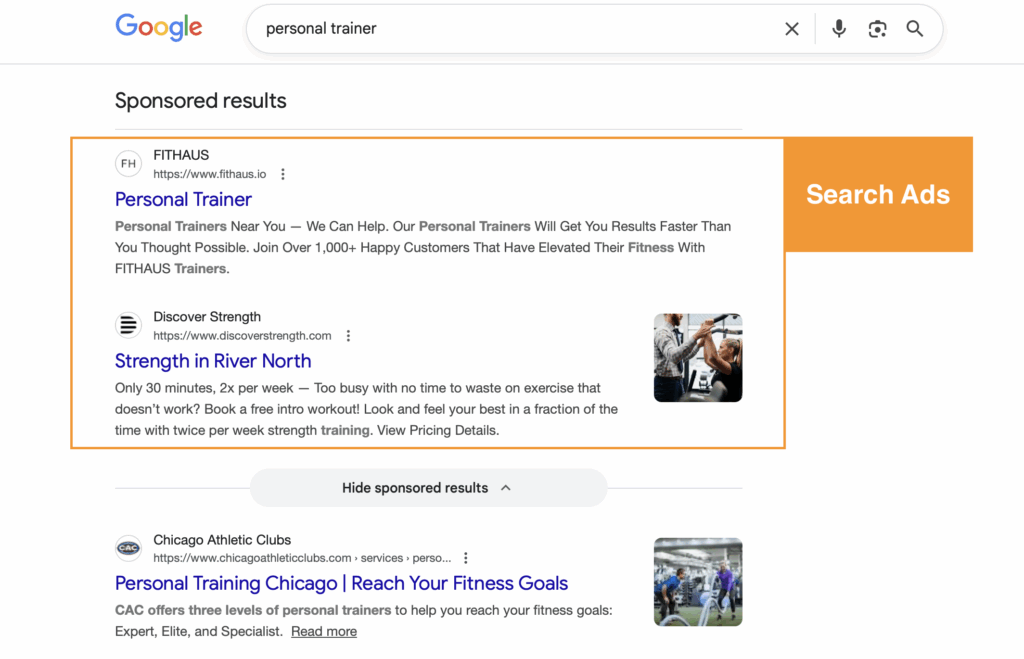
Search ads are the text ads that appear when you search in Google. You’ll usually see them before organic listings but they can also be seen lower on the search results page. Sponsored results have a designated label above their section with the option to hide sponsored ads at the bottom.
How they work:
Advertisers create text ads and then bid on keywords so they appear in the search results when people search for those terms (search terms).
Let’s break that down:
Advertisers create text ads called responsive search ads by providing Google with up to 15 short headlines and 4 descriptions. Google Ads then mixes and matches these by combining 3 headlines and 2 descriptions based on what it believes will perform best for each individual auction. This gives you flexibility while letting Google’s machine learning optimize performance.
Next, advertisers designate keywords they want to “bid on”. When someone searches for those keywords (or variations of them), your ad enters an auction to potentially show up in the results. You’re essentially raising your hand and saying “I want to be visible for this search.”
The bells and whistles: Assets (formerly called extensions) are your secret weapon. They let you provide viewers with more information about who you are and what you can offer them. Assets are a useful tool that can link to other landing pages, highlight value propositions, or provide quick contact options like phone numbers or location details. There are multiple asset types, each with its own function, from sitelinks and callouts to structured snippets and lead forms. Learn more about Google Ads assets here.
Need help optimizing your search campaigns? Check out our Google Ads services.
Shopping Campaigns
What they are:
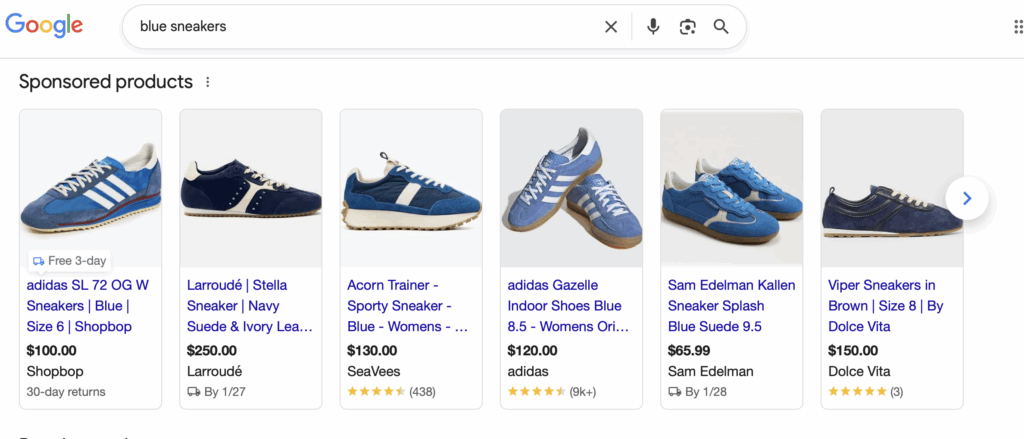
Shopping ads are for advertisers specifically promoting products. These ads also appear in the search results, but this time as “sponsored products” featuring an image, product headline, price, and store name. You’ll typically see them at the top of Google search results in a carousel format or in the Shopping tab.
How they work:
Unlike search campaigns where you bid on keywords, Shopping campaigns pull product data directly from your Google Merchant Center feed. You upload your product catalog with details like titles, descriptions, images, and prices, and Google automatically matches your products to relevant searches.
Here’s the process: You create a product feed in Google Merchant Center containing all your product information. Then in Google Ads, you create a Shopping campaign and connect it to your feed. Google uses the product data to determine when and where to show your ads, so no keyword lists are required.
Advertisers can organize products into groups and set bids at the product level, giving you control over how much you’re willing to pay for clicks on specific items. It’s particularly powerful for e-commerce businesses with large inventories.
Shopping campaigns work best when your product feed is optimized with detailed titles, high-quality images, and accurate information. The better your feed, the better Google can match your products to shopper intent. Looking to get started with Shopping ads? Our Google Shopping services can help.
Display Campaigns
What they are:
Display ads are the banner ads you see across millions of websites, apps, and Google-owned properties like YouTube and Gmail. Unlike search ads that capture active intent, display ads build awareness and reach people as they browse the web.
How they work:
Display campaigns use targeting options to show your visual ads to specific audiences across the Google Display Network which is a collection of over 2 million websites and apps. You can target by demographics, interests, topics, placements, or even specific audiences like past website visitors.
Here’s how it happens: You create visual ads by providing google with up to 15 photos of various formats, 5 logos, 5 headlines (30 characters), 1 long headline (90 characters), and 5 descriptions (90 characters). These are responsive display ads that adapt to available ad spaces based on what Google believes will perform best. Then you select your targeting criteria. Maybe you want to reach people interested in fitness, or people who’ve previously visited your site but didn’t convert.
Google then serves your ads on relevant websites and apps where your target audience spends time. You pay per click or per thousand impressions (CPM), depending on your bidding strategy.
Demand Gen Campaigns
What they are:
Demand Gen campaigns are Google’s newest visual campaign type, designed to reach people across YouTube, Discover, and Gmail. Think of them as the evolution of Discovery campaigns, focused on creating demand and engaging audiences in immersive, visual-first environments.
How they work:
Demand Gen uses a combination of audience targeting and visually rich ads to capture attention and drive action across Google’s most engaging surfaces. These campaigns prioritize high-quality images and video content to tell your brand story.
You create ads using images, videos, carousels, and product feeds (yes, you can showcase multiple products in a swipeable format). Google then uses its audience signals, things like customer lists, website visitors, or similar audiences, to find people most likely to be interested in what you offer.
The magic is in the placement: your ads show up in YouTube feeds (including Shorts), the Discover feed on mobile devices, and Gmail’s social and promotions tabs. These are places where people are actively consuming content and open to discovering something new.
Demand Gen campaigns work particularly well for driving consideration and engagement with lookalike audiences. You’re meeting potential customers where they’re already spending time, with content that fits naturally into their experience.
Performance Max (PMAX) Campaigns
What they are:
Performance Max is Google’s fully automated, goal-based campaign type. It’s designed to give Google’s AI maximum control to deliver results across all of Google’s advertising channels. That’s right! Search, Display, Shopping, YouTube, Gmail, and Discover all in one to form a single campaign.
How they work:
PMAX is fundamentally different from other campaign types because you don’t choose where your ads appear. Instead, you provide Google with your goals, assets (headlines, descriptions, images, videos), and audience signals, then let the algorithm do the heavy lifting.
Here’s the breakdown: You set up a campaign with conversion goals (what actions you want people to take). You create asset groups containing all your creative materials including text, images, logos, videos. You provide Google with search themes which are similar to keywords except they are broader. You can also add audience signals to guide the machine learning (think customer lists or interests), though Google will expand beyond these based on performance data.
Google’s AI then tests combinations of your assets across all available inventory, automatically allocating budget to the placements and audiences that drive the best results for your goals. It’s like having multiple campaigns running simultaneously, all optimized in real-time.
The trade-off? Less control and transparency. You won’t know exactly where ads appear or which combinations perform best. But for advertisers willing to trust the automation, PMAX can drive strong results—especially for e-commerce and lead generation.
Here’s the thing about PMAX: data is the name of the game. If you aren’t able to provide clear conversion data as low in the funnel as you can go (purchases, qualified leads, appointments, not just page views), Google can’t optimize properly and you’re just going to burn through budget. Set up proper conversion tracking before launching PMAX, not after. Curious if PMAX is right for your business? Reach out to our team.
Choosing the Right Campaign Type
Each campaign type serves a specific purpose in your marketing strategy. Search captures high-intent customers actively looking for solutions. Shopping showcases products to ready-to-buy shoppers. Display builds awareness and remarketing audiences. Demand Gen creates interest in visually engaging environments. And PMAX automates everything for efficiency.
Most successful Google Ads strategies use a combination of campaign types, each playing to its strengths. Start with where your customers are in their journey and match the campaign type to that stage.
Ready to build a comprehensive Google Ads strategy? Our PPC team specializes in creating campaigns that actually drive results, not just clicks.
First things first: what is a Google Ads Quality Score?
In a search campaign, Google will assign a quality score at the keyword level between 1-10. This score is an indicator of how well your ad ranks compared to other advertisers. The more relevant google deems your ad and landing page to the keyword, the higher the quality score.
How Quality Score Is Calculated:
There are three main components to calculating the quality score
Expected Click through rate: This is Google’s estimate of how likely they think someone will click on your ad. Google pulls this number from your ads past performance.
Ad Relevance: How well your ad matches a user’s search intent. Does it match the question or need of the user? The more relevant your ad, the higher the quality score.
Landing page experience: Once someone clicks on your ad, what kind of experience do they have on your website? Google evaluates how helpful, relevant, and user-friendly your landing page is. Pages that are clear, fast-loading, and directly related to the ad’s message will earn higher marks.
Google assigns each component a status of “Above Average”, “average”, and “below average” to create a quality score. Your rankings are based on how your ads have performed compared to other advertisers using the same keywords over the past 90 days. In other words, it’s not just about how well you’re doing, it’s about how you stack up against the competition.
Why Quality Scores Matter
Quality Score might seem like just another metric in the dashboard, but it’s much more than that. Every time your ad is eligible to be shown, it is put into an auction against other advertisers. Your quality score indicates how your ads perform in the Google ads auction and can make or break the efficiency and success of your advertising. Here are the top five ways a high quality score affects your ads:
Lower Cost-Per-Click (CPC)
Google rewards high-quality ads with lower CPCs. A higher Quality Score means you pay less for each click while maintaining or improving your ad position.
Better Position
Even if your competitors are bidding more, your ad can still outrank theirs if your Quality Score is better. Ads with higher Quality Scores are more likely to appear in top positions on the search results page, increasing visibility and click-through rates.
Higher ROI
When you’re paying less per click and getting better placements, your return on investment should improve. You’re getting more value for every dollar spent, which is the ultimate goal in any marketing campaign. That said, a better Quality Score isn’t a guarantee of improved ROI; other factors like landing page performance, seasonality, and audience targeting also play a significant role in ROI.
Increased Click-Through Rate (CTR)
Quality Score is partially based on expected CTR, and better ad relevance often means more people click. A higher CTR feeds back into improving the Quality Score.
Relevance to Searchers
High scores indicate that your ads are well-matched to what users are searching for, which often means higher engagement and better user experience. You want to make sure that both keyword and landing page are relevant to searchers to improve down stream metrics.
How to Improve your Google Ads Quality Score:
Since Google’s evaluation is done behind the scenes, your quality score can sometimes feel like a mystery, but have no fear, there are ways to improve it! We can break down our changes into three categories: improving keyword relevance, improving ad quality, and improving landing page experience.
Improving Keyword relevance
Improving keyword relevance can be a bit of a balancing act, especially now that Google is heavily promoting its AI tools and encouraging advertisers to adopt broad match keywords. If you’re currently running campaigns with phrase or exact match types, you’ve likely seen suggestions nudging you to switch to broad match.
While Google’s AI-driven recommendations can be helpful, they’re not foolproof. It’s still up to advertisers to monitor their search terms and ensure ads are showing for relevant queries. Fortunately, enhancing keyword quality doesn’t have to be overwhelming—start with these three actionable steps:
Adjust Match Types: If broad match is pulling in irrelevant traffic, consider switching to phrase or exact, or pausing underperforming keywords to improve CTR.
Use Negative Keywords: Your search term report is a super useful tool. Advertisers can use it to monitor and block irrelevant searches to improve CTR and ad relevance.
Group Keywords Smartly: Keep ad groups tightly themed so your ads and landing pages stay aligned with user intent. Again, this is a bit of a balancing act with google suggestions but use your best judgment based on your knowledge of your account!
Improving Ad Quality
Boosting your ad quality is a key step in improving CTR and, in turn, your Quality Score. Google rewards ads that are closely aligned with user intent, so the more relevant, engaging, and clear your ads are, the better they’ll perform.
Here are three simple but effective ways to improve ad quality:
Match your ad copy to your keywords: seems simple and it is! But this can be something that slips through the cracks, so it is important to audit your ads and make sure your headlines and descriptions use your keywords.
Use all available ad extensions. Don’t forget the bells and whistles! Sitelinks, callouts, and structured snippets add relevance and improve CTR.
Test multiple ad variations. Run A/B tests to find the messaging that resonates most with your audience. Your findings might surprise you!
Improving Landing Page Quality
Landing page experience is one of the key factors of Google’s Quality Score and it’s one that often gets overlooked. Even if your ad and keywords are well-aligned, a poor landing page can drag down your score and your overall campaign performance. To improve landing page experience follow these helpful steps:
Match the Message: Make sure the content on your landing page clearly reflects your ad and keywords. That might sound like a “no duh” moment, but it’s surprisingly common for advertisers to link to their homepage instead of directing users to a more relevant page. For example, if your ad promotes “Custom Office Desks,” the landing page should prominently feature that product, not just general office furniture.
Depending on how built out your website is, this could be as simple as switching the destination URL or might require more effort to create new pages or update existing content to better align with your ad messaging.
Optimize Your Landing Page: Google values landing pages that offer a smooth, user-friendly experience. Two key factors here are load speed and mobile usability.
Slow-loading pages lead to higher bounce rates and a lower Quality Score. It is important to find and fix common issues like large images, unoptimized code, or slow server response times.
Mobile-friendliness is equally important. Since most searches happen on mobile devices, your landing page should be responsive, easy to navigate, and quick to load on smaller screens. A clean, mobile-optimized design keeps users engaged and improves both ad performance and conversions.
Final Quality Score Thoughts
Quality Score isn’t just another metric, it directly impacts how much you pay and how often your ads show. A better score means lower CPCs, higher ad positions, and stronger performance overall.
Focus on keyword relevance, ad quality, and landing page experience to move the needle. You don’t need a perfect 10, just consistent improvements that make your ads more useful to the people searching for what you offer.
Maximizing the effectiveness of your Google Ads campaigns starts with avoiding common pitfalls. From improper conversion tracking to overlooking vital ad assets, each step can significantly impact your campaign’s success. In this comprehensive guide, we’ll explore five critical mistakes to steer clear of and provide actionable tips to ensure your ads drive results. Let’s dive in and optimize your advertising strategy for maximum impact and ROI.
1. Improper Conversion Tracking
One of the most important things when first setting up Google ads is to make sure you have proper conversion tracking set up. Without conversions tracking a couple of things will happen. First, Google won’t know what to optimize. Secondly, the absence of accurate data hinders your ability to assess the effectiveness of your strategies.
So, let’s jump into a few things to check when setting up conversion tracking:
Primary Vs. secondary conversions. Google will automatically track and optimize to your primary conversion and only track your secondary conversions. So, if submitting a lead or a sale are the most important conversion actions for you, then make sure these are set as primary and not secondary conversions.
Don’t over clutter your conversion actions. We like to say “if everything is important then nothing is important”. We recommend choosing the most important conversion actions and tracking those. This might seem simple, however, sometimes Google will recommend many conversion events, including individual page views and link clicks which most likely are less valuable to you than a purchase, call or lead form submission.
Tracking conversion value. Once a user has landed on your website and made a purchase or closed a deal, it’s important to send that purchase value back into google. This way you can track your return on investment instead of just the number of conversions.
2. Not Setting an Ad Schedule
Google allows you to set an ad schedule based on the day or the hour. You could hypothetically run ads at a different time every day, though we can think of many reasons you’d need to do that.
Creating an ad schedule that suits your company is key. This can be done right off the bat or once you have more data.
For instance if you are a B2B organization, running ads Mon-Fri is most likely the way to go. Why waste your money on the weekends when people aren’t at work. In the same vine you might run ads from 9am-5pm to coincide with the average work schedule.
When you are setting up your campaigns you might have no idea when your consumers are most active. No worries! You can always run your campaigns 24/7, and after a couple of weeks and enough data, you can assess when conversions are coming in, and cost/conversion then adjust accordingly.
Running ads on a schedule doesn’t have to be an all or nothing either! You might notice that for some reason on Wednesdays, your conversions and ROI are down but you still want ads to appear on Wednesdays. If you are setting manual bids you can adjust the maximum bid based on the time and day. So on Wednesdays you can set your max bid to 50% of what your normal max bid is to lower spend.
3. Blindly Accepting All of Google’s Recommendations
Don’t get us wrong, Google can have great recommendations but sometimes they can be overzealous and it can lead you down a path you definitely don’t want to go down. For instance, Google will often make recommendations that include a budget increase, which you might not have. It’s okay to tell Google no even if your optimization score goes down a bit.
Another recommendation you should keep an eye on is the key word changes. Google will frequently recommend broad match keywords and we have noticed sometimes they aren’t afraid to add +150 broad match keywords to one ad group. For some, this may be okay, but for others this can lead to irrelevant search terms and messy keyword data.
Not all of Google’s Recommendations are bad, some can be very helpful but make sure to not blindly accept all of their suggestions without thinking about how it will affect your business.
4. Not setting up location targeting
Don’t forget to set up Location targeting for your ads based on your company’s needs. Google allows advertisers to select what countries, states, or zip codes their ads appear in. Google also allows you to set areas that you don’t want to advertise in.
No one likes wasted ad spend and the quickest way to lose money is to advertise in areas where your business is less or not relevant. For instance, if you run a brick and mortar store you should set up location targeting based on the area around your store. No need to be advertising in Texas if your store front is in Chicago, IL.
Location targeting is relevant if you have an online store too. Let’s say your company sells snow blowers. Well, once again advertising in Texas might not be the biggest bang for your buck.
Sure over 5 years I’m sure someone will buy a snowblower in Texas for some reason or another but you’d be better off concentrating your ad spend on places like Wisconsin, Michigan or New Hampshire.
5. Lack of Ad Assets
Our final mistake we see advertisers make is not utilizing assets! Advertisers should use assets in Google Ads because they play a crucial role in creating compelling and effective advertisements that increase ad relevance and increase ad quality score.
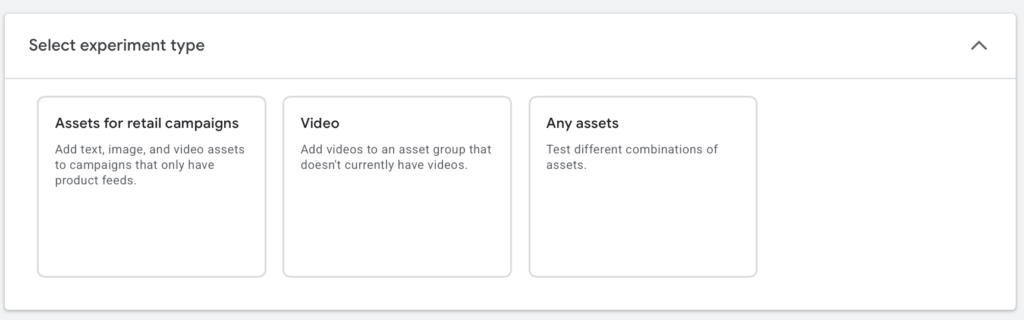
When creating an ad it’s hard to miss the basics like headlines and descriptions because they are required, but don’t forget about the optional ones. You used to have to add the optional assets to an ad after the ad was created in the asset tab.
Now Google has made it easier and gives advertisers the option of adding assets and extensions to the ad while making the ad itself. Some of these assets are:
Sitelink extensions
Call outs
Structured snippets
Photos
Location extension
Lead form extension
Call extension
Price extensions
Image extensions
These different assets allow you to link to relevant pages on your site, highlight important details about your company, and provide contact information up front. Overall assets can be used to provide more information and make your ad more attractive to potential customers.
That being said, not all assets are relevant to every business. For example, you might not take calls or you might sell products solely online and not have a location. That’s okay! Use all that pertains to your business to maximize ad quality score.
Wrapping Up
In conclusion, mastering Google Ads requires diligence and strategic planning to avoid common pitfalls that can hinder your campaign’s performance.
By ensuring proper conversion tracking, setting up ad schedules tailored to your target audience’s behavior, critically evaluating Google’s recommendations, implementing precise location targeting, and leveraging ad assets effectively, you can maximize the effectiveness of your advertising strategy.
With these insights and actionable tips, you’re equipped to optimize your campaigns for maximum impact and ROI. Here’s to your success in the dynamic world of digital advertising!
Starting a business is no easy feat and includes a lot of steps. Two of which are making a website and getting said website in front of customers to promote your product or services.
If you have ever thought about setting up a website before, we are sure most of you have heard of a little platform called Wix, an easy to use, code free website developer. However did you know that Wix also allows you to set up Google ads directly from their platform?
We know that when starting a business there is also a LOT of research that needs to be done. Scouring the internet, bouncing from page to page, trying to decide which path is best, and not everyone has time for that.
Today we are going to keep it all in one place! Everything you need to know about using Google Ads through Wix and if it’s better than setting up a Google Ads account directly through Google.
How To Set Up Google Ads on Wix
Before we go through the pros and cons of using Wix to set up Google Ads, let’s walk through the steps to set it up. Wix keeps things pretty simple so there are only 5 main steps we are going to touch on.
1) Set up location targeting
Advertisers are able to enter up to ten locations based on country, state, city, zip code, and region, or advertisers can enter a street address that they want to advertise near.
2) Set Up Ad Schedule
Choose if you want to run your ads all the time or at specific times. If you opt for specific times you can then choose which days and which hours your ads run.
3) Select Keyword Themes
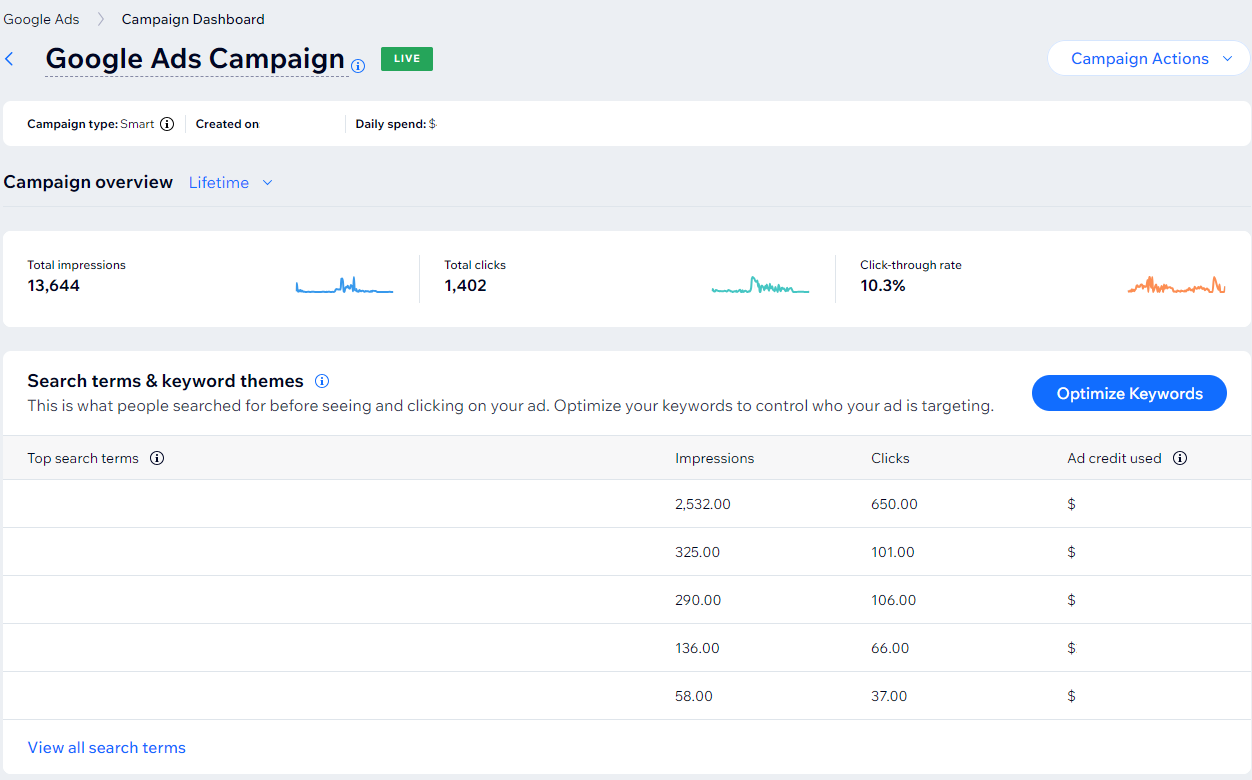
You can then select up to 10 keyword themes that you think are relevant to how people might be searching for products and services like yours. You can enter in your own keywords or pull from Wix’s suggestions. You only get 10, so choose your themes carefully to encompass everything that you want your campaign to target.
4) Assets
Advertisers enter in 3 headlines and 2 descriptions about their company and landing page. This is what will appear when your ad shows to users.
5) Set Budget
For Wix, you must first purchase a monthly subscription starting as low as $150 a month. This will then pool as the ad credit acting as the money that your campaigns can then pull from when you set your daily spend on the campaign level. It’s important to keep in mind that your campaigns also have a minimum daily spend so if you have a second campaign you will need to purchase more ad credit via a one time purchase or an increase in the monthly subscription.
Pros of Running Google Ads Through Wix:
And just like that, in five easy steps, you have yourself a Google Ads campaign set up through Wix, which leads us to our first pro for using the Wix platform to run Google Ads.
Pro 1) It’s Easy
Wix uses a simplified version of Google Ads that allows you to run search ads, as opposed to the Google Ads platform which has a number of different ad types, complex targeting, and more nuanced ad set up.
Though some people like the bells and whistles of Google Ads, not every company has the band-with to set up and manage complex campaigns.
Wix’s easy to use pared down platform is efficient. Plus it comes with step by step tutorials to walk you through how to set up Google Ads in Wix.
Pro 2) Integration
Using the same platform cuts down a lot of time. Right off the jump, you don’t need to create a Google Ads account, become a verified advertiser, or enter credit card information into a new platform.
In fact, You don’t need to learn another platform at all, because it’s all right in Wix, so you are already familiar with their tools.
Pro 3) Singular Platform (part one)
The pro of a singular platform in terms of integration is great but there is a lot to be said for its simplicity of a singular platform in the long term.
Let’s be honest, as a business owner there is a lot to manage and that includes the 101 tabs open on your computer that you need to check on.
Well advertising through the Wix platform instead of the Google Ads platform cuts down on one extra tab that you have to remember to check.
Instead of bouncing around between Wix and Google Ads you are able to view your advertising data alongside your organic data on one platform.
Time is money and there is a lot of time being saved by having one less platform to pay attention to.
Cons of running Google Ads Through Wix
There are a lot of pros to using the Wix platform to run Google Ads but some of those very things that are pros can quickly become cons for advertisers.
Con 1) Limited Data
Having one platform is great when you don’t have time to learn or set up a Google Ads account, however it also means that Wix is not built to report the same way the Google Ads platform reports.
Wix has very limited data compared to Google Ads.
In Google Ads, advertisers have the ability to do detailed audience reports, gather data on individual keywords, and track many metrics such as impression share that Wix does not report.
This lack of reporting prevents advertisers from gathering insights on their target market and limits ad optimization.
Con 2) Limited Ad Control
Again another pro that can quickly become a con. Wix has a simplified ad set up, which makes ads easy to build, but easy doesn’t necessarily mean better. Here are a few ways Wix is limiting:
The biggest drawbacks of ads on Wix is that you can only run search ads, so any display or video advertising is out of the question from the jump.
Wix also doesn’t allow for more than 3 headlines and 2 descriptions. In Google, Advertisers are able to enter up to 10 headlines and 4 descriptions that then get optimized based on performance.
On Wix, advertisers can’t add extensions to their ads, meaning they are missing out on images, pricing, and call outs that can help an ad stand out, be competitive and attract users.
Finally, Wix has advertisers pick out keyword themes and not specific keywords, meaning that the search terms your ads are showing up for are more broad and might not be relevant. Thus, there is also less data on the success of a keyword/keyword theme.
Con 3) Campaign = Ad
Right now every ad that is created in Wix is its own campaign. In Google Ads there are campaigns, ad groups and then ads.
There can be more than one ad group in a campaign and more than one ad in an ad group, allowing advertisers to organize ad content and gather data on different markets in a concise manner.
Con 4) Google Ads and Wix Don’t Connect
Though you are able to advertise with Google Ads through Wix they are separate platforms.
This means, if you start advertising through Wix and then decide you want to switch to using the Google Ads platform for all the tools and data that Google provides, you aren’t able to retroactively pull your data from Wix into Google Ads.
As far as Google Ads is concerned you have not been running ads through them. Thus you won’t have all your data in one place.
Is Using Wix to run Google Ads Worth It
Truthfully this is going to depend on your business.
As an agency, we wouldn’t use Wix to advertise for our clients because it does not provide near enough data for us to work with and make intelligent observations on campaigns.
However, advertising is our world and we have the time, means and knowledge, to quickly and effectively set up Google Ads campaigns.
A small business owner looking for a way to easily advertise their business might benefit from having a simple platform that is in the same place as where their website is being hosted.
In conclusion, if you have the time, Google Ads is more worthwhile, however if you don’t have the time or desire to learn Google Ads, then setting up ads through Wix is a good resource to get you started in advertising.
Want to take advantage of advertising on Google Ads directly, but need help? Contact us for affordable ads management services. After a short conversation where we align with your needs, we can provide you with a free PPC Ads Management quote. Contact is today!
The Role of Remarketing in PPC: Strategies for Targeting and Converting
In the fast-paced world of online advertising, capturing and retaining the attention of potential customers is crucial for success. Pay-Per-Click (PPC) advertising is an effective way to reach targeted audiences, but what happens when those initial clicks don’t immediately lead to conversions? This is where remarketing comes into play. In this article, we’ll explore the pivotal role of remarketing in PPC campaigns and provide strategies for effectively targeting and converting prospects.
Understanding Remarketing:
Remarketing, also known as retargeting, is a digital marketing strategy that involves targeting users who have previously interacted with your website or mobile app but haven’t completed a desired action, such as making a purchase or filling out a contact form. By tracking user behavior and displaying targeted ads to these individuals as they browse other websites or social media platforms, remarketing aims to re-engage them and encourage them to take the desired action.
The Importance of Remarketing in PPC:
Remarketing plays a crucial role in PPC campaigns for several reasons:
Re-Engagement: Remarketing allows advertisers to re-engage with users who have already shown interest in their products or services. By keeping your brand top-of-mind, remarketing helps nurture leads and encourages them to return to your website to complete a conversion.
Increased Conversions: Studies have shown that remarketing can significantly increase conversion rates by targeting users who are already familiar with your brand and are more likely to convert. By delivering personalized ads based on users’ previous interactions, remarketing helps create a more tailored and compelling user experience.
Enhanced ROI: Remarketing campaigns often yield higher returns on investment (ROI) compared to traditional display advertising. Since remarketing targets users who are further along the sales funnel, the likelihood of conversion is higher, resulting in a more efficient use of advertising budget.
Strategies for Remarketing Success:
When launching a remarketing strategy, it is important to not think of it as a one size fits all campaign. Not all people who have been to your site are the same. In fact they aren’t even all at the same place on the conversion path. The plus side of a remarketing campaign is that advertisers already have information on the users, so use it! Cater your ads to the segment.
Remarketing segmentations can get pretty niche depending on your previous campaigns and website, but today we are going to focus on two of the most common remarketing segmentations: landing pages and abandoned carts.
Landing Page Remarketing
Users who bounced off your landing page without taking action may still be in the early stages of the buying journey and may need more nurturing before they’re ready to convert. In this case, remarketing ads can focus on providing valuable content or showcasing other products or services that may be of interest to them.
Abandoned Cart Remarketing
For users who abandoned their carts, they have already expressed a strong intent to purchase, making them prime targets for remarketing efforts.
By creating remarketing campaigns specifically targeted at cart abandoners, you can remind them of the items they left behind and provide additional incentives to encourage them to complete their purchase. This could include offering a discount or promotion, highlighting free shipping or returns, or emphasizing limited-time offers to create a sense of urgency.
Wrapping Up
By creating distinct remarketing segments, advertisers are able to tailor messaging, assets, and landing pages to their target audience to increase click through rate and ROI. By delivering relevant and personalized content that resonates with each segment, advertisers can optimize campaign performance and achieve better results from their remarketing efforts.
Google Ads has ruled the roost for years when it comes to paid advertising, and for good reason. They have a wide breadth of ad types, such as search ads, display ads, and shopping ads. Their expansive targeting and audience options also allows advertisers to successfully reach their desired consumer. Let’s not forget that Google Ads also has relatively reliable measuring tools and solid user experience. That being said, like all platforms, Google isn’t without its flaws.
Some advertisers prefer more control over where their ads are showing, who their ads are showing to, how the copy is displayed and even how assets are paired. As Google is growing and branching into more AI driven features, sometimes this control is getting more limited to the advertiser.
But don’t be afraid, because there is a wide range of platforms that advertisers have at their disposal. Some might even be more suited for your business than Google. I always say that every company is different and thus each company’s advertising needs are going to be different. It’s important to assess what is best for your business in order to have the most successful campaign growth.
Today we are going to dive into five other platforms that can boost your reach!
Facebook/ instagram
Geofencing
Bing
Yelp
Linkedin
1. Facebook and Instagram Ads
Alright, I’m sure it comes as no surprise that this is on the list. If you are in the advertising game at all or even just on social media you know that Facebook and Instagram ads are extremely popular among advertisers and for good reason. Google and Facebook have a lot of similar features. For instance, Facebook allows for remarketing, targeting based on audiences and similar geographical targeting to Google, but what makes it stand out.
For one, pretty obviously, the ads aren’t showing up on the side of a blog article or in a random app, they are showing up alongside organic content in social media feeds. What does this mean for advertisers? Well it’s an entirely different kind of engagement. Users are able to not only click on your site but they can like, comment and share creating opportunities for meaningful interactions with potential customers. Advertisers are granted useful insight into how consumers are feeling about the product or promotion in real time.
We would argue that no platform is better than Meta for the visual appeal of ads. Instagram, in particular, is a highly visual platform, making it ideal for showcasing products and services through eye-catching images and videos. Facebook also supports visual content, ensuring your ads stand out. Luckily with Facebook and instagram you have almost complete control over what your ads look like and how they will appear to consumers.
Facebook and Instagram are an ideal platform for businesses who value community engagement and greater artistic control over their ads.
2. Geofencing
Geofencing ads appear similar to how Google’s Display ads appear, as banner ads and as in app ads. So why would someone look for a geofencing platform over Google Ads?
Choosing a geofencing advertising platform over Google Ads can be a strategic decision for businesses looking to target their audience with precision and relevance. Geofencing has hyper-local targeting by allowing you to draw virtual boundaries around specific physical locations, such as stores, events, or competitors’ locations. This level of granularity ensures your ads are seen by the right people in the right place at the right time.
These Geofencing platforms are also able to easily track foot traffic to your store. For instance if you are a restaurant targeting the office building next door to come in for happy hour, geofencing platforms can see who came from the office to your restaurant’s location. Instead of targeting a whole town or zip code, you can target a singular relevant location and track the success of the foot traffic along with the online metrics. This kind of precision may be key for your business.
3. Bing
The concept of bing ads is not that far off from Google Ads. The two are similar, so why might bing ads be better suited for you. Well it’s pretty common knowledge that google is more widely used then bing. In fact, according to impression digital “Google retains an 83.84% share of the global market” with bing only at 8.88%, but that 8.88% is still 1.1 billion users every month. Those bing users aren’t any less valuable than the google users, and surprise surprise, just like there are more people on google, there are more advertisers on google driving the competition up!
Due to its smaller market share, Bing often has lower competition for keywords and ad placements. This can result in lower advertising costs and a better return on investment (ROI) for some businesses.
Bing also attracts a different user demographic compared to Google. It tends to have a slightly older and more affluent user base, making it a valuable platform for reaching specific customer segments. Now if you are trying to target Gen Z this probably isn’t the platform for you, but if you are selling orthopedic shoes geared towards +55 community bing is worth considering!
4. Yelp
If you are a B2C company, Yelp can be a strong contender for you. There are thousands of businesses on yelp, but remember claiming your business on yelp and having a business page is different from running ads on yelp. When advertising on yelp ads can show in a few places. One of which is pretty standard, at the top of someone’s search results. On Google sometimes the intention of a search is unclear. A consumer could be searching for a product or just simply asking a question. However when people are searching on yelp they are more likely than not looking for a relevant business, thus more active engagement.
Another ad placement is on competitors’ pages! Yes that’s right, you can have your ad appear on a competitor’s profile while a consumer is researching your industry. Having your ad featured on a competitor’s Yelp profile can offer a strategic advantage in the competitive landscape. It provides an opportunity for targeted exposure to an audience actively exploring products or services within your industry. By positioning your ad alongside a competitor’s listing, you engage with potential customers who are already in the decision-making process.
5. LinkedIn
Advertising on a LinkedIn profile can offer distinct advantages over Google Ads, particularly when targeting a professional and business-oriented audience. LinkedIn provides a platform where users showcase their career profiles and interests, making it an ideal space for B2B and professional services marketing. Unlike Google Ads, which primarily relies on keyword targeting, LinkedIn allows precise targeting based on job title, company size, industry, and more. This specificity ensures your ads reach decision-makers and professionals with a genuine interest in your products or services.
Moreover, LinkedIn’s context is professional, making it suitable for industries where trust, credibility, and networking are paramount. In contrast, Google Ads may cast a wider net and include unrelated or less qualified traffic. For businesses looking to connect with a niche B2B audience or establish themselves as industry leaders, LinkedIn advertising often offers a more focused and effective approach.
Wrapping up
In conclusion, Google Ads undoubtedly holds a prominent position in the digital advertising landscape, offering an expansive reach and diverse opportunities for businesses. However, it’s crucial to recognize that no single advertising platform is a one-size-fits-all solution.
Different businesses have unique goals, target audiences, and marketing needs. Facebook, LinkedIn, Yelp, geofencing, and Bing each bring their own strengths to the table, whether it’s precise audience targeting, local focus, professional networking, or competitive edge. Therefore, it is imperative for businesses to assess their specific requirements and objectives carefully. By evaluating the nature of their products or services, their audience’s preferences, and their budget constraints, businesses can strategically choose the advertising platforms that align most closely with their goals, ultimately maximizing their marketing efforts and ROI.
In today’s dynamic digital landscape, flexibility and adaptability in choosing the right platform can make all the difference in achieving advertising success.
As Google Ads grows and expands its capabilities one of their big focuses has been to create automatic systems so that advertisers don’t have to spend as much time making decisions and monitoring. We have seen automatic bidding and smart campaigns, now comes automatic asset creation.
What are Automatically Created Assets?
These new automatically created assets are headlines and descriptions developed by Google’s AI for advertisers’ responsive search ads.
According to Google, “These new assets are generated based on your ad’s unique context, which includes your landing page, existing ads, and keywords in your ad group.”
This is an opt-in feature that many advertisers have a lot of thoughts on. Though not all of the thoughts are positive, let’s start with the pro’s of Google’s automatically created Assets.
Pros of Google’s Automatically Created Assets
Google believes that it will cut back the manual labor for advertisers, increase performance of responsive search ads by running more copy, and create a cohesive user experience across campaigns and landing pages.
Ads perform best when they have keywords in their headlines and descriptions. When setting up ad groups and ads, ideally the keywords will correspond with each other within an ad group allowing advertisers to add those keywords into the headlines. However, sometimes keywords can be contradictory, preventing advertisers from adding that keyword to a headline.
Let’s take a look at a simple example. Sally sets up an ad group to sell t-shirts. She adds keywords, “pink t-shirt” and “blue-tshirt”, but she is hesitant to add these keywords as headlines because she doesnt want someone searching for a blue t-shirt to be fed an ad with the headline “Pink T-shirts for Sale”.
When using automatically created assets, if an ad is triggered by the keyword “blue t-shirt” then a headline using that keyword like “Best Blue T-Shirt Deal” can appear. Google will use your provided headlines, descriptions, and keywords to create the best assets for the searchers so you don’t have to.
Furthermore, as campaigns evolve and keywords and landing pages change, Google’s automatically created assets will adjust to match the new content. This will cut back the time advertisers spend adjusting their creative as campaigns take on new life.
As the campaigns optimize, google will automatically show the best performing assets and remove underperforming assets so you don’t have to.
All that being said, not everyone views google’s automatically created assets as sunshine and rainbow. Some advertisers are even strongly against it.
Cons of Google’s Automatically Created Assets
Right off the bat, when using Google’s automatically created assets, advertisers have less control over what creative is being shown and when.
One of the arguments for using automatically created assets is that it cuts back on the time advertisers have to spend on optimizing their campaign. Ironically, unless you are someone who wholeheartedly trusts Google, (we are not), the time that is saved upfront in creating assets is then lost when you have to monitor the creative that Google is showing. Advertisers are able to remove individual assets that are created but this process can take time.
In that same vein, how frequently are you going to be removing assets? How accurate are the assets that google is creating?
Some advertisers have gone so far as to say the assets created are nonsensical and the tool has a long way to go before it becomes reliable.
Thus it is important for any account manager to add “go through automatically created assets” to their weekly checklist.
If you are thinking about running automatically created assets, some questions to ask yourself include:
Am I okay with having headlines and descriptions run that I don’t fully approve of, even if it’s for a short period of time?
Do I have the bandwidth to add “go through automatically created assets” to my weekly checklist?
Even if you are confident in Google’s AI capabilities it is always a good idea to run a couple of tests to make sure that this feature works for you and your campaigns. Best to use a test budget instead of your full campaign budget, incase the results aren’t everything that you are hoping for.
Summary
Google’s automatically created assets are headlines and descriptions generated based off of a campaigns landing pages, keywords and already created copy. These assets are meant to optimize themselves, provide relevant content for searchers, and reduce the amount of time advertisers spend on an account.
However, Google’s AI capabilities don’t quite reach many advertisers standards, thus requiring involved maintenance and upkeep of the assets. Many Advertisers have instead decided to not opt-in to automatically created assets all together.
If these new tools worked flawlessly we would be all on board, but it seems there are still hiccups that google needs to work through. That being said, it is up to each advertiser to test it out for themselves and decide if it is a good fit for their company!
Manage Cookie Consent
We use cookies to optimize our website and our service.
Functional
Always active
The technical storage or access is strictly necessary for the legitimate purpose of enabling the use of a specific service explicitly requested by the subscriber or user, or for the sole purpose of carrying out the transmission of a communication over an electronic communications network.
Preferences
The technical storage or access is necessary for the legitimate purpose of storing preferences that are not requested by the subscriber or user.
Statistics
The technical storage or access that is used exclusively for statistical purposes.The technical storage or access that is used exclusively for anonymous statistical purposes. Without a subpoena, voluntary compliance on the part of your Internet Service Provider, or additional records from a third party, information stored or retrieved for this purpose alone cannot usually be used to identify you.
Marketing
The technical storage or access is required to create user profiles to send advertising, or to track the user on a website or across several websites for similar marketing purposes.