
Tag: seo

  • Are You Attracting the RIGHT Traffic? Why Search Intent Makes or Breaks Moving Company Leads

    Are You Attracting the RIGHT Traffic? Why Search Intent Makes or Breaks Moving Company Leads

    More traffic is not always better traffic.

    When a moving company’s website gets plenty of visitors but very few estimate requests, the first instinct is usually to fix the website. Redesign the homepage. Change the button color. Rewrite the quote form. Sometimes that helps. But before you touch any of it, there’s a more important question to ask: “am I attracting the RIGHT traffic?”

    That’s right, not all traffic is equal. If the people landing on your site were never going to hire a mover, no amount of design work will turn them into booked jobs. In our post on why you’re getting traffic but not booking jobs, we called this the most important conversion problem. Here, we’re digging into it on both the organic and paid sides, and walking through how to fix it.

    Key Takeaways

    • Intent matters more than volume. A small amount of high-intent traffic will book more moves than a large amount of the wrong traffic.
    • Organic traffic needs to be measured by page type. Blog traffic and service page traffic do different jobs and shouldn’t be judged the same way.
    • Paid traffic needs guardrails. Without negative keywords, tight location settings, and the right match types, Google will happily spend your budget on people who will never book.
    • Audit both sides regularly. Search Console and the Google Ads search terms report tell you exactly who you’re attracting. Use them.

    Search intent is the reason behind a search. Two people can both type “moving” into Google and want completely different things. One wants to hire a crew this month. The other wants to know how many boxes a two-bedroom apartment needs.

    There are four common types of intent. Here’s how they look for a moving company:

    • Informational: The searcher wants an answer, not a mover. Think “how to pack a TV for moving,” “moving checklist,” or “how much to tip movers.”
    • Navigational: The searcher is looking for a specific brand or website, like a national van line or a truck rental company.
    • Commercial: The searcher is comparing options. Think “best movers in [city]” or “[company] reviews.”
    • Transactional: The searcher is ready to act. Think “local movers near me,” “long distance moving quote,” or “[city] to [city] movers.”

    Commercial and transactional searches are where booked jobs come from. Informational searches have value too, but they play a different role. The problem starts when you can’t tell which is which in your reports, or when you’re paying for clicks that sit in the wrong bucket.

    When organic traffic isn’t converting, the first thing to figure out is where it’s landing. Blog posts and service pages have very different jobs, so they shouldn’t be judged the same way. One of these is usually fine. The other usually needs fixing.

    A lot of the organic traffic moving companies get is informational and coming from blogs. Think searches like “how to pack dishes for a move,” “moving checklist,” or “how much to tip movers.” The person reading is usually looking for answers, not a moving company. They might not be local, they might be months away from moving, or they might be planning to do it themselves.

    You can’t compare that traffic directly to service page traffic. It probably isn’t going to convert right away if at all, and that’s okay. Blog content builds brand awareness, so your name is familiar when someone is ready to book. It also builds authority that helps SEO across your whole site, including the service pages you actually want to rank.

    Small Ways to Stay on Their Radar

    For the most part, leave your informational blog traffic alone. It isn’t hurting anything. But a few small touches can help turn a reader today into a customer later:

    • Link to related services where it makes sense. A packing guide can point to your packing services. A long-distance checklist can point to your long-distance page.
    • Add a soft call to action. A simple line at the end of a post, like “Planning a move this year? Get a free estimate,”.
    • Give them something worth saving. A printable moving checklist or timeline in exchange for an email address keeps the conversation going until they’re ready.

    Service and location pages exist to book jobs. If they’re getting traffic but not estimate requests, something is off, and it’s usually search intent.

    Start by Checking Who’s Landing on the Page

    In Google Search Console, open the Performance report, filter by one of your service page URLs, and look at the Queries tab. For each query, ask a simple question: would someone searching this hire us? Then check Google Analytics to compare traffic and quote requests for that page. A page with lots of visits and very few leads is where to start.

    When service pages aren’t converting, we usually find one of three problems.

    Problem 1: Service Pages Attracting Informational Searches

    Sometimes a service page ends up ranking for the kind of searches a blog should be catching. Your long-distance moving page shows up for “what to do with plants when moving across the country.” Your packing services page ranks for “how to pack a kitchen.” Your storage page pulls in “how long can you keep stuff in storage.”

    This usually happens when the page reads more like a guide than an offer, with lots of educational copy and very little about what you actually do.

    The fix: Make the page clearly about hiring you. Lead with what’s included, how pricing works, where you serve, reviews, and a quote form near the top. Move the how-to content into its own blog post and link it back to the service page. Then tighten the title tag and H1 so they read like an offer, such as “Long Distance Movers in [City] | [Company Name],” not a how-to.

    Problem 2: Service and Location Pages Attracting the Wrong Geography

    This one is more common than most movers think. A few examples we see:

    • The wrong city entirely. You rank for “movers in Austin,” but you’re based in Chicago. This often comes from old content or a page that mentions a destination city too many times.
    • Searchers in a different part of the country. Sometimes it’s even simpler: your page is showing up for people searching from another part of the U.S. entirely, often on broad searches like “full-service moving company” with no city attached.
    • Markets you no longer serve. An old location page for a suburb or branch you stopped covering keeps pulling in traffic you can’t take.
    • The destination instead of the origin. Your long-distance page ranks for “Phoenix movers,” bringing in people who are already in Phoenix and need a local crew there, not a company moving them there.

    The fix: Google can only show your site to the right people if it knows where you are. That means sending clear, consistent location signals across your site, starting with your core pages. Mention your city and the areas you serve in your title tags, headings, and page copy. Keep your business name, address, and phone number the same on your website, your Google Business Profile, and your directory listings. Add local details that only a company in your area would know, like neighborhoods you work in and reviews from local customers.

    On top of strong signals on your core pages, build dedicated area served pages for each market you cover. These give Google a clear page to show for searches in each town or city, and give local visitors something more relevant than a general service page. Our guide to service area pages covers how to build them the right way.

    Problem 3: Service Pages Targeting the Wrong Thing

    Sometimes the page is attracting exactly what it was optimized for. The problem is that it was optimized for the wrong thing. For example:

    • A storage page targeting “storage units near me” brings in people looking for self-storage, not moving and storage.
    • A page built around “moving trucks” pulls in people who want to rent one and drive it themselves.
    • A page built around “cheap movers” attracts bargain hunters when you’re a full-service, premium company.
    • A “moving help” or “moving labor” page ranks for job seekers looking for moving help jobs.

    The fix: Match each page’s keywords to the services you actually sell and the customers you actually want. Specific beats broad. “Full-service residential movers,” “interstate moving company,” “commercial office movers,” and “piano movers” bring in people who are looking for exactly what you do. Rewrite titles and meta descriptions so they filter out the wrong searchers, such as “Moving & Storage Services” instead of “Storage Units.” And give your careers page its own clear title, so job seekers land there instead of on a service page.

    Putting It Into Practice

    Don’t try to fix everything at once. Start with the service pages that get the most traffic and the fewest leads, make the changes, then check your Search Console queries again in a month or two to see if the mix has shifted. If you’d rather hand this off, our SEO team builds keyword strategies for movers around booked jobs, not just traffic.

    With organic, wrong-intent traffic costs you time. With paid, it costs you money on every single click. Moving keywords can run $15 to $40+ per click depending on the market, so a few hundred junk clicks a month adds up fast.

    • Broad match with no guardrails. Broad match lets Google show your ads for searches it considers related. For a mover, that can mean “moving jobs near me,” “U-Haul rental,” or “how to move a piano yourself.”
    • Missing negative keywords. If you haven’t told Google which searches to skip, it won’t skip them.
    • Loose location settings. Google Ads’ default location option targets people in or interested in your area. That can put your local ads in front of someone three states away who once searched your city.
    • Mixed campaigns. Lumping local, long-distance, and commercial moves into one campaign makes it hard to control which searches trigger which ads, or to see what’s actually working.
    • Optimizing for the wrong conversion. If Google is told that every form fill is a win, it will chase cheap form fills, including the ones that never book.
    1. Assess where conversions are coming from. Which campaigns are booking jobs not just receiving form fills. Focus on the campaigns that have high impression and click volume but few leads. 
    2. Dig into your geography report. Where are ads showing? Are you targeting the right areas?
    3. The search terms report in Google Ads is your best friend here. It shows the actual searches people typed before clicking your ad, not just the keywords you bid on. Go through the last 30 to 90 days and flag anything that seems to miss the search intent mark.
    • Build a negative keyword list for movers. We like to start with a list of obvious word we don’t want to show for and then expand the negative keyword lists based on the search term report.
      • Looking for negative keywords to kick off you list? Here are a few we often start with: jobs, hiring, salary, careers, rental, truck rental, boxes, free, DIY, cheap labor, and competitor brand names you don’t want to pay for. 
    • Tighten match types. Lean on phrase and exact match for your core terms until you have enough data and enough negatives to trust broader matching.
    • Set location targeting to “Presence.” This limits your ads to people who are in, or regularly in, the areas you serve. Long-distance campaigns can be set up separately with their own targeting.
    • Split campaigns by service. Separate local, long-distance, and commercial moves so each has its own budget, keywords, and ads. This allows for cleaner signals for optimization.
    • Send clicks to matching landing pages. A “long distance movers” ad should land on a long-distance page with a quote form, not your homepage.
    • Teach Google what a real job looks like. Use offline conversion tracking to send booked moves back into Google Ads, so it optimizes for jobs instead of form fills.

    Not sure how much of your budget is going to the wrong searches? A free PPC audit will tell you.

    The key to determining why people aren’t converting is to start by looking at search intent, so before you redesign your site or raise your ad budget, find out who you’re actually attracting. Pull your Search Console queries. Open your search terms report. Sort what you find into ready to book, could book later, and never going to book. Then build your SEO and PPC around the first bucket, and give the second bucket a clear path back to you.

    Once the right people are finding you, every other conversion fix (faster pages, better forms, stronger trust signals) works harder.

    We’ve helped dozens of moving companies turn traffic into booked jobs. If you want a second set of eyes on yours, reach out to us.


  • Local SEO for Dentists: How to Grow Your Practice

    Local SEO for Dentists: How to Grow Your Practice

    Here’s a hard truth for dental practices: the best dentist in town doesn’t automatically get the most new patients. The one Google shows first usually does.

    When someone cracks a molar on a Saturday or finally decides to fix their smile, they don’t flip through the Yellow Pages. They type “dentist near me” into their phone and pick from the handful of practices that pop up in the map. If you’re not in that handful, you’re not in the conversation.

    The good news? Local search rewards consistent effort, and you don’t need a massive budget to compete. It does take time and follow-through, so think of it as a long game, not a quick fix. Below, we’ll break down what local SEO actually is, why it matters so much for dental offices, and a 10-step playbook you can start on this week.

    Key Takeaways

    • Local SEO puts you on the map. It’s how your practice shows up when nearby patients search for a dentist, driven by your Google Business Profile, reviews, directory listings, and website.
    • For dentists, local search is the in with new client. Patients choose care close to home and check reviews before they ever pick up the phone.
    • Your Google Business Profile should be your best friend. Claim it, complete it, and keep it active.
    • Steady, recent reviews build trust with Google and with patients alike.
    • Specific pages and real expertise win over time. Dedicated service pages and strong EEAT signals are what separate the practices that rank.

    Let’s begin by first answering: What is Local SEO? Local SEO is the practice of optimizing your online presence so your practice shows up when people nearby search for the services you offer. Think “dentist in Gurnee,” “emergency dentist near me,” or “Invisalign in Gurnee.” It’s the part of search engine optimization that’s tied to a place on the map.

    It covers more than your website. Your Google Business Profile, your reviews, your listings on directories like Healthgrades and Yelp, and even what other local sites say about you all feed into it. Google itself says local rankings come down to three things: relevance, distance, and prominence. You can read their explanation in the Google Business Profile help center. 

    Dentistry is about as local as it gets. Nobody wants to drive an hour for a cleaning. Your future patients live and work within a few miles of your chairs, and they’re searching on their phones right now. That makes local search the front door to your practice.

    It’s also where trust gets decided. According to BrightLocal’s 2026 Local Consumer Review Survey, 97% of consumers read reviews for local businesses, and nearly a third will only consider businesses rated 4.5 stars or higher. For something as personal as dental care, patients are doing their homework before they ever call.

    And unlike paid ads, the visibility you build with local SEO doesn’t disappear the moment you stop paying. Done right, it compounds. Every review, every optimized page, and every quality listing keeps working for you month after month.

    We’ve split this playbook into two parts. The first five steps are the easier go-gets: things most practices can knock out in-house with a little time and attention. The last five are more advanced and tend to deliver the biggest long-term gains, but they take more planning (or a partner who does this every day).

    1. Claim and Fully Optimize Your Google Business Profile

    Your Google Business Profile (GBP) is the single most important local SEO asset you have. It’s what shows up in the map pack, and for a lot of patients, it’s the first and only thing they look at before calling. If you haven’t claimed and verified yours, stop reading and go do that.

    Then fill out everything. Choose “Dentist” as your primary category and add secondary ones that fit, like “Cosmetic Dentist” or “Emergency Dental Service.” List your services, hours (including holiday hours), insurance info, accessibility details, and a link to online booking. For a deeper dive, check out our guide on how to improve your ranking on Google Maps.

    2. Lock Down Consistent NAP Across the Web

    NAP stands for name, address, and phone number. It’s Important that these align across the internet. Google cross-checks it across the internet, and mismatches (an old suite number, a former phone line, “Dr. Smith Family Dentistry” vs. “Smith Family Dental”) chip away at its confidence in your practice. Sounds like a no brainer but you’d be surprised how easily things can slip through the cracks. 

    3. Build a Steady Stream of Reviews (and Respond to Them)

    Reviews influence rankings and they influence patients. The key word is steady. BrightLocal’s 2026 data shows consumers increasingly expect recent reviews, so twenty reviews from 2022 won’t carry the weight they used to. Make asking part of your routine: a text or email with a direct review link after each appointment works wonders.

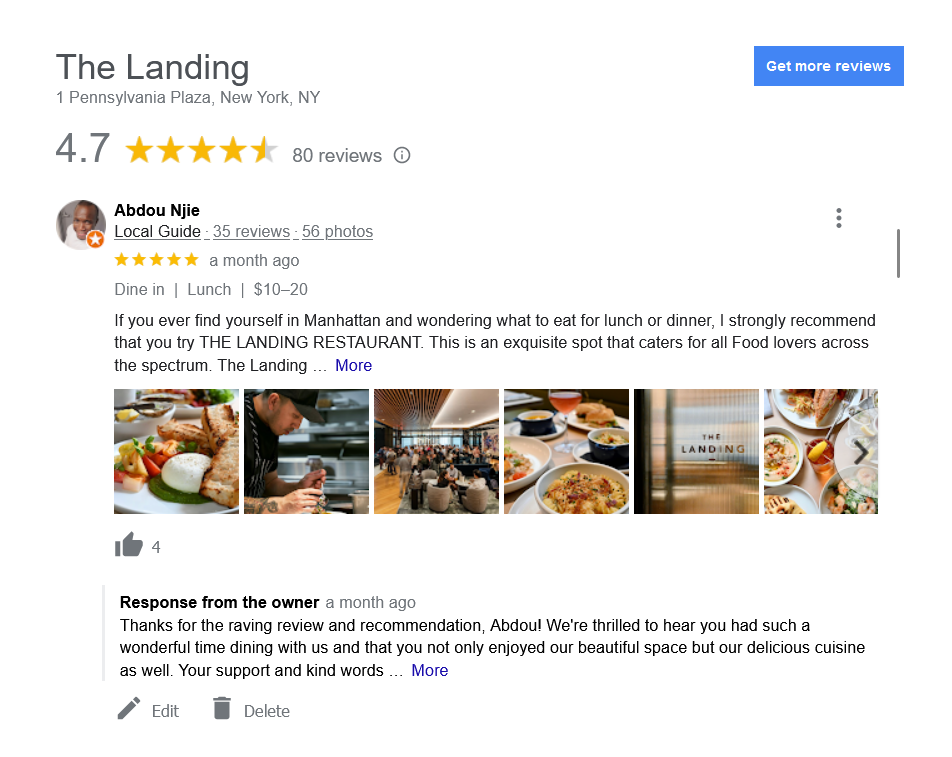
    And respond to every review, good or bad. Thank happy patients by name (if they used it). Address unhappy ones calmly and take the conversation offline. One big caution: never confirm someone is a patient or reference treatment details in a reply. HIPAA applies to review responses too. 

    4. Tune Up Your On-Page Basics

    Your homepage title tag should say what you do and where you do it, like “Family & Cosmetic Dentist in Gurnee, IL | Smith Dental.” Same idea for your H1, your meta description, and the opening copy on your key pages. Google needs clear signals connecting your practice to your city.

    While you’re in there, make your phone number click-to-call on mobile, put your address in the footer, and embed a Google map on your contact page. Most of your local traffic is on a phone, so if your site is slow or clunky on mobile, that’s a problem worth fixing. Google’s free PageSpeed Insights tool is a good gut check. If the site itself is holding you back, that’s where our website development team comes in.

    5. Show Off Your Practice with Real Photos and Regular Updates

    Stock photos of perfect smiles don’t build trust. Real photos of your office, your team, your equipment, and your waiting room do. Upload them to your GBP and your website, and refresh them a few times a year.

    Keep your profile active with Google posts too: new patient specials, a new team member, extended hours, or a quick tip on whitening after the holidays. It signals to Google (and patients) that the lights are on and somebody’s home. 

    6. Establish EEAT Signals on Your Site

    EEAT stands for Experience, Expertise, Authoritativeness, and Trust. Because dental content affects people’s health, Google holds it to a higher standard than most industries. A blog post on wisdom tooth extraction with an anonymous “admin” byline isn’t going to cut it.

    Give every dentist a detailed bio page with credentials (DDS, DMD), training, memberships, and years in practice. Put real author bylines on clinical content and add a “reviewed by” note where it makes sense. We break this down in more detail in EEAT Signals on Healthcare Websites: What Google Actually Wants to See.

    7. Build Dedicated Pages for Each Service

    A single “Services” page with a bulleted list won’t rank for much. Patients search for specific treatments: dental implants, Invisalign, emergency dentist, teeth whitening, pediatric dentistry. Each high-value service deserves its own page that explains the treatment, who it’s for, what to expect, and why your practice is the right choice.

    This is also where you win the higher-value cases. A well-built implants page can bring in patients worth far more than a routine cleaning. Bonus: detailed, well-organized service pages are exactly the kind of content AI tools like ChatGPT and Google’s AI Overviews pull from. More on that on our AI Visibility / AEO page.

    8. Create Location and Neighborhood Pages

    If you pull patients from surrounding towns, or you have more than one office, give those areas their own pages. A page targeting a neighboring town should actually talk about that town: directions, nearby landmarks, parking, the communities you serve, and testimonials from local patients.

    The trap to avoid is copy-and-paste pages where only the city name changes. Google sees right through it. Our post on service area pages cover how to do these the right way.

    9. Add Local Business Schema Markup

    Schema markup is code that tells search engines exactly what your business is, where it is, when it’s open, and what it offers. For a practice, that means using the Dentist schema type on your site with your NAP, hours, accepted insurance, and services.

    It won’t rocket you to #1 on its own, and not every schema type pulls the weight it used to. (Google dropped support for FAQ rich results earlier this year.) But clean business schema removes guesswork for Google, and that’s never a bad thing. It’s one piece of a solid technical SEO foundation.

    10. Earn Local Links and Community Authority

    Links from other trusted local websites tell Google you’re a real, recognized part of the community. The best part? Dental practices have more natural link opportunities than most businesses.

    Sponsor a youth sports team. Host a free screening day or a back-to-school dental event. Partner with local schools on oral health talks. Offer expert quotes to local news outlets or parenting blogs. Each of these can earn a mention and a link that your competitors can’t easily copy. 

    Local SEO isn’t a one-and-done project. It’s a set of habits that, stacked together, make your practice the obvious choice when someone nearby needs a dentist. Start with the easier steps, layer in the advanced ones as you build momentum, and measure success by calls, booked appointments, and new patients, not just rankings. Solid analytics tracking makes that a lot easier.

    If you’d rather spend your time with patients than with title tags, that’s what we’re here for. We work with healthcare and dental practices to build local visibility that lasts. Reach out to us and let’s talk about where your practice stands.

  • EEAT Signals on Healthcare Websites: What Google Actually Wants to See

    EEAT Signals on Healthcare Websites: What Google Actually Wants to See

    Key Takeaways

    • EEAT stands for Experience, Expertise, Authoritativeness, and Trust. Google uses it to decide whether your site deserves to be trusted.
    • Healthcare sites face a higher bar. As YMYL pages, they get far more scrutiny than most other industries.
    • Real credentials and real people matter. Bylines, bios, and “medically reviewed by” notes show who stands behind your content.

    EEAT stands for Experience, Expertise, Authoritativeness, and Trust. It’s the framework Google uses to judge whether a piece of content, and the site publishing it, deserves to be trusted. Every website benefits from strong EEAT signals, but healthcare sites face a much higher bar, because the content isn’t just competing for clicks. It’s shaping decisions people make about their own health.

    Before we break down what each letter looks like on an actual medical website, let’s talk about why healthcare SEO plays by a different rulebook in the first place.

    SEO stands for search engine optimization. It’s the practice of shaping a website, its content, and its technical structure so that search engines like Google can find it, understand it, and rank it for the terms your patients are searching. Good SEO gets the right person to the right page at the right moment, whether that’s someone Googling “urgent care near me” at 2 a.m. or a patient researching a diagnosis they just received.

    That’s SEO in general. Healthcare SEO is a different animal.

    Here’s the thing most business owners don’t realize until they’ve tried to rank a medical site the same way they’d rank a restaurant or a retail shop: Google holds healthcare content to a completely different standard.

    • Healthcare sites fall into a category Google calls YMYL, or “Your Money or Your Life.” These are pages where bad information can directly affect someone’s health, finances, or safety. A blog about the best pizza toppings can afford a few sloppy claims. A page about medication dosages cannot. Google knows this, and it treats YMYL content with a level of scrutiny that doesn’t apply anywhere else.
    • Google is actively policing this space for quality. Search quality raters and Google’s algorithms are specifically trained to sniff out thin, generic, or keyword-stuffed medical content and push it down in the rankings. Padding a page with “back pain treatment” fifteen times isn’t a strategy anymore. It’s a liability.
    • Google leans on EEAT to separate the trustworthy sites from the noise. EEAT stands for Experience, Expertise, Authoritativeness, and Trust, and it’s the lens Google uses to evaluate whether a healthcare page deserves to rank. You can read Google’s own breakdown of the concept in its guide to creating helpful, reliable, people-first content.

    It’s tempting to treat EEAT as another hoop to jump through for rankings. But strong EEAT signals do double duty. On one hand, they tell Google your site deserves visibility. On the other, they tell the person reading your page, who might be scared, in pain, or trying to make a decision about their own care, that they can actually trust what they’re reading. When those two goals line up, everybody wins. Your rankings improve, and your patients get information they can act on with confidence.

    Let’s break down each piece and show you what it looks like once it’s out of the theoretical and onto an actual page.

    In SEO terms, experience means demonstrating that the person behind the content has firsthand, real-world exposure to the subject. Google wants to see that the content wasn’t assembled from a stack of other articles found in a five-minute search. For healthcare specifically, this matters because patients want to know that the person explaining a treatment or condition has actually been in the room for it, not just read about it.

    What this looks like in practice:

    • Physician-authored blog posts that reference real patient scenarios (without violating HIPAA, of course)
    • Provider bios that mention years in practice, specialties, and procedures they perform regularly
    • Photos and video of your actual facility, staff, and equipment instead of generic stock imagery
    • Patient testimonials and case outcomes that show real results, not just marketing copy (again, all while following HIPAA)

    Expertise is about qualifications. It asks: does the person creating this content actually know what they’re talking about, on paper as well as in practice? For a healthcare site, this is non-negotiable. Google wants to see credentials attached to medical claims, not an anonymous “admin” byline on a page about chemotherapy side effects.

    What this looks like in practice:

    • Author bylines with full name, credentials (MD, DDS, RN, PharmD, etc.), and a link to a detailed bio page
    • Board certifications and specialty training listed clearly on provider pages
    • Content reviewed or written by licensed professionals, with a visible “medically reviewed by” note
    • Citations to peer-reviewed studies or established medical sources when making clinical claims

    Authoritativeness is about reputation, specifically, whether other trusted sources in your industry recognize you as a legitimate voice. This is less about what you say about yourself and more about what the rest of the internet says about you. It’s built over time through recognition, not overnight through a single blog post.

    What this looks like in practice:

    • Backlinks from reputable medical associations, hospitals, universities, or health publications
    • Provider profiles listed on directories like Healthgrades, Vitals, or your local hospital network
    • Guest contributions or quotes in credible health and medical publications
    • Consistent NAP (name, address, phone) data across every directory and citation online

    Trust is the foundation everything else sits on, and it’s the hardest to fake. It covers the technical and transparent elements of your site that reassure both Google and your visitors that you’re operating in good faith. A site can have great expertise and authority and still lose on trust if the basics aren’t handled.

    What this looks like in practice:

    • HTTPS security, fast load times, and a mobile-friendly site (all things Google checks before anything else)
    • Transparent contact information, privacy policies, and clear disclosures about affiliations or sponsorships
    • Accurate, up-to-date information, especially around insurance, pricing, and medical guidance
    • Genuine, verifiable patient reviews across Google Business Profile and third-party review sites
    • Clear “About Us” content that shows a real practice with real people behind it

    The practices that win in healthcare search aren’t the ones that stuffed a few credentials on a bio page and called it done. They’re the ones treating EEAT as an ongoing part of how they build and maintain their website: refreshing content, keeping provider information current, earning legitimate backlinks, and giving Google real reasons to trust them, page after page.

    If you’re not sure where your site currently stands on any of these fronts, that’s exactly the kind of audit we do for healthcare and medical clients every day. Take a look at how we approach SEO for healthcare providers and let’s talk about where your site has gaps and where it’s already doing the right things.

  • Before You Change Your SEO Strategy

    Before You Change Your SEO Strategy

    I had a call from a client in the auto repair industry. He asked if I’d be willing to talk to a fellow owner of several shops about a sales performance issue at one of their locations. He’d fired an agency, and after a few months, his new agency wasn’t faring any better, or at least the shop wasn’t. He didn’t want to change agencies; he just wanted an outsider’s perspective. So, of course, I was happy to talk with him.

    SEO Audit Conversation

    The initial focus was on the repair shop’s SEO performance. He wanted to know if there was something about the optimization for that shop that would cause it to underperform the other locations. On the surface, this seems like the right question. And, it was something to look into. 

    So, I agreed to draft a proposal for an SEO audit. But before we did that, I wanted to better understand the markets and the marketing they were doing for each location because he mentioned a couple of things that stood out to me.

    Likely A Market Issue

    First, there was an assumption that the demographics of the poorly performing shop should lead to higher revenue.  Of the three repair shops, its area had the highest average household income: about $250k. 

    The second thing mentioned was the type of promotions. They were discounts, free oil changes, and other price-driven incentives. But, no matter how good the promotions were, they didn’t drive new customers to the shop.

    I thought this might be a case of being too close to the issue to see it clearly. If you are familiar with the core market in the automotive repair industry, you might sense where I am going with this. 

    The short version is, high income does not universally equate to a good target market.

    For auto repair services, vehicle ownership and age in the area are key factors. To a large extent, they make up the addressable market. The best average age range of the vehicles is 6-12 years. At that age, they are owned (not leased) and require regular maintenance and repairs. Owners also tend to look for non-dealer resources due to cost – either real or perceived. 

    High-income households’ vehicle ownership is not a good profile for an auto repair business. They have newer vehicles. The younger cars tend to be under warranty, are often leased, and owners feel more comfortable going to the dealership for repairs and maintenance. 

    Local Auto Repair Market Analysis

    Before we ran the SEO audit, we conducted some research. We ran an in-depth review of the areas around the three repair shops. The report showed what our instincts and experience hinted at. The markets were substantially different. From the demographics, to the presence of high-end dealerships, to the density of repair shops-to-population, the high-income area screamed for a completely different approach to local marketing strategies.

    So, we’ll conduct the SEO audit. But SEO wasn’t the core issue. 

    Serve The Repair Shops’ Actual Customer Base 

    From a marketing perspective, this is where it gets interesting and fun. The high-income market is not concerned with discounts and free oil changes or tire rotations. Their vehicles are high-end and, even if older, well cared for. They want great service, convenience, expert certified mechanics, and confidence that the person taking care of their vehicle actually cares about their vehicle. 

    To attract these customers, highlight offerings that appeal to them. Look at things along the lines of:

    • Online scheduling and visibility into car history – Convenience.
    • Transparent, full diagnostic reports with each visit – Trust.
    • Concierge benefits – Service.
    • Friendly, courteous staff – Respect.

    Essentially, when a high-income customer is in the shop, they have to feel like they are the only customer. To a greater extent than others, they need to feel special. A discount won’t overcome a perceived issue or inconvenience.  

    Importance of Trusted Agency Partnerships

    The other aspect of the conversation that struck me is that his exchange with his current agency didn’t seem to transcend digital marketing, and in particular, SEO. I kind of get that. That’s the agency’s scope. And, to be honest, our tertiary review showed they were covering the bases quite well. I would not encourage him to leave them. 

    My suggestion to business owners is to strongly encourage your marketing partners to look outside their scope. Agencies are reluctant to do so at times because it might look like they’re trying to place blame elsewhere. But this isn’t about blame. It’s about helping clients succeed. And sometimes clients have to help agencies to help them.

  • GOOGLE SUNSETS THE ”&num=100” PARAMETER

    GOOGLE SUNSETS THE ”&num=100” PARAMETER

    The affects on SEO data, and how it acts as an important reminder for Marketers

    September saw a big change in SEO data that caused alarm bells to sound for anyone who pays attention to site vitals. Across the web, spanning industries and interests, sites saw a decrease in impressions, but why? Today we will be diving into the changes that Google made to cause this decrease, the impact it has had on site data and why it is important to zoom out when assessing problems.  

    OUR FIRST DISCOVERY

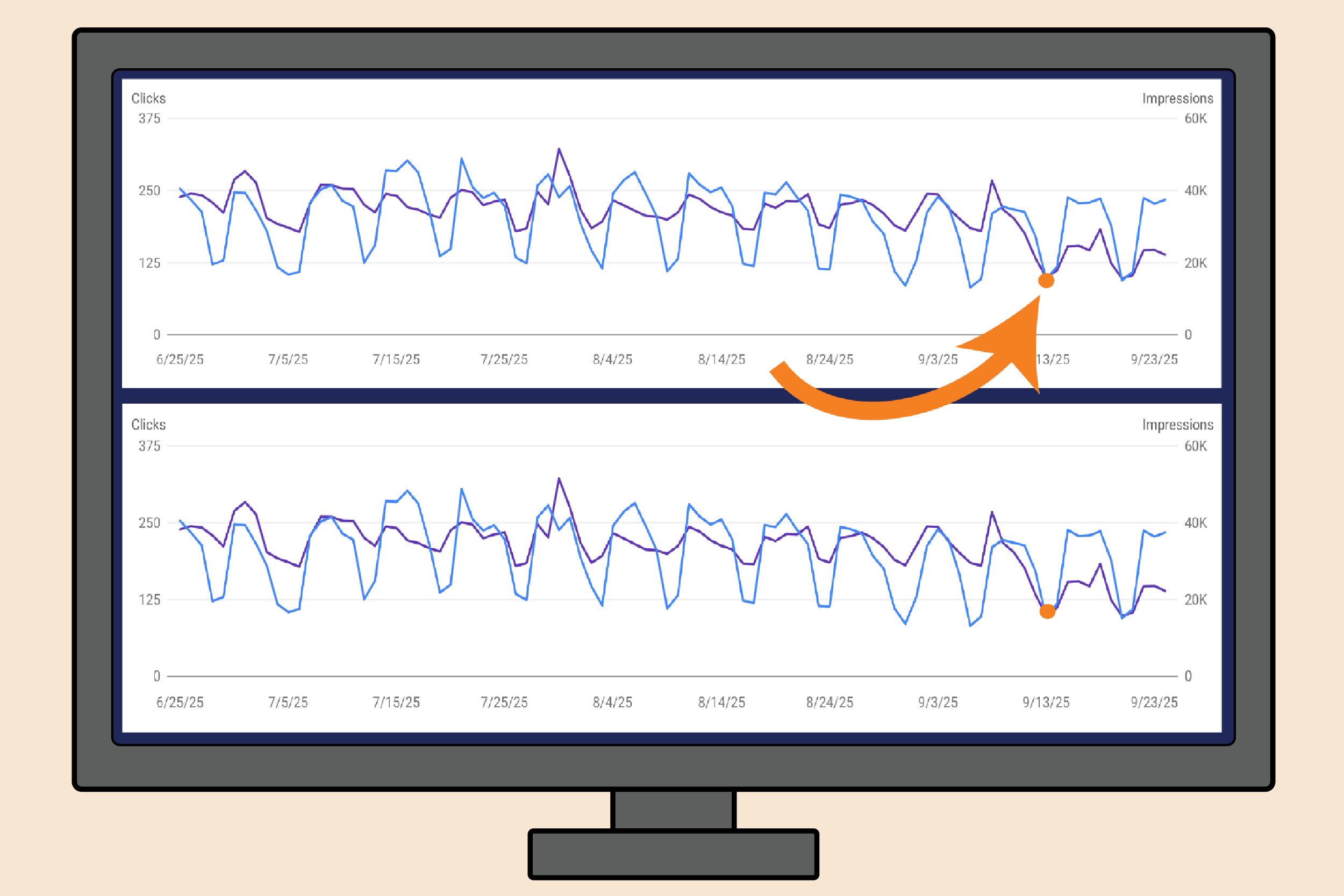
    The first client of ours where we noticed this drop in impressions, just happened to be a client that we had made site changes on the day before the drop. Which, as you can imagine, led to an “oh sh*t moment” for us. Overnight impressions were down by 30%, not just on the services pages we had made the changes to, but across the site, including the homepage. Now, the changes we made weren’t small, but they should not have caused a 30% decrease in impressions. Here lies our first red flag. 

    Our initial reaction was to revert the site changes we made or at least scale back. However, we also noticed that despite our drop in impressions, our clicks remained consistent and our position improved. Red flag number two. 

    This is where we had the important self reminder to zoom out. After we took a step back from this initial client, we quickly saw that the majority of our clients across industries had also experienced a drop in impressions at the same time. Taking a second step back showed us that sites everywhere saw similar decreases and the SEO Community was already buzzing with people questioning this change. 

    THE SOURCE OF THE IMPRESSION DROP

    According to  Search Engine Land, 87% of sites saw a drop in impressions. The fact that we saw this drop right after we made site changes for our client was purely a coincidence. Good thing we didn’t have a knee jerk reaction and start reverting all of our changes! 

    So what actually happened to cause such a drop for all these sites? 

    Google quietly sunsetted the ​​”&num=100” Parameter around September 11th. 

    This parameter originally allowed 100 search results to show for one query on a single SERP page. 

    Reporting tools, like SEMRush used this parameter to efficiently and cost effectively gather and report data. Before this change, SEO platforms could fetch up to 100 results in a single query using the &num=100 parameter. Now, they can only grab 10 results per query, which forces them to make 10 separate requests to Google for the same amount of data.

    This change has caused a significant disruption in tracking across reporting tools and Google Search Console. 

    WHY THIS MATTER FOR PROFESSIONALS

    The most glaringly obvious change to SEO professionals’ site data is the drop in impressions.​​This isn’t because fewer people are searching, but because Google’s change removed what are now understand to be “bot impressions.”

    While tools like SEMrush didn’t directly create impressions in the same way a human searcher does, their large-scale scraping activity inflated impression counts by surfacing lower-ranking pages that real users rarely saw. The result was that sites appeared to be getting more impressions than they truly were. Yikes! Now that these tools can’t use “&num=100”, those impressions are gone. 

    Though the idea that bots and scraping could affect impressions was always something that was acknowledged by professionals, the extent to which it inflated the impressions is eye opening. The silver lining being, now we (hopefully) are seeing a more accurate representation of user search volume and site ranking. 

    HOW SUNSETTING THE “&num=100” PARAMETER IS AFFECTING SITE DATA 

    Impressions drop: As we said before, the most obvious change is the noticeable decline in impressions. We have seen reports of impressions dropping as much as 60% and Search Engine Land observed that “77.6% of sites lost unique ranking terms”. 

    Clicks consistent: Despite the drop in impressions, clicks remain relatively steady. That’s because the majority of clicks come from the first page of results, and those user interactions are unaffected by the parameter change.

    Position Increasing: average position metrics are improving, but not necessarily due to better rankings. With fewer lower-ranking impressions being counted, the data skews upward, making it look like performance has improved when in reality the reporting method has just shifted.

    WHAT DOES THIS MEAN FOR SEO EXPERTS

    At this point, Marketing tools like SEMRUSH have put out statements acknowledging the situation, reassuring customers that the most important data is intact and they are looking into ways to adjust their systems to keep up with Google’s changes, but no updates have been made yet. Oka, cool. That is for the use of the marketing tools themselves, but what about how to manage your site with this very new landscape. .  

    Now what about 

    So, at this time, we advise marketers and SEO experts to do three things. 

    Set a New Baseline
    Since the way impressions and positions are being measured has changed, the first step is to establish a new baseline. Marketers should note that comparisons to pre-change data won’t be apples-to-apples, and moving forward, performance should be measured against the updated reporting standards.

    Manage Expectations
    It’s important to communicate these shifts to clients, leadership, or stakeholders. Explain that drops in impressions and jumps in average position are tied to Google’s change, not necessarily actual user performance shifts. Setting this context helps prevent misinterpretation of results.

    Monitor Trends
    While the raw numbers may look different, trends over time are still valuable. Keep monitoring for consistent movement in impressions, clicks, and positions relative to the new baseline, and watch for genuine performance changes that stand out from the reporting adjustments.

    WHAT WE HAVE LEARNED

    Google can make changes quickly and quietly that have lasting effects on data. The removal of the ”&num=100” parameter isn’t the first and it won’t be the last. This update was a good reminder that not every sudden drop in a metric means something is broken, sometimes it’s the way data is being counted that shifts. By zooming out, checking trends across multiple clients, and staying connected to the SEO community, marketers can separate real performance issues from reporting noise and make smarter, steadier decisions in the face of change.

  • A Guide to Auto Shop SEO

    A Guide to Auto Shop SEO

    A Mechanic’s Guide to Ranking on Google

    In today’s digital landscape, having a strong online presence is crucial for the success of any auto shop. Search Engine Optimization (SEO) is the key to ensuring that potential customers can easily find your services when they search online.

    As an SEO agency, we have decades of experience running local SEO campaigns, and we’ve managed several successful accounts for auto shops in the Midwest. While every shop is different, there are some general principles that you can follow to boost your rankings and grow your revenue.

    So we put together a step-by-step guide of the strategy that we implemented for these shops.

    Measuring Your Success: How to Set up Tracking

    While it’s possible to optimize your site and improve your SEO without tracking your performance, it’s important to know what’s working and what isn’t so you can adjust your strategy.

    We recommend setting up three free-to-use tools to measure your progress: 

    1. Google Analytics
    2. Google Search Console
    3. Google Tag Manager

    In order to link your site to these tools, you will need to insert a snippet of code. Most web builder platforms like Wix, Kukui, etc., make this super easy.

    Step 1: Link your site with Google Analytics. 

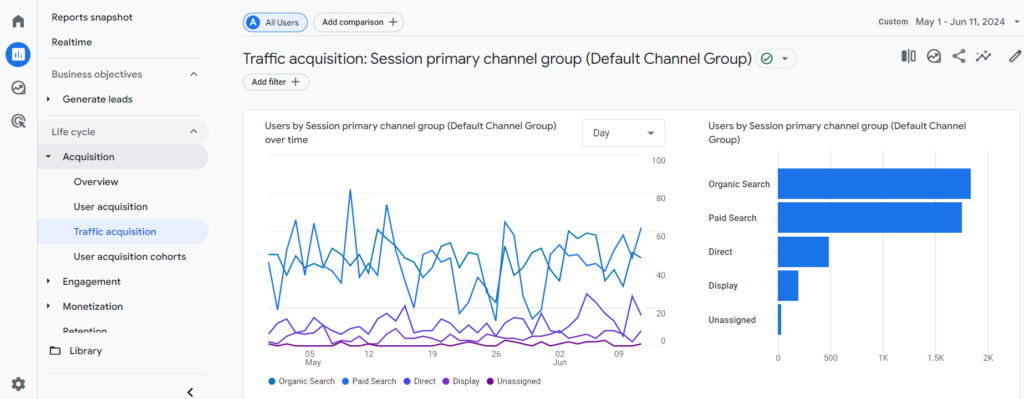
    Google Analytics provides data about the activity that occurs on your website. This includes your web traffic, where users are coming from (e.g. organic search, paid search, email campaigns, etc.), and their behavior on-site.

    You’re also able to track custom conversions or key events, like when a user schedules an appointment or signs up for a rewards program.

    Get started with your Analytics set up here.

    Step 2: Link your site with Google Search Console. 

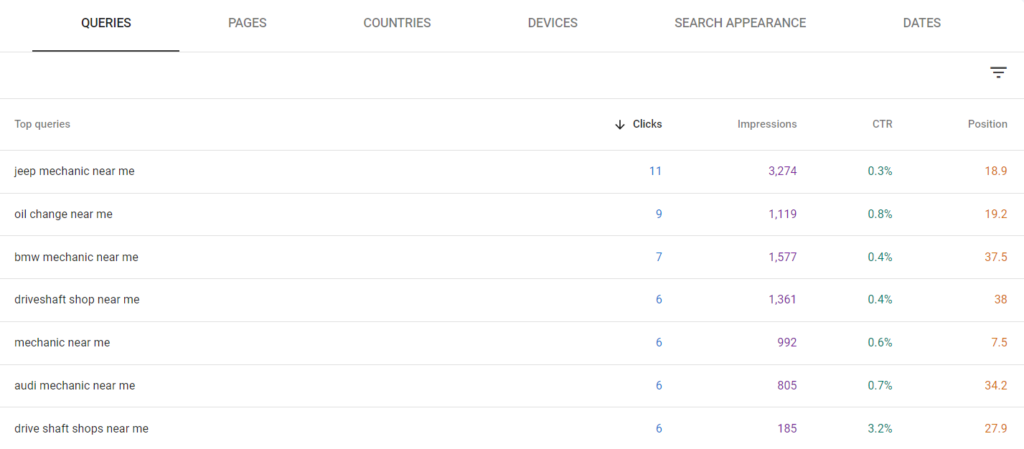
    Google Search Console tracks how your website is ranking on Google. It provides data on the search queries you’re ranking for and can be broken down by page, country, device type and more.

    Get started with your Search Console set up here. 

    Step 3: Link Your Site with Google Tag Manager

    Finally, Google Tag Manager is great for setting up custom events such as form submissions, clicks to particular links, and more.

    This tool is a bit more advanced and will require some time to get the hang of.

    There are a ton of great resources out there for learning the ins and outs of Google’s tools and how they all work together. Analytics Mania is one of them, and he has a Tag Manager tutorial for beginners. 

    Get started with your Tag Manager set up here.

    Google Business Profile

    Step 4: Complete Your Business Profile

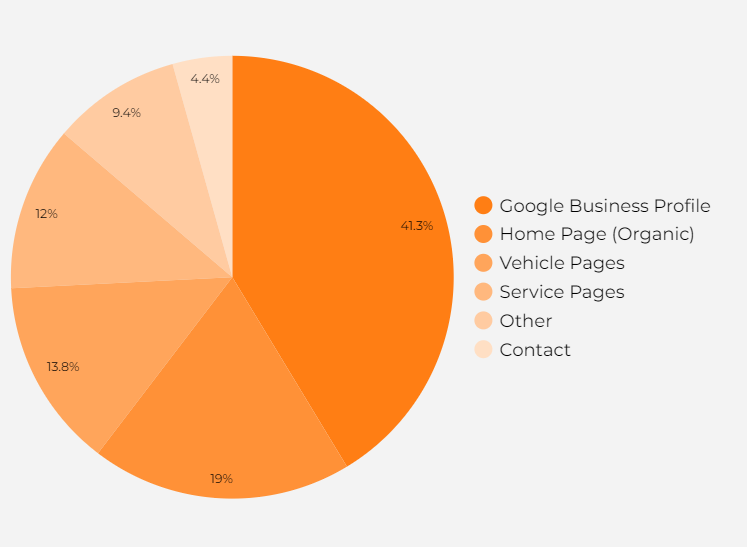
    Google Business Profile is the cornerstone of any local SEO strategy. For our primary auto shop client, about 30%–40% of their organic traffic comes from their Google Business Profile. 

    If you do nothing else for search marketing, complete your Google Business Profile!

    And check out our complete guide to setting up Google Business Profile!

    Step 5: Remain Active of GBP

    But your Google Business Profile isn’t a “set it and forget it” kind of tool. Once your profile is set up, it’s important to remain active. 

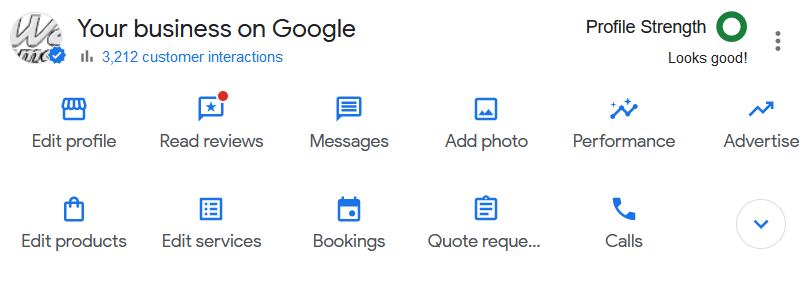
    Activity such as updating holiday hours, uploading photos, creating posts for deals and promotions, and responding to user reviews has been shown to impact your GBP rankings.

    Positive user reviews are also a huge influence on click-through rates and, ultimately whether or not a user decides to schedule an appointment. Be sure to follow up with customers in an email and ask them to share their experience. Don’t forget to include a link to make it as easy as possible.

    Know Your Keywords

    Step 6: Write a List of Your Target Keywords

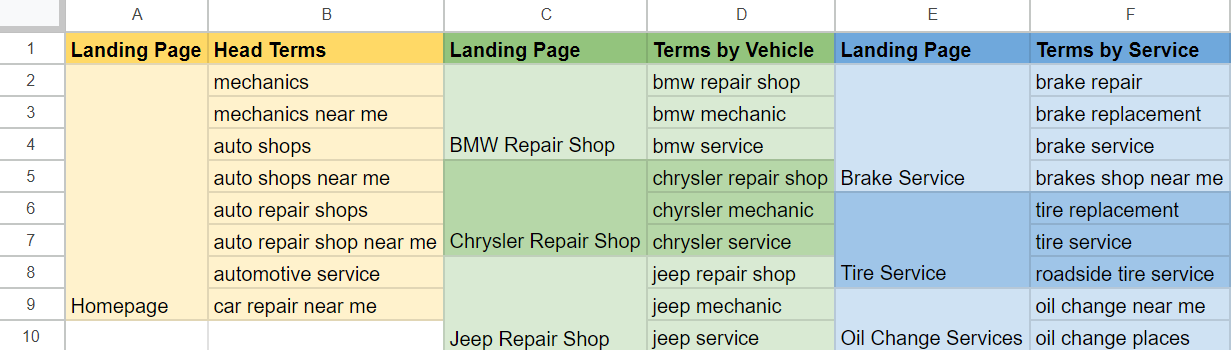
    Generally, auto shops are going to target the same cluster of keywords. This may change between shops depending on the services you offer or areas you specialize in.

    But generally speaking, we can break down our keywords into three categories based on how users search for mechanic services.

    Head termsTerms by vehicleTerms by service
    mechanics 
    mechanics near me
    auto shops
    auto shops near me
    bmw repair shop
    honda mechanic near me
    chrysler service near me
    jeep repair specialist
    brake service
    oil change near me
    wheel alignment near me
    driveshaft repair 

    Step 7: Map Your Keywords

    For SEO, we typically map a keyword (or keyword topic) to one landing page.

    For instance, your homepage will usually be mapped to the most frequently searched and broadly applicable terms (head terms). So the content of your homepage will be optimized to target terms like mechanics and auto shop. We’ll discuss this more in the next step.

    The secondary terms (the terms by vehicle and service) will need separate landing pages in order to target effectively. We typically recommend that our auto shop clients build a landing page for each service they offer and for the most popular brands of vehicles they service.

    Website Optimization 

    Step 8: Optimized Your Homepage

    Your homepage is critical for both users and search engines.  It sets the tone for your website and helps users understand what you do and how you can help them.

    Your primary terms will likely include “auto repair,” “auto shops,” or “mechanics near me.”  These are the keywords your homepage will target.

    It’s also beneficial to add localization to your keywords. If your shop is in Jacksonville, then we’d include “Jacksonville Auto Repair” as a keyword.

    Title Tags

    The title tag is the main title of your webpage that appears in search engine results. Make sure it includes your target keywords and is under 60 characters.

    For example: Auto Repair Shop in Jacksonville | Jax Automotive Service

    Header Tags

    Use effective headers that incorporate relevant keywords.  For instance, your H1 (the main header) should be something like “The Premier Jacksonville Auto Repair Shop.”

    Your other header tags (H2s, H3s…) don’t necessarily need keywords. However, they should be relevant to the page topic.

    If you were to look at the header tags in isolation, you should be able to tell they were taken from an auto shop website (i.e. “We’ll Get You Back On The Road In No Time!”)

    Body Content

    Write informative paragraphs that communicate what your business is and who you serve. Including strong sentences like: “Jax Automotive Service is a proud Jacksonville mechanic serving drivers from across the county!”

    Best practices recommend page content to be at least 300 words. This gives search engines enough “meat” to decipher what the page is about and who it’s best for.

    Call to Action

    Make sure you have a clear call to action.

    Prefer your customers call to schedule an appointment? A prominent phone number on your page or header is key.

    Have an online appointment scheduler instead? Make sure the form is clearly present on the page or obvious buttons that link to the form page.

    Step 9: Create (or Optimize) Your Secondary Landing Pages

    Secondary landing pages target search queries with lower volume like your vehicle or service terms.

    While search queries like “auto shop” or “mechanic near me” are going to be your primary focus, it’s still important to have content that will pick up those less frequently searched terms like “mercedes mechanics”

    The same principles apply to these pages just as they did for your homepage. Think about title tags, header tags, body content and call to actions.

    Step 10: Blog articles

    Regularly publishing blog articles is a great way to supplement your SEO efforts. Writing about common car problems, seasonal maintenance tips, or even featuring customer testimonials can signal to search engines that you are an expert authority that users can trust.

    Blog content also keeps users engaged, leading to longer visits and higher interaction rates—signals that search engines use to gauge a site’s quality and relevance.

    Plus, well-written articles can generate backlinks. Other website may link to your article which increases your site’s authority and improves its ranking on search engine results pages.

    The Potential Numbers

    As mentioned, we’ve implemented this strategy in the past with great success. 

    To give you an idea of one potential outcome, here’s a breakdown of where traffic comes from after a few years of implementation and refining. 

    Most of our business traffic (meaning non-blog traffic since blog traffic typically doesn’t convert into customers) comes through the Google Business Profile, which is why it’s such an important piece of the SEO puzzle. 

    Google Business Profile traffic is followed by organic traffic to the homepage; this is traffic that clicks through to our site via the blue links instead of the GBP.

    Following the homepage, our Service and Vehicle pages collectively make up about a quarter of our business traffic. While it’s a smaller piece of the pie, it’s definitely not something to ignore.

    Wrapping Up

    Optimizing your auto shop’s online presence involves a multifaceted approach that includes understanding your target keywords, effectively mapping these keywords to specific landing pages, and ensuring that your homepage and secondary pages are optimized for search engines.

    By focusing on strong SEO practices, regularly updating your blog with relevant content, and engaging with customers on social media, you can significantly enhance your visibility and attract more potential customers.

    Remember, consistency and continuous improvement are key to maintaining a strong online presence and achieving long-term success.

    If you’re interested in learning more about how we can help improve your search visibility, check out our auto shop SEO services!

  • Does Duplicate Content Hurt SEO?

    Does Duplicate Content Hurt SEO?

    Can Publishing Duplicate Content Hurt Your Search Engine Rankings? 

    Duplicate content is a persistent concern for website owners and SEO specialists alike. From near-identical pages to sections of content reused across a site, the ramifications of duplicate content on search engine rankings are often debated. 

    In this article, we delve into the nuances of duplicate content and its impact on SEO. We explore different scenarios, from full-page duplicates to spun content, to understand when and how duplicate content can affect your site’s performance in search engine results pages (SERPs).

    TL;DR

    • There are different ‘degrees’ of duplicate content (from spun copy to identical full-page content)
    • Generally, duplicate content won’t severely impact your rankings. Google will usually pick the most appropriate page to rank
    • But full-page duplicates carry the potential to hurt your rankings, especially if there are other conflicting signals.
    • Duplicate sections (as opposed to full pages) also shouldn’t impact rankings; so long as the primary focus of the page is not duplicated content
    • Spinning content can be a useful tool, depending on the intent of users. Informational content isn’t good for spinning but commercial/transactional content is usually okay

    There is a Range of Duplicate Content

    Duplicate content can refer to a range of cases. Sometimes we’re talking about duplicates of pages, differentiated only by their URLs.

    It can also refer to sections of content that appear on multiple pages across your site. 

    And other times, duplicate content can refer to text that has been lightly edited–or spun–in order to appear original.

    We’ll take a look at all three cases and what impact (if any) it can have on your ability to rank on the SERPs.

    Full Page Duplicates

    Full-page duplicates are when the same page is effectively copied and pasted.

    Search engines especially dislike this type of duplicate content because it makes it more difficult to determine which pages to prioritize in the rankings. 

    Although most of the time, Google doesn’t have too much trouble and can select one version of the pages to show.

    However, as we found out the hard way, this isn’t always the case. There are some instances in which duplicate content can hurt SEO performance. The case study below demonstrates one of those instances.

    Case Study of Full-Page Duplicate Content

    We have an e-commerce client that has thousands of product pages. Last year, they had a technical hiccup in which some of their pages were republished under a new URL. 

    So for a while, we had two identical versions of many product pages.

    While their developers quickly solved the main issue, there were still a few duplicate pages out there that we didn’t catch right away. 

    But once we did, it gave us an interesting peek into what can happen when you have identical content on your site. And the results are kind of frightening.

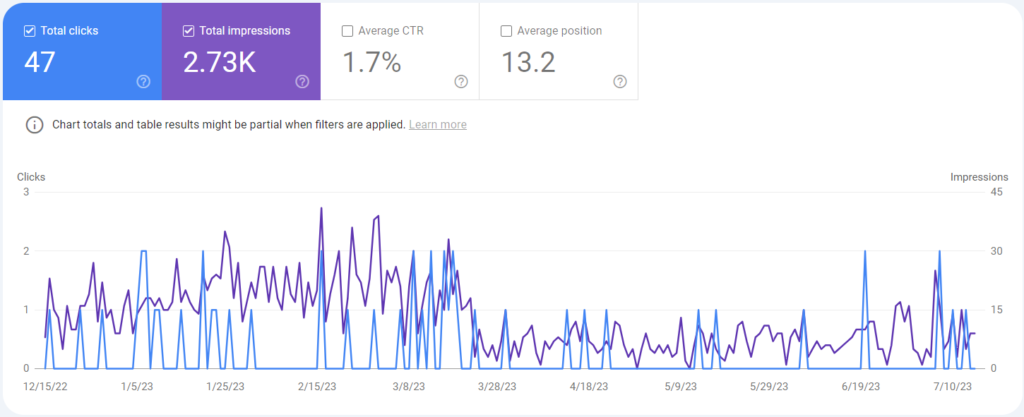
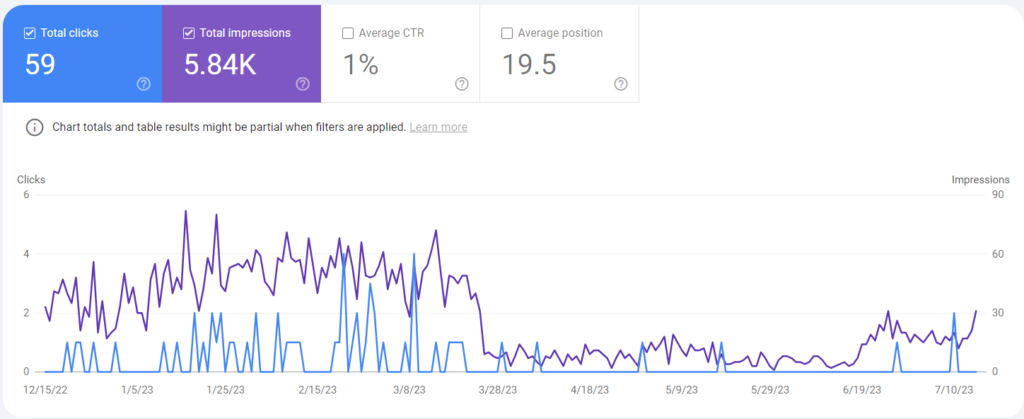
    Here are some screenshots of Search Console performance when filtered to include both versions of the duplicated page.

    When the issue occurred in late March, performance tanked for pages with duplicate versions. Neither the existing page nor the new version ranked well.

    This is what we believe happened:

    The original pages had a longer history with a more robust backlink profile, which gave it a fair amount of “ranking power.”

    However, the links from the client’s internal catalog were overwritten and instead linked to the new versions instead of the original, which sent mixed signals to search engines regarding which version to prioritize.

    And this bumped us down quite a bit in the rankings.

    This was an easy fix once we caught it and performance for those pages soon recovered. But it demonstrates vulnerabilities when publishing identical content (whether intentionally or not).

    Duplicate Sections

    By duplicate sections, I mean identical content that doesn’t make up the primary focus of the page. Generally speaking, duplicate sections won’t have a negative impact on rankings. 

    As long as the remainder of the page’s content hits the criteria required for ranking, then duplicate sections aren’t going to slow things down.

    For example, one of our clients has a section that serves as a call to action with a fair bit of text that they post on their blogs, FAQs and other information-serving pages.

    Since these are primarily informational pages, the call to action isn’t going to play a big role in Google’s analysis of the page.

    But if these sections take up a more substantial portion of the page, it might be worth rewriting the content in order to ensure its originality.

    It’s useful to think about it like this: If you were to remove the section in question, would the page still make sense? Would it still accomplish its goal? If we remove the CTA of the pages mentioned above, then yes, the page would absolutely still make sense and accomplish its goal of informing our audience.

    But there are some instances where rearranging, rewriting, or spinning the content would make sense (more on that below).

    Similar (or spun) Content

    Sometimes, it’s necessary to rewrite existing content–called spinning. 

    But this raises similar questions. Does Google view spun content as ‘legitimate’? Can “spun” content hurt my SEO performance?

    Spinning Content is the practice of rewording existing text to communicate the same ideas but avoiding the appearance of duplicate content or–for some black-hat actors–plagiarism.

    As usual, the answer is–annoyingly–it depends.

    While Google won’t manually penalize sites unless there is obvious malicious behavior, I wouldn’t go so far as to say that publishing spun content can hurt SEO.

    It’s more accurate to say that spinning content is often just a waste of time. Not always. But often.

    When Spinning Content is a Waste of Time

    I’d argue that spinning content is a waste of time when you’re trying to rank for queries with informational intent.

    Google prioritizes content that:

    • contains original information, reporting, research, or analysis
    • provide a substantial, complete, or comprehensive description of the topic
    • offers insight or information beyond the obvious
    • and avoids simply copying or rewriting those sources

    While it’s not perfect, Google is generally pretty good at ranking content that offers more than generic or regurgitated answers to common questions.

    And in our experience, spun content–and even content that’s relatively original but offers little more insight than the sources we used to write it–almost never generates traffic for informational queries.

    However, we have had success when spinning content for queries with commercial or transactional intent. Here’s a case study to demonstrate.

    Case Study of Spun Content

    We have a client that serves Los Angeles with moving services.

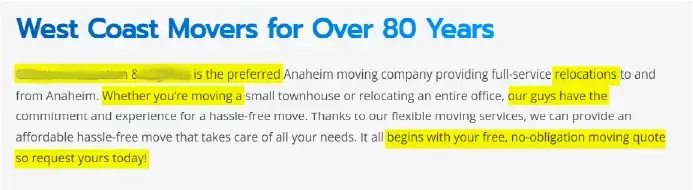
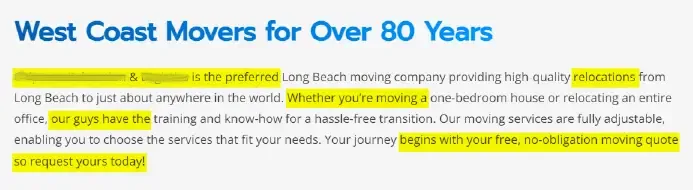
    L.A. has a huge geography with many towns and smaller cities within it. So, as part of our SEO strategy, we published Areas Served pages that target localized search queries (e.g., anaheim movers and movers in beverly hills, etc.).

    With hundreds of these pages to publish, it’s incredibly difficult and time-consuming to write completely original content for each one. So oftentimes, we’ll spin the content.

    While this content is relatively unique on the surface, it’s functionally identical. Google’s crawlers won’t process a distinction between synonyms such as hassle-free transition and hassle-free move.

    So if the content isn’t unique (i.e. duplicate content) why doesn’t this hurt SEO performance? 

    I’d argue it’s because the commercial intent to purchase moving services in a specific geography–Beverly Hills–means the pages’ different geographic focus is enough to make them sufficiently unique.

    A user in Anaheim doesn’t want a page on services in Beverly Hills and vice versa.

    Given the relative success of these particular pages and our Area Served page strategy, it’s safe to assume that Google considers this kind of spun content to be acceptable. 

    Wrapping Up

    Navigating the intricacies of duplicate content in SEO requires a nuanced understanding of search engine algorithms and user intent. While some instances of duplication may have negligible effects or even prove beneficial, others can significantly impact your site’s visibility and ranking potential.

    By recognizing the various forms of duplicate content and implementing strategies to address them effectively, website owners can optimize their SEO efforts and enhance their online presence in a competitive digital landscape.

  • Do No-Follow Links Help SEO?

    Do No-Follow Links Help SEO?

    First, What’s a No Follow Link?

    A no-follow link is a hyperlink that looks like this:

    <a href = “https://fanaticallydigital.com/” rel= ”nofollow” >

    See the no-follow tag? This tag tells search engines to ignore the link.

    A Brief Refresher on Search Engine Crawlers

    Search engines use hyperlinks like these to create a map of the web.

    They’ll read the content of web pages and use hyperlinks to jump from page to page and website to website.

    The more links that a page has pointing to it, the more valuable the page is assumed to be and, therefore, the more potential that page has to rank.

    No-follow tags tell search engines not to include the link in their web map.

    Why Do Websites Use No-Follow Links?

    You’ll most often find no-follow links in social media posts, comment sections, and forums.

    Back in the early days of Google, savvy folks realized you could spam blogs and forums by linking to their own websites in the comments. 

    This would artificially inflate the number of links pointing to their own website, making it seem more valuable.

    To combat this, Google introduced the no-follow tag in 2005, and other search engines quickly followed suit.

    Nowadays, search engines have become smarter and can detect spammy behavior regardless of no-follow tags.

    But you’ll still find them across the web, like on social media, certain blog posts and news sites like Forbes and Huffington Post.

    No Follow Links & SEO

    There’s a fair amount of debate in the SEO world over the value of no-follow links.

    And Google doesn’t help clarify the issue, saying “In general, we don’t follow them.”

    When it comes down to it, a no-follow tag is merely a suggestion that search engines ignore the link.

    Do No-Follow Links Help SEO?

    In short, yes. No-follow links have the potential to help your SEO.

    Let’s take a look at a few case studies that correlate no-follow links with improvements in organic rankings and traffic.

    Case Study 1

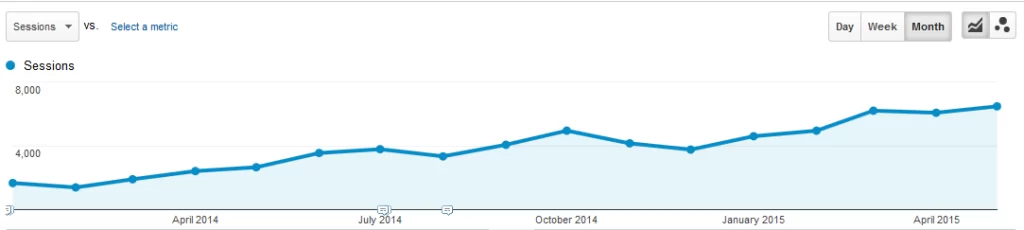
    An agency called Teknicks ran a case study in which they increased a client backlink portfolio over 16 months, 89% of which were no-follow links.

    The client saw a 288% increase in organic traffic.

    Now, this is not a perfect study (SEO studies never are). It doesn’t control for other factors, such as the impact of on-page content changes or the 11% of new links that were do-follow.

    However, the gradual increase in keyword rankings and traffic suggests that no-follow links could absolutely have contributed to their success.

    Case Study 2

    Another case study conducted by SEOJet does a better job of demonstrating a more direct relationship between no-follow links and improved rankings.

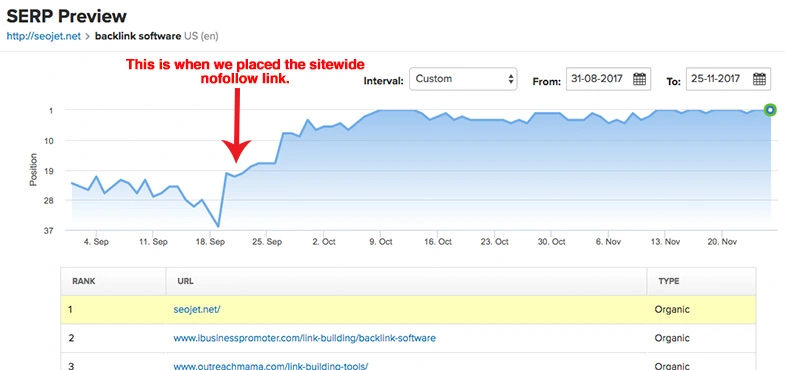
    After being stuck on the third page for “backlink software,” SEOJet placed a no-follow sidebar link on an SEO blog.

    Although it was only a single backlink, the results were immediate. They jumped to the first page within a week.

    Why would this be?

    Google May Still Follow Them

    Again, a no-follow link is merely a request that search engines ignore the link.

    This second case study suggests that Google does follow certain backlinks, especially if the content is relevant.

    Referrals Matter Too!

    When discussing backlinks and SEO, we often forget about the value of referrals.

    Links placed in relevant locations can bring in referral traffic, people who navigate to your site from the hyperlink.

    These are real human beings who check out your website and could potentially share it with others. This is a valuable benefit that shouldn’t be overlooked.

    So, Do No Follow Links Help SEO?

    In summary, no-follow links do have the potential to help your SEO by increasing organic traffic and referral traffic.

    However, the impact of no-follow links is often indirect and can be difficult to measure. 

    In addition, Google’s algorithms are constantly changing and evolving, making it challenging to determine the exact impact of no-follow links on SEO.

    Ultimately, while no-follow links may not necessarily directly contribute to your website’s rankings on search engine results pages, they can still play a role in driving traffic to your website and increasing its overall visibility.

    So, the next time you come across a no-follow link, don’t dismiss its potential value.

  • The Impact of AI on SEO (So Far)

    The Impact of AI on SEO (So Far)

    Generative AI & SEO

    In the rapidly evolving digital landscape, Artificial Intelligence (AI) has emerged as a game-changer, particularly in the realm of Search Engine Optimization (SEO).

    As we reflect on the pivotal year of 2023, it is evident how large-language-models (LLMs) and generative AI tools have revolutionized SEO practices, akin to the transformative impact of internet and smartphones.

    In this post, we’ll delve into the impacts and implications of AI on SEO, highlighting the efficiency and value brought by AI tools in simplifying labor-intensive SEO tasks, while also examining the yet-to-be-realized potential of AI-generated search results in influencing website traffic.

    AI & SEO Tools

    When it comes to search engine optimization, the biggest impact AI had was in the available toolset. Copywriting programs, bulk on-page optimization, and rank tracking tools have streamlined the more tedious aspects of SEO.

    Content Generation

    After the release of ChatGPT’s API, content generation software quickly became ubiquitous throughout the SEO and content marketing space.

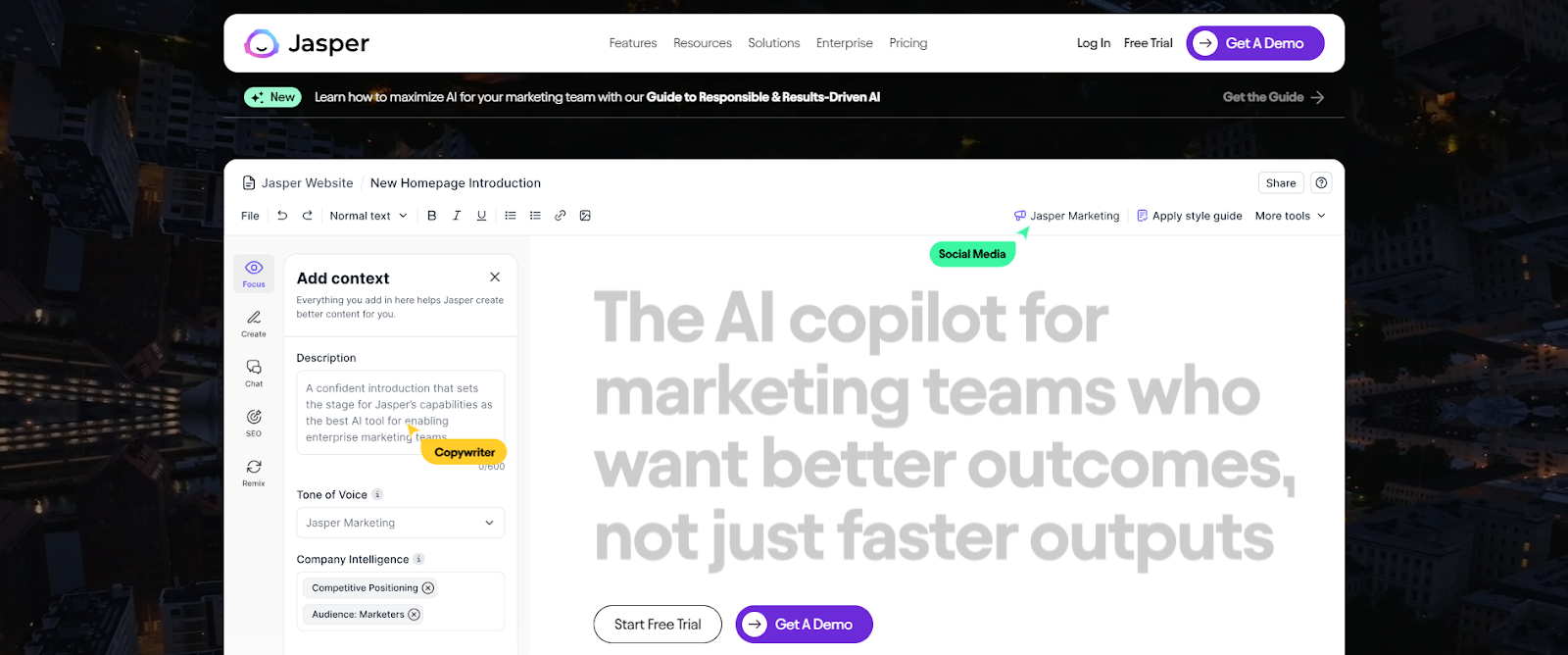
    Tools like Jasper and Copy.ai  can assist SEOs by suggesting blog topics, assist in writing the blogs posts themselves, as well as generate website copy like product descriptions.

    As you can imagine, these tools helped to cut down the time and effort for tasks that many SEOs may find tedious like researching new potential blog topics and content spinning.

    Data Analysis and Trend Identification

    AI tools have also revolutionized data analysis and trend identification in SEO. Tools such as Pro Rank Tracker and MarketMuse can automatically perform keyword research, identify content gaps on a website, and suggest topics for future posts.

    These AI-assisted programs allow for a new level of precision to keyword research and trend identification, enabling quicker response to search trends.

    SEOs also find value in the predictive insights that these tools provide, allowing content to be appropriately tailored for future search algorithm changes.

    When used properly, these advancements in natural language processing (NLP) and AI free up SEO from the more tedious elements of their job to focus on the strategic side for their clients.

    Impact on Search Engines

    Natural Language Processing & Search Engine Algorithms

    In the early days, search engines relied heavily on keywords to understand a given text and match search queries to the appropriate results.

    However, with the advancements in natural language processing (NLP) and AI, search engines can now analyze content more comprehensively and better understand context and intent, allowing for more accurate results.

    This has rendered old SEO tactics such as keywords stuffing obsolete. Over the years, content marketers have had to place a greater emphasis on the quality and relevance of their content.

    One example of these NLP algorithms in action is Google’s BERT, which uses AI to understand the meaning behind a search query and deliver more relevant results.

    With systems like BERT, search engines are able to understand more complex and conversional queries and factors in context from previous searches.

    This has led to the rise of voice search and the need for SEOs to optimize their content for natural language queries.

    In essence, AI has forced SEO professionals to shift their focus from optimizing for robots to creating valuable and user-friendly content.

    Generative Search Results

    While advancements in NLP has had a massive impact on how search engines’ process language over the past decade, much of these improvements have occurred behind the scenes. However, technologies unveiled in the past year and a half have the potential to advance the capability of search algorithms to a new stage in their evolution.

    We’ve seen these NLP and AI advancements go from improving search engine’s ability to understand and interpret text to actually generating text themselves. No longer simply selecting the best results for a particular query but understanding intent well enough to formulate a response itself.

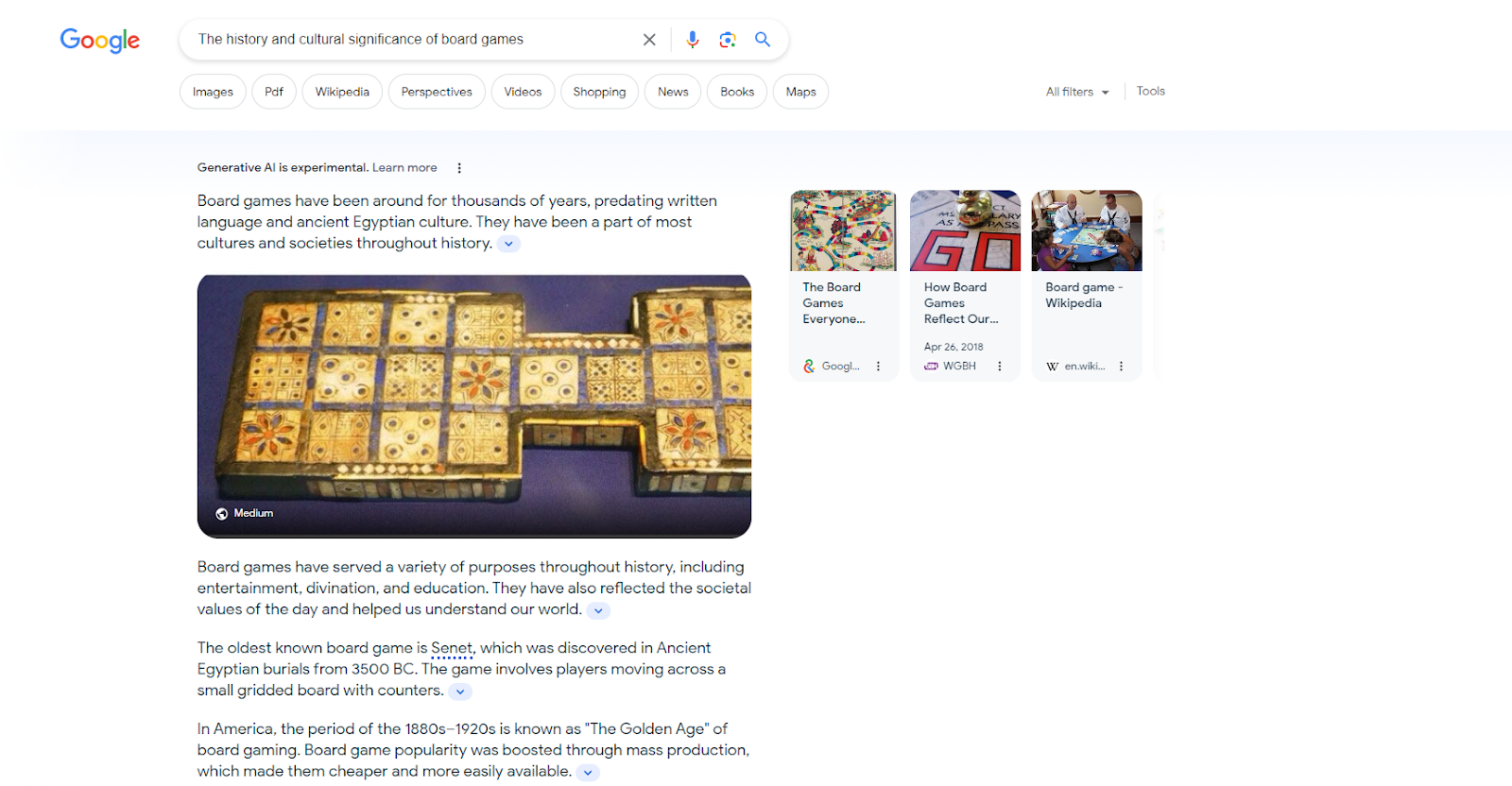
    Programs such as Google’s Search Generative Experience and Bing’s Copilot use generative AI to create answers to search queries on the spot by cross referencing relevant organic results with their own internal knowledge graph.

    This technology has vast implications for SEO, as websites will need to compete not only for top placement in search results but also for generating the most relevant and accurate information.

    As of now, these AI-generated search results have yet to achieve widespread prevalence that significantly impacts website traffic. However, as this technology continues to advance,  it may dramatically alter the current SEO landscape.

    Wrapping Up

    In conclusion, AI has already had a significant impact on the world of SEO, primarily through automation and optimization of tasks. But as we’ve seen with NLP advancements and generative search results, the potential for AI to shape the future of SEO is immense.

    While it’s unclear exactly how these technologies will continue to evolve, it’s safe to say that AI will be a driving force in the world of SEO for years to come. As search algorithms continue to improve and become more sophisticated, so too must our strategies as SEO professionals.

  • How to Improve Your Ranking on Google Maps

    How to Improve Your Ranking on Google Maps

    A Guide to Google Maps SEO

    In the digital age, visibility on platforms like Google Maps is crucial for driving business growth. Whether you’re running a restaurant, plumbing service, law practice, or car dealership, it’s a safe bet that Google Maps is how most of your clients and customers find your business. 

    This guide will provide insights on methods to improve your Google Maps ranking, helping you leverage online tools to amplify your business presence.

    Complete Your Google Business Profile Setup

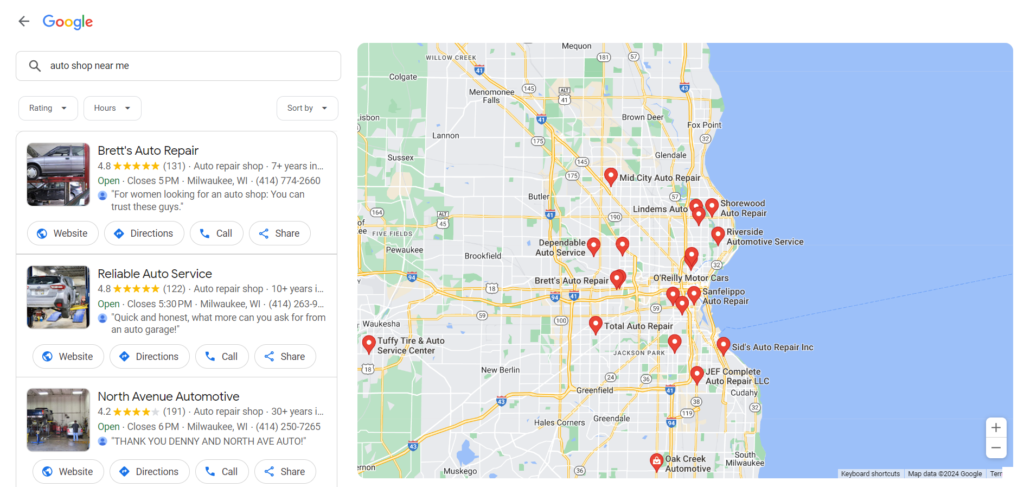
    Google Maps results are linked to your Google Business Profile (GBP), formerly Google My Business. 

    So, if you want to rank on Google Maps, that’s step one. If you need help setting up your business profile, check out this guide over on BrightLocal. For this post, we’ll assume that your GBP is already set up and ready to go.

    Be Active on Your GBP

    Maintaining an active Google Business Profile (GBP) establishes credibility and authenticity in the eyes of both search engines and your customers. Regular updates to your GBP, such as posting about ongoing deals, responding to customer queries, and uploading recent photos of your business, show that your business is operational and attentive to customer interactions.

    Solicit and Respond to Reviews

    Reviews are one of the most important pieces for ranking well on Google Maps.

    To gather reviews, reach out to satisfied clients or customers and ask them to share their positive experiences on your GBP. This can be done at the point of service, through a follow-up email after a purchase or service, or by placing a review link on your business’s website or social media pages.

    When responding to reviews, be sure to address both positive and negative feedback.

    For positive reviews, express gratitude for their patronage and provide a personalized response where feasible.

    For negative reviews, maintain a professional tone, apologize for any inconvenience caused, and offer solutions. If possible, suggest discussing the matter privately to show proactive customer service. This can turn a negative experience into a testament to your dedication to customer satisfaction.

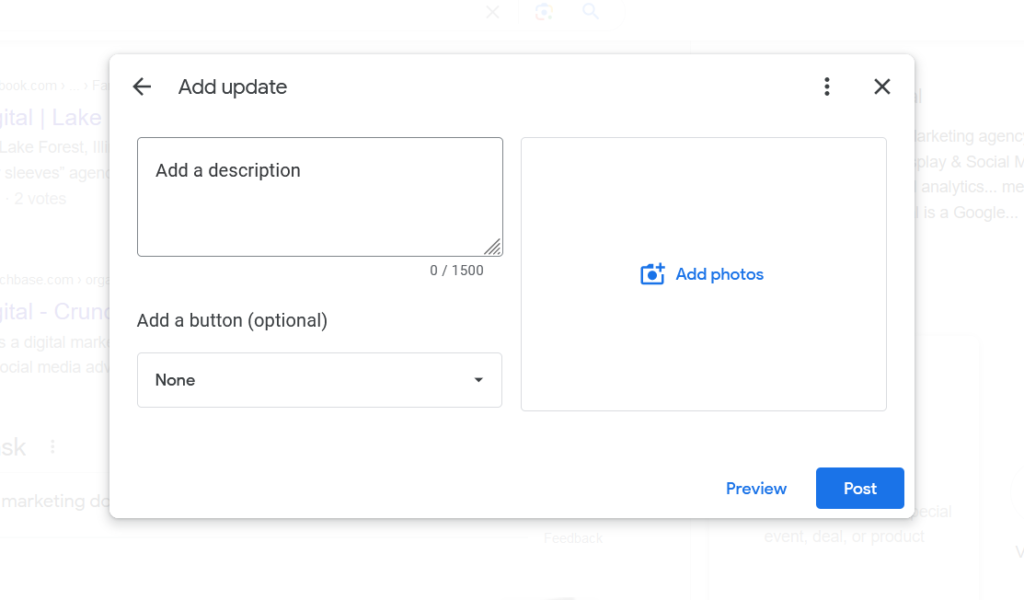
    Post About Deals & Events

    Posting regularly about ongoing deals, promotions, and other updates can be helpful for maintaining an active profile.

    Frequent updates signal Google that your business is active, and ultimately, this fosters a vibrant and dynamic business profile that appeals to both your current customer base and potential new customers.

    Strong On-Page SEO

    In addition to an active Google Business Profile, another key factor to ranking on Google Maps is your website content. This is where Google draws much of what it understands about your business and, therefore, what keywords it will rank your profile for. 

    The ideas is to send Google “signals” about who you are and what your business offers.

    Identify Your Keywords

    The first step is to identify what keywords you want to rank for. Some of these are obvious. 

    Restaurants will want to target “restaurants” and “restaurants near me.” If you’re located in Springfield, then you’ll want to target “restaurants in springfield.” These will be your primary keywords.

    However, there may be secondary keywords you’ll want to target as well. For instance, if you’re located near an event center and want to target customers searching for a place to eat before and after an event, you’ll want to target queries like “restaurants near EVENT CENTER NAME.”

    This is where SEO intersects with your overall marketing strategy. Where are your customers coming from, who are the audiences you’re targeting, and what would they be searching for?

    On-Page Optimization

    Once you have your keywords, you’ll need to optimize your pages. This optimization will not only help in the organic rankings (the blue links on the results page) but in Google Maps as well.

    Your page title tags are the most important part of on-page equation. If you want to target people looking for restaurants in Springfield, then your homepage title should be something like:

    RESTAURANT NAME | Gourmet Restaurant in Springfield

    In addition to title tags, it’ll be important to include geo-modified content in your on-page copy. That means using words like “Springfield restaurant” instead of simply “restaurant.”

    Embed Google Maps

    Embedding Google Maps on your site serves a dual purpose for SEO. Firstly, it provides clear, easy-to-follow directions to your physical location, enhancing user experience. Secondly, it sends strong local signals to search engines, reinforcing the geographical relevance of your site.

    Create Supporting Content

    Supporting content is great for expanding the topics covered by your website and for targeting those secondary keywords.

    For example, if your restaurant wants to target those customers searching for a restaurant near the event center, consider creating a page dedicated to those customers. “If you’re looking for a restaurant near THE EVENT CENTER, our restaurant is the perfect choice.”

    Be sure to include relevant details. This can include content like directions from the event center to your restaurant, any specials you offer on event night, etc.

    Content like this signals to Google that your profile is relevant to a specific location or event, thereby increasing its chances of ranking for related searches.

    Off-Page SEO

    But it’ll take more than signals from your GBP and your own website to achieve good rankings. Google also looks to other websites in order to gauge your credibility and trustworthiness.

    For local business, an important category of websites includes business name address, & phone number (NAP) citations.

    Business NAP Citations

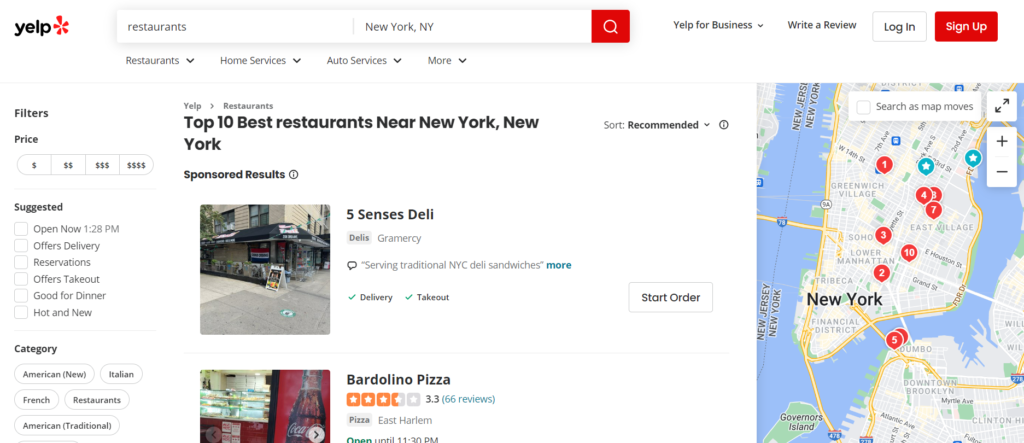
    While your Google Business Profile is the most important business profile, it’s not the only one that matters. In addition to Google, there is Yellow Pages, Yelp, as well as many niche-specific NAP websites.

    These sites not only serve as sources of reviews, but also provide valuable business information to search engines.

    To improve your off-page SEO and Google Maps ranking, it’s crucial to ensure that your business name, address, and phone number (NAP) are consistent across all directories. This consistency helps create trust in the accuracy of your business information and avoids confusion for potential customers.

    Wrapping Up

    In conclusion, optimizing your business for Google Maps involves a comprehensive strategy that includes your Google Business Profile, on-page SEO, and off-page SEO.

    By ensuring consistent NAP information across all platforms, actively managing customer reviews, and carefully implementing keyword strategies, you can enhance your visibility and attract more customers.

    Remember, digital marketing is an ongoing process, and staying proactive in your efforts is key to maintaining a strong online presence.