
Category: SEO News and Information

  • The Role of SEO in B2B Marketing

    The Role of SEO in B2B Marketing

    On the surface, SEO’s role for B2B is simple: help generate sales. However, where SEO comes into play for sales impacts the SEO strategy

    Business-to-business is often discussed as if there is a monolithic go-to-market strategy that somehow applies to all B2B companies. Obviously, this isn’t the case. So, when we talk about SEO, we have to go beyond B2B and beyond the specific industry to understand the individual company’s sales process.

    The Target Metrics For A Website

    Websites are marketing tools. Like any other marketing tool, successfully developing and managing a site depends on defining its purpose/goal. 

    In general, we find that the website, and therefore SEO, plays a role in one or more of three areas.

    Direct Online Sales

    The easiest and most direct metric for a successful website is e-commerce revenue. When selling services, equipment, parts, or consumables online, we have a direct attribution to organic search. 

    Lead Generation

    Lead generation is more commonly a target metric for B2B. While measuring leads and attributing them back to the sources is relatively straightforward, tying back the quality of these leads is less so. This becomes more challenging as the sales cycle becomes more complex.

    Sales Support

    This is more amorphous. For complex or longer-cycle sales processes, websites often become the go-to channel for prospects. Making sure content is easily accessible and discoverable or appears in Google search results when prospects continue with research can make or break a sale. While there is no hard metric for Sales Support, UX and SEO visibility play a key role.

    The Purchase Process

    What is the process from shopper to prospect to customer? For some industries, there may be a standard that applies to most companies, but that is not always the case. Two companies in the same industry may have different growth strategies. One may have an active Outbound Sales Team, while another may have a Product Lead Growth strategy. These involve two distinct buyer experiences even within one vertical.

    Short-Cycle

    From the time a customer identifies a need to the time the purchase is made, it can be a day or perhaps a few days. We often see this in parts and consumables. There is not a lot of research taking place. So, you have to make it to the shortlist quickly, identify and communicate the KSP immediately, and have a 1-3 day communication plan. 

    There is very likely an e-commerce component or a rapid response lead generation program. Once the transaction is complete, the buyer will unlikely visit the site again until another need arises. 

    Mid to Long-term Sales Cycles

    Longer sales cycles tend to involve higher costs or longer-term commitments. They also involve more touch points, research, and a greater need for rich content. The website must support the communication coming to the customer during the sales process as well as support the prospect in providing information during their research. 

    At this point, there is another discussion on customer relationship management involved, which is beyond our scope here. 

    Key Content For Websites in B2B Sales

    Knowing the target audience is vital to prioritizing and developing the website’s content. While all three of the following areas are important, their weight and focus on a site depend on the purchase process and sales strategy. 

    Product/service education

    This can span the category or the company’s specific offerings. The website has to provide sufficient information to educate prospective customers and demonstrate a level of expertise to make prospects comfortable.  

    Company Authority

    Higher costs and longer commitments come with more risk and require more support. But even with lower cost/commitment services, sellers must convey their authority and expertise in the marketplace to make it to a buyer’s shortlist. It is not enough to just describe products or services. The website must convey experience in the industry.

    Company Trustworthiness

    From transaction/information security to post-sale fulfillment, a website has to communicate trust. Verifiable customer reviews, a commitment to providing references, and real case studies are critical to establishing the trust needed to make it onto a prospect shortlist. It is not sufficient to simply list what a company sells; websites have to convey trust. 

    What about SEO for B2B Websites?

    We didn’t forget. But SEO comes after all the above. While we work on SEO strategy, SEO is a tactic within the sales and marketing areas. So, first, all the above-mentioned needs to be figured out, and then search engines and how to structure content for them can be considered.

    One challenge for digital agencies is when clients or prospects begin with SEO discussions (or digital marketing in general) prior to the marketing and sales strategy.  We can work to get content to rank with search engine optimization, but if it is not the right content or not targeted to the right part of the sales funnel, then even page one ranking is not going to move the needle… well, maybe a little. But the point is that we must have the right goals in place for SEO to be effective.

    Fortunately, we have been around long enough to help our clients lay the groundwork for a good digital marketing program, including SEO.


  • Do No-Follow Links Help SEO?

    Do No-Follow Links Help SEO?

    First, What’s a No Follow Link?

    A no-follow link is a hyperlink that looks like this:

    <a href = “https://fanaticallydigital.com/” rel= ”nofollow” >

    See the no-follow tag? This tag tells search engines to ignore the link.

    A Brief Refresher on Search Engine Crawlers

    Search engines use hyperlinks like these to create a map of the web.

    They’ll read the content of web pages and use hyperlinks to jump from page to page and website to website.

    The more links that a page has pointing to it, the more valuable the page is assumed to be and, therefore, the more potential that page has to rank.

    No-follow tags tell search engines not to include the link in their web map.

    Why Do Websites Use No-Follow Links?

    You’ll most often find no-follow links in social media posts, comment sections, and forums.

    Back in the early days of Google, savvy folks realized you could spam blogs and forums by linking to their own websites in the comments. 

    This would artificially inflate the number of links pointing to their own website, making it seem more valuable.

    To combat this, Google introduced the no-follow tag in 2005, and other search engines quickly followed suit.

    Nowadays, search engines have become smarter and can detect spammy behavior regardless of no-follow tags.

    But you’ll still find them across the web, like on social media, certain blog posts and news sites like Forbes and Huffington Post.

    No Follow Links & SEO

    There’s a fair amount of debate in the SEO world over the value of no-follow links.

    And Google doesn’t help clarify the issue, saying “In general, we don’t follow them.”

    When it comes down to it, a no-follow tag is merely a suggestion that search engines ignore the link.

    Do No-Follow Links Help SEO?

    In short, yes. No-follow links have the potential to help your SEO.

    Let’s take a look at a few case studies that correlate no-follow links with improvements in organic rankings and traffic.

    Case Study 1

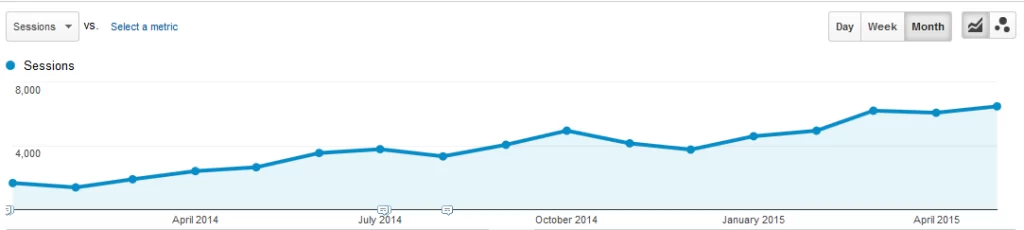
    An agency called Teknicks ran a case study in which they increased a client backlink portfolio over 16 months, 89% of which were no-follow links.

    The client saw a 288% increase in organic traffic.

    Now, this is not a perfect study (SEO studies never are). It doesn’t control for other factors, such as the impact of on-page content changes or the 11% of new links that were do-follow.

    However, the gradual increase in keyword rankings and traffic suggests that no-follow links could absolutely have contributed to their success.

    Case Study 2

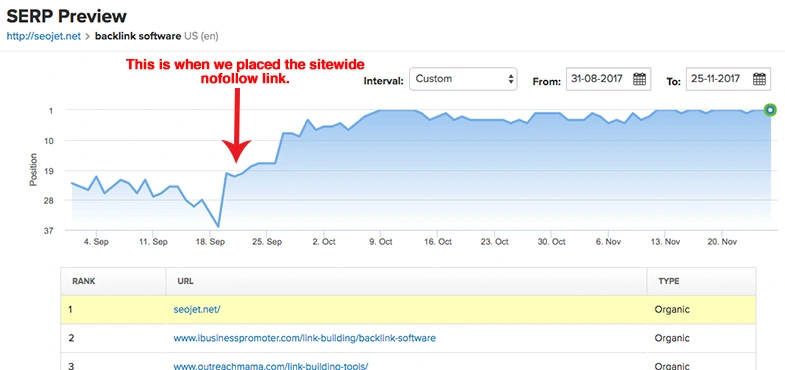
    Another case study conducted by SEOJet does a better job of demonstrating a more direct relationship between no-follow links and improved rankings.

    After being stuck on the third page for “backlink software,” SEOJet placed a no-follow sidebar link on an SEO blog.

    Although it was only a single backlink, the results were immediate. They jumped to the first page within a week.

    Why would this be?

    Google May Still Follow Them

    Again, a no-follow link is merely a request that search engines ignore the link.

    This second case study suggests that Google does follow certain backlinks, especially if the content is relevant.

    Referrals Matter Too!

    When discussing backlinks and SEO, we often forget about the value of referrals.

    Links placed in relevant locations can bring in referral traffic, people who navigate to your site from the hyperlink.

    These are real human beings who check out your website and could potentially share it with others. This is a valuable benefit that shouldn’t be overlooked.

    So, Do No Follow Links Help SEO?

    In summary, no-follow links do have the potential to help your SEO by increasing organic traffic and referral traffic.

    However, the impact of no-follow links is often indirect and can be difficult to measure. 

    In addition, Google’s algorithms are constantly changing and evolving, making it challenging to determine the exact impact of no-follow links on SEO.

    Ultimately, while no-follow links may not necessarily directly contribute to your website’s rankings on search engine results pages, they can still play a role in driving traffic to your website and increasing its overall visibility.

    So, the next time you come across a no-follow link, don’t dismiss its potential value.

  • Technical SEO An Overview

    Technical SEO An Overview

    Technical SEO is the process of ensuring search engines can access and easily crawl your website. From very basic things like a proper server response to the many aspects of how content is delivered to the web browser, they are reviewed and adjusted as part of technical SEO optimization. When done properly, search engine bots can crawl the site, and the search engine can index it so that it appears in the SERPS.

    Website Speed

    Website speed can be tricky in that site owners may not fully understand the elements involved. From their perspective, when they go to their site, it seems to load fast, and they’re lulled into believing that they have good site speed. But this is not necessarily the case.

    Browser Cache & Load Speed

    Browser caching is fairly standard practice. This means that the content one sees after visiting the site for the first time is rendered from the browser’s memory or cache, a very fast experience. This was developed to improve the user experience and to decrease the load on servers and bandwidth. For a site with frequent repeat visitors and few content changes, this is great. But, new visitors to a page may have a very different experience, and perhaps not a good one.

    Because site owners frequent their own sites often, their experience comes from the cache more often than from the server. When Google assesses a website’s speed, it does so from the perspective of a first-time visitor with no browser cache. Google’s assessment and a site owner’s speed experience can be very different.

    Content and Speed

    When site owners think of content, they typically think of what they see. But, when Google assesses site speed, there is a great deal more involved. Using PageSpeed Insights, SEOs can see the various elements of a page that are causing issues with load times. Here are three common speed bumps for websites.

    • One of the most common issues with non-optimized sites usually involves images that are way too large and not web-optimized.
    • Unused CSS and JS code is also an inhibitor to page loading
    • Render-block scripts cause issues with visible content not being loaded because it has to wait for js or other scripts to load first.

    Improving site load speed is one of the more difficult things to do. Balancing image size with creativity/quality and knowing what parts of the scripts are vital to the initial load versus what can wait or be eliminated, it is time-consuming to optimize for speed.

    Page Architecture

    Behind the content people see is code. Website architecture, including the code structure, helps search engines parse and understand the content. One of the tricky things is that you can use different approaches to render content the way you want users to see it, but those methods may not be good for search engines to understand it. The content needs to be rendered well for users and structured well for search engines. Both are absolutely compatible, but often one is forgotten.

    General User Exprience

    Beyond load speed, Google also looks at what happens when content is rendered. Is it within the screen, does it shift once loaded, is the contrast between elements visible, how is the element spacing, and so on? These elements play into how users will see and navigate the site.

    Trickier still, how the site is rendered is different for desktop vs mobile. Generally speaking, if the site is mobile-friendly, it will be good for the desktop. But, the reverse is seldom true. Whether using a mobile-first approach or depending heavily on responsive design (which should be ever-present anyway), the site code has to adjust the rendering appropriately for the users’ devices.

    These more common elements of technical SEO need to be addressed for every website to some degree. How deep you have to go and how much effort is needed really depends on your starting point.

    While there are tools out there that can identify problems, their proposed solutions are not always easily achieved by the average site owner. The process needs to set priorities and provide the right resources, which are often not available. If you are wondering how to improve site speed for your website, give us a call.

  • The Impact of AI on SEO (So Far)

    The Impact of AI on SEO (So Far)

    Generative AI & SEO

    In the rapidly evolving digital landscape, Artificial Intelligence (AI) has emerged as a game-changer, particularly in the realm of Search Engine Optimization (SEO).

    As we reflect on the pivotal year of 2023, it is evident how large-language-models (LLMs) and generative AI tools have revolutionized SEO practices, akin to the transformative impact of internet and smartphones.

    In this post, we’ll delve into the impacts and implications of AI on SEO, highlighting the efficiency and value brought by AI tools in simplifying labor-intensive SEO tasks, while also examining the yet-to-be-realized potential of AI-generated search results in influencing website traffic.

    AI & SEO Tools

    When it comes to search engine optimization, the biggest impact AI had was in the available toolset. Copywriting programs, bulk on-page optimization, and rank tracking tools have streamlined the more tedious aspects of SEO.

    Content Generation

    After the release of ChatGPT’s API, content generation software quickly became ubiquitous throughout the SEO and content marketing space.

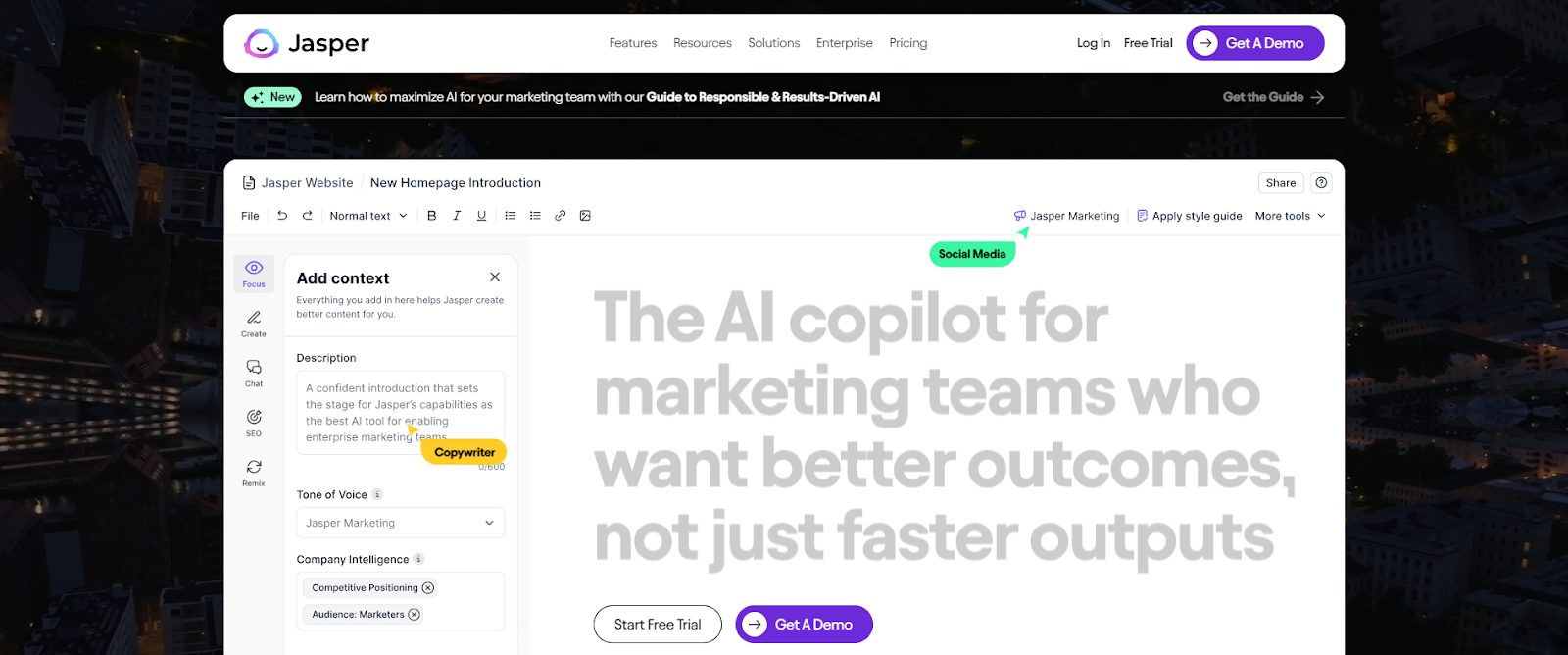
    Tools like Jasper and Copy.ai  can assist SEOs by suggesting blog topics, assist in writing the blogs posts themselves, as well as generate website copy like product descriptions.

    As you can imagine, these tools helped to cut down the time and effort for tasks that many SEOs may find tedious like researching new potential blog topics and content spinning.

    Data Analysis and Trend Identification

    AI tools have also revolutionized data analysis and trend identification in SEO. Tools such as Pro Rank Tracker and MarketMuse can automatically perform keyword research, identify content gaps on a website, and suggest topics for future posts.

    These AI-assisted programs allow for a new level of precision to keyword research and trend identification, enabling quicker response to search trends.

    SEOs also find value in the predictive insights that these tools provide, allowing content to be appropriately tailored for future search algorithm changes.

    When used properly, these advancements in natural language processing (NLP) and AI free up SEO from the more tedious elements of their job to focus on the strategic side for their clients.

    Impact on Search Engines

    Natural Language Processing & Search Engine Algorithms

    In the early days, search engines relied heavily on keywords to understand a given text and match search queries to the appropriate results.

    However, with the advancements in natural language processing (NLP) and AI, search engines can now analyze content more comprehensively and better understand context and intent, allowing for more accurate results.

    This has rendered old SEO tactics such as keywords stuffing obsolete. Over the years, content marketers have had to place a greater emphasis on the quality and relevance of their content.

    One example of these NLP algorithms in action is Google’s BERT, which uses AI to understand the meaning behind a search query and deliver more relevant results.

    With systems like BERT, search engines are able to understand more complex and conversional queries and factors in context from previous searches.

    This has led to the rise of voice search and the need for SEOs to optimize their content for natural language queries.

    In essence, AI has forced SEO professionals to shift their focus from optimizing for robots to creating valuable and user-friendly content.

    Generative Search Results

    While advancements in NLP has had a massive impact on how search engines’ process language over the past decade, much of these improvements have occurred behind the scenes. However, technologies unveiled in the past year and a half have the potential to advance the capability of search algorithms to a new stage in their evolution.

    We’ve seen these NLP and AI advancements go from improving search engine’s ability to understand and interpret text to actually generating text themselves. No longer simply selecting the best results for a particular query but understanding intent well enough to formulate a response itself.

    Programs such as Google’s Search Generative Experience and Bing’s Copilot use generative AI to create answers to search queries on the spot by cross referencing relevant organic results with their own internal knowledge graph.

    This technology has vast implications for SEO, as websites will need to compete not only for top placement in search results but also for generating the most relevant and accurate information.

    As of now, these AI-generated search results have yet to achieve widespread prevalence that significantly impacts website traffic. However, as this technology continues to advance,  it may dramatically alter the current SEO landscape.

    Wrapping Up

    In conclusion, AI has already had a significant impact on the world of SEO, primarily through automation and optimization of tasks. But as we’ve seen with NLP advancements and generative search results, the potential for AI to shape the future of SEO is immense.

    While it’s unclear exactly how these technologies will continue to evolve, it’s safe to say that AI will be a driving force in the world of SEO for years to come. As search algorithms continue to improve and become more sophisticated, so too must our strategies as SEO professionals.

  • How to Improve Your Ranking on Google Maps

    How to Improve Your Ranking on Google Maps

    A Guide to Google Maps SEO

    In the digital age, visibility on platforms like Google Maps is crucial for driving business growth. Whether you’re running a restaurant, plumbing service, law practice, or car dealership, it’s a safe bet that Google Maps is how most of your clients and customers find your business. 

    This guide will provide insights on methods to improve your Google Maps ranking, helping you leverage online tools to amplify your business presence.

    Complete Your Google Business Profile Setup

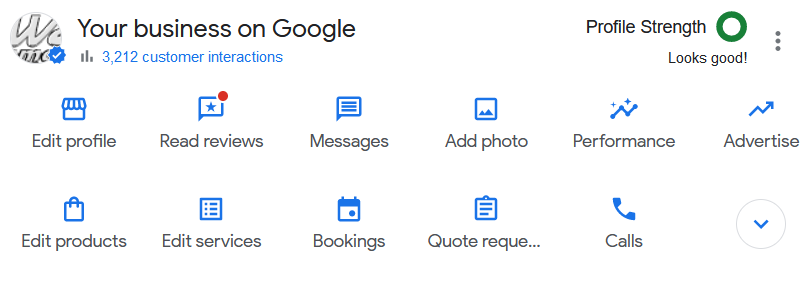
    Google Maps results are linked to your Google Business Profile (GBP), formerly Google My Business. 

    So, if you want to rank on Google Maps, that’s step one. If you need help setting up your business profile, check out this guide over on BrightLocal. For this post, we’ll assume that your GBP is already set up and ready to go.

    Be Active on Your GBP

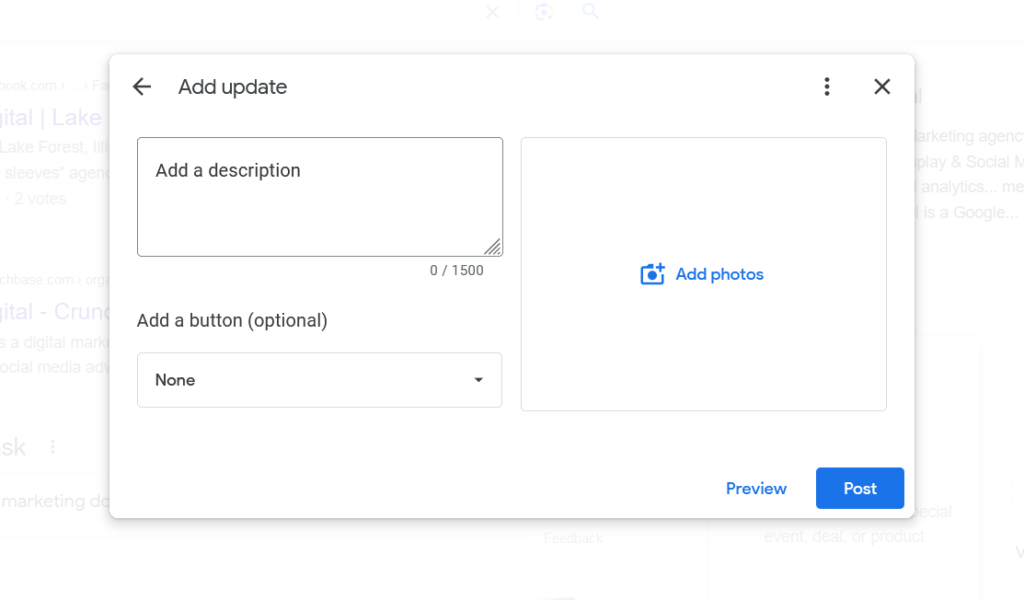
    Maintaining an active Google Business Profile (GBP) establishes credibility and authenticity in the eyes of both search engines and your customers. Regular updates to your GBP, such as posting about ongoing deals, responding to customer queries, and uploading recent photos of your business, show that your business is operational and attentive to customer interactions.

    Solicit and Respond to Reviews

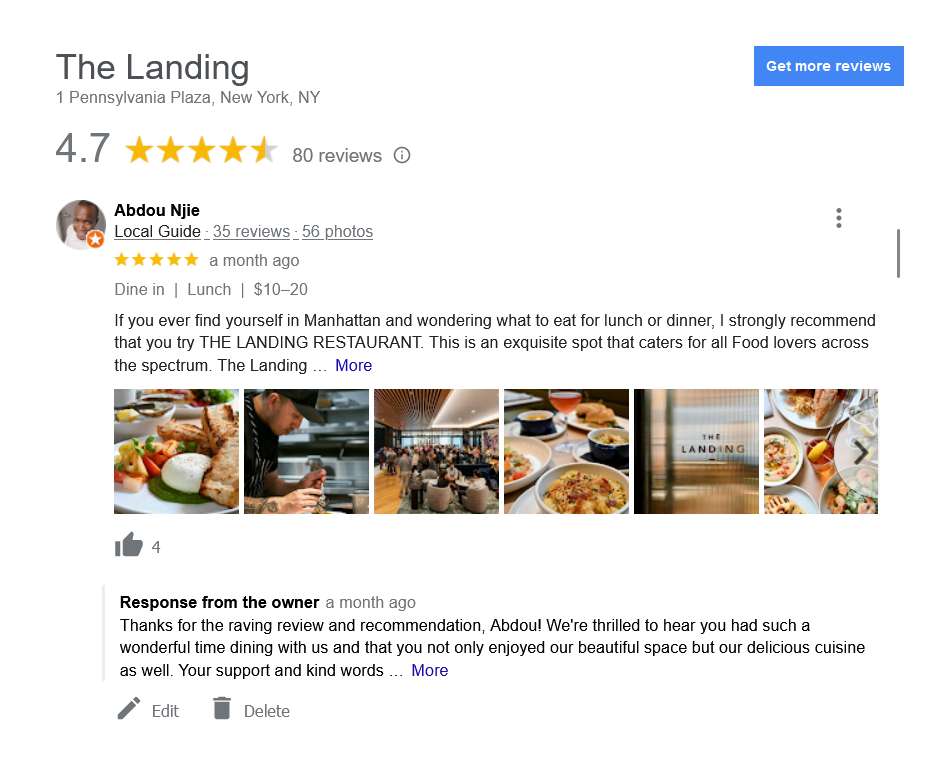
    Reviews are one of the most important pieces for ranking well on Google Maps.

    To gather reviews, reach out to satisfied clients or customers and ask them to share their positive experiences on your GBP. This can be done at the point of service, through a follow-up email after a purchase or service, or by placing a review link on your business’s website or social media pages.

    When responding to reviews, be sure to address both positive and negative feedback.

    For positive reviews, express gratitude for their patronage and provide a personalized response where feasible.

    For negative reviews, maintain a professional tone, apologize for any inconvenience caused, and offer solutions. If possible, suggest discussing the matter privately to show proactive customer service. This can turn a negative experience into a testament to your dedication to customer satisfaction.

    Post About Deals & Events

    Posting regularly about ongoing deals, promotions, and other updates can be helpful for maintaining an active profile.

    Frequent updates signal Google that your business is active, and ultimately, this fosters a vibrant and dynamic business profile that appeals to both your current customer base and potential new customers.

    Strong On-Page SEO

    In addition to an active Google Business Profile, another key factor to ranking on Google Maps is your website content. This is where Google draws much of what it understands about your business and, therefore, what keywords it will rank your profile for. 

    The ideas is to send Google “signals” about who you are and what your business offers.

    Identify Your Keywords

    The first step is to identify what keywords you want to rank for. Some of these are obvious. 

    Restaurants will want to target “restaurants” and “restaurants near me.” If you’re located in Springfield, then you’ll want to target “restaurants in springfield.” These will be your primary keywords.

    However, there may be secondary keywords you’ll want to target as well. For instance, if you’re located near an event center and want to target customers searching for a place to eat before and after an event, you’ll want to target queries like “restaurants near EVENT CENTER NAME.”

    This is where SEO intersects with your overall marketing strategy. Where are your customers coming from, who are the audiences you’re targeting, and what would they be searching for?

    On-Page Optimization

    Once you have your keywords, you’ll need to optimize your pages. This optimization will not only help in the organic rankings (the blue links on the results page) but in Google Maps as well.

    Your page title tags are the most important part of on-page equation. If you want to target people looking for restaurants in Springfield, then your homepage title should be something like:

    RESTAURANT NAME | Gourmet Restaurant in Springfield

    In addition to title tags, it’ll be important to include geo-modified content in your on-page copy. That means using words like “Springfield restaurant” instead of simply “restaurant.”

    Embed Google Maps

    Embedding Google Maps on your site serves a dual purpose for SEO. Firstly, it provides clear, easy-to-follow directions to your physical location, enhancing user experience. Secondly, it sends strong local signals to search engines, reinforcing the geographical relevance of your site.

    Create Supporting Content

    Supporting content is great for expanding the topics covered by your website and for targeting those secondary keywords.

    For example, if your restaurant wants to target those customers searching for a restaurant near the event center, consider creating a page dedicated to those customers. “If you’re looking for a restaurant near THE EVENT CENTER, our restaurant is the perfect choice.”

    Be sure to include relevant details. This can include content like directions from the event center to your restaurant, any specials you offer on event night, etc.

    Content like this signals to Google that your profile is relevant to a specific location or event, thereby increasing its chances of ranking for related searches.

    Off-Page SEO

    But it’ll take more than signals from your GBP and your own website to achieve good rankings. Google also looks to other websites in order to gauge your credibility and trustworthiness.

    For local business, an important category of websites includes business name address, & phone number (NAP) citations.

    Business NAP Citations

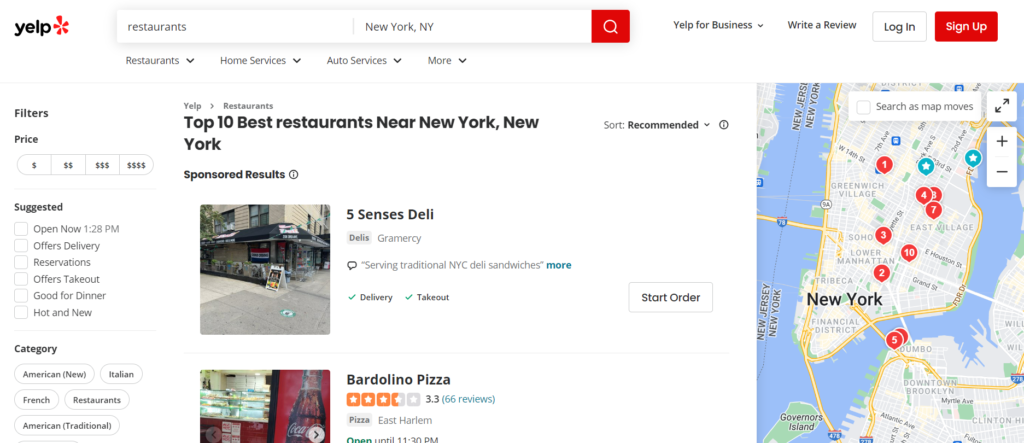
    While your Google Business Profile is the most important business profile, it’s not the only one that matters. In addition to Google, there is Yellow Pages, Yelp, as well as many niche-specific NAP websites.

    These sites not only serve as sources of reviews, but also provide valuable business information to search engines.

    To improve your off-page SEO and Google Maps ranking, it’s crucial to ensure that your business name, address, and phone number (NAP) are consistent across all directories. This consistency helps create trust in the accuracy of your business information and avoids confusion for potential customers.

    Wrapping Up

    In conclusion, optimizing your business for Google Maps involves a comprehensive strategy that includes your Google Business Profile, on-page SEO, and off-page SEO.

    By ensuring consistent NAP information across all platforms, actively managing customer reviews, and carefully implementing keyword strategies, you can enhance your visibility and attract more customers.

    Remember, digital marketing is an ongoing process, and staying proactive in your efforts is key to maintaining a strong online presence.

  • Rebrand Your Site Without Losing SEO Rankings

    Rebrand Your Site Without Losing SEO Rankings

    SEO Tips for a Smooth Rebrand

    At some point in their lifecycles, many businesses will undergo a rebrand or website redesign, and with it often comes the fear of losing SEO rankings.

    This can be both an exciting and scary undertaking, especially if your website has had success with SEO. Nobody wants to lose all that traffic and revenue, not to mention all the resources you put into achieving those rankings.

    So the question most businesses will ask is, ‘How can I rebrand my website without losing SEO rankings?’

    The short answer is continuity. That means (1) retaining the same URL structure & architecture where possible and using 301s where it’s not, (2) ensuring the title tags and content of high-performing pages are kept consistent, and (3) using links and content to signal your new brand/identity.

    In this post, we’ll detail each of these steps to ensure a successful rebrand without losing rankings

    Rebranding Considerations 

    Rebrands exist on a spectrum. On one end, you have minor cosmetic touch-ups. This can be something as simple as altering the color scheme or getting a shiny new logo. 

    On the other end are total identity overhauls. Changing your company name, business focus, or offering a dramatic shift in tone and messaging requires more work than just swapping out logos.

    In this post, we’ll focus more on the latter. Specifically, cases that involve changing domain names.

    Site Architecture & URL Schemes

    URLs

    One of the most critical steps for a successful rebrand is establishing consistent URLs between your old and new site. For example, if your old site was www.olddomain.com/product-category/, then you’ll want to make sure the new URL is something like www.newdomain.com/product-category/.

    Why?

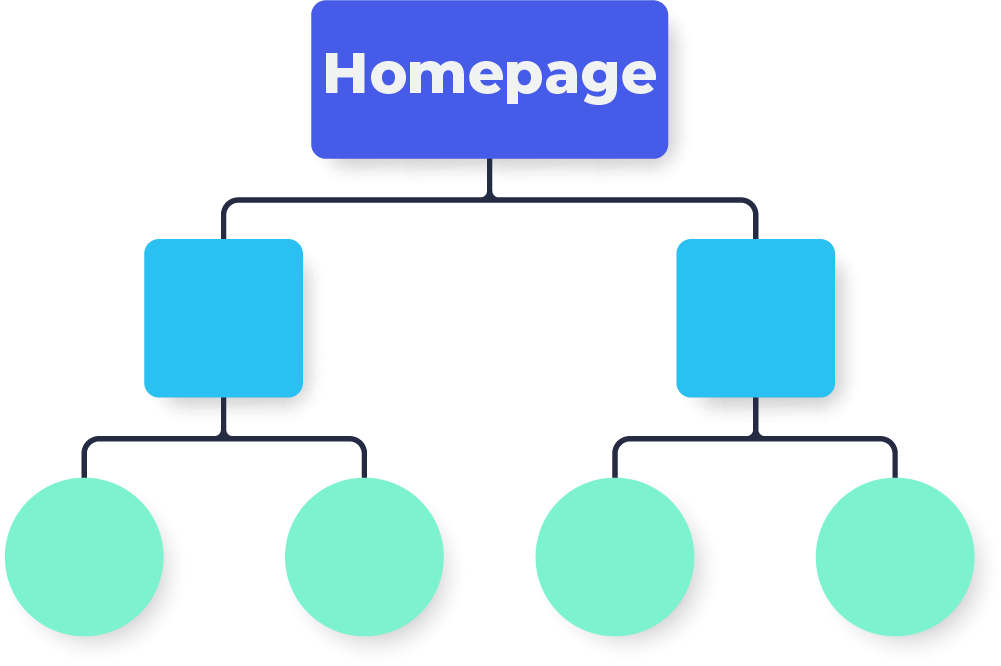
    Within its index of web pages, Google has a ‘map’ of your website layout. It knows which pages link to which others and has an idea of how they relate to each other. This informs how Google will rank your pages for search queries.

    The closer the structure of your new site matches your old site, the better understanding search engines will have right off the bat, and the more likely you are to retain your SEO rankings.

    301 Redirects

    But sometimes, rebranding requires splitting or consolidating content. When this is the case, 301 redirects are a critical step in guiding Google and other search engines to the new URL. 

    It’s important that you use properly implemented 301 redirects for any pages where content is no longer available, as this helps Google understand your new website structure and pass ranking signals to the new URLs. 

    www.olddomain.com/best-sightseeing-spots-in-alaska/

    www.olddomain.com/10-most-beautiful-tourist-destinations-alaska/

    — both pages 301 redirect too —

    www.newdomain.com/sightseeing-and-tours-alaska/

    While Google will eventually piece everything together, effective redirects will ensure that your rankings don’t take as big of a hit when you finally launch your new site. Think of it as helping Google redraw these old maps instead of waiting for it to reindex everything on its own.

    On-Page Content

    Consistent Title Tags & Content

    The next step is to make sure your title tags, meta descriptions, and content are consistent with the pages you had before the rebrand. This helps preserve rankings since these elements are some of the most important signals for search engines.

    In addition to title tags and meta descriptions, your old page content should match up to the new pages you’re creating. Not only will this help keep rankings intact, but it will also give users the same familiar experience they had before the rebrand.

    Updating Internal Links

    Any internal links pointing to pages that are no longer in use should be updated to point to their relevant counterparts on the new domain name. Doing this will help ensure a smoother experience for visitors and keep your page crawling efficient and effective.

    Signal Your New Brand to Customers & Search Engines

    One of the biggest losses in potential traffic is through your company’s old branded searches. Customers will continue to search for your old brand, but without proper signals, Google (and your customers!) may have trouble connecting the old with the new. 

    In order to counteract this, it’s important to signal the connection between both before and after your launch.

    This can be done through blogs posts on your site detailing the upcoming rebrand, sections or FAQ pages on your new site that mention the change, and by clearly displaying your new brand throughout all of your content. 

    Wrapping Up

    Rebrands can pose a risk to your high ranking content. But by taking proactive steps, you can ensure that your new brand sends the proper signals to search engines, and minimize any negative impact of your rebrand.

  • Citation Building for Local SEO: A Beginners Guide

    Citation Building for Local SEO: A Beginners Guide

    Local Citations & Linkbuilding

    There are tons of components that go into a successful local SEO strategy. But for digital marketers and business owners, building citations is one of the easiest and most effective steps to building a comprehensive local SEO program.

    In this blog post, we’ll provide a beginner-friendly guide on the process of building citations and links so that you can begin optimizing your website and draw more customers through organic search results. Read on to learn the basics of citation building as part of a successful local SEO strategy.

    What are Local Citations and Why are They Important for SEO

    Local citations refer to online mentions of a business’s name, address, and phone number (sometimes abbreviated as ‘NAP’) on various directories, review sites, and blogs. 

    Citations on reputable directories and review sites like Yelp, Open Table, and Angies List, signal to Google and other search engines that a website is trustworthy and relevant to a particular locality. 

    With local search becoming increasingly competitive, having a robust citation and link profile has become paramount in improving a website’s search engine rankings and driving more traffic to a business’s website.

    How to Find the Best Citation Sites for Your Business

    We’ve all heard of the big business directories. Angi, Yelp, etc. And there are tons of lists and resources out that can point you towards some of the lesser known, but still important, national directories.

    But to really maximize the benefit for local SEO, it will be important to find niche or local-specific directories. How do you find these?

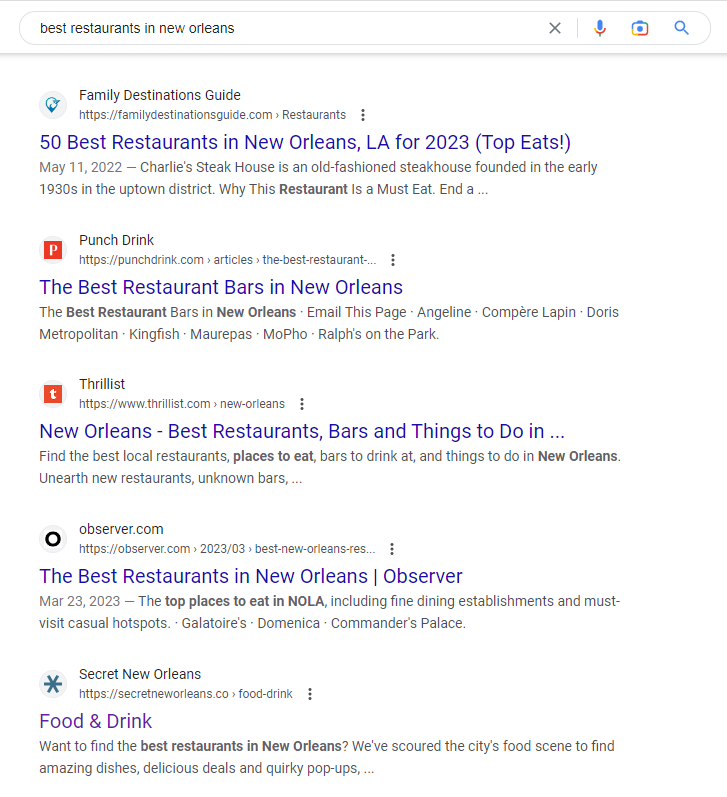
    One of the best ways to find these directories is to simply Google the keywords that you’d like to rank. 

    For example, restaurants can Google “best restaurants in [town].” The results page will contain a mix of restaurants but more importantly the directories, and review sites that cater to your niche and location.

    From here, you can begin to either claim your business profile if it already exists or sign up for the website and create a profile yourself.

    Finding the right citation sites can take some time and effort, but it is well worth it to ensure your business is seen by the right people in the right places.

    Creating a Consistent NAP Profile Across All Directories

    One of the critical elements of citation building is ensure your business name, address, and phone number (NAP) are the same across all directories. 

    If your business has been around for a while, chances are that some of the information has changed. Maybe you’ve relocated or altered the services you provide. 

    Most aggregators and directories don’t spend a whole lot of energy keeping their listings up to date so it falls on the businesses themselves to ensure everything is accurate.

    Doing so will solidify the authority and trustworthiness of your business and increase your chances of ranking for the keywords that matter to you.

    Citation Builder Tool

    Of course, most business owners are pressed for time as it is. So most folks don’t have the time nor the patience to scroll through SERPs and creating profiles and verifying emails.

    That’s why there are many tools and citation building services out there such as SEMRush, Moz, BrightLocal and many more.

    Services like these will recommend directories and other sites to create new NAP on. And many will even create these profiles for you.

    Wrapping up

    In conclusion, local SEO is an important tool for any business to stay competitive and gain visibility in the current digital marketing landscape. 

    By building local citations and links with consistent NAP profile, businesses are able to improve their visibility on search engine results pages. 

    With these best practices, businesses will be on their way to optimizing their local SEO rankings for maximum online success.

  • Comparing Website Authority Scores (DA vs DR vs AS)

    Comparing Website Authority Scores (DA vs DR vs AS)

    Domain Authority vs. Domain Rating vs. Authority Score

    One of the primary selling points of popular SEO tools such as Moz, Ahrefs, and SEMRush are the website authority metrics. These metrics proport to calculate a website’s “authority” based, for the most part, on the quantity and quality of its backlinks.

    Website Authority Tools

    While these metrics measure roughly the same thing, each tool uses different factors in their calculations which can result in radically different scores.

    In this post, we’ll offer a head to head of Domain Authority vs Domain Rating vs Authority Score by first looking at the original authority metric, PageRank. Then we’ll dive into each metric, their individual input factors, and compare the outcomes by looking at our own website’s performance on each.

    But first, a short history lesson.

    It all Begins with PageRank

    What is Google PageRank? This was one of the most important SEO metrics a decade ago. Back then, an update to the PageRank toolbar provided an opportunity to determine if the recent steps you took helped to improve the positioning of the website – and that Google viewed your site as one with more authority. Where does PageRank fit into metrics today?

    To understand the value and place of PageRank and authority scores, you need to consider the application in today’s industry and how they may or may not matter to your link building strategy. 

    What You Should Know About PageRank

    PageRank is quite a complex algorithm. It provides a score in a numerical format that is supposed to give you an idea of where your website stands. PageRank is more of a linear representation of that rather than a true way to know how well your website is going to rank in the search engines.

    A low score, for example of 0, means that your website is low quality. That often means that it is not seen as an authority website by Google, and as such, Google may not value it high enough to position it high in search engines. 

    A score of 10, on the other hand, seems like a good figure, and it does indicate that the website is more authoritative than other sites. 

    What Factors Influence PageRank?

    While we know that PageRank is no longer used in the way it once was, there are still some key components of it that do make a difference. For example, things like anchor text and how likely it is that the link will be followed can still play a role in your success. 

    While Google retired the PageRank Toolbar that was often used to help with this figure, we know that PageRank still matters to some degree. That’s why several other organizations decided to create their own tools to help you better understand how well your website ranks. 

    Difference Between DA, DR, and AS

    When considering website authority scores, you will find a lot of different acronyms out there. It is easy to become overwhelmed with trying to navigate all of your options. Here are some of the explanations you need to do that.

    Domain Rating

    Domain Rating, DR, is one of the terms you will see readily used. This metric was developed by Ahrefs. It helps to show the strength of your website’s backlink profile. It provides this information on a scale that ranges from 1 to 100. How does Ahrefs determine what this number is? 

    Key factors that DR uses

    To calculate this information, the tool will look at the following:

    • Referring domains
    • Link root domains
    • Domain age
    • The total number of links

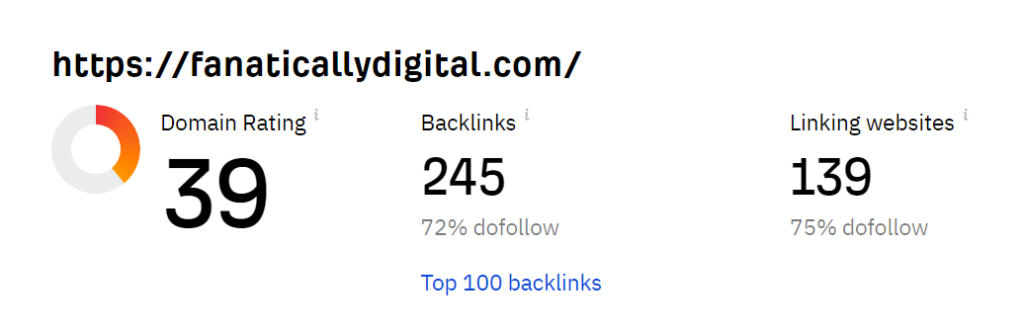
    Fanatically Digital’s Domain Rating

    domain rating

    Fanatically Digital’s Domate Rating is 39, apparently. Cool.

    They have also found 139 unique websites that link to us. Ahrefs relies heavily (if not exclusively) on backlinks in order to calculated their score.

    This can be a positive because it keeps things relatively simplified. We know what is being measured. That is, where a website generally stands within the backlink hierarchy of the internet.

    However, having only a few variables impacting this score (quantity and quality of links) means it’s more susceptible to spamming and manipulation.

    Anyway, let’s see how this compare to what the others found.

    Domain Authority 

    Domain Authority, or DA, is a bit different. It is a Moz calculation. That means it provides a bit of a different source of data. It aims to provide you with insight into how well your website may rank in the search engines.

    What factors does DA use?

    • The age of the domain itself
    • The spam score it has
    • The amount of traffic volume the website sees
    • The total number of backlinks that are on the website
    • The quality and the quantity of backlinks in comparison to each other
    • Social signals pointing to the website
    • The linking root domains

    Fanatically Digital’s Domain Authority

    Domain Authority

    Rather than focus exclusively on backlinks, which is what PankRank did, Moz takes things a step further by factoring in performance on search engines.

    Domain Authority isn’t merely attempting to mirror PageRank. It’s not trying to gauge the quality of the inputs (i.e. quality of it’s backlinks). It’s using the outputs (i.e. search engine performance) to predict Google’s assessment of authority.

    You can see this reflected in Fanatically Digital’s lower Domain Authority, only 22 compared to our 39 Domain Rating. That’s because Moz’s evaluation of our search engine performance is lower than one might expect given our backline profile. Only 44 keywords, according to Moz (although according to Search Console, this metric is off by a factor of 100).

    They also take into account our Spam Score, which is only 1% so that’s nice, I guess.

    Authority Score

    The third option is Authority Score, or AS, which SEMRush designed. It provides a different viewpoint as well. Here, the score is more explicitly a prediction of the overall quality of the webpage or the website itself. It is best used to compare domains.

    What factors does AS use?

    Your AS is dependent on numerous factors but specifically focuses on these areas:

    • The link power of the domain. By this, the organization focuses on the quality as well as the number of backlinks for the website.
    • Organic traffic. The second key factor here is the amount of organic traffic that is coming to your website. This is estimated on a monthly average. Organic traffic stems from people landing on your page from search engine results often thanks to your SEO efforts.
    • Spam factors. The third factor that plays a significant role in this process is spam. That is, the tool looks for anything that seems spammy and whether or not there is a natural link profile.

    To provide some additional insight into Spam Factors, SEMRush shares that there are six key things it does to determine this:

    • If you get no organic rankings on the search engine results page
    • Having a super high percentage of do follow domains
    • Having too many referring domains that come from the same IP address or the same IP network
    • An imbalance in the amount of organic traffic the website gets compared to the number of links it has
    • Another domain that has the same (identical even) backlink profile

    Fanatically Digital’s Authority Score

    Authority Score

    While our Domain Rating is a cool 39 and our Domain Authority was a respectable 22, our Authority Score is a meager 5.

    These are all out of 100.

    As you can probably tell just from these numbers here, SEMRush weighs organic search performance A LOT. Our organic traffic is 0 visitors per month, apparently (also heavily contested by Search Console).

    So despite our relatively respectable backlink profile, our Authority Score has been given an F–

    This all begs the question, what exactly are these tools purporting to be measuring? And how do we as search marketers or business owners find value in them.

    It’s interesting how, over time, these tools try less and less to be mirrors of PageRank, focused exclusively on the quality and quantity of backlines. Instead, they shift further towards an all encompassing SEO score.

    Where Do You Stand on the Use of PageRank?

    We find that these website authority metrics are a viable bit of information, and all of these versions, AS, DR, and DA, are great tools to have. However, this is just one component of a much larger picture. You cannot determine how well your website is optimized for search engines using these tools. They cannot provide you with enough insight to know what you need to improve either.

    The key here is that these scores can be used as a component of an overall marketing strategy but not the total picture. They are merely proxies, and what is worse, they are highly susceptible to manipulation. For that reason, they are often overvalued in today’s use.

    Don’t rely on this as the sole component of your marketing campaign. Instead, use it along with the help of a professional organization to customize your marketing strategy.

  • Service Area Pages

    Service Area Pages

    How Location Pages Can Boost Your Local SEO

    Service area landing pages are a critical–if sometimes overlooked–tool used in local SEO.

    Whether you call them location pages, town pages, areas served pages, or service area pages, they’re all essentially the same.

    In this article, we’ll take a look at how service area pages fit within your SEO strategy before going over best practices. 

     (And by the way, we’ll assume that readers will have a basic grasp of local SEO. But if you need a primer, check out our local SEO guide here).

    Service Area Pages & Your SEO Strategy

    What’s the point of creating service area pages? Why do we need them? 

    In short, it allows us to effectively target a larger, more diverse set of locally focused keywords. For example…

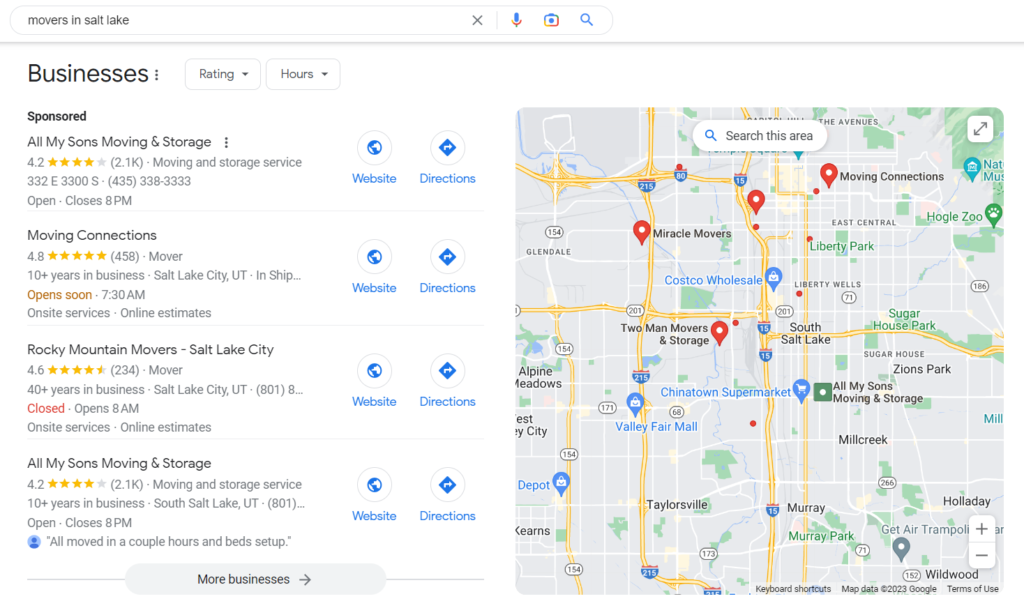
    Let’s say you own a moving company in the heart of Salt Lake City.  Most of your target keywords are going to include queries like moving companies, movers near me, movers in salt lake, etc. 

    These local-focused search queries will bring up the Local Pack on the results page. If you have a Google Business Profile (and you absolutely should!), many of your website clicks will come through these local pack results.

    Limits of Google Business Profile 

    But here’s the issue: 

    Local Pack results lean heavily on proximity. Meaning closer businesses will tend to rank higher than businesses far away. 

    Makes sense. 

    However, consider the consequences for our moving company example. Chances are, a Salt Lake City moving company wants to serve movers throughout the ENTIRE Salt Lake metro area. Not just those within a few-mile radius of their office.

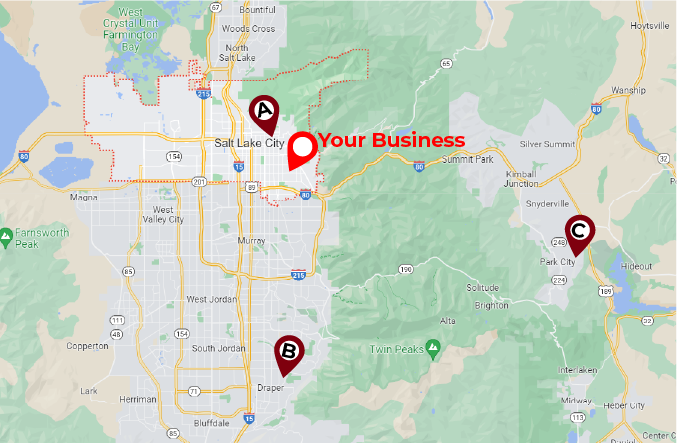
    Salt Lake Local Map

    This is the problem: Your company wants to serve this entire map, BUT your Google Business Profile listing might only show up for someone searching from point A–next to your office in the heart of the city. And you probably won’t show up for someone searching from points B and C.

    This puts a huge cap on the effectiveness of your Google Business Profile listings and severely limits the reach of your local SEO and digital marketing.

    So now what?

    Well, in order to rank for relevant search queries at points B and C, we need to tell Google that your business serves these areas as well.

    And this is where service area pages come in.

    Expanding Organic Reach

    In order to reach users searching for moving companies out in Draper and Park City–points B and C–we’ll need to create pages that target geo-modified queries such as moving companies draper ut

    This allows us to target both (1) users searching for geo-modified queries like moving companies draper ut and (2) users searching for generic queries like moving companies from Draper. Without a service area page, we likely would not have ranked for either of those queries.

    Service area pages without a physical location will typically show up in the organic results (as in the image above) instead of the local pack. 

    Within our SEO strategy, service area pages generally target more specific geo-modified queries that are lower in search volume but also less competitive and, therefore, easier to rank for. 

    How to Build Service Area Pages

    Now that we know how these pages fit within our SEO strategy, it’s time to get down to the nitty-gritty. How do we best design and write service area pages for SEO?

    Step 1: Identify your locations. If your business has multiple brick-and-mortar locations, this part is easy. Create a page for each location. 

    On the other hand, if you have a single location or run a service-based business such as a handyman, plumber, moving company, construction, home improvement, etc., you’ll create a page for each town you want to do business in. 

    Step 2: Write your pages. They should provide a relatively comprehensive overview of the services you provide. Best practices suggest at least 300 words split into manageable paragraphs with informative header tags.

    Don’t be afraid to use (but not overuse) industry jargon. Nowadays, Google expects to see more than the keywords you’re trying to rank for. They want to see ‘secondary’ keywords that are related to your primary keywords.

    For example, if we want our moving company to rank for movers draper ut, we need to include secondary keywords such as household movers, international relocation, furniture hauling, full-service moving, etc. 

    Check out some of the top pages that rank for your target keywords and see what kind of language they incorporate.

    Step 3: Optimize your pages. Ensure your keywords appear in your URL, title, header, and meta descriptions. For example…

    LocationDraper, UTPark City, UT
    URLexample.com/areas-served/draper-ut-movers/example.com/areas-served/park-city-ut-movers/
    TitleMovers Draper, UT | My Moving CompanyMovers Park City, UT | My Moving Company
    H1Draper Moving CompanyPark City Moving Company
    Meta descriptionsMy Moving Company’s team of Draper movers provides unbeatable relocation services…My Moving Company’s team of Park City movers provides unbeatable relocation services…

    Step 4: Place a prominent call-to-action. There should be no question about how to engage your services. Whether it’s a big colorful CALL NOW button, a contact form, or directly scheduling service, clear calls-to-action will ensure higher conversion rates and more business.

    Step 5: Implement linking schemes. Without links pointing to your page, Google’s crawlers have no way of finding them. Link to your location pages from a parent /areas-served/ page, from the main navigation menu, or in natural locations in page copy throughout your site.

    Step 6: Add schema markup. This part is a bit more technical. If you have a dev team for your website, this is something they can help with.

    Schema markup is little bits of code that tell search engines exactly what your page is about. For example, if you have your office address on your location page or in your website footer, you can add markup that explicitly tells Google that this is your business address.

    This helps Google to make better sense of your page as well as provide information for Rich Results; additional information on the results page.

    Local SEO is increasingly becoming an essential part of any digital marketer’s toolbox, and building a reliable location page setup is a key part of that. Leveraging local search features can help businesses reach potential customers, boosting their visibility and benefitting both the customer and the business itself.

    Here is a bit about the concerns of duplicate content when building areas served pages.

    With this in mind, it’s important to take time crafting quality location pages for maximum impact – something that will benefit you for years to come!

  • SEO for Dentists

    SEO for Dentists

    A Complete SEO Guide for Dental Practices

    As a dental care provider, your primary goal is to provide your patients with exceptional service. Gone are the days when you could rely on word of mouth advertising as enough to build your practice. Today, it is more important than ever to build online visibility into your practice. Doing so can create impressive outcomes for any dentist. At the heart of this is the implementation of search engine optimization (SEO) for dentists. 

    Local SEO Overview 

    Why does SEO matter? Even if your current patient tells their friends about your services, chances are good that the individual will still head online to learn more about your company. A Google search could reveal fantastic information and encourage the individual to set up an appointment. 

    Local SEO is also critically important when it comes to helping people find your location. A person with a dental need may search for a provider within their local area that can help them. If your dental practice isn’t easy to find online, the prospective patient has no idea that you are available to them. Local SEO ensures your practice is visible when someone needs you.

    Popular SEO Tools

    SEO for dentists can be an overwhelming process, and whenever possible, it should be something done by professionals who can enhance your ROI. However, there are numerous SEO tools available today to help ensure your efforts get the most attention. Here are a few of them.

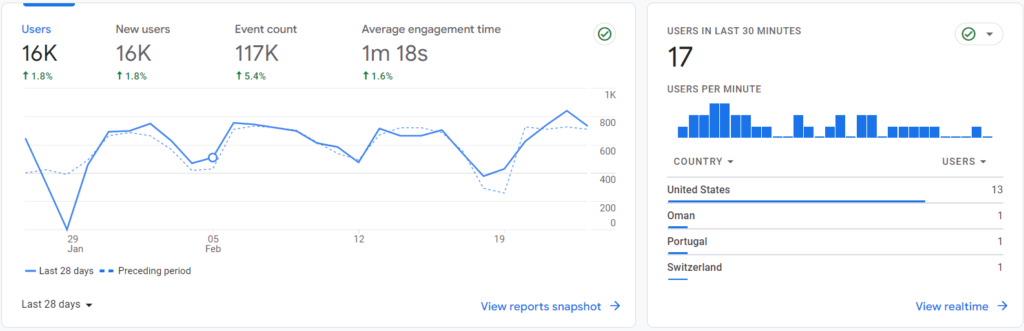
    • Analytics, such as those from Google, provide insight into who is visiting your website, how they are getting there, and how your site compares to your competitors. It allows for the adjustment of strategies to enhance outcomes.
    • Google Search Console is an excellent tool to help you to learn how well you rank for various terms and phrases people put into the search engines. It helps to monitor and then debug your website and then optimize the site without any need to learn how to code to improve visibility.
    • Moz Pro is a type of all-in-one tool that can help to improve search ranking for your company. It can help you to find SEO opportunities on your site, build reports, and track your growth over time. 
    • SEMrush provides a dashboard that provides insight into how well your domain is working as a whole. SEO Toolkit is one component of this tool that can help you with building links, selecting keywords, and monitoring competitors. 

    Keyword Research and On-page Optimization

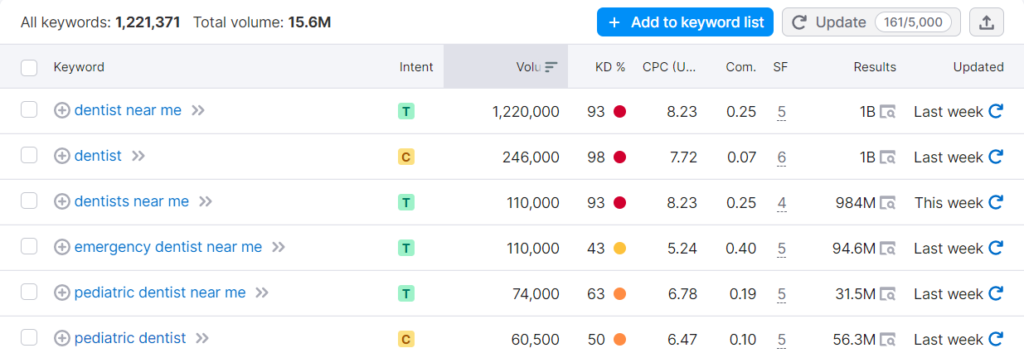
    Keywords are a big part of SEO for dentists, but often not taken seriously enough in the strategy building phase. However, you need to know the following:

    • What phrases people use to find services you offer
    • How to include local components into your site to attract a more local audience
    • What amount of competition is present for any phrase you are using
    • How to improve beyond your competitors for key phrases

    Much of this comes down to on-page optimization or the process of understanding your target keywords and then utilizing them properly on your website to improve ranking.

    Site Health and Technical SEO

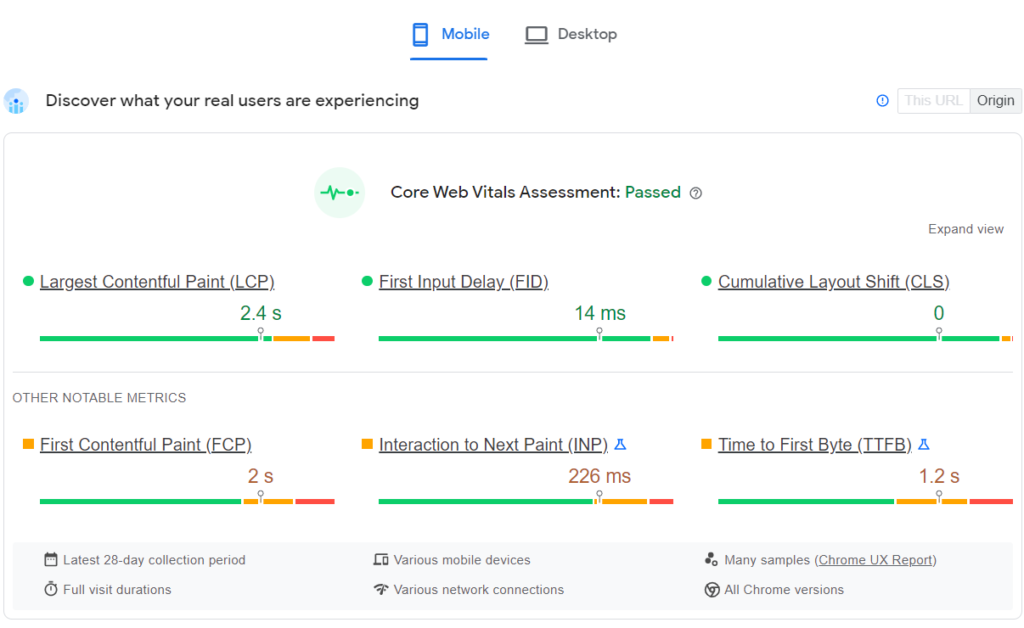
    While many factors impact the overall success of a website, the overall site health and technical aspects of it can play a big role in that process as well. If you do not have a dedicated staff or a professional available to handle your technical SEO – like the use of metadata, coding, and other behind-the-scenes components, you may be missing out on key opportunities to improve your strategy.

    If a website does not load properly, prospective patients go to another service that does. If the graphics do not display properly or the process of booking an appointment is complex or confusing, people simply will not wait to figure it out. Instead, they just move on. This goes beyond just setting up your website. Ongoing oversight remains critical during this process. 

    Google Business Profile and NAP Citations 

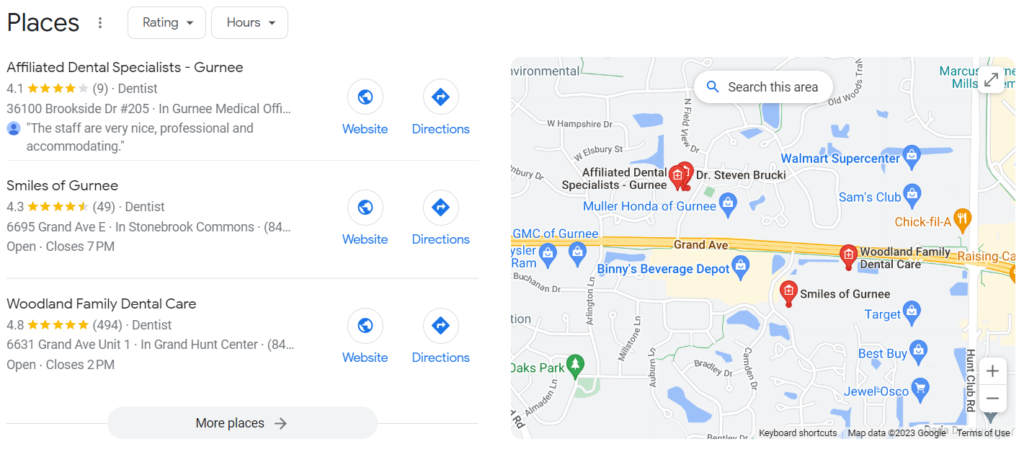
    Google Business Profile is one of the best tools for professionals like dentists. It is a free tool that Google provides. You will list information about your practice, hours, location, services, and any other data that’s valuable to your patients. Then, when someone Googles a dentist in your area fitting those criteria, your website shows up in the Three Pack – the three listings that appear on a search engine results page. This also makes it incredibly easy for consumers to book an appointment or call you without even going to your website.

    Also important are NAP citations. Across the internet, your business’s name, address, phone number, and other data are present. However, if there is data on one site that isn’t accurate or has a mistake in it, that could impact the patient who is looking for service. By monitoring and improving NAP citations, it’s possible to boost your SEO ranking. 

    Link Building and Content Strategy 

    Yet another component of building your practice’s online presence is using link building and content strategy. Google values links to your website on other websites. It shows that your website is valuable and respected. That gives you a boost in your search engine results if you are being linked to from high-quality and highly valuable websites. Creating a link building strategy can empower this process.

    Content strategy is the creation of content for:

    • Your website
    • Blog
    • Social media
    • Email
    • Other outreach tools

    The goal here is to create content that includes keywords and your overall SEO strategy, but also that is valuable. It is content that people will learn from, respect, and use to make their decision on whether or not to call you for help. Content also helps create engagement for your patients on social media. They can see your business, learn about it, learn from it, and then remember it when they have a need.

    SEO for dentists is a critical component of growing a practice. It does not have to be a challenge when done well, but it should be an ongoing effort. With the help of professionals, this could become one of the best ways to grow your practice over time.