
Author: steve

  • Evolution of a PPC Agency

    Evolution of a PPC Agency

    There is a lot of talk about artificial intelligence in digital marketing and its impact on us as an agency, specifically in PPC advertising. For over twenty years, I have seen a lot of changes in the search engines.  We’ve gone from managing the minutia to strategizing with AI.

    Some of the changes in the PPC world and where it lands us as a PPC agency:

    The Search Engine Competitors

    In the early years, the change was about the players. As the different search engines competed for PPC marketing dollars, the number of paid search engine options faded over time. Yahoo! and Ask had dedicated sales teams, then eventually stopped selling and simply incorporated competing search engines into their search tools. Google and Microsoft are the last two (viable) PPC search engines. 

    Through all this time, Google set the standards that the others tried to emulate. From consumer-facing features to ad management UI, most tried to copy Google. We are at a point where Microsoft simply says to import your Google Ads or Google Merchant data directly. 

    As an agency, it is easier to deal with a few players, but it seems restrictive in the search space.

    Google Ads: From complete control to black-box

    Focusing on Google which set the stage for all search engines, Google tried to provide the PPC managers as much information and control as possible. The search management landscape is unrecognizable in today’s environment. Take these examples:

    Long-Tail Search Term

    When Google reps visited our agency, one of the first strategies they encouraged was an exceptionally well-built-out keyword list with well-structured ad groups. Having five- or more-word search term targets was very common. Creating ad groups focused on very finite terms created a competitive advantage. 

    You could find terms on which very few competitors were bidding, thus creating very low-cost CPC programs. While everyone was bidding on head terms, only those who did a great deal of work built out long-tail programs. 

    Google effectively killed long-tail PPC programs by implementing “low volume” barriers to creating a search auction. Now, Google has forced us to compete with head terms (or very close), inflating the cost for any advertiser who managed long-tail terms.

    SKAG – Single Keyword Ad Group

    One strategy implemented by many PPC agencies and managers is the SKAG. It was very targeted, with very tight ad copy and landing pages. Running the SKAG was a lot of work, as was managing the ad groups and the negative match type to funnel the correct ad to the best search.

    Google effectively killed this strategy by no longer honoring match types. When your ad group ad can show for searches that Google deems “mean the same” and seems to grow the list of “qualifying searches” as you increase your negative keyword list, the SKAG loses its validity.

    CPC Max Bid – still available, lease valuable

    From Enhanced bidding to CPA to ROAS, CPC Max Bid has all but lost its meaning. You can absolutely do this. But, with the advent of AI, manual bidding is highly inefficient and perhaps even detrimental to a PPC ad program’s success. 

    With the advent of PMax campaigns and CPA/ROAS targeting, the CPC quickly becomes irrelevant. This is where AI is making itself felt.

    What Does AI Mean for a PPC Agency?

    For any agency or in-house PPC manager, the direction of Google Ads will greatly reduce the time spent on tactical implementation and increase the focus on strategy. 

    This is a difficult switch for larger agencies or any PPC agency that built a team dedicated to managing the tactical implementation of paid search, which almost all have. I have seen recent PPC agency recommendations that make it clear that the agency is still clinging to the old tactics (old being just a couple of years). To shift from tactics to strategy, agencies have to reduce staff at the lower to mid levels and hire/promote staff at upper-mid levels to work with clients.

    It makes managing the client relationship more challenging on two fronts. 

    One is that helping clients transition from the tactically focused account structure to a more strategic/AI-centric approach is difficult. Clients are used to seeing very detailed campaign builds and reporting. As one agency put it, manually managing the program gives you more control… but not better results. Clients feel better with the control. As an agency, we have to help them look past the lack of direct control and see the results.

    Two, fee structures are based on the old paradigm. With hours baked into tactical actions that are no longer needed, agencies must reevaluate their fees with current and new clients. These hours and the agency’s profit based on them are going away. It can be challenging to take steps to reduce the agency billings. It’s a bit frightening to give up the revenue, and let’s face it, a bit of an ego hit. But our industry is changing, and we need to adapt and be fair.

    The pace of change in the pay-per-click industry is accelerating. Agencies should be leading their clients down this path with a result-centric, strategic approach. Waiting until you have no choice when Google and other channels force the use of their AI, will leave the agency and the clients behind.
  • Are You Starving Your Google Ads PMax Campaign?

    Are You Starving Your Google Ads PMax Campaign?

    Google Ads is in a transition, and while this may initially feel unsettling for PPC ad managers, it’s important to remember that this change is designed to enhance our strategies. The world of Performance Max (PMax) campaigns is an AI and ML-driven approach, promising greater efficiency and results. 

    This world requires a great deal of trust. With PMax, we provide Google with assets and data; users provide the data through behavior and signals, and Google pulls information about behaviors from all over. AI optimizes the campaigns in ways that are challenging to comprehend. 

    This is challenging partly because of the opaque nature of the PMax campaigns. Google will adjust bids, create ads in real time, and select placements without managers seeing any detail. Even when the campaigns meet or exceed the goals, we are troubled by our lack of knowing how. 

    PMax Needs Data

    The power of AI lies in its ability to sift through vast volumes of data and establish connections at a scale that surpasses our traditional ‘if-then’ logic. AI/ML continually assimilates data, identifying patterns and enhancing performance. This underscores the importance of our campaigns acquiring as much information as possible, a crucial step in the PMax journey. 

    How We Siphon Data From PMax Campaigns

    Campaign managers are used to tactical actions, and it is tempting to maintain tactical control of some aspects of the Google Ads campaigns. Whether keeping a pure search campaign going, creating multiple PMax campaigns to segment messaging, or creating several asset groups,  having some level of tactical control is common. 

    However, each separate campaign isolates data, removing it from the aggregate data collection that helps AI improve campaign performance.

    There are legitimate reasons to create different campaigns. As managers, it is important to ensure each campaign serves a unique purpose—every campaign siphons activity (data) from the PMax campaign. Reducing the number of campaigns should help the overall account performance.

    If unique campaigns are maintained, consider applying portfolio management. This allows Google to optimize budgets across campaigns.

    The PMax Journey

    A common strategy (broadly speaking) is to segment campaigns into prospecting (people who have never been to your site or searched your brand) and remarketing (messaging people who have visited your site or provided their information). For manually managed campaigns, this makes sense. Gaining the first visit and guiding a person through the lower funnel require different messaging.

    But, when we do this manually, we are guessing at budget allocation and optimal cost per action. 

    A PMax campaign monitors users throughout the journey and optimizes their experience at each step. Ads are created in real-time and targeted for context/placement and the person’s journey process. AI adjusts the bids across the Google ecosystem to maximize the end result. 

    So, while we may manually create a prospecting campaign that gets the most users to our site (let’s say), AI can identify those most likely to convert and adjust the bid accordingly. Rather than getting 100 visitors for $1 each, the AI may find the best ten prospects and pay $10 each—a classic case of quality over quantity.

    However, the PMax campaign must see the entire conversion journey to gather the right data. If we siphon prospecting data from remarketing data, the PMax campaign cannot make the connections. It essentially mirrors your manual optimization. 

    Steps To Moving to PMax

    Google Ads provides many tools to help ad programs move to PMax. Some convert existing campaigns, others implement experiments, and others make it easy to build a PMax campaign from scratch.

    Before implementing new PMax campaigns, consider the scope of existing campaigns in the account. The more campaigns running, the less data the PMax campaign can receive. So, start scaling back if there are many campaigns. 

    Setting goals will help determine which campaigns can be shut down and is necessary to establish a PMax campaign. You can target several types of goals, from CPA to Max value to ROAS, even max traffic. The more data you can feed back to Google, the more successful your campaign will be.

    There are technical aspects to implementing PMax outlined in Google Ads as you implement the program. Follow the steps they show, and you should be good.

    So, are you starving your PMax campaign? If you are just starting one, will you feed it enough data? Keep your PMax campaigns healthy with a steady flow of data and assets to leverage what AI/ML can do.

  • Google Tag for Ads

    Google Tag for Ads

    Google Ads’ latest tag is simply called “Google Tag.” This code allows Google Ads and other Google tools to track activity on your website and return information to the respective Google Tools.

    Why you need to implement Google Tag

    Browser security has been changing, tightening restrictions on third-party Cookies. 

    If you’re unfamiliar with browser cookies, they are simple text files saved to your computer that store information. The information varies depending on what the author of the cookie wants to track. As a site owner, you may want to save a user’s preferences to the cookie, then when they return, set their browser experience accordingly. It could be language, layout, or some IDs that indicate who they are (non-PII-based). 

    Third-party Browser Cookies

    Third-party cookies, as the name suggests, are created by and transmit the information from these text files to another domain. However, due to security and privacy concerns, this cross-domain access to cookies is being phased out from most browsers, requiring a shift in tracking methods.

    Until recently, most tracking tools, including Google’s, relied on third-party cookies to save and share information with services like Google Ads. Safari restricted this a while back. Google Chrome will be in early 2025 (perhaps; the time keeps getting pushed back). Eventually, however, browsers will no longer support these.

    The Google Tag is a tracking method that does not rely on third-party cookies. When cookies are blocked, the Google Tag will be the only way to provide data back to Google Ads to track conversions and help optimize the advertising.

    Enhanced Conversions with Google Tag

    Google Tag is part of a toolset that combines ad data with site data and AI/ML to optimize advertising programs. To fully leverage the capabilities available, advertisers need to implement Enhanced Conversions as part of the Google Ads program. Enhanced Conversions collects user-provided data from forms and checkouts back to Google Ads to provide the AI with value and user data. This is used to improve the campaign performance.

    Automated Detection

    Google Tag can detect form fills and read the user-provided data automatically. Google Tage is the quickest way to implement Enhanced Conversions. But, it is also dependent on Google correctly picking up the signals.

    Manual Implementation

    You can manually implement form data transmission through Google Tag Manager(GTM). This requires familiarity with HTML elements, Javascript, and GTM configuration. With GTM, you can test the process to see what is sent to the Google Tag.

    Privacy Policy for Enhanced Conversions 

    Implementing Google Ads Enhance Conversions requires sites to conform to privacy disclosure policies. When implemented, check the latest Google Requirements for user notification. A link will be shown to you during the setup process.

    Two trends are converging with the implementation of Google Tag. First, Artificial Intelligence and Machine Learning are replacing manual optimization. Second, browser privacy concerns are pushing us into new methods of measuring ad performance and collecting information. Combined, these have the potential to increase ROAS significantly while reducing time spent in the weeds of managing ad programs.

  • The Role of SEO in B2B Marketing

    The Role of SEO in B2B Marketing

    On the surface, SEO’s role for B2B is simple: help generate sales. However, where SEO comes into play for sales impacts the SEO strategy

    Business-to-business is often discussed as if there is a monolithic go-to-market strategy that somehow applies to all B2B companies. Obviously, this isn’t the case. So, when we talk about SEO, we have to go beyond B2B and beyond the specific industry to understand the individual company’s sales process.

    The Target Metrics For A Website

    Websites are marketing tools. Like any other marketing tool, successfully developing and managing a site depends on defining its purpose/goal. 

    In general, we find that the website, and therefore SEO, plays a role in one or more of three areas.

    Direct Online Sales

    The easiest and most direct metric for a successful website is e-commerce revenue. When selling services, equipment, parts, or consumables online, we have a direct attribution to organic search. 

    Lead Generation

    Lead generation is more commonly a target metric for B2B. While measuring leads and attributing them back to the sources is relatively straightforward, tying back the quality of these leads is less so. This becomes more challenging as the sales cycle becomes more complex.

    Sales Support

    This is more amorphous. For complex or longer-cycle sales processes, websites often become the go-to channel for prospects. Making sure content is easily accessible and discoverable or appears in Google search results when prospects continue with research can make or break a sale. While there is no hard metric for Sales Support, UX and SEO visibility play a key role.

    The Purchase Process

    What is the process from shopper to prospect to customer? For some industries, there may be a standard that applies to most companies, but that is not always the case. Two companies in the same industry may have different growth strategies. One may have an active Outbound Sales Team, while another may have a Product Lead Growth strategy. These involve two distinct buyer experiences even within one vertical.

    Short-Cycle

    From the time a customer identifies a need to the time the purchase is made, it can be a day or perhaps a few days. We often see this in parts and consumables. There is not a lot of research taking place. So, you have to make it to the shortlist quickly, identify and communicate the KSP immediately, and have a 1-3 day communication plan. 

    There is very likely an e-commerce component or a rapid response lead generation program. Once the transaction is complete, the buyer will unlikely visit the site again until another need arises. 

    Mid to Long-term Sales Cycles

    Longer sales cycles tend to involve higher costs or longer-term commitments. They also involve more touch points, research, and a greater need for rich content. The website must support the communication coming to the customer during the sales process as well as support the prospect in providing information during their research. 

    At this point, there is another discussion on customer relationship management involved, which is beyond our scope here. 

    Key Content For Websites in B2B Sales

    Knowing the target audience is vital to prioritizing and developing the website’s content. While all three of the following areas are important, their weight and focus on a site depend on the purchase process and sales strategy. 

    Product/service education

    This can span the category or the company’s specific offerings. The website has to provide sufficient information to educate prospective customers and demonstrate a level of expertise to make prospects comfortable.  

    Company Authority

    Higher costs and longer commitments come with more risk and require more support. But even with lower cost/commitment services, sellers must convey their authority and expertise in the marketplace to make it to a buyer’s shortlist. It is not enough to just describe products or services. The website must convey experience in the industry.

    Company Trustworthiness

    From transaction/information security to post-sale fulfillment, a website has to communicate trust. Verifiable customer reviews, a commitment to providing references, and real case studies are critical to establishing the trust needed to make it onto a prospect shortlist. It is not sufficient to simply list what a company sells; websites have to convey trust. 

    What about SEO for B2B Websites?

    We didn’t forget. But SEO comes after all the above. While we work on SEO strategy, SEO is a tactic within the sales and marketing areas. So, first, all the above-mentioned needs to be figured out, and then search engines and how to structure content for them can be considered.

    One challenge for digital agencies is when clients or prospects begin with SEO discussions (or digital marketing in general) prior to the marketing and sales strategy.  We can work to get content to rank with search engine optimization, but if it is not the right content or not targeted to the right part of the sales funnel, then even page one ranking is not going to move the needle… well, maybe a little. But the point is that we must have the right goals in place for SEO to be effective.

    Fortunately, we have been around long enough to help our clients lay the groundwork for a good digital marketing program, including SEO.

  • The demise of Cookies and lessons from it

    The demise of Cookies and lessons from it

    As Google Chrome is sent to send Cookies to the dustbin this year, digital marketers will lose one tracking mechanism on which they have come to rely…perhaps too much so.

    A primary application for browser cookies in marketing is the ability to remarket/retarget a browser (person) that has been to the website. This seems great, as it shows interest. But, it has led to lazy marketing habits.

    Blanket remarketing gives no real thought to context or timing. It intrudes on users when they are completely removed from the context or concerns that led them to the advertiser in the first place.

    But doesn’t Google automation deal with this? Not really. In theory, it should. But we’ve all experienced the unsettling sensation of being “followed” around the Internet by a site we visited. 

    This recent article in AdAge speaks to this very issue. 

    The next level of automation

    As Google pushes everyone to trust their AI, it expands on the concern raised by blindly retargeting users based on cookies: that, as marketers, we are relinquishing our control to a black box of automation. We are told this improves our marketing ROAS, but I am not convinced.

    I think AI will improve results when it comes to unmanaged programs. For marketers who do not have the time to monitor and adjust their campaigns, AI provides a level of optimization that is bound to make things better.

    I have seen dedicated campaign managers do much better for the average company. One thing AI is good at is finding the low-hanging fruit. A freshly launched program managed by AI can get quick wins, but they often plateau. Changes to pages, offerings, and budgets can reset the AI to a learning phase. Manually managed programs can get beyond the low-hanging fruit.

    The other area where AI will excel is data analysis and response. However, the response/output is only as good as the data input, and the average company has issues with this.

    A full circle of ads, outcomes, and feedback works well for AI. The most basic of these is E-commerce sites that feed all the sales back into Google Ads (directly or through G4.) AI is likely your best bet if you have an e-commerce website, and your primary conversion is an online sale.

    Where Google AI falls short is when the value of an action is determined after the conversion point. All Google knows is that a conversion point was triggered. Herein lies the problem. 

    Left to Google, the initial round of leads is more likely to be filled with junk than value. However, Google doesn’t know this, so junk leads are used equally in conversions. The AI is optimizing the program to deliver junk.

    Can this be fixed? Yes. Absolutely. But not by the resources of the average company.

    Fixing Junk Leads in Google Ads

    Google provides valuable mechanisms to improve lead generation for offline activity following an online conversion.

    Every lead submitted to Google Ads should include the corresponding lead ID, which should be carried with the lead through the sales/closing process.

    When leads are closed, a file can be generated (or API used) to load the results back to Google. With this file, Google can assign value to each lead, allowing the AI to optimize lead generation.

    For junk leads, which are usually identifiable very quickly, a file with the lead ID can be uploaded to Google to have these leads deleted from the system.

    Like so much of the ad tech hype, leading-edge tools require resources and knowledge that are not available in the average company. 

    Beyond the issue of resources is that of reliance on technology and complacency. Remarketing as we know it will end this year. And that’s not a bad thing. It reminds us that we are prone to accepting the easy out, allowing technology to do what we should be doing—or at least paying a great deal more attention to. 

    As we continue to push the envelope of AI in advertising, we must always pay close attention to the outputs and ask ourselves if this really is the best that can be done.

  • Sales and B2B PPC Programs

    Sales and B2B PPC Programs

    Business-to-business (B2B) marketing has many facets. And a given company may employ just one or many of them. The challenge for PPC programs is determining where they fit (if at all) in the various B2B go-to-market strategies.

    What is PPC for B2B?

    First, let’s cover what PPC means in our context. Yes, it is pay-per-click, but beyond that, PPC used to be nearly synonymous with paid search engine advertising. While still including search, it encompasses so much more. Some platforms are not technically PPC, yet most have a PPC component. But, even with a CPM channel, ROAS-based advertising and tracking are helping bring PPC and CPM under the umbrella of the cost per lead or cost per sale metric.

    One benefit of starting with a PPC model (even with CPM channels) is that we start with a “cost-per-action” mindset. While CPMs are great up funnel, when we try to maximize ROAS, the more actions we can drive, even a basic click, the further we are down the path of the value of the advertising. 

    PPC advertisements management has the perspective of driving measurable value from the ad spend at any funnel stage.

    Role of B2B PPC Advertising

    The goal of advertising in B2B can vary among industries and even between companies within an industry. Yes, ultimately, it is to make money. However, how advertising can impact the prospect is, to a large extent, determined by the sales cycle. 

    Direct-to-Sale

    Perhaps the easiest to measure, direct-to-sale, is what it sounds like. From the advertising engagement, the prospect is to make a purchase, usually through e-commerce. These tend to be low-involvement purchases or product-lead strategies. The sales are usually e-commerce but can also be PO-based.

    Lead Generation

    Many B2B advertising programs are developed to drive leads a sales team follows up on. A lead-quality feedback loop is important to assess the value of the various PPC lead channels. While qualitative input from the salespeople is important, quantitative input is essential.

    Many companies employ CRMs with marketing automation tools. These allow each lead and lead value to be tracked and then fed back for media optimization. As a result of direct media optimization, the more efficient programs allow the sales teams to spend more time on likely leads and less on low-quality leads.

    Sales Support

    Perhaps the more difficult way to attach value is a sales strategy involving support in pre- and post-contact. The intent is to ensure prospects can easily access product and service information during the buying process.

    Phases of B2B PPC Implementation

    As an agency, we work with B2B clients across the strategy spectrum. The key to our success lies in our communication with the clients’ senior management, ensuring that everyone understands the role the PPC program has in supporting the sales process. This best plays out in phases.

    Initial conversations: getting alignment

    With this understanding, we set the target metrics and developed a plan to achieve them. As part of this process, we ensure that everyone is in agreement. Once we align the first stage, we start the program.

    Launching the PPC Program: confirming metrics

    In the initial stage of the program, metrics are validated, and the feedback loop is verified. During this phase, assumptions are tested, reporting is confirmed, and the sales team is consulted to ensure all aspects are as they should be.

    Any needed adjustments are made to the program or the tracking and reporting.

    Ongoing PPC optimization

    Once the tracking and metrics are confirmed, the PPC management team will begin optimizing the program. Depending on the program objectives, this stage may start immediately or require a longer period to start seeing actionable data.

    B2B PPC optimization is an ongoing process. Over time, the competitive landscape may alter, prospects may change, or industry dynamics can force small or even large adjustments to the PPC program. Additionally, Google’s algorithms may also change. The PPC programs must continually be monitored and optimized.

  • Why is it so hard to get a Verified Google Business Profile?

    Why is it so hard to get a Verified Google Business Profile?

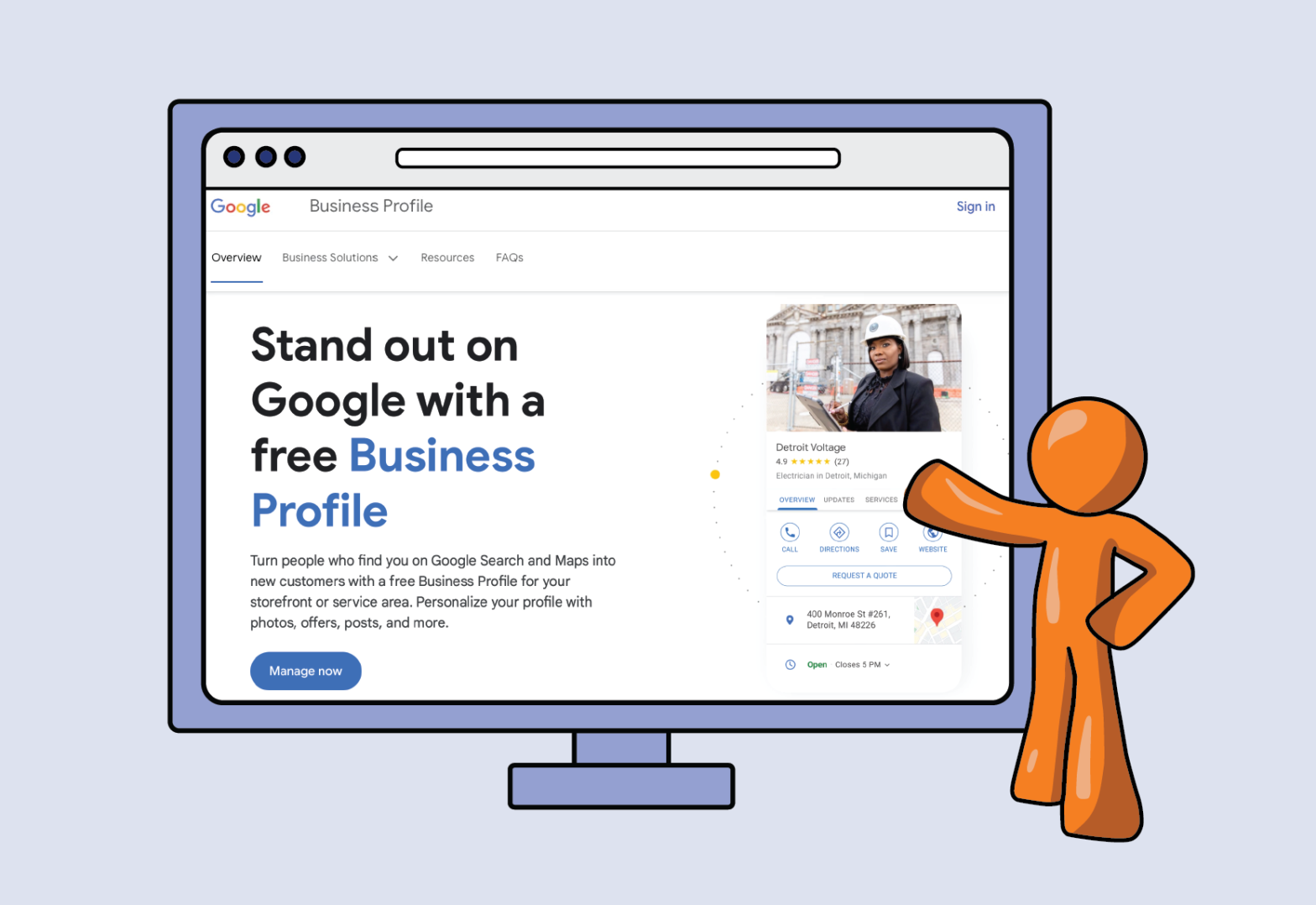
    Looking to get your new business verified on Google or an existing business reverified? Everything from opening a business to changing a phone number or location can lead to a new verification process. Until it’s complete, you will have no information or (perhaps worse) the wrong information appearing on Google. It is critical to a well-rounded SEO program.

    What is A Google Business Profile?

    First, let’s discuss a Google Business Profile. Over the years, Google has recognized that people are searching for local businesses, and much of the information about the name, location, and phone number (known as NAP) varied and was incorrect. So, Google created business profiles that appeared on the search results as a separate ‘panel’ on the side of the desktop search results. We’re going back 15+ years.

    To populate the results, Google would scan the Internet and use its search technology to determine a business’s correct NAP. An entire industry was dedicated to spreading NAP information around the Internet so that Google’s spiders would be more likely to pick up the right information rather than the wrong information. There are remnants of that industry, but it is less about Google than getting the right information to where people may be looking.

    Then Google opened up the ability to provide NAP directly to the search engine. But it still used its spiders to determine whether the submissions were correct. At the start, there wasn’t a real verification process. You could submit the right information, but it did not appear if the contradictory information was too prevalent.

    Introducing Business Verification

    Google opens the verification process for local businesses. At the time, virtual or remote was not a big part of the scene. So, the process was developed around brick-and-mortar businesses. Simply put, Google would send a postcard to the location, and on the card was a verification URL and a code. Log into your Google account, go to the URL, and enter the code… you were verified. 

    This allowed businesses to fully control the NAP that appeared on their Google business information. The name changed over the years to Google Business, previously Google My Business. Along with the NAP, Google added the ability to manage hours, services, messaging, and more. But, at the heart of it all, it was about the Name, Address, and Phone Number.

    So, what changed that makes it so difficult now?

    Two major factors have forced Google to make the verification process more vigorous. 

    Fake locations 

    For various reasons, fake business locations were appearing. Remember that Google Business is about local businesses. Using its algorithm, Google determines how close a business needs to be to the person searching in order to be considered “local.” 

    If you want to get a call from people in a target geographic area, you must have a location near enough that Google would show your results. The closer, the better. So, use a fake location (mailbox locations, virtual office centers, etc.) to receive and forward the verification postcard Google sends, and you’ll be verified. 

    For businesses where the customer always comes to the location, the phantom location process simply does not apply. But, think of regional or national service chains with a fleet of technicians that can travel long distances to their customers. A fake location makes it more likely that you will get the call. 

    To help businesses that serve an area and travel to the customer, Google provides the ability to designate an area no more than a 100-mile radius from the location. For most small businesses, this is adequate. Most Business profile appearances are much less than 100 miles away.

    But for regional or national players, the economics are better if they can have a single real location and create multiple phantom locations, even within the 100-mile radius. They’d be more likely to show up in the search results.

    Growth in No-Premise Businesses

    Over the past 5+ years, the number of small businesses operating out of a home has increased. Professional services like accounting, legal, and consulting have gone remote/virtual. Small businesses for home services like plumbing, electrical, or contractors grew and are virtual as far as their offices are concerned. They still serve a local community, but they don’t have a physical location (other than a home) that can be verified.

    With the growth and acceptance of virtual meetings, people have become much more comfortable with the no-premise business model. Google has struggled with a method to verify these types of companies.

    How are Businesses Verified in Google?

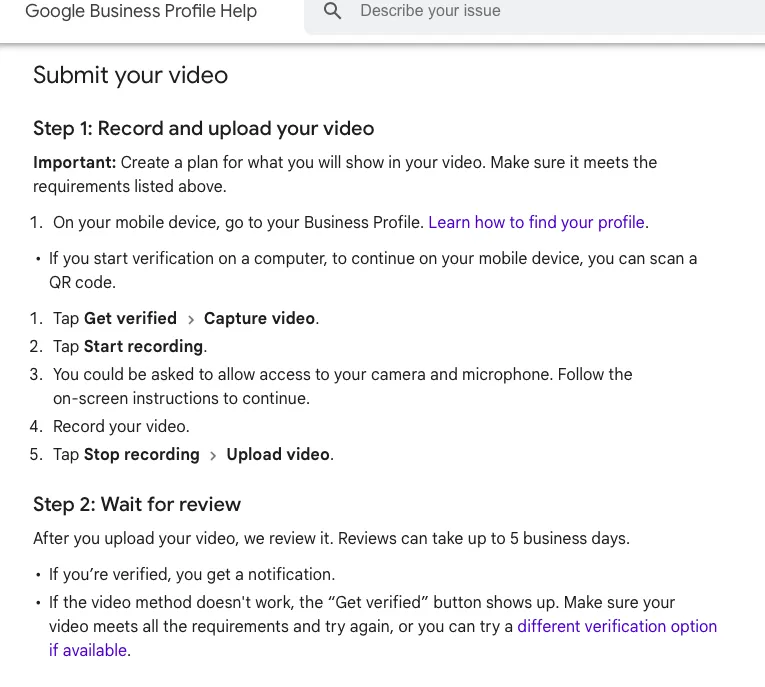
    Google has moved to a video verification process. Unfortunately, the foundation of this process is still based on the brick-and-mortar model. 

    Business owners are asked to take a video of their location that includes:

    • An outside view of the premise with the address clearly visible. Usually, a street sign and build number.
    • Clear signage with the business name.
    • An interior view of the business to demonstrate that it is operating.

    More details on Google business verification are here.

    But what if you don’t have a brick-and-mortar storefront to verify?

    You will still need some kind of NAP information, but you toggle the profile not to show the address and mark you as an area’s service provider.  You will set your area in the profile. There is a good chance that you will need to request a verification call even after you submit a video, but the video will be a required first step. 

    So, if you don’t have a storefront, what are you showing Google on the video/call?

    Keep in mind that Google is not intentionally making it difficult to verify. It is trying to prevent fraud and fake locations. With this in mind, the following is a pain but not unreasonable.

    1. You still need to show a physical location to verify that you are in the area. Provide the street and number of your home or apartment.
    2. The space where you work. Should be an “office-like” environment and clearly a place where you are working on business. 
    3. A business card with the company name. Show both sides. Other marketing materials can help as well.
    4. Your face in the video.
    5. You access your business accounts on the computer. These can be a Google Business profile, business email, etc. 
    6. A vehicle. This can get tricky if you don’t have one. But, a video of the outside with the tag visible (state license plate), and you get into it and start it with the dashboard in view.

    Here is where Google is a bit behind. It gets difficult if you don’t have transportation because you operate virtually or you are in a city and use public transportation to visit customers. Your best bet is to get a video call set up as early in the process as possible and talk to a Google representative.  They may be able to help with an exception.

    Here is a screenshot of the current Google video process.

    steps for Google business video verification

    Using a different verification process

    Google’s documentation shows various methods for verification, but not all are available to each business profile. Going through the help section and diving deep, you can get to the point of “contact us.” While this should not be your first step, once you’ve submitted a video that gets rejected, and perhaps one revision, getting a direct contact is a good next step.

    Verification can take some time and patience. But, it is worth the effort to be present when people search for your services on Google.

  • Google Ads Updates – Feb 2024

    Google Ads Updates – Feb 2024

    Over the past month, the two biggest (but not surprising) announcements have to do with Google and the automation of the PerformanceMax, or PMax campaigns.  Google has faced several critiques about its AI-driven programs.

    Because there is no transparency, ads are run in objectionable places. 

    Google will launch placement visibility and exclusion capabilities to PMax, according to Campaign.com.

    Gemini (Google Generative AI) will become part of PMax 

    One challenge advertisers may face with PMax is creating ad assets to fit within all the possible placements of a PMax campaign. With Generative AI, Gemini can create appropriately formatted ad assets for the campaigns. Google PMax and Gemini

    Google continues to push for AI control while advertisers are looking for more visibility and manual input, if not actual control(that ship has sailed.)

  • How much should a new website cost?

    How much should a new website cost?

    Well, we have to say it. The cost of a new website depends. And it can vary greatly. 

    We’ll start with a price range for building a site. It’s useless really, but if we don’t show it up front we won’t answer the basic question. 

    Building a new site can range from a few hundreds dollars to 10s of thousands. Is that vague enough? 

    Most small businesses can expect to spend $2,000-$4,000 for a new site that is not one of the template drive CMS systems. More on those in a bit.

    So why the wide range in cost site development? 

    Broadly speaking, there are a few factors involved. The following will impact the price of building a new website..

    Technical complexity of the user experience. 

    Once you step beyond the basic HTML code of a site and start to address functionality, costs can rise. Any reaction the site has to a user action increases the technical complexity. Common elements  like form fills or simple roll-over/clicks to display expanded content, are usually not too costly.  Most front-end developers can handle these things, and if you have a CMS like WordPress, there are plugins the take care of them.

    If you start to get too complex, you will need to engage UX designers and site architects as well as developers. The project can go from easy to difficult very quickly. It is not just a matter of coding a function, but ensuring the entire site navigation/interface  is user friendly, the technologies are compatible, and the structure is manageable as the technical aspects get complex. Very few sites get to this level, but when they do, it can be a 5 to 6 figure cost.

    So the more you want the site to do, the more time and higher level of technical knowledge is required. This simply costs more.

    The creative/aesthetic level

    Do you want a truly unique creative execution with custom design and graphics, or are you good with available themes and stock creative?

    There are a lot of stock image and video resources available. You can get some nice creative elements for relatively cheap. Then there is additional time to make the images web-friendly, resize and change their format. While it takes some time, it is a more economical option.

    Custom creative elements take time to design and execute. For this site (fanaticallydigital.com) the creative is entirely custom. The graphic designer created the elements for all the main pages. This takes talent and time. A site that uses custom graphics can easily have a five-figure price tag. 

    Managing the cost of revisions

    Beyond the general directions (stock vs custom), is the number of revisions. Whichever route is taken, the website owner rarely accepts the first version. Each iteration is more time and adds more cost. Scopes of work have to be very clear on the number of revisions allowed or the approval process for the additional hours to make them.

    Ongoing cost for hosting and maintenance

    Once built, a website has to live somewhere and be updated regularly. Hosting can be as cheap as $15/month (or less) or $100+ (though rarely this high.) Most websites can have adequate hosting for $15-$30/month. 

    Maintenance is another issue. For something like a WordPress site, basic upkeep is pretty straightforward. But, most site owners are not familiar enough with the CMS to do this. As a result, maintenance is not done and then a core WP update breaks the site because the site was too far out of date. 

    Ultimately, time/hours are the most costly part of building a site. And the more specialized the knowledge needed, the higher the hourly rate.

    So, realistically, what can a business expect to pay for a website to be created?

    On the low end $20/month using templates and doing the work yourself.

    Cost of Captive CMS Systems

    Using platforms like Wix or Squarespace for a basic site, or Shopify for ecommerce, you can have a relatively low development cost IF you use the templates and do the work yourself. 

    Wix starts at $17/month, but you’d likely want to opt for the $29/month Option or higher

    SquareSpace starts at $16/month, but again, you’d want to opt for the higher $23/month option or higher.

    Both Wix and SquareSpace have ecommerce capabilities, but if you are serious about selling online, you’ll want to look at Shopify

    Shopify starts at $29/month and has good base packages. 

    What about WordPress?

    WordPress (WP) is one of the most popular content management systems (CMS),however  it is not an out-of-the-box solution. Where the above-mentioned website builders are straightforward if you use their templates, WordPress requires a basic understanding of how the CMS works and the ability to work with the Themes and Plugins. If you are not familiar with it, WordPress can be frustrating (you do need that for the others, but they are easier to grasp.)

    That said, companies like GoDaddy and BlueHost have built website wizards to help you create a WordPress site. What is challenging is that, even with the wizards, things can go sideways. You can only deal with that if you learn the ins and outs of the CMS. 

    So, why is WordPress so popular?

     It was an early entry into the CMS ecosystem before sites like Wix and SquareSpace became popular. As an open source CMS, developers could implement sites and site owners could edit the sites without having to pay recurring license fees. It became an early goto for a CMS because little else could compare.

    WordPress is also more flexible than the captive CMS systems like Wix and SquareSpace. The UX can be customized and functionality can be created that is unique. Developers soon specialized in WP development, making it their goto for client solutions.  It also has a vast library of plugins that extend functionality for little or no additional cost. 

    Other CMSs can be customized, but there are simply fewer resources available to do so and the knowledge is applicable only to the respective CMS. Besides, once you start with customization that requires code development, you step away from the low-cost advantage of these CMSs.

    Also, WordPress is portable. Unlike the captive CMS systems, you can move a WP site from one host to another. This allows site owners to assess their hosting costs and make adjustments if needed.

    What should a site developed in WordPress Cost?

    If you hire a WordPress developer to create your site, the cost will range based on customization.

    Using a theme with no customization, but adding your graphics and images, you can expect $750 on the very low end to $3,000 on the higher end. 

    If you add custom page templates, the cost can increase by a few hundred to a few thousand dollars. Sorry, but it just depends on the complexity of the customization.

    Add custom graphics and WP sites can cost $10k or more. 

    The two pricing elements in site development (including WP sites) are time and specialized knowledge. 

    Most businesses can get a nice WordPress site developed for a few thousand dollars.

    There is much ambiguity in website development pricing. Some of this has to do with the number of technical variables and some has to do with who is developing the site. Domestic developers cost more, off-shore is less to varying degrees, As you reap the benefit of lower cost, you experience the trade-offs of off-shoring projects. 

    We may dive into the components of a website development project to provide a better understanding of why the cost and experience you have can vary so much.

    Finally, we’ll close with this: Whether a development project is successful or not depends as much on your ability to understand what the purpose of the site will be. Is it a sales-assist for your sales team, is it a lead gen, ecomm/sales,  or is in branding and awareness. Chances are it can be all, but your company may emphasize one or two more than the others. The site needs to be designed accordingly. 


    Is SEO critical, Conversion Optimization, Calculators for prospective customers, disseminating sales material? This an a host of other questions should be answered before the site development project gets going.

  • Why is it hard to trust Google Ads AI?

    Why is it hard to trust Google Ads AI?

    There is no doubt that Google is pushing advertisers and their agencies to implement Google Performance Max or PMax (combined with Gemini.) PMax is Google’s latest iteration to automate the advertising program for companies. Whether your program is search, display, or shopping, Google wants to move you to PMax, promising that it will outperform anything you do.

    If you are new to digital advertising, you’ll see that implementing a PMax campaign is not too difficult. But that is part of the issue. As the path of least resistance, it makes it easy not to consider what you don’t see and don’t know. For advertisers that have worked through the programs of manually managing ads and automated campaigns, as well as implementations between the two, fully trusting PMax is a challenge.

    Trust issue with Google Ads

    When you speak with a Google rep, they are confident that the automated system is the best. They quite sincerely believe and recommend advertisers use it. The confidence with which they tout PMax is borderline cult-like. If you dive into the details of the ads and run a PMax for an extended period, your trust in their confidence will wane.

    Some basic observations with Search Terms

    In a fully automated program, Google will present your ads to users in various channels that the AI considers important and likely precursors to a conversion. With all the data that the AI is fed, it makes sense that it should be able to determine what leads to a conversion. So, why do we lack confidence?

    Run a managed search campaign

    Even if you use an exact match or phrase match, Google will present your ads to people based on what it deems to be a close variant. While doing this, Google continually asks you to move all your terms to a broad match. In theory, this allows the system to match against what it deems intent, even if the search term used doesn’t appear to match with your target keywords.

    Take a look at the search terms that were entered and triggered your ads. Some very basic things stand out. As an example, look at geographic terms. 

    Run ads for your local market using geo-targeting. With that, you can also use geo modifiers, such as “xyz companies in Chicago.” You will notice some things:

    1. People who enter “xyz companies in Canada.”  will show up.
    2. If you add “Canada” as a broad negative match, suddenly, “XYZ companies in Toronto” or some other geography like France, New York, San Diego etc will show on the search query report.
    3. Long-tail bidding has not been possible for a long time, but Google is still showing that people are using long-tail searches.

    Google Ads Deliver to Inappropriate Searches

    These few (of many issues) used to be fully manageable through match-type implementation. Now that Google ignores match types, all we can do is add negatives. This has always been part of the process, but it is now the only tool we have.

    To the issue of trust in Google’s AI: A company can only work with other companies in a market, they set up the Geo-targeting correctly and also set up target keywords correctly, but Google is showing ads to people who explicitly are looking for providers in other markets. 

    When giving the AIs even a little latitude, Google spends advertising dollars on searches that cannot lead to a qualified prospect. It seems to be a simple concept that when we target a geo and use geo-targeted terms, the AI should be able to weed out bad queries. It just doesn’t.

    A cynical perspective is that Google is simply amping up the number of bidders for each user search, thereby driving up the average CPC. Similar to the implication of removing long-tail bidding. Lump every 4+ word query into an auction with three or fewer words, and you increase the number of bidders for each auction. 

    Whatever the drivers behind showing queries that are not appropriate, the effect is the same: higher CPC and lower qualified clicks.

    The Fragility of PMax

    Moving from keywords to complete AI-managed campaigns through PMax, there are a few things that show up.

    Consistency matters to AI

    The PMax platform depends on a period of learning. Set a budget, and the system starts slowly, learning how people respond and eventually spending the entire daily budget. This can take 1-2 weeks. If you have a change, your PMax campaign can reset itself. 

    Budget Matters

    The representatives at Google will direct PMax users with large budgets to a special team with more experience on the platform. One thing we did notice is that the performance at the higher spending level did not match the performance at the lower spending level. It deteriorated. 

    This can happen with manually managed programs as well. However, there is a notion being presented that PMax is some kind of magic that can make your program work on any budget. 

    Learning Matters

    As marketers, understanding our customers and how they respond to our marketing is important. We can cross-seed our channels by learning from another channel. PMax campaigns (and, to a lesser extent, the responsive ad campaigns) remove our ability to learn. It either performs or it doesn’t. We can’t tell why because we can see nuance.

    Premature Confidence in Artificial Intelligence

    Over the past couple of years, AI has been hyped as the holy grail of advertising optimization. In reality, it has a long way to go. From basic mistakes that it doesn’t know are happening, or the need for a relatively steady state in order to maintain optimization, or not truly outperforming manually managed paid search programs at scale, PMax has a role in search but not the only part to play.

    Opaque AI Tools

    As mentioned earlier, learning matters in marketing. It is not enough that the AI “learns,” but the people managing the programs also learn. This is important to other marketing campaigns. Understanding how changes in your overall marketing, products, and competitors might affect campaign performance is also important. With the black-box AI, not only can you not see what is working, but you can’t see what isn’t… and the AI doesn’t know either.

    Take the recent problems with Google Generative AI Gemini and it’s image generation. It produced historically inaccurate images when users asked for it to create images of the pope (and other historical cases), and the images were clearly not an accurate historical representation(CNN.) Given that only white men have been popes (for better or worse), it is a simple historical fact; there is no ambiguity. But Gemini didn’t know that, or wasn’t allowed to apply it. 

    If real people hadn’t reviewed the images, the AI would continue to produce inaccurate results and never make adjustments. 

    So, we know Google Ads’ AI delivers ads for a Chicago company (that only wants to do business with other Chicago companies) to people interested in Canadian companies. What else is it doing that we can’t see? How much waste is there when implementing a fully AI-driven campaign with no inputs or visibility other than your URL?