
Tag: seo

  • An Absolute Beginner’s Guide to Google Business Profile

    An Absolute Beginner’s Guide to Google Business Profile

    The Ultimate Local Marketing Tool for SMBs

    There aren’t many marketing tools that provide more value to both customers and local businesses than Google Business Profile. Whether you’re a local service provider like a plumber or moving company or you run a brick and mortar business like retail or restaurants, Google Business Profile can be an immensely powerful tool for bringing customers to your business.

    In this article, we’ll provide a quick overview on how to setup your profile and leverage it for maximum returns!

    I. What is a Google Business Profile (GBP)?

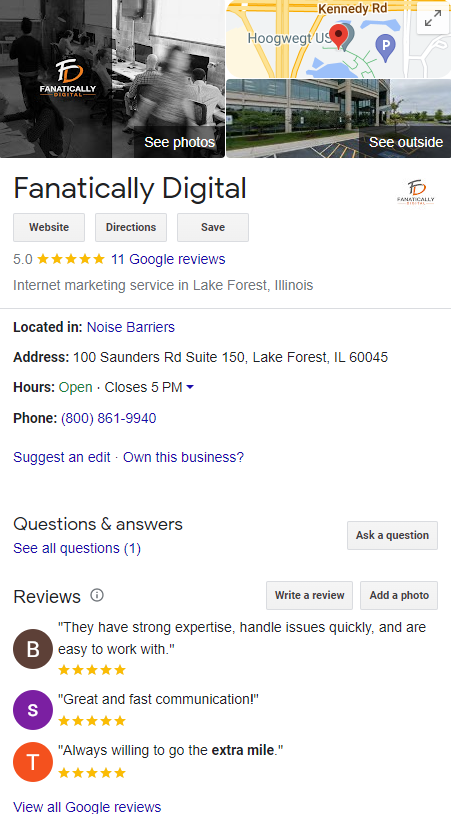
    A Google Business Profile (GBP) is a free profile that businesses can create to showcase their services and products on Google’s platform. It includes information such as your business name, contact info, hours of operation, website address, reviews, and photos. 

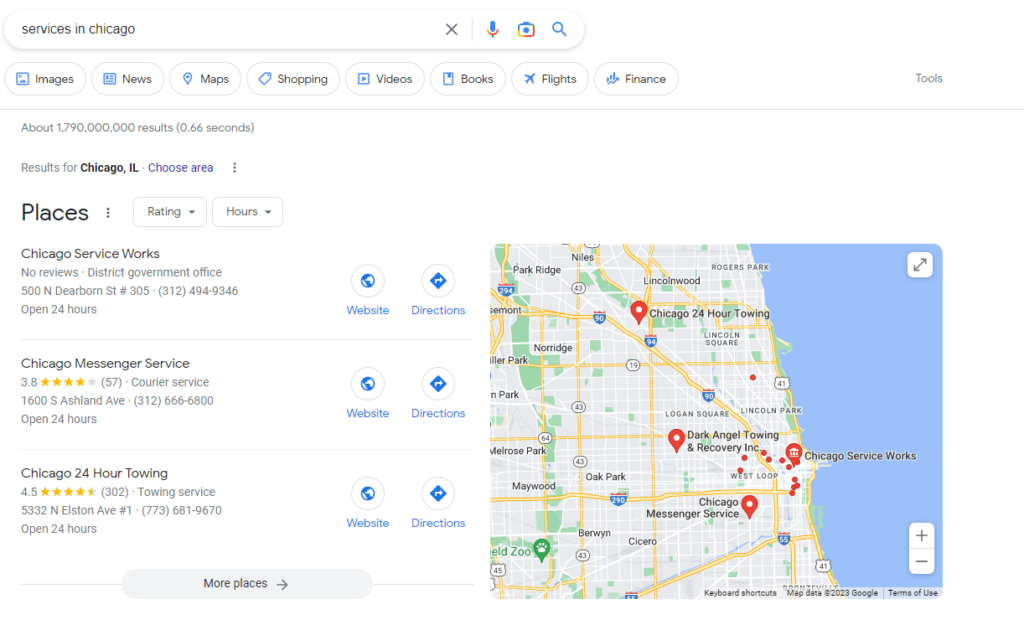
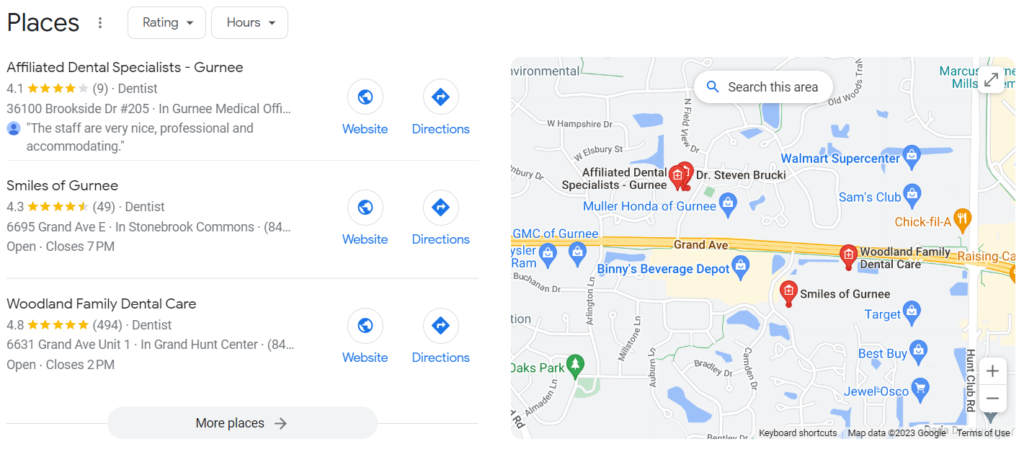
    By creating a GBP, businesses can appear when people search for terms related to their services or products. There are two primary places where GBP appears in rankings: the Local Pack and Google Maps.

    SERPs and the Local Pack

    The local pack section appears at the top of search engine result pages (SERPs) when someone searches for a specific type of product or service in an area they are located in or they have specified in the search query. These are the all-important “X near me” queries.

    This is particularly valuable because it increases visibility at the top of SERPs. Companies don’t need to break the top 10 organic search results in order to appear on the first page of the search results, providing more opportunities for customers looking for goods and services nearby to see them first.

    GBP on Google Maps

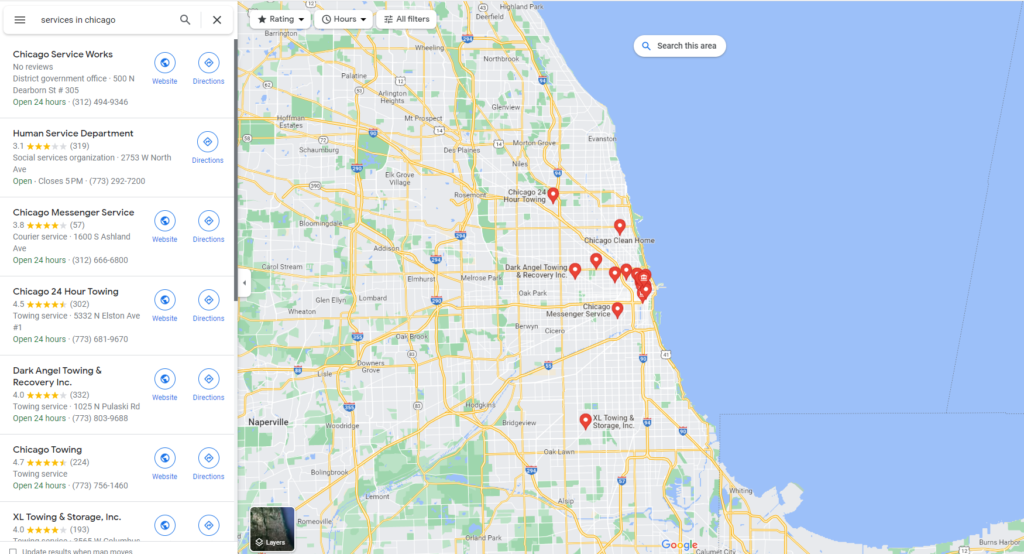
    Google Business Profile results are not limited to the Local Pack. Users have the option to search from or click through to Google Maps where your profile can appear even if you’re not in the top 3 Local Pack results. 

    This user-friendly interface allows users to gauge how close businesses are to their location, read reviews, see images, and more, all from the Maps interface. 

    II. How to Set Up and Verify GBP

    Step-by-step process of setting up the profile

    1. Login to your Google Account and go to create a profile
    2. Enter the name of your business or select from the list of suggestions.
    3. Choose your business category
    4. Input your business location and whether you have a brick and mortar location customers can visit.
    5. Select your service areas by city or zip code.
    6. Input your business phone number, website, and any other information.
    7. Finish!
    8. Now it’s time to select the verification options. 

     Verification process

    You’ll be able to verify your business through a few different methods and it may require more than one method to complete. Google breaks it down into “standard” and “instant” verification methods.

    Standard verification can take up to a week and can be done by phone call, video call, video recording, email, and postcard.

    Instant verification is less common and requires your website to be connected with Google Search Console.

    III. Ongoing Profile Management 

    Keeping an updated and accurate profile is important for potential customers searching for local businesses online because they need reliable information at their fingertips when trying to make a decision.

    Managing Reviews and Feedback

    Why Customer Reviews Matter

    Reviews matter to local businesses for several reasons. First, reviews can greatly impact a business’s online reputation, which can influence potential customers’ decisions to choose that business over its competitors. 

    Positive reviews can serve as social proof that a business is trustworthy and provides quality products or services, while negative reviews can harm a business’s reputation and deter potential customers.

    Second, reviews can also impact a business’s search engine optimization (SEO) efforts. Google’s algorithm takes into account the number, quality, and relevance of reviews when ranking businesses in local search results. 

    Therefore, businesses with a high quantity and quality of reviews are more likely to appear at the top of search results and attract more traffic to their website.

    Finally, reviews provide valuable feedback and insights for businesses. By monitoring and analyzing reviews, businesses can gain insights into their strengths and weaknesses and identify areas for improvement. 

    Responding to reviews can also demonstrate a business’s commitment to customer service and help build trust with customers.

    How to Get Reviews

    There are several ways that a company can encourage customers to leave more reviews. Here are some effective strategies:

    • Ask for reviews: Simply asking customers to leave a review is often an effective way to get more reviews. This can be done in person, through email, or via social media.
    • Make it easy to leave a review: Provide clear instructions on how to leave a review on your Google Business Profile or other review sites, and make the process as simple and user-friendly as possible.
    • Follow up with customers: After a customer makes a purchase or uses your service, send a follow-up email asking for feedback and encouraging them to leave a review.
    • Display review prompts: Display prompts on your website or in-store encouraging customers to leave a review. You can also include review links in your email signature or social media profiles.
    • Engage with customers: Engage with customers on social media and respond to reviews, both positive and negative. This shows that you value their feedback and are committed to providing excellent customer service.

    Remember that it’s important to encourage genuine and authentic reviews. Avoid incentivizing customers to leave positive reviews or posting fake reviews, as this can harm your reputation and violate review site guidelines.

    Engaging with Feedback

    Business Profile owners have the ability to respond to customer reviews. Engaging with reviews is an important part of reputation management for businesses. Here are some best practices for engaging with reviews:

    • Thank customers for positive reviews: Respond to positive reviews by thanking the customer for their feedback and expressing your appreciation for their business.
    • Address negative reviews: Respond to negative reviews by addressing the customer’s concerns and offering a solution if possible. Be empathetic and avoid getting defensive or confrontational.
    • Keep it professional: Maintain a professional tone and avoid engaging in arguments or negative interactions with customers. Remember that your responses are public and can be seen by other potential customers.
    • Encourage further communication: Invite customers to contact you directly if they have additional concerns or feedback. This shows that you are committed to resolving any issues and improving the customer experience.
    • Respond promptly: Respond to reviews as soon as possible, ideally within 24-48 hours. This shows that you value customer feedback and are committed to providing excellent service.

    Google Business Profile Optimization 

    While Google reviews have been demonstrated to have an impact on local SEO, there is an ongoing debate within the digital marketing sphere over what extent we can influence our Business Profile rankings. 

    Regardless of the answer, staying on top of your business profile management and engaging with customers helps to establish transparency and trust, which not only can impact a business’s search engine ranking and visibility, but it can influence potential customers’ decisions.

    Wrapping Up

    Setting up and managing a Google Business Profile is an important step in helping your business grow. With the right tools and strategies, your profile can be optimized to drive visibility, conversion, and growth. Creating a well-curated profile will help customers find relevant information quickly and easily. 

    Remember to update your business listings regularly to stay ahead of changes in local ranking factors, as this can have a big impact on how successful you are in achieving business goals. With the right setup, a Google Business Profile can become a powerful tool for businesses of all sizes.

  • Service Area Pages

    Service Area Pages

    How Location Pages Can Boost Your Local SEO

    Service area landing pages are a critical–if sometimes overlooked–tool used in local SEO.

    Whether you call them location pages, town pages, areas served pages, or service area pages, they’re all essentially the same.

    In this article, we’ll take a look at how service area pages fit within your SEO strategy before going over best practices. 

     (And by the way, we’ll assume that readers will have a basic grasp of local SEO. But if you need a primer, check out our local SEO guide here).

    Service Area Pages & Your SEO Strategy

    What’s the point of creating service area pages? Why do we need them? 

    In short, it allows us to effectively target a larger, more diverse set of locally focused keywords. For example…

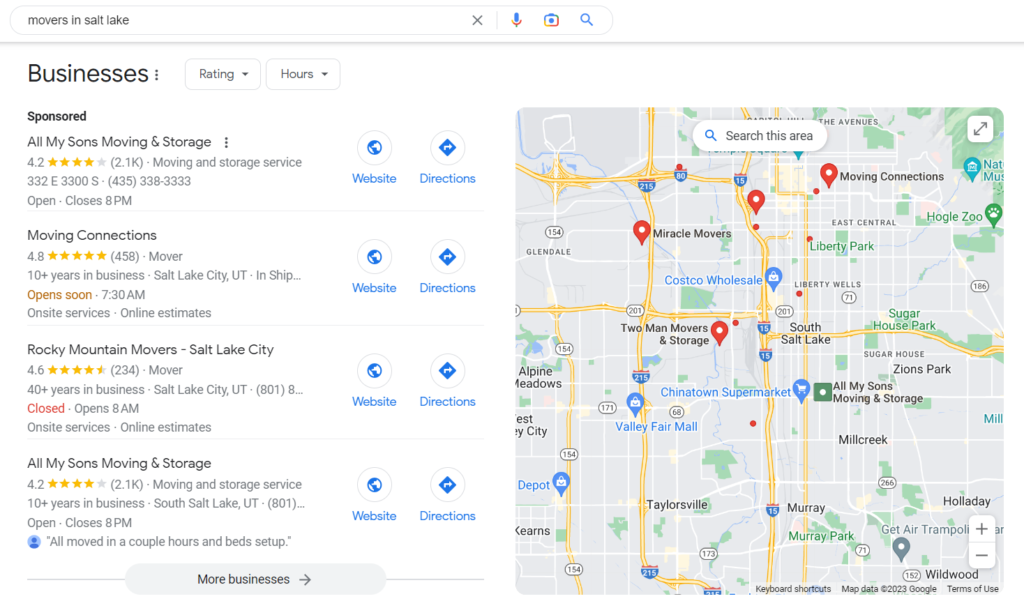
    Let’s say you own a moving company in the heart of Salt Lake City.  Most of your target keywords are going to include queries like moving companies, movers near me, movers in salt lake, etc. 

    These local-focused search queries will bring up the Local Pack on the results page. If you have a Google Business Profile (and you absolutely should!), many of your website clicks will come through these local pack results.

    Limits of Google Business Profile 

    But here’s the issue: 

    Local Pack results lean heavily on proximity. Meaning closer businesses will tend to rank higher than businesses far away. 

    Makes sense. 

    However, consider the consequences for our moving company example. Chances are, a Salt Lake City moving company wants to serve movers throughout the ENTIRE Salt Lake metro area. Not just those within a few-mile radius of their office.

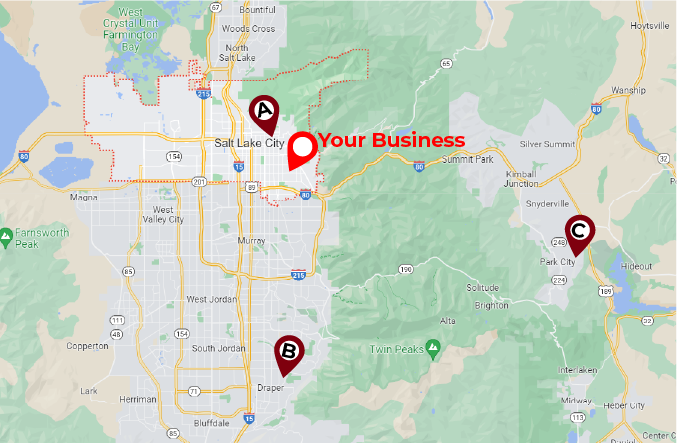
    Salt Lake Local Map

    This is the problem: Your company wants to serve this entire map, BUT your Google Business Profile listing might only show up for someone searching from point A–next to your office in the heart of the city. And you probably won’t show up for someone searching from points B and C.

    This puts a huge cap on the effectiveness of your Google Business Profile listings and severely limits the reach of your local SEO and digital marketing.

    So now what?

    Well, in order to rank for relevant search queries at points B and C, we need to tell Google that your business serves these areas as well.

    And this is where service area pages come in.

    Expanding Organic Reach

    In order to reach users searching for moving companies out in Draper and Park City–points B and C–we’ll need to create pages that target geo-modified queries such as moving companies draper ut

    This allows us to target both (1) users searching for geo-modified queries like moving companies draper ut and (2) users searching for generic queries like moving companies from Draper. Without a service area page, we likely would not have ranked for either of those queries.

    Service area pages without a physical location will typically show up in the organic results (as in the image above) instead of the local pack. 

    Within our SEO strategy, service area pages generally target more specific geo-modified queries that are lower in search volume but also less competitive and, therefore, easier to rank for. 

    How to Build Service Area Pages

    Now that we know how these pages fit within our SEO strategy, it’s time to get down to the nitty-gritty. How do we best design and write service area pages for SEO?

    Step 1: Identify your locations. If your business has multiple brick-and-mortar locations, this part is easy. Create a page for each location. 

    On the other hand, if you have a single location or run a service-based business such as a handyman, plumber, moving company, construction, home improvement, etc., you’ll create a page for each town you want to do business in. 

    Step 2: Write your pages. They should provide a relatively comprehensive overview of the services you provide. Best practices suggest at least 300 words split into manageable paragraphs with informative header tags.

    Don’t be afraid to use (but not overuse) industry jargon. Nowadays, Google expects to see more than the keywords you’re trying to rank for. They want to see ‘secondary’ keywords that are related to your primary keywords.

    For example, if we want our moving company to rank for movers draper ut, we need to include secondary keywords such as household movers, international relocation, furniture hauling, full-service moving, etc. 

    Check out some of the top pages that rank for your target keywords and see what kind of language they incorporate.

    Step 3: Optimize your pages. Ensure your keywords appear in your URL, title, header, and meta descriptions. For example…

    LocationDraper, UTPark City, UT
    URLexample.com/areas-served/draper-ut-movers/example.com/areas-served/park-city-ut-movers/
    TitleMovers Draper, UT | My Moving CompanyMovers Park City, UT | My Moving Company
    H1Draper Moving CompanyPark City Moving Company
    Meta descriptionsMy Moving Company’s team of Draper movers provides unbeatable relocation services…My Moving Company’s team of Park City movers provides unbeatable relocation services…

    Step 4: Place a prominent call-to-action. There should be no question about how to engage your services. Whether it’s a big colorful CALL NOW button, a contact form, or directly scheduling service, clear calls-to-action will ensure higher conversion rates and more business.

    Step 5: Implement linking schemes. Without links pointing to your page, Google’s crawlers have no way of finding them. Link to your location pages from a parent /areas-served/ page, from the main navigation menu, or in natural locations in page copy throughout your site.

    Step 6: Add schema markup. This part is a bit more technical. If you have a dev team for your website, this is something they can help with.

    Schema markup is little bits of code that tell search engines exactly what your page is about. For example, if you have your office address on your location page or in your website footer, you can add markup that explicitly tells Google that this is your business address.

    This helps Google to make better sense of your page as well as provide information for Rich Results; additional information on the results page.

    Local SEO is increasingly becoming an essential part of any digital marketer’s toolbox, and building a reliable location page setup is a key part of that. Leveraging local search features can help businesses reach potential customers, boosting their visibility and benefitting both the customer and the business itself.

    Here is a bit about the concerns of duplicate content when building areas served pages.

    With this in mind, it’s important to take time crafting quality location pages for maximum impact – something that will benefit you for years to come!

  • SEO for Dentists

    SEO for Dentists

    A Complete SEO Guide for Dental Practices

    As a dental care provider, your primary goal is to provide your patients with exceptional service. Gone are the days when you could rely on word of mouth advertising as enough to build your practice. Today, it is more important than ever to build online visibility into your practice. Doing so can create impressive outcomes for any dentist. At the heart of this is the implementation of search engine optimization (SEO) for dentists. 

    Local SEO Overview 

    Why does SEO matter? Even if your current patient tells their friends about your services, chances are good that the individual will still head online to learn more about your company. A Google search could reveal fantastic information and encourage the individual to set up an appointment. 

    Local SEO is also critically important when it comes to helping people find your location. A person with a dental need may search for a provider within their local area that can help them. If your dental practice isn’t easy to find online, the prospective patient has no idea that you are available to them. Local SEO ensures your practice is visible when someone needs you.

    Popular SEO Tools

    SEO for dentists can be an overwhelming process, and whenever possible, it should be something done by professionals who can enhance your ROI. However, there are numerous SEO tools available today to help ensure your efforts get the most attention. Here are a few of them.

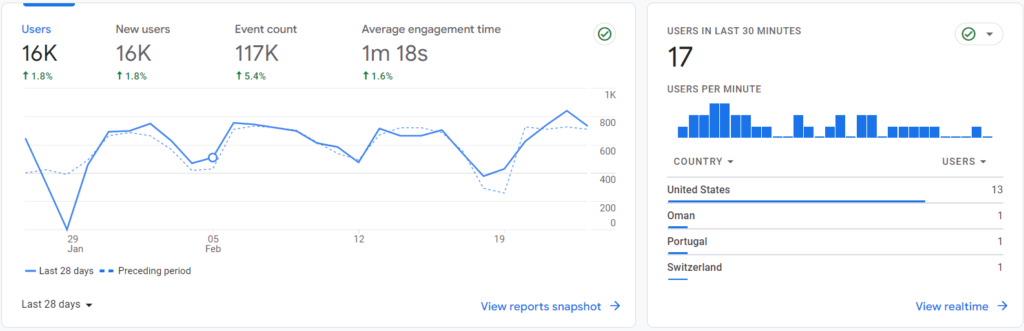
    • Analytics, such as those from Google, provide insight into who is visiting your website, how they are getting there, and how your site compares to your competitors. It allows for the adjustment of strategies to enhance outcomes.
    • Google Search Console is an excellent tool to help you to learn how well you rank for various terms and phrases people put into the search engines. It helps to monitor and then debug your website and then optimize the site without any need to learn how to code to improve visibility.
    • Moz Pro is a type of all-in-one tool that can help to improve search ranking for your company. It can help you to find SEO opportunities on your site, build reports, and track your growth over time. 
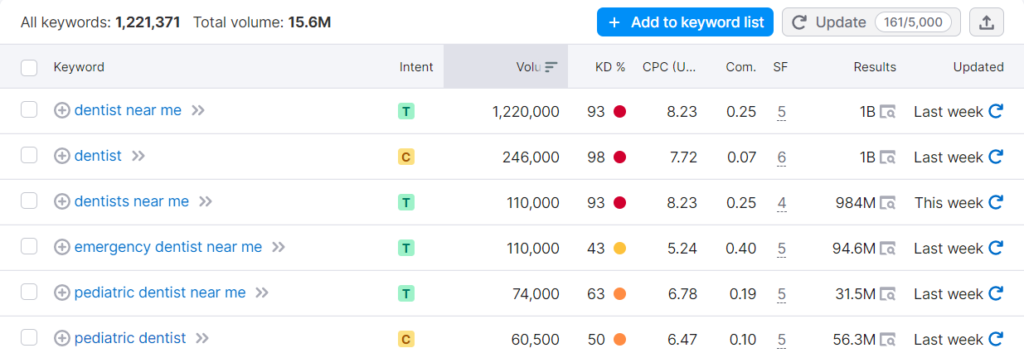
    • SEMrush provides a dashboard that provides insight into how well your domain is working as a whole. SEO Toolkit is one component of this tool that can help you with building links, selecting keywords, and monitoring competitors. 

    Keyword Research and On-page Optimization

    Keywords are a big part of SEO for dentists, but often not taken seriously enough in the strategy building phase. However, you need to know the following:

    • What phrases people use to find services you offer
    • How to include local components into your site to attract a more local audience
    • What amount of competition is present for any phrase you are using
    • How to improve beyond your competitors for key phrases

    Much of this comes down to on-page optimization or the process of understanding your target keywords and then utilizing them properly on your website to improve ranking.

    Site Health and Technical SEO

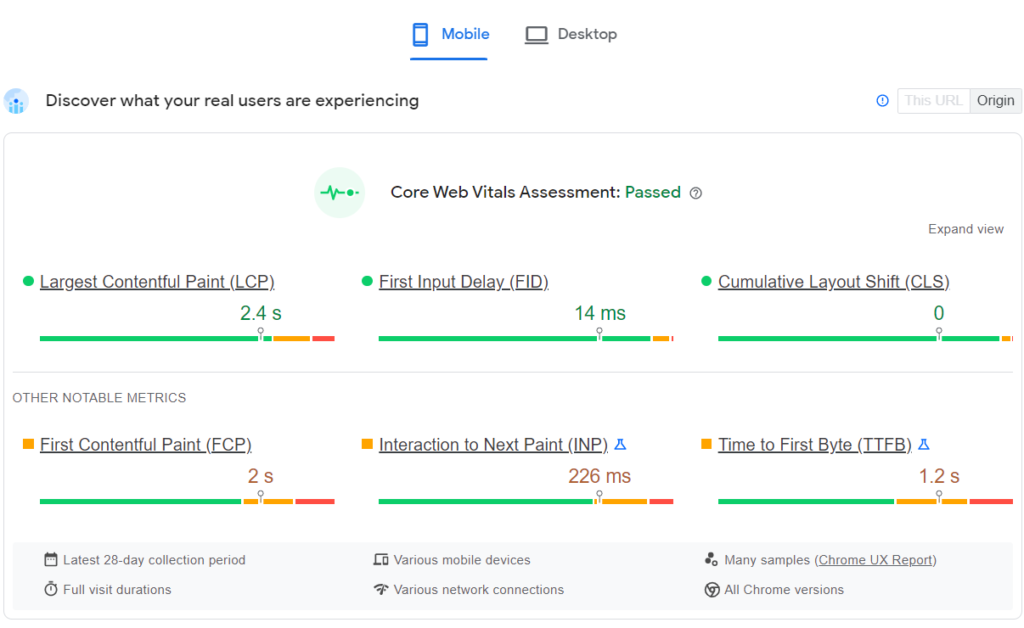
    While many factors impact the overall success of a website, the overall site health and technical aspects of it can play a big role in that process as well. If you do not have a dedicated staff or a professional available to handle your technical SEO – like the use of metadata, coding, and other behind-the-scenes components, you may be missing out on key opportunities to improve your strategy.

    If a website does not load properly, prospective patients go to another service that does. If the graphics do not display properly or the process of booking an appointment is complex or confusing, people simply will not wait to figure it out. Instead, they just move on. This goes beyond just setting up your website. Ongoing oversight remains critical during this process. 

    Google Business Profile and NAP Citations 

    Google Business Profile is one of the best tools for professionals like dentists. It is a free tool that Google provides. You will list information about your practice, hours, location, services, and any other data that’s valuable to your patients. Then, when someone Googles a dentist in your area fitting those criteria, your website shows up in the Three Pack – the three listings that appear on a search engine results page. This also makes it incredibly easy for consumers to book an appointment or call you without even going to your website.

    Also important are NAP citations. Across the internet, your business’s name, address, phone number, and other data are present. However, if there is data on one site that isn’t accurate or has a mistake in it, that could impact the patient who is looking for service. By monitoring and improving NAP citations, it’s possible to boost your SEO ranking. 

    Link Building and Content Strategy 

    Yet another component of building your practice’s online presence is using link building and content strategy. Google values links to your website on other websites. It shows that your website is valuable and respected. That gives you a boost in your search engine results if you are being linked to from high-quality and highly valuable websites. Creating a link building strategy can empower this process.

    Content strategy is the creation of content for:

    • Your website
    • Blog
    • Social media
    • Email
    • Other outreach tools

    The goal here is to create content that includes keywords and your overall SEO strategy, but also that is valuable. It is content that people will learn from, respect, and use to make their decision on whether or not to call you for help. Content also helps create engagement for your patients on social media. They can see your business, learn about it, learn from it, and then remember it when they have a need.

    SEO for dentists is a critical component of growing a practice. It does not have to be a challenge when done well, but it should be an ongoing effort. With the help of professionals, this could become one of the best ways to grow your practice over time.