Using Wix to Set-up Google Ads
Starting a business means juggling a hundred things at once. Two of the big ones are building a website and getting that website in front of people who actually want to buy from you or use your services.
If you’ve ever built a site, you’ve probably heard of Wix, the drag-and-drop website builder that lets you skip the code. What a lot of business owners don’t realize is that Wix also lets you run Google Ads right from your site dashboard.
We first wrote about this back in 2024. Since then, Wix has overhauled the whole thing. It’s no longer a simple search ads tool. It now runs on Google’s Performance Max campaigns. So we figured it was time for an update.
Here’s everything you need to know in one place: how it works now, what’s improved, what’s still missing, and whether it beats running Google Ads directly.
First, the Big Change: Wix Is Now Performance Max
In 2024, Wix only let you run search ads. That’s no longer the case.
When you create a campaign in Wix today, you pick one of two goals:
Drive traffic and get leads. This creates a Performance Max (PMAX) Leads campaign, built for service businesses that want calls, form fills, and site visits.
Boost product purchases. This creates a PMAX Sales campaign, built for eCommerce. Your products can show across Google Search, YouTube, Google Images, and the Display Network. This option only appears once you’ve connected Google Merchant Center and submitted your products.
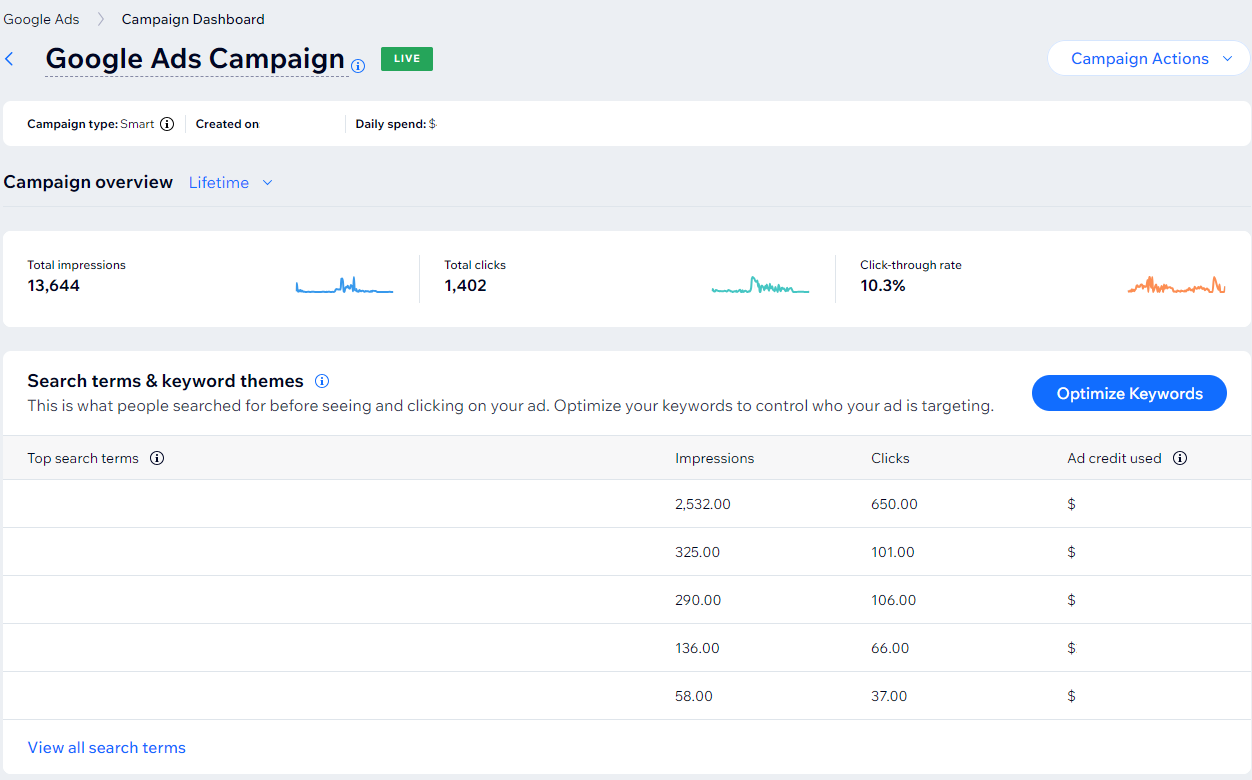
If you’re not familiar with Performance Max, here’s the quick version. You hand Google your text, images, and a few targeting signals, and Google’s AI decides where and when your ads show across its entire network. PMAX used to be a bit of a black box, but over the years Google Ads has expanded their reporting to include detailed search terms data and channel performance data.
How to Set Up Google Ads on Wix
Before you start, Wix requires three things: your site has to be published, on a paid Premium plan, and connected to a custom domain. Once that’s done, setup looks like this.
1) Choose Your Landing Page and Language
Pick the page on your site where people land after clicking your ad, and the language of that page. You only get one language per campaign.
2) Set Your Location Targeting
You can target up to ten cities, zip codes, or regions, or you can target a radius around a street address.
3) Set Your Ad Schedule
Run your ads all the time (Wix’s recommendation) or only during certain days and hours. If you want phone calls, scheduling ads for business hours is a smart move. There’s also an optional call button you can add to your ads.
4) Pick Your Search Themes
Wix used to call these “keyword themes.” Now they’re “search themes,” which matches Google’s PMAX terminology. You get up to 10, and Wix can suggest some using AI. For comparison, the Google Ads platform lets you add up to 50 per asset group, so choose your 10 carefully.
These are signals, not tight keyword controls. Not sure what the difference is? Our back-to-basics guide on keywords, search terms, and search themes breaks it down.
5) Add Your Assets
This is where things have gotten much better. For Leads campaigns, you can now write up to 15 short headlines, 5 long headlines, and 5 descriptions. You can also add up to 20 images and 5 logos. Wix will even generate headline suggestions and images with AI if you’re stuck.
6) Set Your Budget
Choose one of three preset budgets or enter your own daily spend. Wix says you can start as low as $150 a month, and it recommends a budget of about 5% of your monthly revenue.
Heads up: your campaign can spend up to twice your daily average on busy days. It won’t go over your daily average times 30.4 for the month, though.
And just like that, you’ve got a Google Ads campaign running through Wix.
Pros of Running Google Ads Through Wix
Pro 1) It’s Still Easy
Wix’s guided setup is about as beginner-friendly as paid advertising gets. There are step-by-step prompts, AI suggestions for search themes and ad copy, and far fewer settings to trip over than in the full Google Ads platform.
Pro 2) Everything Lives in One Place
You don’t need to create a separate Google Ads account or learn a new platform. Your ad data syncs into Wix Analytics right alongside your organic traffic. For a busy business owner with 101 tabs open, that’s one less tab to worry about.
Pro 3) Way More Ad Reach Than Before
Thanks to Performance Max, your ads aren’t stuck on search results anymore. PMAX campaigns offer more variety in ad placements allowing you to reach potential customers across multiple channels.
Pro 4) Free Ad Credit for New Advertisers
If you’ve never run Google Ads before, you may qualify for up to $500 in promotional credit from Google after spending $500 in your first 60 days. Terms apply, but it’s a nice boost for getting started.
Cons of Running Google Ads Through Wix
Con 1) Your Data Is Still Limited
Wix’s reporting has improved, but it’s still nowhere near what the full Google Ads platform offers. Things like detailed audience insights, impression share, and granular keyword data are what let you make smart optimization decisions. Without them, you’re mostly trusting that things are working.
Con 2) Limited Control
Easy doesn’t always mean better. You get search themes, not actual keywords. And while you can exclude terms, you can’t run structured A/B tests or fine-tune bidding strategies.
In the Google Ads platform, you can do things like A/B asset experiments in PMAX campaigns. In Wix, “testing” means running a second campaign and comparing results by eye.
The most glaring difference between the two would be, in Wix you can set one goal for a campaign “Boost product purchases” (Sales) or “Drive traffic and get leads” (Leads). The Google ads platform lets you get more detailed and allows you to choose multiple primary conversion actions. These goals can be the make or break of a successful campaign.
Con 3) PMAX or Bust
Here’s the big one: in Wix, Performance Max is the only campaign option. You can’t run a standard Search campaign, a Display campaign, a YouTube campaign, or any of the other campaign types Google offers.
PMAX can be a great tool, but it’s not the right tool for every business or every goal. Sometimes a tightly controlled Search campaign is exactly what you need, especially on a smaller budget. In the Google Ads platform, you get to choose. Curious what the options are? Check out our Google Ads campaign types breakdown.
Con 4) No Asset Groups, Limited Campaigns
In the Google Ads platform, a single PMAX campaign can hold multiple asset groups. Each one has its own headlines, descriptions, images, search themes, and landing page. That lets you organize by service, product line, or audience, and see what’s working for each one.
Wix doesn’t have asset groups. Each campaign gets one set of assets, period. If you want to promote a second service with its own messaging, you need a whole separate campaign.
On top of that, you can only have one live PMAX Sales campaign per site and up to five live PMAX Leads campaigns at a time. That’s a pretty tight ceiling if you offer more than a handful of services.
Con 5) You’re Locked Into Wix
This one hasn’t changed. You can’t connect an existing Google Ads account to Wix, and campaigns built in Wix can only be managed in Wix.
If you grow and want to switch to Google Ads directly, your Wix campaign history doesn’t come with you. As far as Google Ads is concerned, you’re starting from zero.
Con 6) Wix Takes a 15% Cut
This is the one most Wix advertisers don’t realize: Wix charges a 15% service fee, which means part of what you’re billed never goes toward your ads. It goes straight to Wix.
Google Ads doesn’t do that. When you run campaigns directly through Google, you pay for your clicks and that’s it.
Sure, 15% might not sound like much on a small budget, but it adds up fast. That’s money that could be buying you more clicks, more leads, and more sales. And unlike an agency management fee, that 15% doesn’t get you a strategist looking at your account. It just gets you the tool.
So, Is Using Wix to Run Google Ads Worth It?
Honestly? It still depends on your business.
As an agency, we wouldn’t run client campaigns through Wix. It doesn’t give us nearly enough data or control to make intelligent decisions or room to grow..
But we live and breathe this stuff. If you’re a small shop that just wants to run a few ads without learning a whole new platform, Wix is a solid, low-friction way to dip your toe in.
That said, if you have any plans to grow your ad presence, we almost always recommend starting in Google Ads, whether you work with an agency or manage it yourself. Here’s why:
No extra fees. Every dollar you spend goes toward your ads, not a 15% cut to Wix.
More insights. You get search terms, channel performance, audience data, and impression share, the stuff that tells you what’s actually working.
Room to grow. You get every campaign type, asset groups, full conversion tracking, and an account history that’s yours to keep.
Starting in Google Ads also means you won’t have to start over later. Everything you learn and every bit of data you collect stays with you as your business grows.
Here’s our rule of thumb: Wix is fine for a little advertising. But if ads are going to be a real part of how you grow, start in Google Ads.
Ready to Graduate From Wix Ads?
If you want the full power of Google Ads without the learning curve, that’s what we do. We’ll start with a free PPC auditto see where you stand, then build a strategy around your goals.
Thinking about moving off Wix altogether? Our website development team can help with that too.
Contact us today for a free PPC management quote.
Updated: September 2026