Tag: google

  • GOOGLE SUNSETS THE ”&num=100” PARAMETER

    GOOGLE SUNSETS THE ”&num=100” PARAMETER

    The affects on SEO data, and how it acts as an important reminder for Marketers

    September saw a big change in SEO data that caused alarm bells to sound for anyone who pays attention to site vitals. Across the web, spanning industries and interests, sites saw a decrease in impressions, but why? Today we will be diving into the changes that Google made to cause this decrease, the impact it has had on site data and why it is important to zoom out when assessing problems.  

    OUR FIRST DISCOVERY

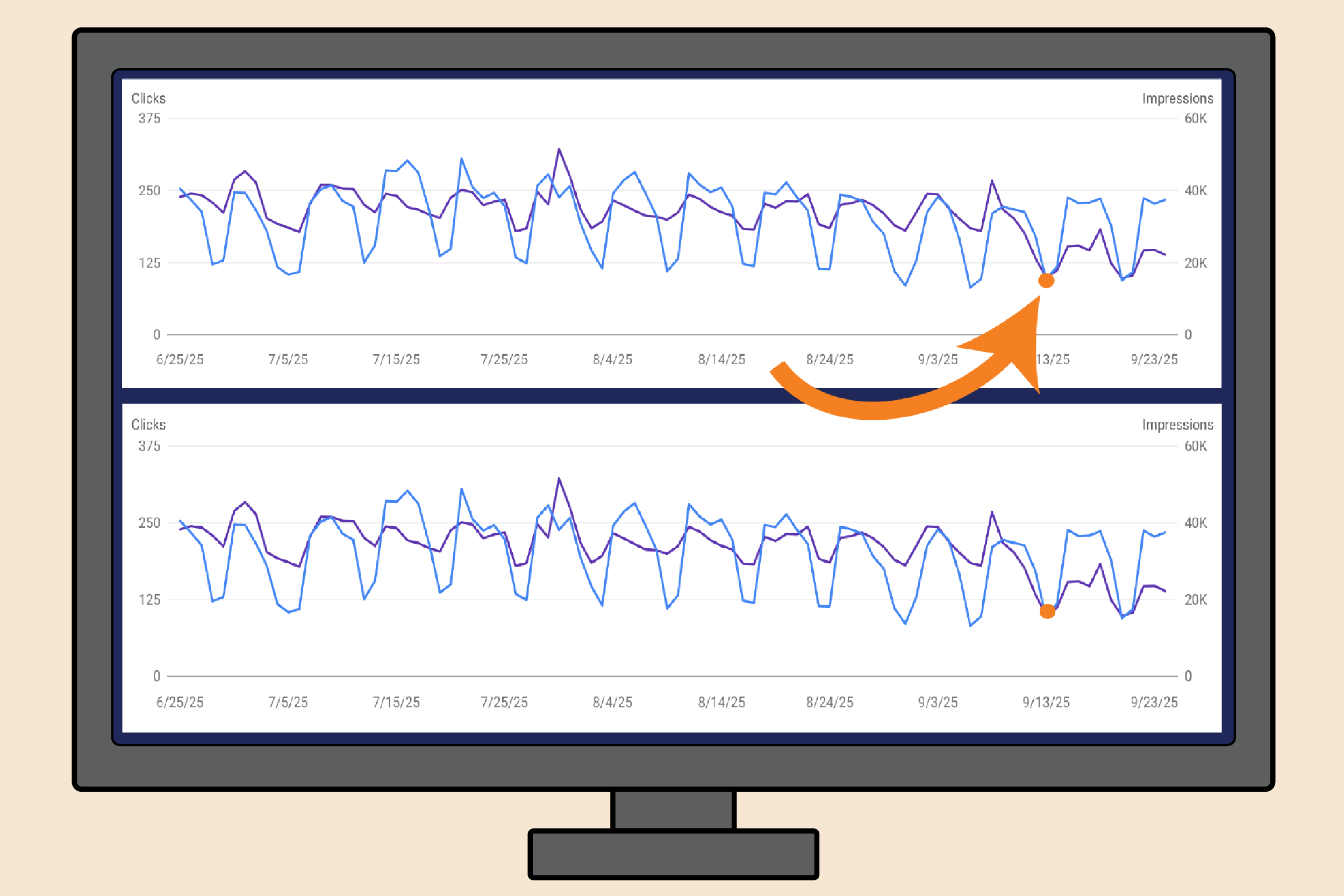
    The first client of ours where we noticed this drop in impressions, just happened to be a client that we had made site changes on the day before the drop. Which, as you can imagine, led to an “oh sh*t moment” for us. Overnight impressions were down by 30%, not just on the services pages we had made the changes to, but across the site, including the homepage. Now, the changes we made weren’t small, but they should not have caused a 30% decrease in impressions. Here lies our first red flag. 

    Our initial reaction was to revert the site changes we made or at least scale back. However, we also noticed that despite our drop in impressions, our clicks remained consistent and our position improved. Red flag number two. 

    This is where we had the important self reminder to zoom out. After we took a step back from this initial client, we quickly saw that the majority of our clients across industries had also experienced a drop in impressions at the same time. Taking a second step back showed us that sites everywhere saw similar decreases and the SEO Community was already buzzing with people questioning this change. 

    THE SOURCE OF THE IMPRESSION DROP

    According to  Search Engine Land, 87% of sites saw a drop in impressions. The fact that we saw this drop right after we made site changes for our client was purely a coincidence. Good thing we didn’t have a knee jerk reaction and start reverting all of our changes! 

    So what actually happened to cause such a drop for all these sites? 

    Google quietly sunsetted the ​​”&num=100” Parameter around September 11th. 

    This parameter originally allowed 100 search results to show for one query on a single SERP page. 

    Reporting tools, like SEMRush used this parameter to efficiently and cost effectively gather and report data. Before this change, SEO platforms could fetch up to 100 results in a single query using the &num=100 parameter. Now, they can only grab 10 results per query, which forces them to make 10 separate requests to Google for the same amount of data.

    This change has caused a significant disruption in tracking across reporting tools and Google Search Console. 

    WHY THIS MATTER FOR PROFESSIONALS

    The most glaringly obvious change to SEO professionals’ site data is the drop in impressions.​​This isn’t because fewer people are searching, but because Google’s change removed what are now understand to be “bot impressions.”

    While tools like SEMrush didn’t directly create impressions in the same way a human searcher does, their large-scale scraping activity inflated impression counts by surfacing lower-ranking pages that real users rarely saw. The result was that sites appeared to be getting more impressions than they truly were. Yikes! Now that these tools can’t use “&num=100”, those impressions are gone. 

    Though the idea that bots and scraping could affect impressions was always something that was acknowledged by professionals, the extent to which it inflated the impressions is eye opening. The silver lining being, now we (hopefully) are seeing a more accurate representation of user search volume and site ranking. 

    HOW SUNSETTING THE “&num=100” PARAMETER IS AFFECTING SITE DATA 

    Impressions drop: As we said before, the most obvious change is the noticeable decline in impressions. We have seen reports of impressions dropping as much as 60% and Search Engine Land observed that “77.6% of sites lost unique ranking terms”. 

    Clicks consistent: Despite the drop in impressions, clicks remain relatively steady. That’s because the majority of clicks come from the first page of results, and those user interactions are unaffected by the parameter change.

    Position Increasing: average position metrics are improving, but not necessarily due to better rankings. With fewer lower-ranking impressions being counted, the data skews upward, making it look like performance has improved when in reality the reporting method has just shifted.

    WHAT DOES THIS MEAN FOR SEO EXPERTS

    At this point, Marketing tools like SEMRUSH have put out statements acknowledging the situation, reassuring customers that the most important data is intact and they are looking into ways to adjust their systems to keep up with Google’s changes, but no updates have been made yet. Oka, cool. That is for the use of the marketing tools themselves, but what about how to manage your site with this very new landscape. .  

    Now what about 

    So, at this time, we advise marketers and SEO experts to do three things. 

    Set a New Baseline
    Since the way impressions and positions are being measured has changed, the first step is to establish a new baseline. Marketers should note that comparisons to pre-change data won’t be apples-to-apples, and moving forward, performance should be measured against the updated reporting standards.

    Manage Expectations
    It’s important to communicate these shifts to clients, leadership, or stakeholders. Explain that drops in impressions and jumps in average position are tied to Google’s change, not necessarily actual user performance shifts. Setting this context helps prevent misinterpretation of results.

    Monitor Trends
    While the raw numbers may look different, trends over time are still valuable. Keep monitoring for consistent movement in impressions, clicks, and positions relative to the new baseline, and watch for genuine performance changes that stand out from the reporting adjustments.

    WHAT WE HAVE LEARNED

    Google can make changes quickly and quietly that have lasting effects on data. The removal of the ”&num=100” parameter isn’t the first and it won’t be the last. This update was a good reminder that not every sudden drop in a metric means something is broken, sometimes it’s the way data is being counted that shifts. By zooming out, checking trends across multiple clients, and staying connected to the SEO community, marketers can separate real performance issues from reporting noise and make smarter, steadier decisions in the face of change.
  • An Absolute Beginner’s Guide to Google Business Profile

    An Absolute Beginner’s Guide to Google Business Profile

    The Ultimate Local Marketing Tool for SMBs

    There aren’t many marketing tools that provide more value to both customers and local businesses than Google Business Profile. Whether you’re a local service provider like a plumber or moving company or you run a brick and mortar business like retail or restaurants, Google Business Profile can be an immensely powerful tool for bringing customers to your business.

    In this article, we’ll provide a quick overview on how to setup your profile and leverage it for maximum returns!

    I. What is a Google Business Profile (GBP)?

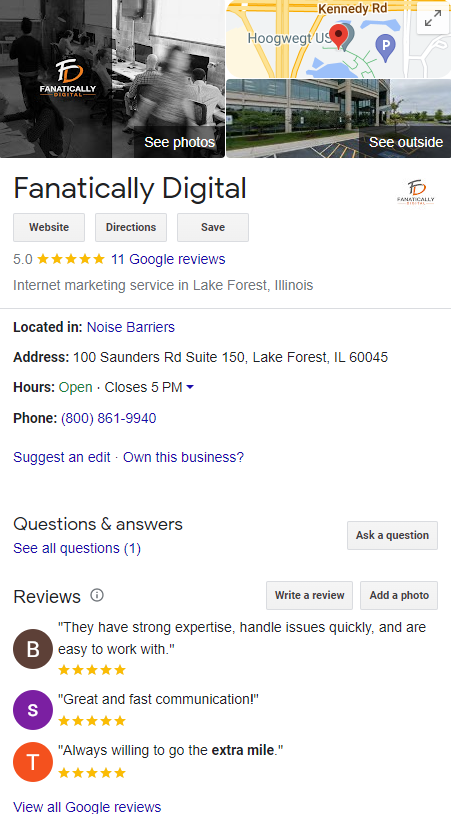
    A Google Business Profile (GBP) is a free profile that businesses can create to showcase their services and products on Google’s platform. It includes information such as your business name, contact info, hours of operation, website address, reviews, and photos. 

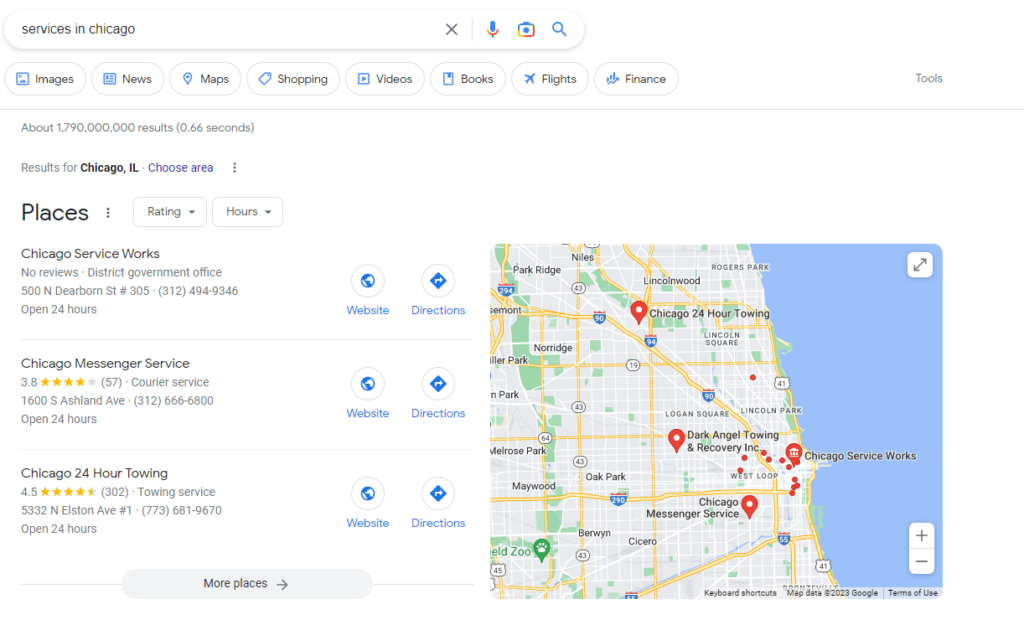
    By creating a GBP, businesses can appear when people search for terms related to their services or products. There are two primary places where GBP appears in rankings: the Local Pack and Google Maps.

    SERPs and the Local Pack

    The local pack section appears at the top of search engine result pages (SERPs) when someone searches for a specific type of product or service in an area they are located in or they have specified in the search query. These are the all-important “X near me” queries.

    This is particularly valuable because it increases visibility at the top of SERPs. Companies don’t need to break the top 10 organic search results in order to appear on the first page of the search results, providing more opportunities for customers looking for goods and services nearby to see them first.

    GBP on Google Maps

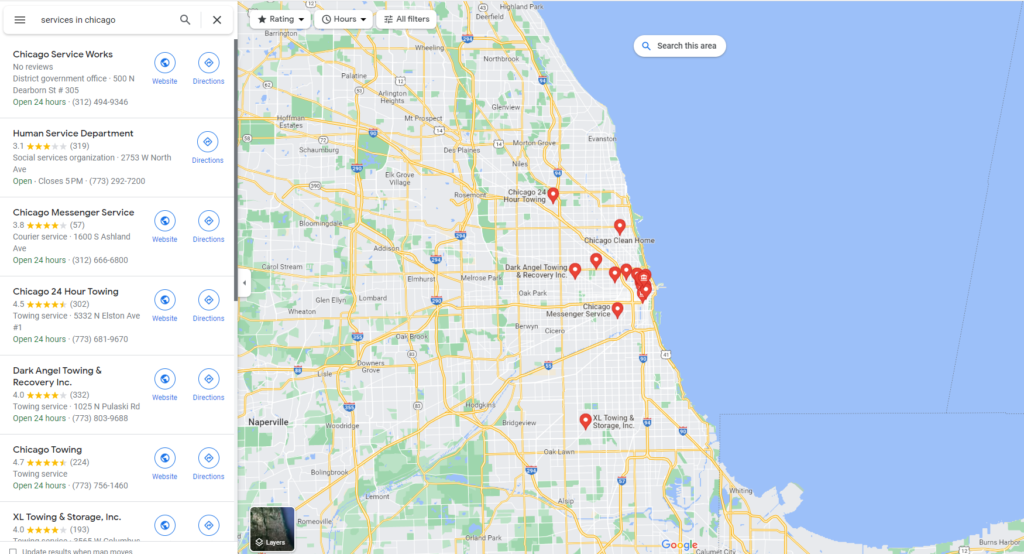
    Google Business Profile results are not limited to the Local Pack. Users have the option to search from or click through to Google Maps where your profile can appear even if you’re not in the top 3 Local Pack results. 

    This user-friendly interface allows users to gauge how close businesses are to their location, read reviews, see images, and more, all from the Maps interface. 

    II. How to Set Up and Verify GBP

    Step-by-step process of setting up the profile

    1. Login to your Google Account and go to create a profile
    2. Enter the name of your business or select from the list of suggestions.
    3. Choose your business category
    4. Input your business location and whether you have a brick and mortar location customers can visit.
    5. Select your service areas by city or zip code.
    6. Input your business phone number, website, and any other information.
    7. Finish!
    8. Now it’s time to select the verification options. 

     Verification process

    You’ll be able to verify your business through a few different methods and it may require more than one method to complete. Google breaks it down into “standard” and “instant” verification methods.

    Standard verification can take up to a week and can be done by phone call, video call, video recording, email, and postcard.

    Instant verification is less common and requires your website to be connected with Google Search Console.

    III. Ongoing Profile Management 

    Keeping an updated and accurate profile is important for potential customers searching for local businesses online because they need reliable information at their fingertips when trying to make a decision.

    Managing Reviews and Feedback

    Why Customer Reviews Matter

    Reviews matter to local businesses for several reasons. First, reviews can greatly impact a business’s online reputation, which can influence potential customers’ decisions to choose that business over its competitors. 

    Positive reviews can serve as social proof that a business is trustworthy and provides quality products or services, while negative reviews can harm a business’s reputation and deter potential customers.

    Second, reviews can also impact a business’s search engine optimization (SEO) efforts. Google’s algorithm takes into account the number, quality, and relevance of reviews when ranking businesses in local search results. 

    Therefore, businesses with a high quantity and quality of reviews are more likely to appear at the top of search results and attract more traffic to their website.

    Finally, reviews provide valuable feedback and insights for businesses. By monitoring and analyzing reviews, businesses can gain insights into their strengths and weaknesses and identify areas for improvement. 

    Responding to reviews can also demonstrate a business’s commitment to customer service and help build trust with customers.

    How to Get Reviews

    There are several ways that a company can encourage customers to leave more reviews. Here are some effective strategies:

    • Ask for reviews: Simply asking customers to leave a review is often an effective way to get more reviews. This can be done in person, through email, or via social media.
    • Make it easy to leave a review: Provide clear instructions on how to leave a review on your Google Business Profile or other review sites, and make the process as simple and user-friendly as possible.
    • Follow up with customers: After a customer makes a purchase or uses your service, send a follow-up email asking for feedback and encouraging them to leave a review.
    • Display review prompts: Display prompts on your website or in-store encouraging customers to leave a review. You can also include review links in your email signature or social media profiles.
    • Engage with customers: Engage with customers on social media and respond to reviews, both positive and negative. This shows that you value their feedback and are committed to providing excellent customer service.

    Remember that it’s important to encourage genuine and authentic reviews. Avoid incentivizing customers to leave positive reviews or posting fake reviews, as this can harm your reputation and violate review site guidelines.

    Engaging with Feedback

    Business Profile owners have the ability to respond to customer reviews. Engaging with reviews is an important part of reputation management for businesses. Here are some best practices for engaging with reviews:

    • Thank customers for positive reviews: Respond to positive reviews by thanking the customer for their feedback and expressing your appreciation for their business.
    • Address negative reviews: Respond to negative reviews by addressing the customer’s concerns and offering a solution if possible. Be empathetic and avoid getting defensive or confrontational.
    • Keep it professional: Maintain a professional tone and avoid engaging in arguments or negative interactions with customers. Remember that your responses are public and can be seen by other potential customers.
    • Encourage further communication: Invite customers to contact you directly if they have additional concerns or feedback. This shows that you are committed to resolving any issues and improving the customer experience.
    • Respond promptly: Respond to reviews as soon as possible, ideally within 24-48 hours. This shows that you value customer feedback and are committed to providing excellent service.

    Google Business Profile Optimization 

    While Google reviews have been demonstrated to have an impact on local SEO, there is an ongoing debate within the digital marketing sphere over what extent we can influence our Business Profile rankings. 

    Regardless of the answer, staying on top of your business profile management and engaging with customers helps to establish transparency and trust, which not only can impact a business’s search engine ranking and visibility, but it can influence potential customers’ decisions.

    Wrapping Up

    Setting up and managing a Google Business Profile is an important step in helping your business grow. With the right tools and strategies, your profile can be optimized to drive visibility, conversion, and growth. Creating a well-curated profile will help customers find relevant information quickly and easily. 

    Remember to update your business listings regularly to stay ahead of changes in local ranking factors, as this can have a big impact on how successful you are in achieving business goals. With the right setup, a Google Business Profile can become a powerful tool for businesses of all sizes.

  • Google’s Penguin Goes Real Time

    Last month Google hit us with two pretty major changes to the search algorithm.

    The first was a straightforward update in early September. When this hit, we saw most programs take a slight dip and then recover after about a week. But, then Google announced that they will incorporate Penguin into the core algorithm as well, applying it to every query. This caused a lot of consternation as things fluctuated wildly for a couple of weeks.

    If you are not familiar with Penguin, it is the part of Google’s system that looks at the quality of backlinks – those links to your site from other websites. Until September of this year, Google would run Penguin periodically, assess the quality of the backlinks and then stick you with a score that stays with you for months until the new update is run.

    Now, every search has a real time backlink quality assessment. What this means for your SEO:

    1. If your category in search is very active in SEO / link building, you will see more volatility. As site managers expand their linking partners, the impact will be seen more quickly
    2. There is still NO quick fix to link building, or quick kills. When new links are created, Google still needs to crawl and index pages. Additionally, even with on page changes, we see a lag time between changes and Google’s (apparent) incorporation in search rankings. I suspect the same will be true with backlinks.
    3. Your competitors’ moves will be more quickly felt. This means that your rankings may go up or down based not on what you do, but what a competitor has done. While this has always been true, this change means we will see that impact more quickly and more often relative to what we’ve seen in the past.
    4. For categories in which there is little activity on link building, this is an opportunity to get ahead by moving aggressively into a quality link building program.


    Over the years, since Google has removed visibility into organic keywords to a large extent, I have encouraged clients to view rankings as a lesser metric and focus on organic site traffic and quality. Keyword rankings can fluctuate quite a bit day-to-day and the incorporation of Penguin into the real time ranking will exacerbate this. Looking long term, improving visibility is the upstream indicator to growth in site traffic. While we keep an eye on the rankings /  visibility, the our purpose should be to find early indications of problems and not create an environment of knee-jerk reactions to rank changes.
    Bottom line, if you’ve had a good SEO program going, this change by Google should not lead to substantive changes in what you do. But, if you’ve not focused on SEO, your site may have trouble ahead.

  • The Google Panda Smack Down

    Content is king. Google has always been clear in this. Too many SEOs have sought to trick google, Bing & Yahoo into thinking bad content was good content. Panda has been aggressively distinguishing between the two.

    Producing good content is not easy. In the short term, some have instead tried to trick the engines into ranking poor content. Those who played the long game were less affected by the Panda hits. This becomes almost amusing as we see the response from some SEOs to Google’s continued guidance that good content is key.

    One strategy for addressing a google panda smack down is to remove the poor content. Short term, this is easy, fast and a feel good action. But, it ultimately defeats the purpose. Google is not seeking the removal of content, but the improved quality of content.

    When you are addressing the issues related to Panda, ask yourself a simple question, “why did we put the content there in the first place?”

    If your answer is along the lines of “we’re trying to get rankings,” then remove it. It doesn’t help you, the users or the engines. Yes, rankings are part of the equation. But, the driver is end user benefit so your company has value and can enhance your relationship with customers or prospects.

    The more likely answer (I hope) is that you are trying to provide useful information to the user. Google’s point (correct or not) is that the content is too thin to be useful. It is something to keep, but improve upon, and that takes work. The process may start with keyword research, but more likely, you need to go back a bit further and ask some basic question about your customers.

    Knowing how they shop, your company’s role in the purchase process and how customers want to interact with you is important in content development. With this understanding, you can review the current content issues, determine their priority and then start to rebuild your pages with better, more complete information for the customers, keeping basic SEO development practices in mind.

    If you’ve been hit by Google Panda, take the long view, prioritize and thoughtfully address the core issues. Resist the temptation to ‘pull it down’ or create smoke-and-mirrors to try to get around doing the right thing. SEO is a long view game; treat it accordingly and there will be fewer surprises when Google updates come out.

    Feature panda image – tee shirt I thought was funny.