As Google Ads grows and expands its capabilities one of their big focuses has been to create automatic systems so that advertisers don’t have to spend as much time making decisions and monitoring. We have seen automatic bidding and smart campaigns, now comes automatic asset creation.
What are Automatically Created Assets?
These new automatically created assets are headlines and descriptions developed by Google’s AI for advertisers’ responsive search ads.
According to Google, “These new assets are generated based on your ad’s unique context, which includes your landing page, existing ads, and keywords in your ad group.”
This is an opt-in feature that many advertisers have a lot of thoughts on. Though not all of the thoughts are positive, let’s start with the pro’s of Google’s automatically created Assets.
Pros of Google’s Automatically Created Assets
Google believes that it will cut back the manual labor for advertisers, increase performance of responsive search ads by running more copy, and create a cohesive user experience across campaigns and landing pages.
Ads perform best when they have keywords in their headlines and descriptions. When setting up ad groups and ads, ideally the keywords will correspond with each other within an ad group allowing advertisers to add those keywords into the headlines. However, sometimes keywords can be contradictory, preventing advertisers from adding that keyword to a headline.
Let’s take a look at a simple example. Sally sets up an ad group to sell t-shirts. She adds keywords, “pink t-shirt” and “blue-tshirt”, but she is hesitant to add these keywords as headlines because she doesnt want someone searching for a blue t-shirt to be fed an ad with the headline “Pink T-shirts for Sale”.
When using automatically created assets, if an ad is triggered by the keyword “blue t-shirt” then a headline using that keyword like “Best Blue T-Shirt Deal” can appear. Google will use your provided headlines, descriptions, and keywords to create the best assets for the searchers so you don’t have to.
Furthermore, as campaigns evolve and keywords and landing pages change, Google’s automatically created assets will adjust to match the new content. This will cut back the time advertisers spend adjusting their creative as campaigns take on new life.
As the campaigns optimize, google will automatically show the best performing assets and remove underperforming assets so you don’t have to.
All that being said, not everyone views google’s automatically created assets as sunshine and rainbow. Some advertisers are even strongly against it.
Cons of Google’s Automatically Created Assets
Right off the bat, when using Google’s automatically created assets, advertisers have less control over what creative is being shown and when.
One of the arguments for using automatically created assets is that it cuts back on the time advertisers have to spend on optimizing their campaign. Ironically, unless you are someone who wholeheartedly trusts Google, (we are not), the time that is saved upfront in creating assets is then lost when you have to monitor the creative that Google is showing. Advertisers are able to remove individual assets that are created but this process can take time.
In that same vein, how frequently are you going to be removing assets? How accurate are the assets that google is creating?
Some advertisers have gone so far as to say the assets created are nonsensical and the tool has a long way to go before it becomes reliable.
Thus it is important for any account manager to add “go through automatically created assets” to their weekly checklist.
If you are thinking about running automatically created assets, some questions to ask yourself include:
Am I okay with having headlines and descriptions run that I don’t fully approve of, even if it’s for a short period of time?
Do I have the bandwidth to add “go through automatically created assets” to my weekly checklist?
Even if you are confident in Google’s AI capabilities it is always a good idea to run a couple of tests to make sure that this feature works for you and your campaigns. Best to use a test budget instead of your full campaign budget, incase the results aren’t everything that you are hoping for.
Summary
Google’s automatically created assets are headlines and descriptions generated based off of a campaigns landing pages, keywords and already created copy. These assets are meant to optimize themselves, provide relevant content for searchers, and reduce the amount of time advertisers spend on an account.
However, Google’s AI capabilities don’t quite reach many advertisers standards, thus requiring involved maintenance and upkeep of the assets. Many Advertisers have instead decided to not opt-in to automatically created assets all together.
If these new tools worked flawlessly we would be all on board, but it seems there are still hiccups that google needs to work through. That being said, it is up to each advertiser to test it out for themselves and decide if it is a good fit for their company!
Google ads can be a great tool to drive traffic and awareness for your brand. However it is important to ensure that your ads aren’t just appearing in front of people but appearing in front of potential customers. We have laid out 5 key ways advertisers can make sure they aren’t wasting budget on impressions and clicks that aren’t valuable.
Limit Broad Match Keywords
Managing keywords effectively in Google Ads is crucial for maximizing your advertising budget and driving relevant traffic to your campaigns. Keywords play a pivotal role in determining when and where your ads will appear on the search engine results page.
While broad match keywords might seem like a quick way to capture a wide range of search queries, they can also lead to wastage of your budget if not managed carefully. Google tends to really push broad match keywords. If you haven’t noticed already, changing your keywords to broad match will likely come up repeatedly as a Google Ads recommendation. It’s okay to reject this recommendation because, while this can expand your reach, it can also bring in clicks from users who aren’t truly interested in your offerings.
Right off the bat some may be drawn to the broad match keywords because they tend to have a lower Cost Per Click (CPC). Clicks are great and clicks with a low cost are great, but if you are paying for clicks that are bouncing then the click has no value.
We recommend using Broad match keywords sparingly. For instance Using broad match keywords at the start of a campaign can be a valuable strategy to gain insights into the diverse array of search terms that potential customers are using to discover your business. However if you think you have a good handle on what potential customers are searching for, then jumping straight to exact match and phrase match keywords is the way to go!
Use Negative Keywords and Negative Keyword Lists
When managing a google ads campaign one of the most crucial things you can do to make sure you aren’t wasting money is to regularly review search term reports to identify new negative keyword opportunities. By analyzing the actual search terms that trigger your ads, you can spot terms that are consistently leading to irrelevant clicks or impressions. These terms can then be added to your negative keyword list, further refining your campaign’s targeting and preventing future wastage of budget on unproductive clicks.
The first method of negative keyword management is to add negative keywords directly to the campaign or add group. The second method is to add negative keywords to a negative keyword list that can be applied to multiple campaigns.
For example if you are running ads for your local restaurant and don’t want to appear when people search for competitor restaurants, we recommend creating a competitor negative keyword list. This way when you add a negative keyword to the list it will automatically apply to all campaigns that the negative keyword list is assigned to.
Same goes for when you start a new campaign. Instead of doing more work and adding negative keywords individually to that campaign, you merely add the negative keyword list! Boom, no money wasted on unwanted search terms!
Leveraging Ad Schedules
When starting off with google ads keywords and search terms are going to come in to play right from the jump but now let’s dive into more specifics. Google ads allows users to control when their ads are displayed throughout the day and week. Leveraging ad scheduling strategically can significantly contribute to preventing a waste of budget on clicks that don’t deliver value. By tailoring your ad schedule to align with your target audience’s most active and relevant periods, you can ensure that your ads are shown to users when they are more likely to convert.
Understanding your audience’s behavior and preferences is key to effective ad scheduling. If your business offers products or services that are more in demand during specific hours or days, adjusting your ad schedule to match those patterns can be highly beneficial.
For instance, a restaurant might want to increase ad visibility during lunch and dinner hours, while an online retailer might focus more on evenings and weekends when users have more time to browse and make purchases. Another example would be only running ads during business hours if your company primarily provides B2B services.
If you don’t know when your customers are most active don’t fret! You can always run your campaigns with no ad schedule and then after a few weeks assess the data and build out an ad schedule based on click through and conversion rates.
In the ads scheduling You are also able to make bid adjustments. Let’s say you don’t want to be bidding your full bid during off hours but you also don’t want to go completely dark. This would be the perfect case to decrease your bid by 50% or whatever feels comfortable for you.
Use Big Modifiers
Speaking of bid modifying, there is so much more than time based bid modifying that can be done in a campaign.
Utilizing bid modifiers in Google Ads can significantly enhance targeting precision, leading to more effective campaigns. Bid modifiers empower advertisers to adjust their bids based on specific criteria, allowing them to tailor their ad delivery to audiences that are more likely to convert. This approach maximizes the impact of your budget by focusing on high-potential segments while minimizing exposure to less valuable traffic.
Geographic bid modifiers, for instance, enable you to increase or decrease bids for users in specific locations. If your business has higher value in certain geographic regions, you can allocate more budget to those areas, ensuring that your ads are prominently displayed to audiences with stronger conversion potential.
Similarly, device bid modifiers help cater to users’ preferred devices. If your data shows that conversions are more likely to occur on mobile devices compared to desktops, adjusting your bids accordingly can optimize your ad delivery for higher-converting platforms. By prioritizing the devices that align with your audience’s behaviors, you channel your budget more effectively and reduce the risk of wasting it on less productive channels.
Separate Your Search and Display Campaigns
Alright folks this one is so simple but so tricky many veteran advertisers fall trap to it. All you have to do for this tip is Opt out of the google display network when setting up a search campaign.
Google is great when it comes to guiding advertisers through setting up a campaign. They have that step by step process down pat. Google asks you questions and most of the time you as the advertiser have to input information, ie budget, keywords, copy.
However when setting up a search campaign you will eventually hit the “Network” section. Google will automatically have the display network checked meaning that in your search campaign “ads can also appear on relevant sites, videos and apps across google”. This would essentially make your search campaign, not just a search campaign.
On the surface, this might seem advantageous – an automatic expansion of your reach! However, our strong suggestion is to consistently split your search and display campaigns, providing you with greater authority over:
Budget Allocation: Dividing your campaigns allows for more precise budget management. You can allocate funds to each network according to their individual performance and importance.
Ad Placement Control: With separate campaigns, you can have a say in where your ads appear. You can target specific placements on the Display network and maintain precision in your search placements.
Bid Adjustments for Search and Display: Individual campaigns let you fine-tune your bidding strategies based on the differing user behaviors on the search and display networks. An actively engaged searcher has distinct conversion potential compared to someone casually browsing content.
It’s vital to distinguish between individuals actively seeking your offerings on Google searches and those who see your ad by chance on a blog post. By keeping these visitor categories apart, you ensure more effective targeting and a better return on your advertising investment, thus not wasting money.
Wrapping Up
Google ads has a plethora of features at advertisers disposal. So many features in fact, that it can be overwhelming for new advertisers when first starting out. But no worries! Leverage Google ad’s tools by following our key steps to best optimize your campaigns and budget. Remember that every campaign and company is different so what works for one might not work for the next! Take our tips as a jumping off point and see if they are the best fit for your business or decide if optimizing your campaigns looks different.
The line between geotargeting and geofencing can get blurred pretty quickly in the marketing world, and depending on who you talk to the two are used interchangeably.
For instance Google ads offers geotargeting but not geofencing. When looking closely at google’s site you’ll notice that never once does it mention geofencing. Instead it uses words like “Google Ads location targeting”, yet if you search “Google ads Geofencing” you will get article after article on all of Google ad’s geofencing capabilities. Yikes!
So why do these terms get used interchangeably and what is the difference between google ads location targeting and geofencing platforms.
BREAKING DOWN THE TERMS
Let’s start by outlining what geotargeting and geofencing are.
Geotargeting uses IP addresses, GPS coordinates, user interest, and proximity marketing to target consumers in an advertiser’s desired geographic location.
Geofencing Uses GPS or RFID signals to set a customizable virtual boundary that will trigger ads when a person enters the location.
Okay we know, we know. These still sound very similar, so we are going to break down Google ads geotargeting capabilities and other platforms’ geofencing capabilities to hopefully create a bigger more defined picture of the differences between geotargeting and geofencing.
In general, I like to think of Google ads location targeting, as being a wider net then geofencing. It’s important to keep in mind that a wider net has both its pros and cons, so let’s look closer.
GOOGLE ADS’ TARGETING METHODS
Google ads has two forms of targeting, location and radius. First, location based, allows you to target the following areas:
Countries
Cities
Regions
Postal codes
For one campaign, multiple locations can be selected at a time, i.e. a campaign can target California, Florida, and North Carolina at the same time. You could even target 1,000 zip codes if you wanted to.
That being said, no one wants to spend the better part of an afternoon entering 1,000 zip codes manually! Luckily the google ads platform allows you to upload a list in bulk for an easier experience or enter locations manually if you just have a few.
On the flip side, Google Ads also allows you to exclude locations in the same fashion that you would target. This would be helpful if you are promoting a product in the United States but aren’t able to ship to Alaska or Hawaii. Instead of entering in the 48 states that you can ship to, you would instead target the United States and exclude Alaska and Hawaii.
The second kind of targeting is radius targeting. This can be found under advanced search options in the locations setting. In Google ads radius targeting allows an advertiser to enter their business profile location or an address. From there a radius size of your choosing will appear around that location. The radius around that location can be anywhere between 1 and 500 miles.
A one mile radius is the closest you can get to your location. In Google ads if you want to target Grand Central Station the most precise targeting would be Grand Central Station plus a 1 mile radius. Some advertisers may want to hone in on the station itself and not the surrounding area. That would be a task for Geofencing, but more on that later.
GOOGLE LOCATION VS INTEREST TARGETING
Something else to keep an eye on when setting up location targeting for Google ads is their question on presence or interest. You will have the option to target not only people who are physically in your designated location but also people who show interest in your designated area.
For example, let’s say you want to run ads for your tour bus company in Chicago. You don’t want to only target those who live in the city because that might not be your sole target demographic. Instead you want to reach tourists who are interested in and planning a trip to Chicago but don’t live there. This is a scenario when using presence and interest is your best option.
HOW DOES GOOGLE DECIDE WHO TO SHOW ADS TO
Ideally when you set a target location, you will be sending ads to that location specifically, but with Google that isn’t always the case. Google uses GPS signals, IP Addresses and interests to target people and therefore will sometimes hit people outside of your set location.
For example, people use IP addresses that don’t match their actual location. We are seeing a rise in VPN usage, whether it be for watching Netflix shows in a different country or for protecting data online. Nevertheless, Google will still target IP addresses that are set for your location even if that person is not physically there.
GEOFENCING PLATFORMS
Before we dive into Geofencing, let’s clear something up. In the first section we talked about Google ads’ geotargeting because people will likely interact with google ads at some point in their Marketing career. When it comes to Geofencing there are many platforms with geofencing capabilities. Today we are going to go over some of the main components frequently seen on geofencing platforms. It’s important to note that not all platforms are created equal and some have more capabilities than others.
So, Let’s jump into geofencing and what makes it different from Google ads location targeting.
GEOFENCING TARGETING METHODS
Unlike google ads, Geofencing allows you to get super specific with where you are targeting. How specific, you may ask. Well not only can you target a single building but you can separate that building from its parking lot. You can even select the front part of the building if you know that the back of the building is all storage and your target group of people isn’t there.
This is done by setting up “fences”. You provide the geofencing platform with locations you want to target, and they will set up a virtual fence around the area. Then, using GPS signals when someone enters that location they will be eligible for your ads. Frequently these locations can be edited to fit exactly what you need. You can also target more than one place at a time.
We have all been there. Going through our campaign recommendations and being told once again to change all our phrase and exact match keywords to broad match. Moving people to Broad Match Keywords seems to be one of google’s biggest goals as of late.
Don’t worry, you are not the only one receiving this recommendation again and again. In fact, we manage a number of accounts and about 90% of them receive this recommendation repeatedly.
But is changing your keywords to broad match always the best move?
Our short answer is no, switching all your keywords to broad match without analyzing them is not the best move, and here is why.
Match Types Looking Different Nowadays
If you’ve not managed the day-to-day of a campaign in a few years you may be out of the game and may have missed the memo that keyword match types are not what they were five years ago. In fact they are not even what they were a year ago.
Google still has the core match types: broad match, phrase match, and exact match. However, their definitions have changed in the past few years and google completely went away with broad match modifiers in July 2021. We would argue that the new definitions for the match types have actually blurred the lines between them.
Let’s take a look at the new definitions for each match type and what that means for the search terms google pulls.
KEYWORD MATCH TYPE DEFINITIONS
This is how google now defines each term:
Broad Match Keywords: The search term has to be related to the keyword but does not need to have the same meaning.
Phrase Match Keywords: The Search Term has to include the same meaning as the keyword.
Exact Match Keywords: The search term has to have the same meaning as the keyword.
SOME EXAMPLES
Keyword: Auto Shop
Broad Match
Phrase Match
Exact Match
Car Towing company Purchase a Ford
Custom Auto Shopauto shop labor rates by state
Auto Shop
These rules make sense and are pretty straight forward, but here is where the waters get really muddied. Google has also introduced “close variants”. What does close variant mean? Well, it means that exact match keywords are no longer just exact match and phrase match Keywords are no longer just phrase match. Close variants are not a setting like phrase or exact match, rather if you set a keyword to exact match google might show search terms that are exact match “close variant”. Same goes for phrase match. Here are some examples of close variants for the same keyword “Auto Shop”.
Keyword: Auto Shop
Phrase Match “close variant”
Exact Match “close variant”
car accessory shop exhaust shop near me bmw performance shop
auto store car shops auto places
As you can see some of the phrase match “close variant” examples start to look similar to the broad match search terms. We have even seen the same search term appear as both a phrase match “close variant” and an exact match “close variant” for the same keyword.
Right about now is when you might be asking the same question that we were asking: Can you turn close variant matches off? Nope. Truly there is no off switch. There have been a handful of articles written about stopping google ads from showing close variants, but these articles all include tips on negative matching and account organization. Sadly none of them include a magic answer about where a hidden off switch button is. That being said, if you are interested in these other tactics Browser Media goes into detail on close variants and ways to prevent them.
What Keyword Match Type Is Best For You?
Now that we have looked at the match type definitions, let’s get into what this looks like in practice and assess if changing your exact match keywords to broad or phrase match is the best fit for your company.
Our biggest observation that companies need to look out for is the difference in search terms when using exact match vs phrase match for general industry keywords, like “automotive shop” or “Restaurants in Chicago”. The difference being that exact match will get you search terms with the same meaning as your keywords but phrase match will get you names of other companies.
Let’s use “Restaurants in Chicago” as our example. Some exact match search terms would be “best chicago restaurants”, “chicago restaurant” and “must try restaurants in chicago”. Whereas, Phrase match search terms that include competitor names would include “portillos in chicago” and “cooper hawks Chicago”.
If your company doesn’t want to bid on competitor search terms, you will need to monitor the search terms closely and frequently negative match when using phrase match. If you don’t have the bandwidth for negative matching, then using more specific keywords or sticking to exact match keywords is the way to go.
Don’t get us wrong, phrase match keywords will bring in non-competitor search terms as well which may in fact be helpful for your company, but you will need to be thorough in your negative keyword build-out.
So those are observations on the actual search terms that appear but what about numbers? How do the match types perform compared to one another?
Our campaigns, that span across industries, show consistently that exact match keywords out perform broad match and phrase match keywords in terms of CTR and Conversion rate. However exact match keywords also have a higher Cost Per Click.
Thus if your goal is number of ad impressions and brand awareness, broad match is the way to go. However, most of the time companies value conversions over impressions in which case the exact match keywords are your friend.
Our Recommendation
Our biggest recommendation is to not switch all your keywords to broad match at once without doing your research and being prepared that your metrics might take a turn. Understand that making the switch from exact match to phrase match or phrase match to broad match is going to bring in search terms that your campaigns haven’t seen yet.
One option we recommend is to take it slow and try a few keywords at a time to see if you like the results of broad match keywords. From there, you can make the call if your other keywords should follow suit.
That being said, here are some questions to ask yourself before making the switch:
Do I have the time to sort through search terms and build out negative keyword lists?
What are my KPIs? Do I value conversion rates or impressions?
Do I want to bid on competitor terms?
Do I have the time to do deep dives into individual keyword performances?
Final Take Away
Don’t be pressured by Google recommendations to change all your keywords to broad match without understanding what that is going to do to your campaigns. Remember, you know your account. You know your keywords and your metrics. You can make the best decision for your campaigns, whether it is taking Google’s recommendation or once again hitting that pesky dismiss button and keeping your exact match keywords.
In the year 2023, we have all experienced ad overload from a company. That’s right, you viewed a product one time on Nike’s website, now, every time you open up Facebook, BOOM Nike ad. Okay open up Instagram, BOOM an in-feed Nike ad. Surely there won’t be a Nike ad while reading your local morning news website. Wrong. There, on the side, is a Nike banner ad. These ads even find their way onto your solitaire app.
While some people do actually find these ads helpful, others of us feel like we are being bombarded or even stalked by these companies. Why are they showing up everywhere? Are they invasive or helpful?
So, is ALL paid advertising Evil?
Truthfully our answer is no, paid advertising isn’t usually evil and in fact can be used for a lot of good. And yes this is coming from someone who makes a living running these ads but bear with us here.
We understand that companies have their own view on paid advertising. Some love it and will pour all their money into running +50 campaigns and other companies fear that paid advertising comes off as sleazy and inauthentic to consumers.
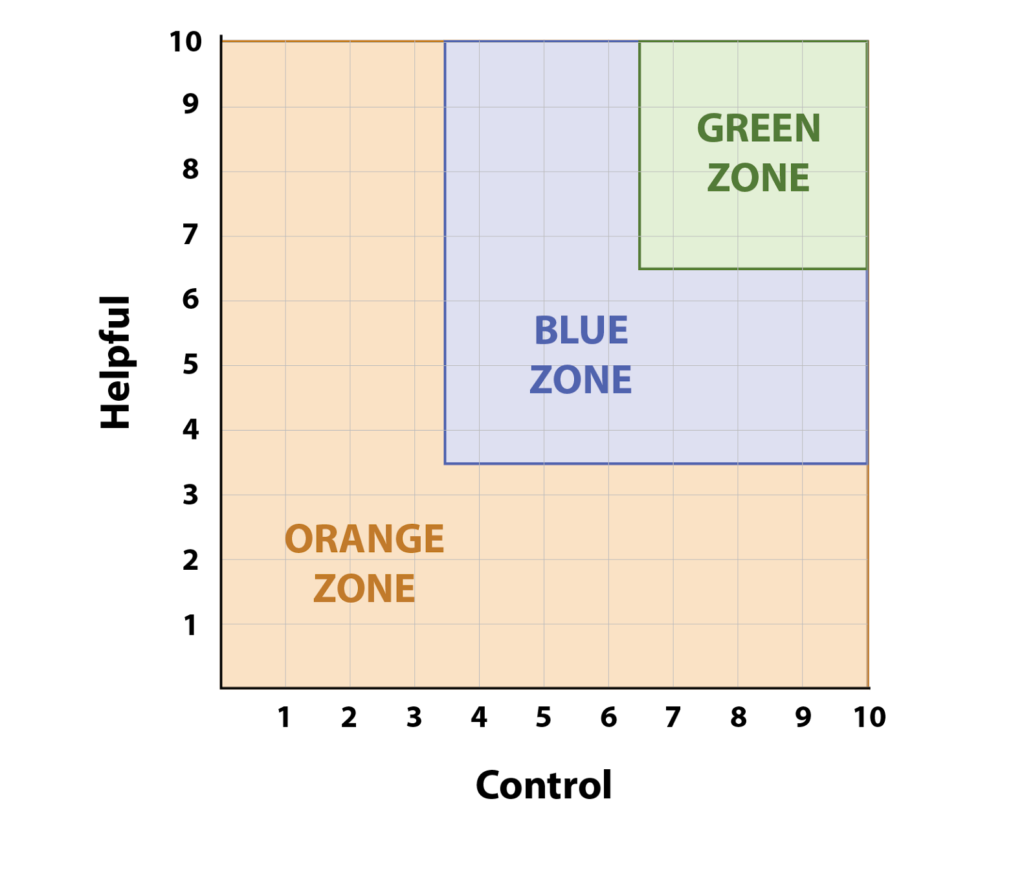
But with paid advertising there are so many forms of targeting and placements, that labeling them all the same way isn’t the best route. We have created an Authenticity scale that uses two metrics, control and helpfulness. The Goal of the Authenticity scale is to help advertisers determine what their comfort zone is when it comes to paid advertising.
First we are going to do a brief recap of search ads and display ads. Next we will outline what the Authenticity Scale is and how to use it. Finally, we will break down a handful of examples and place them on the scale to help you get the hang of it.
SEARCH vs. DISPLAY ADS
Let’s quickly layout 2 kinds of Google ads, search and display ads, before we dive into the Authenticity of advertising tactics.
First, Search ads. Search Ads appear alongside organic results when a consumer enters a query in the search engine. Advertisers bid on search terms and if those terms are queried then their ad may appear. For example, if Nike bid on “Running shoes” and someone searches “Best tennis shoes for running” then they will be met with a Nike ad like the one below:
Display ads. Display ads can appear in apps, in video, or as banner ads on websites. They will look something like this:
Now that we have nailed down two ad types, let’s jump into our Authenticity Scale.
ADVERTISING AUTHENTICITY SCALE
Paid advertising comes in many forms. In order to determine an ad’s Authenticity, we are going to utilize two different scales.
Control: The control an advertiser has over who, where, how a consumer is receiving ads.
Helpfulness: The extent to which an ad is helpful to the consumer.
When using this two point scale ads are going to fall into a Green Zone, Blue Zone, and Orange Zone.
Ads that are high on both control and helpfulness are going to be in the Green Zone. The Green Zone consists of ads that will almost always be beneficial for both company and consumer.
Next are our Blue Zone ads, which are ads that will be in the middle of either control or helpfulness. These ads are usually still beneficial for company and consumer, though seeing as they fall in the middle of one or both of the scales we can’t be certain about either customers intent or placement of ads.
Now for our Orange Zone ads. Orange Zone ads will fall low on one or both of the scales. Just because ads are in the Orange Zone doesn’t mean they are evil, however, we understand there is a time and a place for them. We recommend using Orange Zone ads when the primary focus is for brand awareness rather than high conversion rates.
Let’s look at this on a graph.
Advertising Authenticity Score
PUTTING THE GRAPH TO WORK
Now let’s put this graph to work and plot where different advertising strategies fall.
SEARCH ADS IN THE ORANGE ZONE:
I am going to play devil’s advocate right off the bat, and give an example of advertising that is closer to the ~evil~ side, or inauthentic side, of advertising.
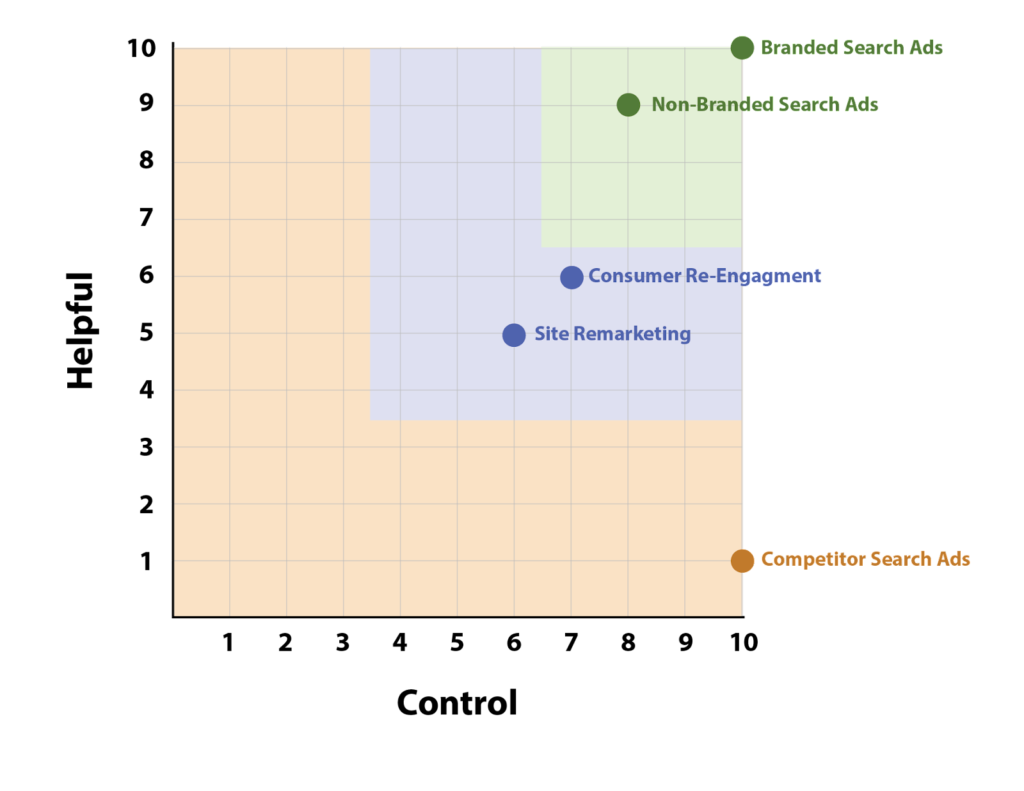
Competitor Search ads. For a company like Nike, this would be bidding on terms like “Adidas Shoes”. On our first scale, Control, competitor search ads actually rank very high. We would know where these ads are showing and for the exact search terms they are showing for.
On our second scale, Helpfulness, Competitors Search ads rank very low placing them in the Orange Zone. If a consumer searches, Adidas shoes, chances are they know what they want and it’s not Nike Shoes. With this method of advertising, the goal is less about being helpful and more about disrupting a consumer’s actions. Getting Nike’s name in their last minute, one, probably won’t have a high return on investment, and two, is disregarding the consumers preferences and is thus more invasive.
Therefore, Competitor Search ads are in our bottom right corner in the Orange Zone.
Advertising Authenticity Score
SEARCH ADS IN THE GREEN ZONE:
Now let’s look at Search ads that are on the flip side of the Helpful scale in our Green Zone.
Branded Search Ads. Pretty self explanatory, but Branded Search ads re when a company bids on its own name. For example Nike bidding on “Nike” or “Nike Shoes”.
Control: These ads like Competitor Search ads rank high on control. When bidding on branded terms you have a narrow and controlled pool of search terms your ads are showing up for.
Helpfulness: Unlike Competitor Search ads, Branded Search ads are high on Helpfulness. When a consumer is searching for your company, they are point blank looking for you and exactly you. Therefore you want to be front and center for them when they search.
Non-Brand Search Ads. Some examples of Non-Brand Search keywords for Nike are “Athletic shoes”, “gym shoes”, or “best sneakers for running”.
Control:In terms of control Non Brand Search ads rank just below Branded Search Ads. The only reason there is a little less control is because there is a wider pool of search terms.
Helpfulness: Believe it or not, non brand search ads we still classify as high on the helpfulness scale. If a consumer is searching for a product and just doesn’t know the name of a company that supplies said product they are still information gathering.
Let’s go back to Nike but pretend that this consumer who is searching for running shoes does not know any of the big brands. The consumer searches for “running shoes”. They are looking for a high quality product, so why not Nike. Whether Nike is bidding on these terms or not other people will be. Therefore, even if Nike is the first organic result, they won’t be the first company that consumers see because there will be ads at the top. If Nike is the best option for the consumer and they simply don’t see them because their organic result is buried under ads then both consumer and company are missing out. Thus you want to be there as an option in their search for information.
Since both our Brand and Non-Brand Search ads ranked high on Control and Helpfulness, that places them right in our Green zone.
Advertising Authenticity Score
DISPLAY ADS IN THE BLUE ZONE
Let’s dive into which Google Display ads fall into our Blue Zone.
Consumer Renegament Display ads: targeting previous consumers based on email lists. This is not people who have simply visited the site but people who have actually purchased the product or service.
Control: Medium High. Since this ad type is based on email lists from the company we know exactly who we are targeting. The only reason it is bumped down a few points is because of the nature of display ads. In this scenario we aren’t picking specific placements on the google display network so the ads could be running on a variety of sites and apps.
Helpfulness: Medium. Truthfully this one depends on the product being sold. For instance if the product being sold is a Refrigerator, consumers probably aren’t going to be in the market for a new refrigerator for many more years. Therefore hitting them with a display ad 3 months after purchase isn’t helpful.ing.
However if the product being sold is a face wash, hitting the consumer with an ad 3 months after initial purchase to remind them to place a new order before they run out can be very helpful. We know these people have used the company’s product or service, and assuming a positive experience, they most likely like the company and would purchase again.
Site Remarketing Display Ads: targeting those who have visited the companies site without purchase.
Control: Medium. We know for the most part who is being hit with the ads but it’s a wider pool than consumer re-engagement and it’s on the Display network.
Helpfulness: Medium. Hopefully the consumer is at least interested in the company, hence spending time on the site. However we don’t fully know their motives for being on the site or their impressions of the company after the visit.
Blue Zone ads tend to be reconnecting with people who are at least aware of the company’s name.
Advertising Authenticity Score
DISPLAY ADS IN THE ORANGE ZONE
We talked about Competitor Search ads being in the Orange Zone but let’s finish filling this zone out.
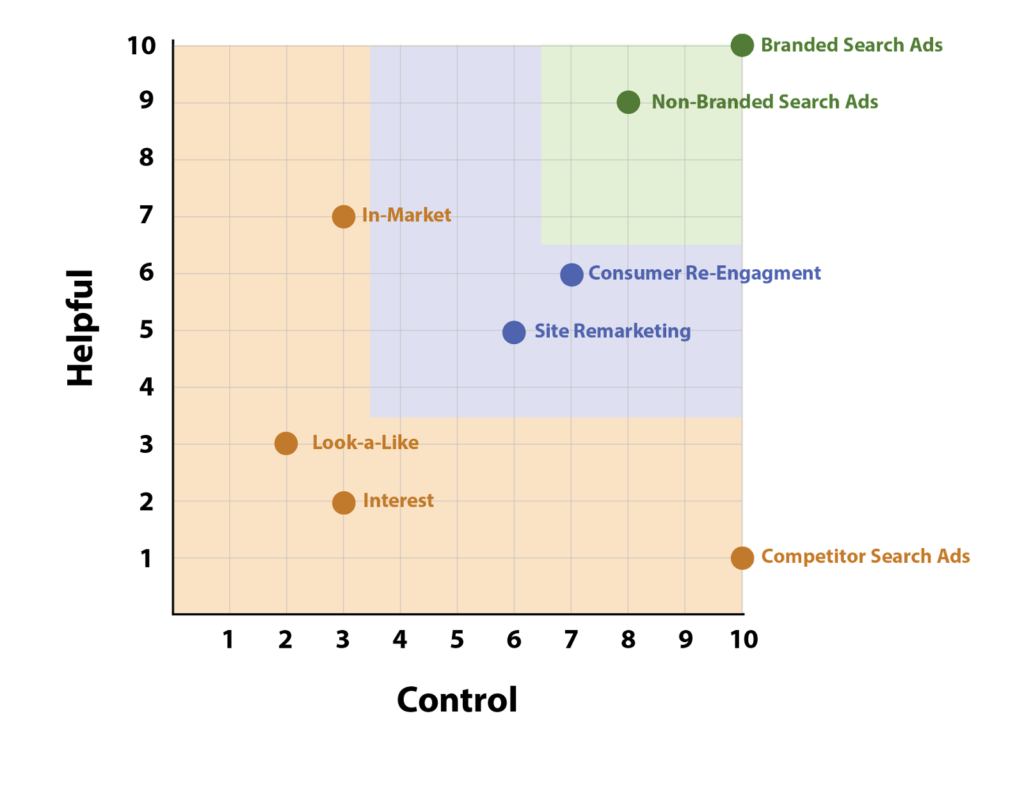
In Market Display: Using Google’s AI, we are targeting those who are in the market for a product. For example Nike’s In Market Display ads would be targeted at people who are “in the market” or looking to purchase running shoes. Again, who is in the market for new running shoes is determined by google not the advertiser.
Control: Low. The nature of display ads already knocks it down a few pegs, but the second reason it loses points is because we are relying on google’s targeting metrics. What exactly makes someone “in market” for new running shoes? We as advertisers have less control over who sees the ads when google is at the wheel.
Helpfulness: Medium high. Since we are targeting people who are in-market or actively looking for a new pair of running shoes, showing Nike’s name is hopefully beneficial.
Interest Display Ads: Using Google’s AI to target people who have interests that would align with a company’s target market. Using Nike again as an example, they could target people with interests in playing sports, running marathons, or even coaching.
Control: Medium low. We have an idea of who is getting targeted but again it’s a very wide pool that google has created. Also, as stated before, the display network naturally has less control than search ads.
Helpfulness: Low. Honestly with this group we truly don’t know if they are interested in running shoes at the moment, they might be swimmers or love their new balances. The positives for running ads like this would be more for brand recognition. Getting your company’s name out there so that they are remembered when the consumer is looking for your product even if they aren’t in need of it at the moment.
Look Alike Display Ads: Target people who match a profile (lookalike) of those who have purchased a product or used your service. Lookalikes are again determined by google’s AI.
Control: Low. Again, this is reliant on what google demes a lookalike. Maybe Because we don’t know what metrics google uses to compare, we deem these pretty low on control.
Helpfulness: Medium low. Going on the idea that google is in fact showing us to quality consumers we rank this medium low. Ideally they will be similar to previous consumers but that’s not to say they are in the market for your service right now.
As we state early, just because an ad is in the Orange Zone doesn’t mean it is evil and invasive by nature. For our Green and Blue Zones we are looking for conversions and a lower cost./conversion. For these Orange Zones ads on the other hand it’s best to have a totally different goal. That goal being brand awareness. Many of these ad types tend to have high impressions which is a great metric to use when trying to measure the success of a brand awareness campaign.
Advertising Authenticity Score
WRAPPING UP
We went over a lot of ad types and tactics today and, let’s be honest, that’s just breaking the surface, since we didn’t even touch on Social media advertising. With all the different kinds of targeting and placements out there, it can get overwhelming for a company to decide what direction they want to take and what kind of advertising aligns with the values of their company. By looking at each tactic individually and using this two point scale companies can better understand if said tactic fits within their comfort zone.
Now what about our very first example of one person getting bombarded with every ad on every network for Nike Tennis Shoes? Yeah….we would consider this the closest thing to invasive evil advertising. Though we would also be lying if we said these ads have never worked on us.
Why wait for spring cleaning when the start of the year is the perfect opportunity to freshen up your Google ad campaigns! With these quick 5 steps, we are going to cut the dead weight from your campaigns and breathe new life into our account.
Ideally, you are continuously optimizing your campaigns for peak performance, but sometimes non-crucial things slip through the cracks, especially during the holiday season. Now is the perfect chance to clean it up!
Now let’s roll up our sleeves and jump in:
Step 1: Remove Non Serving Keywords
Look at this! Google has done half the work for us. In your keywords under status, Google will label keywords as “not eligible. Low search volume” if there is little to no search history on google for this term.
Some people may have a hard time removing these keywords because they seem relevant to their ad group and they want to cover their bases. However, if google is telling you that no one searches for that term, then it is just cluttering up your account.
Time to pause these keywords and focus on your keywords that are receiving impressions. By cutting out the unnecessary terms, you will have a better view of what is relevant.
Step 2: Remove Keywords With Few Impressions
Now, step two is similar to step one. We are still cleaning out those keywords, except this time, google hasn’t done the first part for us.
When looking at about a year’s worth of data, focus on the keyword impressions. If a keyword has received relatively few impressions or even zero impressions, it is time to pause them. No sense in having them distract from important keywords that you have running.
Why are these keywords not receiving impressions?
They might not be receiving impressions simply because few people are searching for them. They also might not be receiving impressions because your other keywords are picking up the relevant search terms.
Over the past few years, Google has changed its definition of “phrase” and “exact” match keywords to be much more broad. Thus one keyword is more likely to pick up broader search terms.
Now, the majority of the time these are keywords that can be removed all together without a second thought. However, if you have a relevant keyword that you know gets a substantial number of google searches, but you still aren’t receiving impressions, it might fall to your bidding as the issue.
In this case, If you are working with manual bidding you need to consider your budget and goal CPC. If you believe your keyword is just that strong, then increase your max CPC. Just remember to check back in with this keyword and how it is performing!
Step 3: Cleaning Up Your Ads.
Alright by step three I’m sure you are getting the hang of it! Don’t keep what you dont need. It is very easy for ads to build up in a single ad group and before you know it you have ten ads and only three ads are regularly being shown.
What have we learned so far? CUT THEM!
You may have been trying out a new headline or body copy variation, but if they aren’t being shown, you don’t need to keep them around.
Step 4: Review all Extensions and Assets.
Extensions and assets are a pesky one that tends to fall between the cracks because people often focus on their ad group or ads pages as a whole. It’s time to make sure everything being shown is still relevant. Some things to check:
Do you have any seasonal language that is out of date for this time of year?
Are all products and services promoted still provided?
Are the prices still accurate with current site pricing?
Has there been any update in product packaging or company branding that doesn’t match your image assets?
Not only is it important to check in on your extensions to make sure they are relevant but giving yourself a refresher on what copy and assets are running in tandem with your ads is always a good practice. And we get it. This seems very simple, and it is! However, we have also noticed that extensions often are live for an extended period of time and get overlooked or forgotten when managing a large account.
Step 5: Clearing Out Ad Groups With No Impressions
Now after all of that, removing keywords, removing ads, and removing extensions, lets jump into our final step. Take a look at your Ad groups as a whole and how many impressions they are receiving.
If you have an ad group that isn’t receiving any impressions, you may have already noticed this when cleaning out keywords and ads that have not received any impressions.
Hypothetically this ad group might not even have any keywords or ads left in it. If this is the case it is almost time to let this campaign go, but first a few checks.
Make sure your ad group is set up correctly and make sure no information is missing.
Verify your targeting is set up properly for your intended market.
And finally, is your bidding competitive?
If all of this seems in check and you still weren’t receiving impressions, say goodbye to the unneeded ad group and hello to a cleaned-up account!
Summary
Congratulations! With those 5 steps under your belt, you now have a clean account for the start of the new year.
We know people either love decluttering or hate decluttering but either way, the feeling of a clean account is always a good feeling. Now hopefully, you can find insights and important information faster because you can focus on the elements that actually matter.
Search engine optimization and pay-per-click advertising both play critical roles in any digital marketing strategy. One of the most important for both is the landing page.
Although both SEO and PPC landing pages follow many of the same best practices such as mobile friendly designs and conversion rate optimization tactics, there are a few key differences that separate the best SEO landing pages from the best PPC landing pages.
In this article, we’ll take a look at how the differences in goals and strategy of these two campaign types generate distinct best practices in PPC & SEO landing page design.
What Makes a Strong Landing Page?
Good landing pages serve a particular function that advances your business goals. Whether it’s making a direct purchase, signing up for a newsletter, or requesting a quote, meeting, or demo, a good landing page should be judged based on its ability to acquire traffic and convert users.
SEO & PPC Tactics
To understand the differences between PPC landing pages and SEO landing pages, one must first get a better overview of how PPC and SEO vary in the first place.
Search engine optimization (SEO) is the process of optimizing a website to rank highly in engines like Google. You do this through the use of specific keywords, among other tactics. The goal is to expand the page’s organic reach – meaning the page ranks highly on Google.
Pay-per-click (PPC) involves a situation where advertisers pay a fee every time someone clicks on their ad. On a search engine like Google, PPC ads typically appear alongside the organic results. The benefit here is that you don’t have to wait for your page to rank highly for your desired keywords naturally. So long as you’ve created the right type of compelling, relevant ad, you’re targeting the right audience, and you’re competitive in terms of how much you’re willing to pay for each click, you can quickly “buy your way” to the top.
While the overall look of both landing page types will be similar, the steps that you use to optimize them will vary.
SEO Landing Pages
SEO landing pages have a difficult job to do because they have not just one but two primary functions: user acquisition and user conversion.
Before we worry about converting users, we have to make sure they can find us to begin with.
Writing for Robots
While the search engine algorithms are in constant flux, they generally prefer pages with longer content. More text provides the robots with more material that they can use to discern what the page is about. With a more complete understanding of the page’s content, they’re better able to decide which users and search queries will find the page most useful.
Therefore, a big part of ranking on Google is demonstrating expertise on your given topic. They want to see websites approach their topic from different angles.
For example…
…let’s say you’re a law firm looking to rank for “car accident lawyers”. Google wants to see that your company knows what it’s talking about when it comes to traffic, insurance, and personal injury law.
As a result, you’ll often see landing pages for car accident attorneys featuring a wide range of content. They often contain instructions about what to do after an accident, facts about vehicle collisions, comparisons between different types of accidents, penalties for certain infractions, and on and on.
This content demonstrates a sufficient level of relevant knowledge on the given topic, and therefore, is worthy of ranking.
Now, are most users really going to find all of this information useful in their search for attorneys?
Probably not.
While some may find it useful, writing that much content takes valuable time and effort and could be better spent elsewhere. But it’s important for SEO, i.e. user acquisition.
In other words, it’s written for robots. Not humans.
Consequently, SEO landing pages tend to have a lot more “fluff.” But in the end, that’s what makes a good SEO landing page. They balance writing for robots and writing for humans.
PPC Landing Pages
On the other hand, PPC landing pages don’t need to “convince” search engines to rank their page. PPC user acquisition is primarily done off-page; in the Google Ads interface for example. We acquire users by creating quality ads and making competitive bids.
Because we don’t need to dedicate on-page space and resources to user acquisition, we can focus all of our efforts on maximizing conversions.
Writing for Conversions
In PPC, we’re paying a little bit for every user who lands on our page. Which means there’s a greater cost for non-converting clicks. We lose money for every user who lands on the page and doesn’t convert. Therefore more of our resources, efforts, and overall design should be spent on maximizing conversion rates.
What does this mean exactly?
Generally, it means that pages are more streamlined. The content tends to be short, sweet, and relevant.
If we’re bidding on key terms such as “car accident lawyers”, we don’t need all the “fluff” content about what to do after a car accident or penalties for certain infractions like we might see for SEO.
Our content should be dedicated to convincing users why our law firm is the right one to hire for their case.
Good landing pages (both SEO and PPC) also feature prominent calls to action with big obvious buttons and clearly marked forms. Users should have no question about how to engage your services.
CLICK HERE! SIGN UP NOW! CALL TODAY!
Moreover, we want users to convert. Not click away from the page. Thus, you might see PPC landing pages without any internal or outbound links. Not even a main navigation menu.
In the End
Overall, both PPC and SEO landing pages have a home in your digital marketing campaigns – you just need to better understand when and where to use each one. SEO landing pages tend to stand the test of time – meaning that once they rank in Google, they continue to bring in traffic. PPC landing pages tend to be focused on the short-term, meaning that they’re likely to lose their internal value once your campaign ends.
By understanding the best practices you need to use when optimizing each one, you’re left with invaluable resources that will help you accomplish all of your goals and more.
Today, we’re looking at how to build brand awareness with display advertising. This can be a very nuanced conversation and it is important your team is on the same page from the jump. Some decisions that need to be made from the start are, what campaign and ad types to use and what KPIs will be used to measure the success of a brand awareness campaign.
Here we are going to break down a few ways to set up and measure a brand awareness campaign.
Why Display Campaigns for Brand Awareness?
Using a display campaign alongside a search campaign is a great tactic for a brand awareness objective.
These two campaign types will work side by side to support one another. When solely using search campaigns you are only getting in front of people who are actively searching for your product or service.
However, when using display campaigns and curated audiences your ads will appear in front of potential customers who might not even know your product or service exists. Thus expanding your potential and actual reach exponentially.
Here is where your search ads come in handy to support your display ads.
A potential customer who viewed your display ad may click directly on your ad and be taken straight to your sight. Great!
However, they might not be ready to buy just yet. Then a few days, weeks, or even months later, when they are ready to buy or looking for more information, they can search for your company and be met with a search ad.
Perfect! The tag team ad types did their job. Now, your search ads may come into play much quicker.
Those who are distrusting of display ads may pop over and do a quick google search right away for your company. Again being met with your search ads. So don’t be surprised if you see an increase in your search campaign impression and make sure to budget accordingly to pick up the new traffic.
Measuring the Success of a Brand Awareness Campaign
Being on the same page regarding Key Performance Indicators is crucial for any campaign, especially for a brand awareness campaign.
That’s because usually, brand awareness campaigns aren’t using conversion rate or cost per conversion as their success metrics, instead oftentimes using impressions, clicks, and CPM.
This can be a tricky adjustment if your team isn’t used to using these KPIs.
If your goal is to see an increase in impressions and clicks for a brand awareness campaign there is also a good chance that conversion rates will go down and cost per conversion will go up, which can make people uneasy.
We get that.
Usually, you want a higher conversion rate and a lower cost per conversion, which is why your KPIs need to be straightened out ahead of time.
So, why is a display campaign with a brand awareness objective worth it?
Well, it’s true, display ads, unlike search ads, aren’t necessarily reaching people who are actively searching for your product or service thus your click-through rate and conversion rate are logically going to decrease.
That being said, brand awareness campaigns are all about the long term pay off. Display ads aren’t reaching people actively searching for your product or service, no, but hopefully when people are in need of your product or service your company will come to mind or at least be a recognizable name when they search.
Keep in mind this need could be in 2 weeks, 2 months or even 2 years. Therefore you want to increase your impressions and clicks so you are getting in front of as many new customers as possible.
This leads us to another good indicator of a successful brand awareness campaign.
Rather than zeroing in and looking at the impressions and clicks of one individual campaign try zooming out and looking at branded queries as a whole. This is relevant for both paid ads and organic searches. Are more people searching for your company name?
For example, when running a Brand Awareness Campaign for 10 weeks we saw an 88% increase in paid branded search term queries and a 110% increase in organic branded search queries.
We saw that our increase in branded awareness spend strongly correlated with the increase in branded search queries. This benefit would not have been something that was noticed if we isolated ourselves to only looking at the display ad metrics. Thus, once again it is important to take a step back and look at the whole picture when running a brand awareness campaign.
All companies and campaigns are different. Running ads and goals can be very nuanced. It is crucial to have the important conversations about ad types and KPIs right off the bat to ensure that your campaign runs smoothly towards your team’s goals.
As Google continues to push its belief that the Google Ads AI is better at aligning search queries to advertisers’ needs than are advertisers, the Google Ads Match type becomes less meaningful. From phrase match to exact match, Google increasingly serves ads for queries that are not aligned with the goals of the advertisers.
This isn’t to say the queries are not relevant to the general themes of the keywords, but they tend to push the edge of relevance. Google reps will argue that these terms are connected to future sales or conversions. The reality is, most programs have shorter timelines for ROAS than can be attributed to these peripheral queries.
We’ve always managed programs with deep sets of negative keywords. As Google (and Bing) make match types meaningless, these negative keyword lists become ever more important.
Shared Negative Keyword Lists
Google’s shared negative keyword lists make for more efficient management of the negative keywords.
The way Google Ads aligns search queries, we see ads for one campaign showing for keywords that are in other campaigns. This is true for the expansion of phrase match and exact match as well. While this has been true with broad match keywords all long, we were “safe” with the other match types. Now, not so much.
So, while each ad group should have a distince set of negative match types, you will need to leverage shared lists for negative keywords. We find that adding all the targeted keywords for a campaign or ad group to a nagative list, you can then share these lists across the other campaigns. This will keep Google (in theory) from showing ads in campaigns or ad groups that you would prefere to go to a defined ad group.
That sounds familiar, and it is. This technique was used extensively for broadmatch ad groups, and quite a bit for phrase match. But, unfortunately, if you want control of how your ads appear, to which pages you drive users, and how you align offers with ad groups, you need to do this for every campaign, every match type, in your account.
Google Ads, (AdWords) has become a mainstay of most advertising programs, and certainly of most digital advertising programs. Let’s face it, it’s pretty easy to light up a new campaign. But, it’s not so easy to do it well. Then, once running, there are a lot of actions to make a paid search program run well. Chief among these is the search query analysis using the Search Terms Report.
A little background for those unfamiliar with query data.
When you bid on keywords, Google will decide if a user really meant something close to the keyword on which you bid. It used to be that you could say “match only exact queries.” But that option is gone. You can say “exact”, but Google will decide “how exact” you really mean. So, your ads appear for queries that are different than the target keywords on which you bid.
This has always been true for broad (modified or standard) and phrase match bids. But the changes to how Google interprets exact match have moved it to a vague area.
The query report shows the queries for which Google has shown your ad. These may look nothing like your target keywords. The times that you can isolate your terms based on exact match are gone, not even close anymore. Use the Google Search Terms report (in the keyword area of the UI) to see the queries for which your ad was shown. This also shows you the target keyword, ad group, and campaign associated with the query.
How To Use The Search Terms Reports
Getting the Search Term Data
We find it best to pull the search terms data into a spreadsheet. You can download the reports in the Google Ads interface, or (as we do) connect to Google Ads via api and pull the data automatically.
If you have conversion data feeding back to Google Ads, be sure this is part of your data set.
Before you dive too deep
The first step is a quick review of the report. The purpose is to determine if Google Ads is showing your exact match keywords for a whole lot of non-exact queries. Ultimately, you should consider revamping the account campaigns to adjust for the changes in exact match. A review of this report will tell you if that change should happen sooner rather than later.
If there are many queries that are different from the exact keyword, you will spend a lot of time managing the changes based on the Search Term report. If this is the case, you may want to jump to restructuring your campaigns now; essentially pushing everything to number three below.
If you’re one of the fortunate people who have a lot of time, you should probably do #3 now anyway.
Using the Search Term Report
Reviewing the user queries should be a regular practice in managing your campaigns. The actions apply to all ad groups, and now, all match types.
There are three basic decisions to make when reviewing the Search Terms(query) report:
Add a query term as a negative match
Add a query term as a new target keyword to the ad group
Create a new ad group, or campaign structure
Negative match
If you add queries as negative keywords, look beyond the ad group that generated the query. It may be applicable to other ad groups or the broader campaigns. No sense restricting it in one ad group only to have Google Ads decide to show your ad from another campaign anyway.
Add the query term
There is a tendency for some campaign managers to throw everything from the Search Terms report that is relevant to the ad group into the keywords. This has a couple of issues.
First, it leads to keyword bloat. Having hundreds of keywords in an ad group dilutes it’s relevance to any one term. Be sure only keywords that are tightly aligned with the core message are in the ad group.
Second, Google has a “low search volume” designation that is applied to keywords that have few searches. The days of bidding on the hyper-long tail are gone; Google will simply not even create an auction for these keywords. Instead, Google uses its AI to decide if your ad should appear for the long search terms. Putting everything in an ad group simply clutters it with terms that never see the search results.
Create a new ad group or campaign
If you see a lot of search terms that truly deserve to be directly managed, pulled these from the report and develop new campaigns or ad groups just as if you were starting a new program. Build a solid campaign structure around these new terms, even if it is just one ad group.
The change to Google’s Exact match policy has taken some level of control away from search marketers. But, with proper use of the Search Term report, you can effectively create an “exact” match ad group by building out a strong negative match list.
Manage Cookie Consent
We use cookies to optimize our website and our service.
Functional
Always active
The technical storage or access is strictly necessary for the legitimate purpose of enabling the use of a specific service explicitly requested by the subscriber or user, or for the sole purpose of carrying out the transmission of a communication over an electronic communications network.
Preferences
The technical storage or access is necessary for the legitimate purpose of storing preferences that are not requested by the subscriber or user.
Statistics
The technical storage or access that is used exclusively for statistical purposes.The technical storage or access that is used exclusively for anonymous statistical purposes. Without a subpoena, voluntary compliance on the part of your Internet Service Provider, or additional records from a third party, information stored or retrieved for this purpose alone cannot usually be used to identify you.
Marketing
The technical storage or access is required to create user profiles to send advertising, or to track the user on a website or across several websites for similar marketing purposes.