
Author: Maddie

  • Google Ads Campaign Types Breakdown

    Google Ads Campaign Types Breakdown

    Whether you’re new to Google Ads or just need a refresher on their updates, understanding campaign types is essential. Think of them as different tools in your advertising toolkit. Each campaign type is designed for specific goals and audiences. Let’s break down what each type of campaign does and how it works.

    We like to think of search campaigns as the bread and butter of Google Ads. They’re the foundation most advertisers start with, and for good reason.

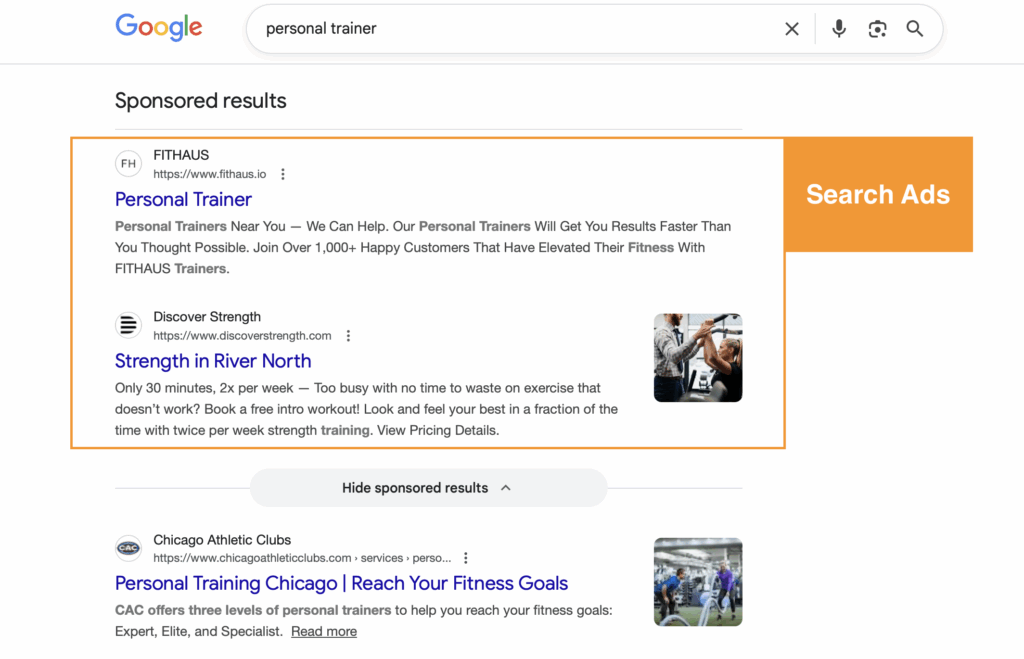
    Search ads are the text ads that appear when you search in Google. You’ll usually see them before organic listings but they can also be seen lower on the search results page. Sponsored results have a designated label above their section with the option to hide sponsored ads at the bottom. 

    Search Results for the search term "personal trainer", showing two paid search ads and one organic result.

    Advertisers create text ads and then bid on keywords so they appear in the search results when people search for those terms (search terms).

    Let’s break that down:

    Advertisers create text ads called responsive search ads by providing Google with up to 15 short headlines and 4 descriptions. Google Ads then mixes and matches these by combining 3 headlines and 2 descriptions based on what it believes will perform best for each individual auction. This gives you flexibility while letting Google’s machine learning optimize performance.

    Next, advertisers designate keywords they want to “bid on”. When someone searches for those keywords (or variations of them), your ad enters an auction to potentially show up in the results. You’re essentially raising your hand and saying “I want to be visible for this search.” 

    The bells and whistles: Assets (formerly called extensions) are your secret weapon. They let you provide viewers with more information about who you are and what you can offer them. Assets are a useful tool that can link to other landing pages, highlight value propositions, or provide quick contact options like phone numbers or location details. There are multiple asset types, each with its own function, from sitelinks and callouts to structured snippets and lead forms. Learn more about Google Ads assets here.

    Need help optimizing your search campaigns? Check out our Google Ads services.


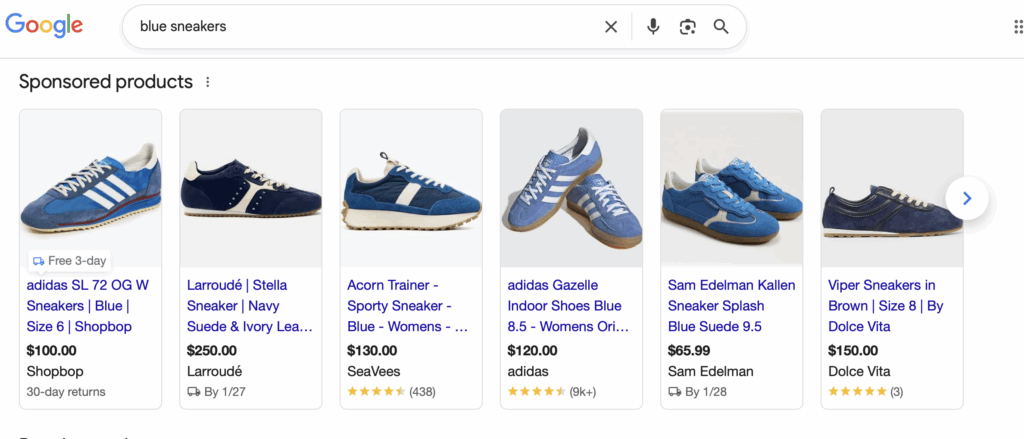
    Shopping ads are for advertisers specifically promoting products. These ads also appear in the search results, but this time as “sponsored products” featuring an image, product headline, price, and store name. You’ll typically see them at the top of Google search results in a carousel format or in the Shopping tab.

    Search results for blue sneakers displaying shopping campaign sponsored product ads.

    Unlike search campaigns where you bid on keywords, Shopping campaigns pull product data directly from your Google Merchant Center feed. You upload your product catalog with details like titles, descriptions, images, and prices, and Google automatically matches your products to relevant searches.

    Here’s the process: You create a product feed in Google Merchant Center containing all your product information. Then in Google Ads, you create a Shopping campaign and connect it to your feed. Google uses the product data to determine when and where to show your ads, so no keyword lists are required.

    Advertisers can organize products into groups and set bids at the product level, giving you control over how much you’re willing to pay for clicks on specific items. It’s particularly powerful for e-commerce businesses with large inventories.

    Shopping campaigns work best when your product feed is optimized with detailed titles, high-quality images, and accurate information. The better your feed, the better Google can match your products to shopper intent. Looking to get started with Shopping ads? Our Google Shopping services can help.


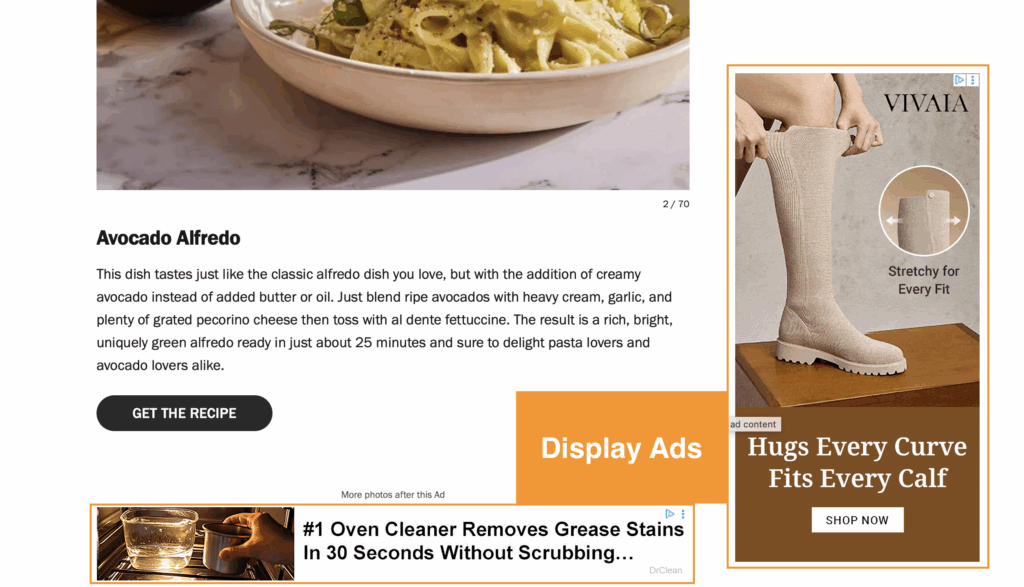
    Display ads are the banner ads you see across millions of websites, apps, and Google-owned properties like YouTube and Gmail. Unlike search ads that capture active intent, display ads build awareness and reach people as they browse the web.

    Two examples of display ads on a recipe blog.

    Display campaigns use targeting options to show your visual ads to specific audiences across the Google Display Network which is a collection of over 2 million websites and apps. You can target by demographics, interests, topics, placements, or even specific audiences like past website visitors.

    Here’s how it happens: You create visual ads by providing google with up to 15 photos of various formats, 5 logos, 5 headlines (30 characters), 1 long headline (90 characters), and 5 descriptions (90 characters). These are responsive display ads that adapt to available ad spaces based on what Google believes will perform best. Then you select your targeting criteria. Maybe you want to reach people interested in fitness, or people who’ve previously visited your site but didn’t convert.

    Google then serves your ads on relevant websites and apps where your target audience spends time. You pay per click or per thousand impressions (CPM), depending on your bidding strategy.


    Demand Gen campaigns are Google’s newest visual campaign type, designed to reach people across YouTube, Discover, and Gmail. Think of them as the evolution of Discovery campaigns, focused on creating demand and engaging audiences in immersive, visual-first environments.

    Demand Gen uses a combination of audience targeting and visually rich ads to capture attention and drive action across Google’s most engaging surfaces. These campaigns prioritize high-quality images and video content to tell your brand story.

    You create ads using images, videos, carousels, and product feeds (yes, you can showcase multiple products in a swipeable format). Google then uses its audience signals, things like customer lists, website visitors, or similar audiences, to find people most likely to be interested in what you offer.

    The magic is in the placement: your ads show up in YouTube feeds (including Shorts), the Discover feed on mobile devices, and Gmail’s social and promotions tabs. These are places where people are actively consuming content and open to discovering something new.

    Demand Gen campaigns work particularly well for driving consideration and engagement with lookalike audiences. You’re meeting potential customers where they’re already spending time, with content that fits naturally into their experience.


    Performance Max is Google’s fully automated, goal-based campaign type. It’s designed to give Google’s AI maximum control to deliver results across all of Google’s advertising channels. That’s right! Search, Display, Shopping, YouTube, Gmail, and Discover all in one to form a single campaign.

    PMAX is fundamentally different from other campaign types because you don’t choose where your ads appear. Instead, you provide Google with your goals, assets (headlines, descriptions, images, videos), and audience signals, then let the algorithm do the heavy lifting.

    Here’s the breakdown: You set up a campaign with conversion goals (what actions you want people to take).  You create asset groups containing all your creative materials including text, images, logos, videos. You provide Google with search themes which are similar to keywords except they are broader.  You can also add audience signals to guide the machine learning (think customer lists or interests), though Google will expand beyond these based on performance data.

    Google’s AI then tests combinations of your assets across all available inventory, automatically allocating budget to the placements and audiences that drive the best results for your goals. It’s like having multiple campaigns running simultaneously, all optimized in real-time.

    The trade-off? Less control and transparency. You won’t know exactly where ads appear or which combinations perform best. But for advertisers willing to trust the automation, PMAX can drive strong results—especially for e-commerce and lead generation.

    Here’s the thing about PMAX: data is the name of the game. If you aren’t able to provide clear conversion data as low in the funnel as you can go (purchases, qualified leads, appointments, not just page views), Google can’t optimize properly and you’re just going to burn through budget. Set up proper conversion tracking before launching PMAX, not after. Curious if PMAX is right for your business? Reach out to our team.


    Each campaign type serves a specific purpose in your marketing strategy. Search captures high-intent customers actively looking for solutions. Shopping showcases products to ready-to-buy shoppers. Display builds awareness and remarketing audiences. Demand Gen creates interest in visually engaging environments. And PMAX automates everything for efficiency.

    Most successful Google Ads strategies use a combination of campaign types, each playing to its strengths. Start with where your customers are in their journey and match the campaign type to that stage.

    Ready to build a comprehensive Google Ads strategy? Our PPC team specializes in creating campaigns that actually drive results, not just clicks.

  • What Is A Google Ads Quality Score and Why Does It Matter?

    What Is A Google Ads Quality Score and Why Does It Matter?

    What is a Google Ads Quality Score?

    First things first: what is a Google Ads Quality Score?

    In a search campaign, Google will assign a quality score at the keyword level between 1-10. This score is an indicator of how well your ad ranks compared to other advertisers. The more relevant google deems your ad and landing page to the keyword, the higher the quality score.

    How Quality Score Is Calculated:

    There are three main components to calculating the quality score

    1. Expected Click through rate: This is Google’s estimate of how likely they think someone will click on your ad. Google pulls this number from your ads past performance.
    2. Ad Relevance: How well your ad matches a user’s search intent. Does it match the question or need of the user? The more relevant your ad, the higher the quality score.
    3. Landing page experience: Once someone clicks on your ad, what kind of experience do they have on your website? Google evaluates how helpful, relevant, and user-friendly your landing page is. Pages that are clear, fast-loading, and directly related to the ad’s message will earn higher marks.

    Google assigns each component a status of “Above Average”, “average”, and “below average” to create a quality score. Your rankings are based on how your ads have performed compared to other advertisers using the same keywords over the past 90 days. In other words, it’s not just about how well you’re doing, it’s about how you stack up against the competition. 

    Why Quality Scores Matter

    Quality Score might seem like just another metric in the dashboard, but it’s much more than that. Every time your ad is eligible to be shown, it is put into an auction against other advertisers. Your quality score indicates how your ads perform in the Google ads auction and can make or break the efficiency and success of your advertising. Here are the top five ways a high quality score affects your ads:

    1. Lower Cost-Per-Click (CPC)
      • Google rewards high-quality ads with lower CPCs. A higher Quality Score means you pay less for each click while maintaining or improving your ad position.
    2. Better Position
      • Even if your competitors are bidding more, your ad can still outrank theirs if your Quality Score is better. Ads with higher Quality Scores are more likely to appear in top positions on the search results page, increasing visibility and click-through rates.
    3. Higher ROI
      • When you’re paying less per click and getting better placements, your return on investment should improve.  You’re getting more value for every dollar spent, which is the ultimate goal in any marketing campaign. That said, a better Quality Score isn’t a guarantee of improved ROI; other factors like landing page performance, seasonality, and audience targeting also play a significant role in ROI.
    4. Increased Click-Through Rate (CTR)
      • Quality Score is partially based on expected CTR, and better ad relevance often means more people click. A higher CTR feeds back into improving the Quality Score.
    5. Relevance to Searchers
      • High scores indicate that your ads are well-matched to what users are searching for, which often means higher engagement and better user experience. You want to make sure that both keyword and landing page are relevant to searchers to improve down stream metrics.

    How to Improve your Google Ads Quality Score:

    Since Google’s evaluation is done behind the scenes, your quality score can sometimes feel like a mystery, but have no fear, there are ways to improve it! We can break down our changes into three categories: improving keyword relevance, improving ad quality, and improving landing page experience. 

    Improving Keyword relevance 

    Improving keyword relevance can be a bit of a balancing act, especially now that Google is heavily promoting its AI tools and encouraging advertisers to adopt broad match keywords. If you’re currently running campaigns with phrase or exact match types, you’ve likely seen suggestions nudging you to switch to broad match.

    While Google’s AI-driven recommendations can be helpful, they’re not foolproof. It’s still up to advertisers to monitor their search terms and ensure ads are showing for relevant queries. Fortunately, enhancing keyword quality doesn’t have to be overwhelming—start with these three actionable steps:

    1. Adjust Match Types: If broad match is pulling in irrelevant traffic, consider switching to phrase or exact, or pausing underperforming keywords to improve CTR.
    2. Use Negative Keywords: Your search term report is a super useful tool. Advertisers can use it to monitor and block irrelevant searches to improve CTR and ad relevance.
    3. Group Keywords Smartly: Keep ad groups tightly themed so your ads and landing pages stay aligned with user intent. Again, this is a bit of a balancing act with google suggestions but use your best judgment based on your knowledge of your account! 

    Improving Ad Quality

    Boosting your ad quality is a key step in improving CTR and, in turn, your Quality Score. Google rewards ads that are closely aligned with user intent, so the more relevant, engaging, and clear your ads are, the better they’ll perform. 

    Here are three simple but effective ways to improve ad quality:

    1. Match your ad copy to your keywords: seems simple and it is! But this can be something that slips through the cracks, so it is important to audit your ads and make sure your headlines and descriptions use your keywords.
    2. Use all available ad extensions. Don’t forget the bells and whistles! Sitelinks, callouts, and structured snippets add relevance and improve CTR.
    3. Test multiple ad variations. Run A/B tests to find the messaging that resonates most with your audience. Your findings might surprise you!

    Improving Landing Page Quality

    Landing page experience is one of the key factors of Google’s Quality Score and it’s one that often gets overlooked. Even if your ad and keywords are well-aligned, a poor landing page can drag down your score and your overall campaign performance. To improve landing page experience follow these helpful steps:

    1. Match the Message: Make sure the content on your landing page clearly reflects your ad and keywords. That might sound like a “no duh” moment, but it’s surprisingly common for advertisers to link to their homepage instead of directing users to a more relevant page. For example, if your ad promotes “Custom Office Desks,” the landing page should prominently feature that product, not just general office furniture.

    Depending on how built out your website is, this could be as simple as switching the destination URL or might require more effort to create new pages or update existing content to better align with your ad messaging.

    1. Optimize Your Landing Page: Google values landing pages that offer a smooth, user-friendly experience. Two key factors here are load speed and mobile usability.

    Slow-loading pages lead to higher bounce rates and a lower Quality Score. It is important to find and fix common issues like large images, unoptimized code, or slow server response times.

    Mobile-friendliness is equally important. Since most searches happen on mobile devices, your landing page should be responsive, easy to navigate, and quick to load on smaller screens. A clean, mobile-optimized design keeps users engaged and improves both ad performance and conversions.

    Final Quality Score Thoughts

    Quality Score isn’t just another metric, it directly impacts how much you pay and how often your ads show. A better score means lower CPCs, higher ad positions, and stronger performance overall.

    Focus on keyword relevance, ad quality, and landing page experience to move the needle. You don’t need a perfect 10, just consistent improvements that make your ads more useful to the people searching for what you offer.